Minecraft version
Back to mods 
CurseForge · Minecraft mod
Tool Savior
Prevent player from using a tool that is about to break. Your items are saved and you can repair them later. Now your mind is free to go.
Choose a version Pick your version below, then grab the matching file.
Quick answer
Which Tool Savior release should I use?
Latest stable file ToolSavior-1.0.3-neoforge-1.21-1.21.8.jar
Game version 1.21.8, 1.21.7
Loader NeoForge
Tool Savior ToolSavior-1.0.3-neoforge-1.21-1.21.8.jar targets 1.21.8, 1.21.7 with NeoForge. The project page does not say whether this file belongs on the client, dedicated server, or both. No extra mods listed for this file.
Where it goes
Is Tool Savior required on the client, server, or both?
The project page does not say whether this file belongs on the client, dedicated server, or both.
Client Source doesn’t say
Dedicated server Source doesn’t say
Loader for this release NeoForge
Required install it here Optional supported, not mandatory Not supported do not install here Source doesn’t say do not assume
The source does not explicitly classify this release as client-only or server-only.
What else does Tool Savior ToolSavior-1.0.3-neoforge-1.21-1.21.8.jar need?
ToolSavior-1.0.3-neoforge-1.21-1.21.8.jar. Change the file and its required mods may change too.
This file does not list any required mods. Do not add a library just because a different file uses it.
This file does not list any required or optional mods.
Before you install it
Add Tool Savior without breaking your instance.
Built for Tool Savior ToolSavior-1.0.3-neoforge-1.21-1.21.8.jar. Pick another file and the loader, install side or required mods may change.
- 01
Stick to this file
Use ToolSavior-1.0.3-neoforge-1.21-1.21.8.jar. It targets 1.21.8, 1.21.7 with NeoForge; another release may have different loader, side or dependency requirements.
- 02
Bring the mods it needs
This file does not list any required mods. Do not add a library just because a different file uses it.
- 03
Put it on the correct side
The project page does not say whether this file belongs on the client, dedicated server, or both.
- 04
Pick the file you checked
Use the “Get this file” button beside ToolSavior-1.0.3-neoforge-1.21-1.21.8.jar. It opens that exact file at the source.
About this project
What does Tool Savior add?
Description :
With ToolSavior, you wont break any expensive stuff into boring chunk excavation while you keep watching your series.
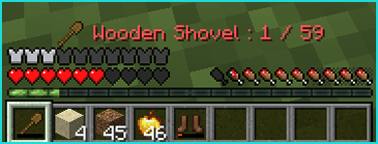
What's in it ? :
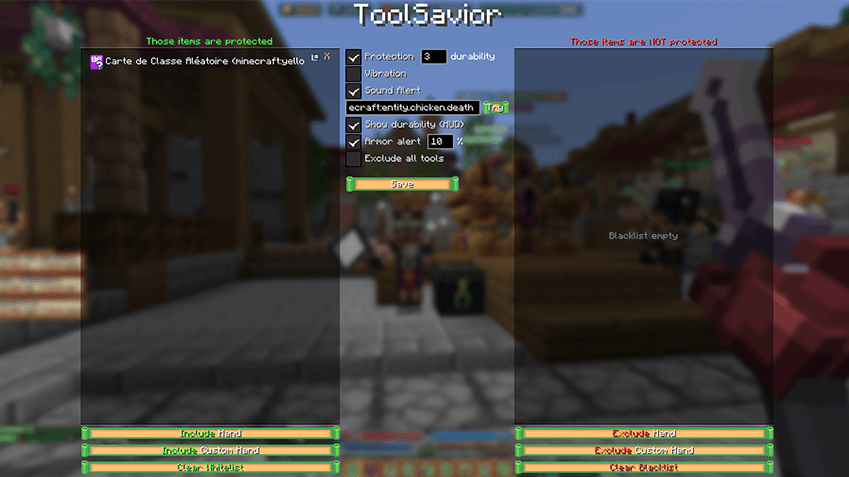
Open the GUI with Sneak + "O" (configurable in Keybinds) and enjoy the customization of this client-side mod :
- Screen Vibration : Alerts you by shaking screen or not.
- Sound Alert : From your choice (vanilla sound only) or none.
- HUD Alert : Showing on HUD why you can't break or none.
- Threshold : Set your own durability treshold in case your server can consume different amount of durability.
- Blacklist : You can also blacklist vanilla and custom items and prevent them from protection.
- Whitelist : You can also whitelist vanilla and custom items and force their protection.
- Armor Alert : Show on screen when armors are about to break with configurable threshold.
Tool Savior Roadmap :
- Change the position of the alert in the HUD.
- Armor real protection, by blocking (at will) inventory slot, keeping them free to unequip safely.
- Any suggestion are welcome :)
GUI screenshot :
Project description from CurseForge.
Pick your setup
Tool Savior by Minecraft version and loader
Choose the version and loader you play, then open the matching release.
Minecraft version
1.21.7
2 loader buildsCheck the dependencies, then try the file in a copied instance before changing a world you care about.
Recent files
Tool Savior versions and loaders
ToolSavior-1.0.3-neoforge-1.21-1.21.8.jar
20 Aug 2026
Client Source doesn’t say Server Source doesn’t say Dependencies No extras listed Listed on Release listing
Check the 1.21.8 · NeoForge setup 1.21.81.21.7NeoForge release
ToolSavior-1.0.3-fabric-1.21-1.21.8.jar
20 Aug 2026
Client Source doesn’t say Server Source doesn’t say Dependencies No extras listed Listed on Release listing
Check the 1.21.8 · Fabric setup Fabric1.21.81.21.7 release
Looking for an older file? The official CurseForge project page is in Resources.
 mod
mod CurseForge + Modrinth · Minecraft
Easy Model Entities
Turn Blockbench models into simple Minecraft entities without writing Java code.
 mod
mod CurseForge · Minecraft
VeinShift: Timber & Ore
Mine whole ore veins and chop down entire trees effortlessly just by sneaking! Supports both Forge and Fabric.
 mod
mod CurseForge · Minecraft
auto Anchor (by Shadows)
The best auto anchor for minecraft java 1.21.11