Minecraft version
Back to mods 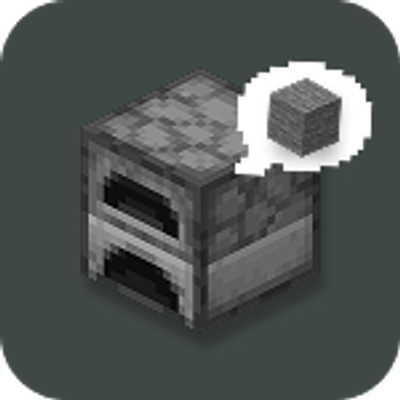
CurseForge · Minecraft mod
QuickGlance
A minimalist HUD that allows you to see resources and fuel inside the furnaces without opening them.
Choose a version Pick your version below, then grab the matching file.
Quick answer
Which QuickGlance release should I use?
Latest stable file QuickGlance 1.1.0 (NeoForge 26.3)
Game version 26.3
Loader NeoForge
QuickGlance 1.1.0 (NeoForge 26.3) targets 26.3 with NeoForge. The project page does not say whether this file belongs on the client, dedicated server, or both. No extra mods listed for this file.
Where it goes
Is QuickGlance required on the client, server, or both?
The project page does not say whether this file belongs on the client, dedicated server, or both.
Client Source doesn’t say
Dedicated server Source doesn’t say
Loader for this release NeoForge
Required install it here Optional supported, not mandatory Not supported do not install here Source doesn’t say do not assume
The source does not explicitly classify this release as client-only or server-only.
What else does QuickGlance 1.1.0 (NeoForge 26.3) need?
QuickGlance 1.1.0 (NeoForge 26.3). Change the file and its required mods may change too.
This file does not list any required mods. Do not add a library just because a different file uses it.
This file does not list any required or optional mods.
Before you install it
Add QuickGlance without breaking your instance.
Built for QuickGlance 1.1.0 (NeoForge 26.3). Pick another file and the loader, install side or required mods may change.
- 01
Stick to this file
Use QuickGlance 1.1.0 (NeoForge 26.3). It targets 26.3 with NeoForge; another release may have different loader, side or dependency requirements.
- 02
Bring the mods it needs
This file does not list any required mods. Do not add a library just because a different file uses it.
- 03
Put it on the correct side
The project page does not say whether this file belongs on the client, dedicated server, or both.
- 04
Pick the file you checked
Use the “Get this file” button beside QuickGlance 1.1.0 (NeoForge 26.3). It opens that exact file at the source.
About this project
What does QuickGlance add?
QuickGlance
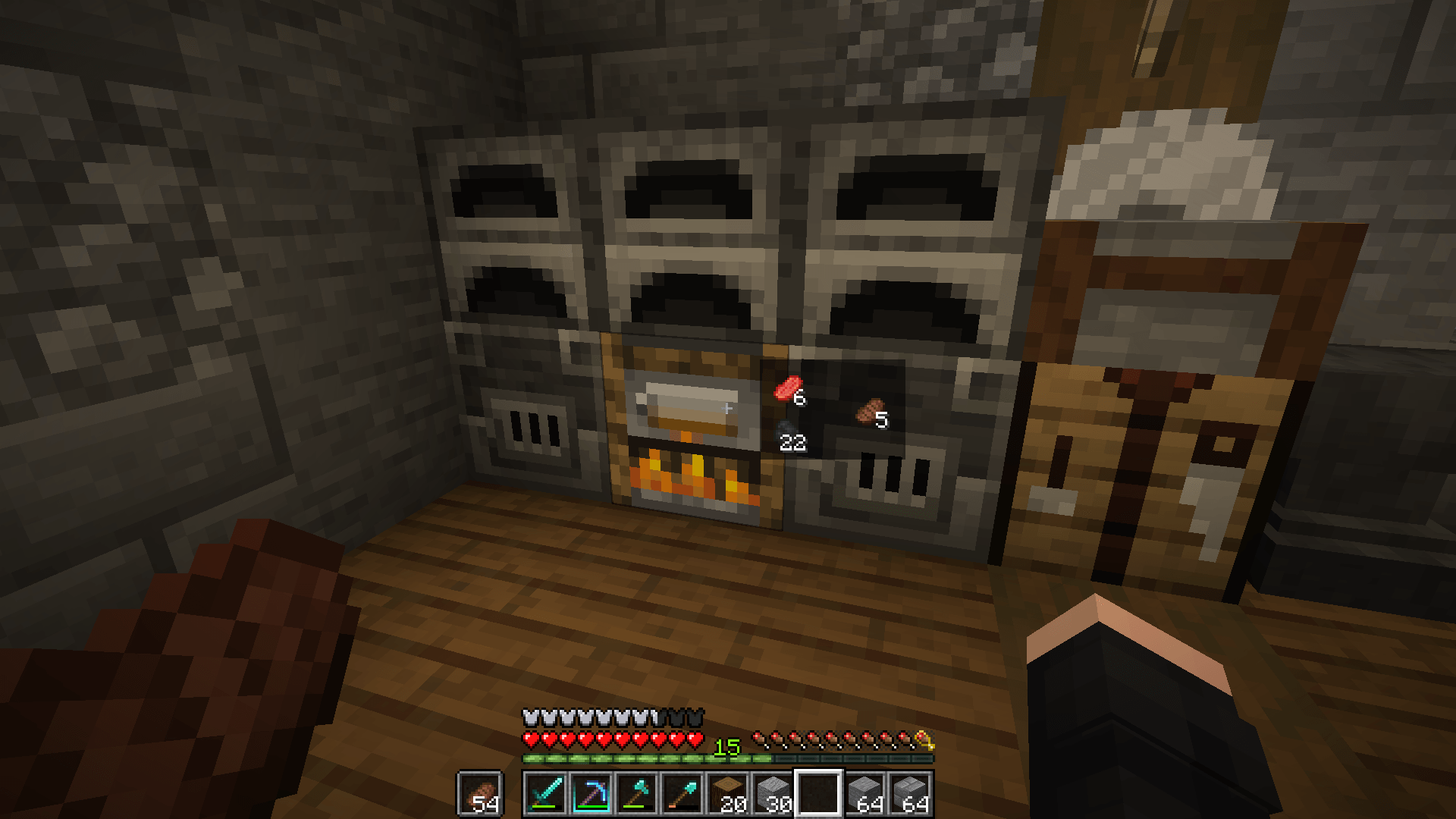
A sleek, minimalist HUD mod that lets you preview container contents in real time just by looking at them — no GUI opening required.
✨ Features
- 👁️ Instant Inspection: Glance at any container to instantly see what's inside without opening it.
- 🌊 Fluid Animations: Smooth cubic ease-out fade-in and fade-out transitions.
- 🛡️ Anti-Flicker (Grace Period): A smart delay prevents the HUD from flashing or jittering when your crosshair quickly sweeps past blocks.
- 📦 Adaptive Container Layouts:
- Furnaces, Blast Furnaces & Smokers: Dedicated slots for fuel, input, and cooking results.
- Campfires & Soul Campfires: Compact 2×2 grid showing all 4 cooking items.
- Chests, Hoppers, Dispensers, Brewing Stands & More: Auto-scaling rows and wrapped grids for any inventory size.
- 🌐 Multiplayer & Server Friendly: Works seamlessly in singleplayer and uses ultra-lightweight packets when installed on servers.
- 🧩 Datapack Extensible: Easily add support or custom layouts for modded containers using simple JSON tags without writing code!
⚙️ Configuration
Customize the HUD to fit your screen and playstyle!
You can configure options in-game using:
- Fabric / Quilt: via Mod Menu
- NeoForge: via the built-in Mods config menu
- Or by editing
config/quickglance.jsondirectly.
| Setting | Default | Description |
|---|---|---|
Animation Duration (animDurationMs) |
150 ms |
Controls how fast the HUD fades in and out. |
Grace Period (gracePeriodMs) |
100 ms |
Delay before hiding the HUD after looking away (prevents annoying flickering). |
Offset X / Offset Y (offsetX, offsetY) |
14 / 22 |
Adjusts HUD position relative to your crosshair for the perfect fit. |
🔌 Compatibility & Installation
- Supported Loaders: Fabric, Quilt, and NeoForge.
- Dependencies: Requires Fabric API on Fabric/Quilt.
- Multiplayer: Install on both client and server for full synchronization.
📖 Adding Modded Containers (Datapacks)
QuickGlance is fully datapack-driven. You can tag any modded container block entity to support QuickGlance layouts:
#quickglance:furnace_like— 3-slot furnace layout.#quickglance:campfire_like— 2×2 campfire layout.#quickglance:row_like— dynamic item row / grid.
Check out DATAPACKS.md on GitHub for full instructions and examples.
Project description from CurseForge.
Pick your setup
QuickGlance by Minecraft version and loader
Choose the version and loader you play, then open the matching release.
Minecraft version
26.2
1 loader buildMinecraft version
1.21.1
3 loader buildsMinecraft version
1.21
3 loader buildsMinecraft version
1.20.1
2 loader buildsCheck the dependencies, then try the file in a copied instance before changing a world you care about.
Recent files
QuickGlance versions and loaders
QuickGlance 1.1.0 (NeoForge 26.3)
quickglance-neoforge-1.1.0+26.3.jar
22 Oct 2026
Client Source doesn’t say Server Source doesn’t say Dependencies No extras listed Listed on Release listing
Check the 26.3 · NeoForge setup NeoForge26.3 release
QuickGlance 1.1.0 (Fabric 26.3)
quickglance-fabric-1.1.0+26.3.jar
22 Oct 2026
Client Source doesn’t say Server Source doesn’t say Dependencies No extras listed Listed on Release listing
Check the 26.3 · Fabric setup FabricQuilt26.3 release
QuickGlance 1.1.0 (Fabric 1.20.1)
quickglance-fabric-1.1.0+1.20.1.jar
22 Oct 2026
Client Source doesn’t say Server Source doesn’t say Dependencies No extras listed Listed on Release listing
Check the 1.20.1 · Fabric setup Fabric1.20.1Quilt release
QuickGlance 1.1.0 (NeoForge 1.21.1)
quickglance-neoforge-1.1.0+1.21.1.jar
22 Oct 2026
Client Source doesn’t say Server Source doesn’t say Dependencies No extras listed Listed on Release listing
Check the 1.21.1 · NeoForge setup 1.211.21.1NeoForge release
QuickGlance 1.1.0 (Fabric 1.21.1)
quickglance-fabric-1.1.0+1.21.1.jar
22 Oct 2026
Client Source doesn’t say Server Source doesn’t say Dependencies No extras listed Listed on Release listing
Check the 1.21.1 · Fabric setup 1.21Fabric1.21.1Quilt release
QuickGlance 1.1.0 (Fabric 26.3)
quickglance-fabric-1.1.0+26.3.jar
22 Oct 2026
Client Source doesn’t say Server Source doesn’t say Dependencies No extras listed Listed on Release listing
Check the 26.3 · Fabric setup FabricQuilt26.3 release
QuickGlance-1.0.0+26.2.jar
18 Aug 2026
Client Source doesn’t say Server Source doesn’t say Dependencies 4 required · 4 unchecked Listed on Release listing
Check the 26.2 · Fabric setup Fabric26.2 release
Looking for an older file? The official CurseForge project page is in Resources.
 mod
mod CurseForge + Modrinth · Minecraft
Reliable Recipes
A lightweight utility for recipe and tag manipulation via simple JSON configuration!
 mod
mod CurseForge + Modrinth · Minecraft
Rad Gyms [Cobblemon]
Cobblemon roguelike gyms based on RCT Api
 mod
mod CurseForge · Minecraft
Cobblemon JEI & JourneyMap Integration
Cobblemon JEI & JourneyMap Integration is a high-performance client-side mod for Minecraft Java (NeoForge & Fabric 1.21.1), designed to seamlessly bridge the Cobblemon ecosystem with Just Enough Items (JEI) and JourneyMap.