Fabric API Needed by Armor Model API 1.0.2+1.21.11
requiredMatching file found Matched file: [1.21.11] Fabric API 0.141.6+1.21.11
CurseForge · Minecraft mod
Renders Bedrock/GeckoLib geo armor models through the vanilla armor pipeline.
Quick answer
Armor Model API 1.0.2+1.21.11 targets 1.21.11 with Fabric. The project page does not say whether this file belongs on the client, dedicated server, or both. All 1 required mods have matching files.
Where it goes
The project page does not say whether this file belongs on the client, dedicated server, or both.
The source does not explicitly classify this release as client-only or server-only.
1.0.2+1.21.11. Change the file and its required mods may change too.
Install Fabric API first. We found matching files for this game-version and loader setup.
We only count dependency files that match this setup. A file for another loader does not fill the gap.
Before you install it
Built for Armor Model API 1.0.2+1.21.11. Pick another file and the loader, install side or required mods may change.
Use 1.0.2+1.21.11. It targets 1.21.11 with Fabric; another release may have different loader, side or dependency requirements.
Install Fabric API first. We found matching files for this game-version and loader setup.
The project page does not say whether this file belongs on the client, dedicated server, or both.
Use the “Get this file” button beside 1.0.2+1.21.11. It opens that exact file at the source.
About this project
Renders armor with custom geometry authored in the Bedrock/GeckoLib .geo.json format, through the vanilla armor rendering pipeline.
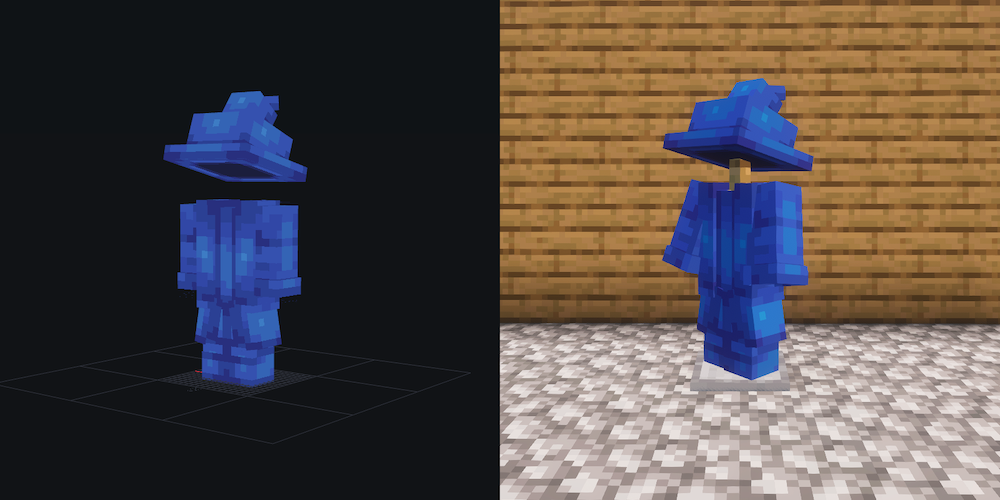
_glowmask.png convention; pixels that stay bright in the dark.geo.json is parsed and baked once into a vanilla ModelPart tree (the same TexturedModelData every vanilla entity model is built from), cached until the next reload. Textures are plain resources, resolved by the render layers on demand — nothing is preprocessed.ArmorRenderer hook, on NeoForge through a small equivalent mixin. Vanilla's overlay rendering is skipped for that piece and the dispatcher renders the baked model instead — vanilla pose copied on, slot visibility applied. Unregistered items are untouched.From bake to buffer this is 100% the vanilla code path — the same pose copy, render layers, and buffers vanilla armor uses. That is the whole compatibility and performance story: Sodium, Iris, and anything else that works with vanilla armor sees ordinary vanilla model rendering. There is no custom vertex pipeline.
For developer documentation, check out the GitHub readme.
Project description from CurseForge.
Pick your setup
Choose the version and loader you play, then open the matching release.
Check the dependencies, then try the file in a copied instance before changing a world you care about.
Recent files
armor_model_api-fabric-1.0.2+1.21.11.jar
26 Aug 2026
armor_model_api-neoforge-1.0.2+1.21.11.jar
26 Aug 2026
armor_model_api-neoforge-1.0.0+1.21.1.jar
19 Aug 2026
armor_model_api-fabric-1.0.0+1.21.1.jar
19 Aug 2026
Looking for an older file? The official CurseForge project page is in Resources.
 mod
modOreganized is a mod that adds two new metals to minecraft, Lead, Silver, and the alloy Electrum. All with their unique uses and abilities and not just a new meaningless toolset.
 mod
modA smart humanoid companion (not LLMs or external services, only behavior on its own) that fights, mines, fishes, harvests and replants crops, and levels up through unique classes.
 mod
modJust Get this Ore and Relaaaaaax