Minecraft version
Back to mods 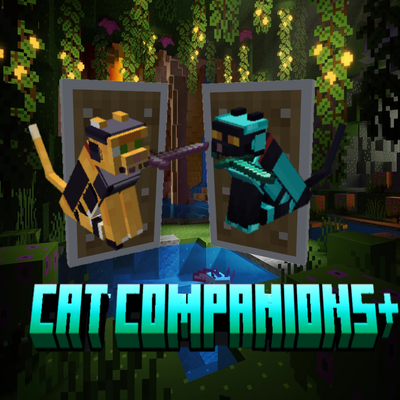
CurseForge · Minecraft mod
Cat Companions+
Cat Companions+ expands Minecraft’s tameable cats into useful adventuring companions. Cats can be equipped with custom armor and weapons, allowing them to fight alongside their owner while keeping the familiar behavior and personality of vanilla cats.
Choose a version Pick your version below, then grab the matching file.
Quick answer
Which Cat Companions+ release should I use?
Latest stable file cat-companions-forge-26.2-2.0.0.jar
Game version 26.2
Loader Forge
Cat Companions+ cat-companions-forge-26.2-2.0.0.jar targets 26.2 with Forge. The project page does not say whether this file belongs on the client, dedicated server, or both. No extra mods listed for this file.
Where it goes
Is Cat Companions+ required on the client, server, or both?
The project page does not say whether this file belongs on the client, dedicated server, or both.
Client Source doesn’t say
Dedicated server Source doesn’t say
Loader for this release Forge
Required install it here Optional supported, not mandatory Not supported do not install here Source doesn’t say do not assume
The source does not explicitly classify this release as client-only or server-only.
What else does Cat Companions+ cat-companions-forge-26.2-2.0.0.jar need?
cat-companions-forge-26.2-2.0.0.jar. Change the file and its required mods may change too.
This file does not list any required mods. Do not add a library just because a different file uses it.
This file does not list any required or optional mods.
Before you install it
Add Cat Companions+ without breaking your instance.
Built for Cat Companions+ cat-companions-forge-26.2-2.0.0.jar. Pick another file and the loader, install side or required mods may change.
- 01
Stick to this file
Use cat-companions-forge-26.2-2.0.0.jar. It targets 26.2 with Forge; another release may have different loader, side or dependency requirements.
- 02
Bring the mods it needs
This file does not list any required mods. Do not add a library just because a different file uses it.
- 03
Put it on the correct side
The project page does not say whether this file belongs on the client, dedicated server, or both.
- 04
Pick the file you checked
Use the “Get this file” button beside cat-companions-forge-26.2-2.0.0.jar. It opens that exact file at the source.
About this project
What does Cat Companions+ add?
Cat Companions+
Cat Companions+ gives Minecraft cats a much larger role after taming them.
Instead of existing primarily as decorative pets, tamed cats can become true combat companions that can be equipped, commanded, protected, and managed individually.
The goal is to expand cats in a way that still feels natural within Minecraft. Cats retain their familiar tameable behavior, ownership, sitting and wandering mechanics while gaining equipment, combat, behavior, and companion-management features.
Features
Cat Companion Management
Owned cats have a dedicated companion menu for managing their equipment, behavior, and settings.
Shift + Right-Click a tamed cat, or use Control + C to open its companion menu.
The menu shows:
- Cat name
- Cat appearance
- Current and maximum health
- Damage
- Damage reduction
- Equipped armor
- Equipped weapon
- Current behavior
- Owner distance
- Guard status
- Retreat settings
- Nearby companion cats
You can also select other nearby owned cats directly from the same menu without having to close it.
Cat Behavior Modes
Cats can now be given different behavior modes depending on how you want them to act.
Follow
The cat follows you normally and helps defend you when necessary.
Stay
The cat remains around its assigned location instead of following you everywhere.
Guard
The cat protects an assigned area and actively looks for hostile threats within that area, even when you haven't attacked anything yourself.
Defensive
The cat will defend itself and its owner when threatened.
Passive
The cat will not engage in combat.
Behavior settings are saved individually for each cat.
Guard Area
Guard mode allows a cat to protect a specific area.
A guarding cat will:
- Patrol around its assigned area
- Look for nearby hostile creatures
- Attack threats without requiring the player to attack first
- Pursue threats within its allowed range
- Return to its guard area afterward
Guard areas make cats useful for protecting bases, farms, villages, entrances, and other locations.
Companion Combat
Cats can actively participate in combat alongside their owner.
Cats are capable of:
- Surrounding enemies instead of stacking in one location
- Moving around targets while fighting
- Choosing safer attack positions
- Repositioning after attacks
- Performing short pounces when appropriate
- Avoiding dangerous attack paths
- Working together when multiple companion cats are present
Cats remain support companions rather than replacing the player's own combat ability.
Low-Health Retreat
Cats can be configured to retreat when their health becomes low.
Retreat can be turned On or Off, with three available health thresholds:
- 10%
- 30%
- 50%
When retreating, the cat stops pursuing enemies and attempts to move toward a safer location.
The cat can retreat toward:
- Its owner when following
- Its assigned location when staying
- Its guard area when guarding
Cats also avoid immediately returning to combat until they have recovered enough health.
Hazard Avoidance
Companion cats are much more careful around dangerous terrain.
They attempt to avoid hazards such as:
- Lava
- Fire
- Soul fire
- Campfires
- Cactus
- Magma
- Powder snow
- Dangerous falls
- Other recognized dangerous paths
This helps prevent companion cats from needlessly killing themselves while following or fighting.
Recall
Recall calls a companion back to its owner.
When recalled, the cat:
- Returns safely to the player
- Switches to Follow
- Stops sitting
- Resumes normal companion behavior
Recall also checks the destination so the cat isn't intentionally placed inside dangerous terrain or another unsafe location.
Sit & Stand
Cats can still be manually told to sit or stand.
Sit temporarily stops the cat from moving, fighting, patrolling, or pursuing enemies.
Stand allows the cat to resume its previously selected behavior.
Sitting does not erase the cat's saved behavior settings.
Multiple Companion Cats
The companion menu can display multiple cats owned by the player.
Each cat can be selected individually to view its:
- Appearance
- Health
- Equipment
- Distance
- Behavior
- Current status
Cats also use improved positioning during combat so several companions are less likely to occupy exactly the same space around an enemy.
Cat Companion Inventory
Owned cats have their own equipment interface for managing companion gear.
The inventory provides dedicated places for:
- Cat armor
- Weapons
The menu also displays important information about the selected cat, including its name, health, damage reduction, damage, equipment, and current behavior.
The companion inventory is separate from normal vanilla cat interaction so normal sit/stand behavior remains available.
Custom Cat Armor
Cats can wear specially modeled armor designed specifically around the Minecraft cat body.
Current armor tiers include:
- Iron Cat Armor
- Gold Cat Armor
- Diamond Cat Armor
- Netherite Cat Armor
Armor is visibly rendered on the cat rather than simply existing as an invisible stat bonus.
Each material uses the same fitted armor design with its own appropriate material appearance.
Visible Weapons
Cat Companions can carry weapons visibly in their mouths.
Rather than simply increasing damage invisibly, the equipped weapon becomes part of the companion's appearance and combat progression.
Persistent Equipment & Settings
Each cat keeps its own equipment and companion settings.
This includes:
- Armor
- Weapon
- Behavior mode
- Guard location
- Stay location
- Retreat settings
These settings remain associated with the individual cat through normal world saves and reloads.
Vanilla-Friendly Design
Cat Companions+ builds on Minecraft's existing cat system rather than replacing it with an entirely different pet system.
Cats retain familiar mechanics such as:
- Taming
- Ownership
- Sitting and standing
- Normal movement
- Cat variants
- Existing vanilla cat behavior where appropriate
The additional companion features are layered on top of the familiar Minecraft cat.
Minecraft-Style Design
The armor, equipment, combat system, and interface are designed to remain visually compatible with Minecraft rather than turning cats into heavily over-designed RPG characters.
The focus is on:
- Recognizable vanilla cats
- Useful companion behavior
- Lightweight equipment progression
- Visible gear
- Simple controls
- Individual companion management
Supported Versions
Cat Companions+ is being developed for Fabric.
Supported project versions are:
- Minecraft Fabric 1.20.1
- Minecraft Fabric 1.21.1
- Minecraft Fabric 26.2
- Minecraft Forge 1.20.1
- Minecraft Forge 1.21.1
- Minecraft Forge 26.2
Each Minecraft version uses its own separate mod file. Players should install the file specifically made for their Minecraft version.
Cat Companions+ does not currently support Quilt or NeoForge.
Required Dependencies
Fabric
- Fabric Loader
- Fabric API
Forge
- None
Optional:
- None currently
Client / Server
Cat Companions+ is required on both the client and server.
The server controls companion equipment, behavior, combat, health, damage reduction, weapon damage, and persistence.
The client provides the companion menu, equipment display, armor rendering, weapon rendering, and other visual features.
Project description from CurseForge.
Pick your setup
Cat Companions+ by Minecraft version and loader
Choose the version and loader you play, then open the matching release.
Minecraft version
1.21.1
2 loader buildsMinecraft version
1.20.1
2 loader buildsCheck the dependencies, then try the file in a copied instance before changing a world you care about.
Recent files
Cat Companions+ versions and loaders
cat-companions-forge-26.2-2.0.0.jar
5 Sept 2026
Client Source doesn’t say Server Source doesn’t say Dependencies No extras listed Listed on Release listing
Check the 26.2 · Forge setup Forge26.2 release
cat-companions-forge-1.21.1-2.0.0.jar
5 Sept 2026
Client Source doesn’t say Server Source doesn’t say Dependencies No extras listed Listed on Release listing
Check the 1.21.1 · Forge setup Forge1.21.1 release
cat-companions-forge-1.20.1-2.0.0.jar
5 Sept 2026
Client Source doesn’t say Server Source doesn’t say Dependencies No extras listed Listed on Release listing
Check the 1.20.1 · Forge setup 1.20.1Forge release
cat-companions-fabric-26.2-2.0.0.jar
5 Sept 2026
Client Source doesn’t say Server Source doesn’t say Dependencies No extras listed Listed on Release listing
Check the 26.2 · Fabric setup Fabric26.2 release
cat-companions-fabric-1.21.1-2.0.0.jar
5 Sept 2026
Client Source doesn’t say Server Source doesn’t say Dependencies No extras listed Listed on Release listing
Check the 1.21.1 · Fabric setup Fabric1.21.1 release
cat-companions-fabric-1.20.1-2.0.0.jar
5 Sept 2026
Client Source doesn’t say Server Source doesn’t say Dependencies No extras listed Listed on Release listing
Check the 1.20.1 · Fabric setup Fabric1.20.1 release
cat-companions-fabric-1.21.1-1.0.2+1.21.1.jar
20 Aug 2026
Client Source doesn’t say Server Source doesn’t say Dependencies No extras listed Listed on Release listing
Check the 1.21.1 · Fabric setup Fabric1.21.1 release
cat-companions-fabric-26.2-1.0.2.jar
20 Aug 2026
Client Source doesn’t say Server Source doesn’t say Dependencies No extras listed Listed on Release listing
Check the 26.2 · Fabric setup Fabric26.2 release
cat-companions-fabric-1.20.1-1.0.1.jar
20 Aug 2026
Client Source doesn’t say Server Source doesn’t say Dependencies No extras listed Listed on Release listing
Check the 1.20.1 · Fabric setup Fabric1.20.1 release
Looking for an older file? The official CurseForge project page is in Resources.
 mod
mod CurseForge · Minecraft
The Siege Overhaul
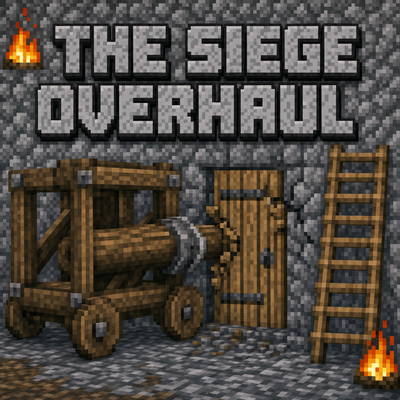
Tactical PvE sieges for 1.20.1 Forge. Enemy armies build a war camp, breach your walls, and try to occupy your base. You and your Villager Recruits soldiers hold the line. Zero admin setup, full block restoration, server-friendly. Formerly Faction Raids.
 mod
mod CurseForge · Minecraft
RPG Magic Skills
An RPG-style progression mod where you gain experience by defeating enemies and freely strengthen your character through leveling up.
 mod
mod CurseForge · Minecraft
Celestia: Shooting Stars
Celestia adds synchronized meteor showers to the Overworld. The server calculates the trajectory and appearance so all players see the exact same streak at the same time.