Minecraft version
Back to mods 
CurseForge · Minecraft mod
Initial Dim Choice
Choose your initial dimension before joining the world!
Choose a version Pick your version below, then grab the matching file.
Quick answer
Which Initial Dim Choice release should I use?
Latest stable file initial_dim_choice-1.2.0.jar
Game version 1.20.1
Loader Forge
Initial Dim Choice initial_dim_choice-1.2.0.jar targets 1.20.1 with Forge. The project page does not say whether this file belongs on the client, dedicated server, or both. No extra mods listed for this file.
Where it goes
Is Initial Dim Choice required on the client, server, or both?
The project page does not say whether this file belongs on the client, dedicated server, or both.
Client Source doesn’t say
Dedicated server Source doesn’t say
Loader for this release Forge
Required install it here Optional supported, not mandatory Not supported do not install here Source doesn’t say do not assume
The source does not explicitly classify this release as client-only or server-only.
What else does Initial Dim Choice initial_dim_choice-1.2.0.jar need?
initial_dim_choice-1.2.0.jar. Change the file and its required mods may change too.
This file does not list any required mods. Do not add a library just because a different file uses it.
This file does not list any required or optional mods.
Before you install it
Add Initial Dim Choice without breaking your instance.
Built for Initial Dim Choice initial_dim_choice-1.2.0.jar. Pick another file and the loader, install side or required mods may change.
- 01
Stick to this file
Use initial_dim_choice-1.2.0.jar. It targets 1.20.1 with Forge; another release may have different loader, side or dependency requirements.
- 02
Bring the mods it needs
This file does not list any required mods. Do not add a library just because a different file uses it.
- 03
Put it on the correct side
The project page does not say whether this file belongs on the client, dedicated server, or both.
- 04
Pick the file you checked
Use the “Get this file” button beside initial_dim_choice-1.2.0.jar. It opens that exact file at the source.
About this project
What does Initial Dim Choice add?
Choose your starting dimension before joining the world!
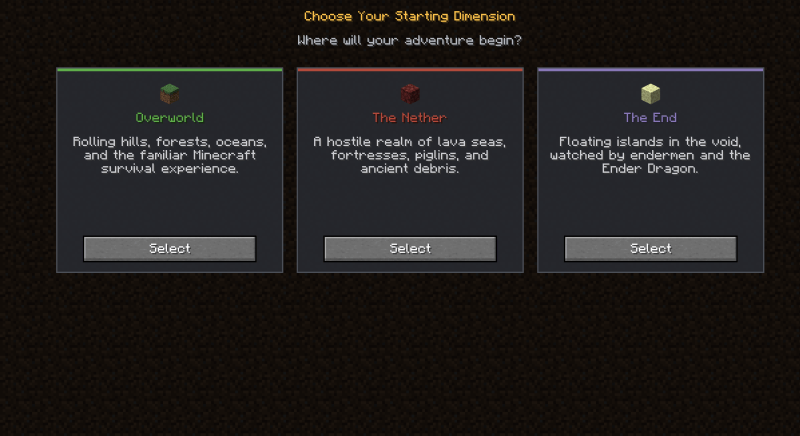
Initial Dim Choice is a data-driven mod for Minecraft 1.20.1 Forge that lets players pick their starting dimension when first joining a world. The mod automatically finds a safe landing spot, sets the respawn point in the chosen dimension, and teleports the player there.
For modpack developers who only want to change the default spawn dimension, a silent mode is also available — no selection screen is shown, and players are sent directly to a preset dimension.
Everything is highly customizable and data-driven, giving developers full freedom to tailor the experience.
✨ Features
- First-Join Selection Screen — Players choose their starting dimension from a clean, intuitive UI when joining a world for the first time.
- Safe Spawn Search — Multiple built-in spawn-finding algorithms (heightmap, Y-range, fixed position, end islands) ensure players never spawn in the void or inside walls.
- Forced Spawn Platform — Optionally generates a 3×3 cobblestone platform and clears the space above, guaranteeing a safe landing in even the harshest dimensions.
- Graceful Fallback — If a configured dimension isn't loaded, the option is silently hidden without crashing or breaking datapack loading.
- Fully Data-Driven — Add or modify dimension choices easily via datapacks.
⚙️ Configuration
All behavior is configured through simple JSON files:
- A global config toggles the selection screen and sets the default dimension choice.
- Dimension choice files define each option — target dimension, translation keys, icon, UI color, display order, and spawn search settings.
- Four spawn search types are supported: fixed, y_range, heightmap, and end_islands, each with optional parameters such as y_anchor and enable_spawn_platform.
See the README on GitHub for full configuration documentation.
Project description from CurseForge.
Pick your setup
Initial Dim Choice by Minecraft version and loader
Choose the version and loader you play, then open the matching release.
Check the dependencies, then try the file in a copied instance before changing a world you care about.
Recent files
Initial Dim Choice versions and loaders
initial_dim_choice-1.2.0.jar
27 Aug 2026
Client Source doesn’t say Server Source doesn’t say Dependencies No extras listed Listed on Release listing
Check the 1.20.1 · Forge setup 1.20.1Forge release
initial_dim_choice-1.1.0.jar
24 Aug 2026
Client Source doesn’t say Server Source doesn’t say Dependencies No extras listed Listed on Release listing
Check the 1.20.1 · Forge setup 1.20.1Forge release
initial_dim_choice-1.0.0.jar
19 Aug 2026
Client Source doesn’t say Server Source doesn’t say Dependencies No extras listed Listed on Release listing
Check the 1.20.1 · Forge setup 1.20.1Forge release
Looking for an older file? The official CurseForge project page is in Resources.
 mod
mod CurseForge + Modrinth · Minecraft
Neo Vitae
Spill blood for power. Altars that consume life, sigils that bend the world, custom demons in an endless dungeon, sentient armor that drinks souls, a shield that pays your damage in essentia. Datapack-driven from the ground up.
 mod
mod CurseForge · Minecraft
Nuclear Radiation
Radioactive hazards into Minecraft
 mod
mod CurseForge · Minecraft
MineCoin: Economy & Trade
Complete physical economy system with tiered coins, functional wallets, lottery scratch-offs, and player-to-player auctions.