Minecraft version
Back to mods 
CurseForge · Minecraft mod
Auto Mod Fetcher
Stop hunting down missing mods—just join any server and let AutoModFetcher automatically download, verify, and sync everything for you.
Choose a version Pick your version below, then grab the matching file.
Quick answer
Which Auto Mod Fetcher release should I use?
Latest stable file automodfetcher-neoforge-0.2.9.1+1.21.1.jar
Game version 1.21.1
Loader NeoForge
Auto Mod Fetcher automodfetcher-neoforge-0.2.9.1+1.21.1.jar targets 1.21.1 with NeoForge. The project page does not say whether this file belongs on the client, dedicated server, or both. No extra mods listed for this file.
Where it goes
Is Auto Mod Fetcher required on the client, server, or both?
The project page does not say whether this file belongs on the client, dedicated server, or both.
Client Source doesn’t say
Dedicated server Source doesn’t say
Loader for this release NeoForge
Required install it here Optional supported, not mandatory Not supported do not install here Source doesn’t say do not assume
The source does not explicitly classify this release as client-only or server-only.
What else does Auto Mod Fetcher automodfetcher-neoforge-0.2.9.1+1.21.1.jar need?
automodfetcher-neoforge-0.2.9.1+1.21.1.jar. Change the file and its required mods may change too.
This file does not list any required mods. Do not add a library just because a different file uses it.
This file does not list any required or optional mods.
Before you install it
Add Auto Mod Fetcher without breaking your instance.
Built for Auto Mod Fetcher automodfetcher-neoforge-0.2.9.1+1.21.1.jar. Pick another file and the loader, install side or required mods may change.
- 01
Stick to this file
Use automodfetcher-neoforge-0.2.9.1+1.21.1.jar. It targets 1.21.1 with NeoForge; another release may have different loader, side or dependency requirements.
- 02
Bring the mods it needs
This file does not list any required mods. Do not add a library just because a different file uses it.
- 03
Put it on the correct side
The project page does not say whether this file belongs on the client, dedicated server, or both.
- 04
Pick the file you checked
Use the “Get this file” button beside automodfetcher-neoforge-0.2.9.1+1.21.1.jar. It opens that exact file at the source.
About this project
What does Auto Mod Fetcher add?
| CurseForge | Modrinth | Discord |
Auto Mod Fetcher
Join modded servers instantly. No more hunting for files, guessing versions, or staring at "Disconnected" screens. Just connect, and let AutoModFetcher handle the rest.
✨ Features
- Automatic Sync: The server tells your game exactly which mods are missing and downloads them for you.
- Safe & Transparent: Before anything installs, a clear menu shows you exactly what is being downloaded. Files only come from trusted sources like Modrinth and CurseForge.
- Keeps Your Mods Safe: It only cleans up leftover server mods you no longer need. Your personal mods (like client-side performance boosters) are never deleted.
- Plug-and-Play for Servers: Server owners just drop the mod in. It automatically creates the mod list and syncs it with joining players without any complex setup.
- Custom Mods Welcome: Servers can easily bundle and share private, custom-made, or unlisted mods directly with players.
- "Trust this Server": Check this box once, and future mod updates for that server will happen quietly in the background.
Snapshots
Confirm screen
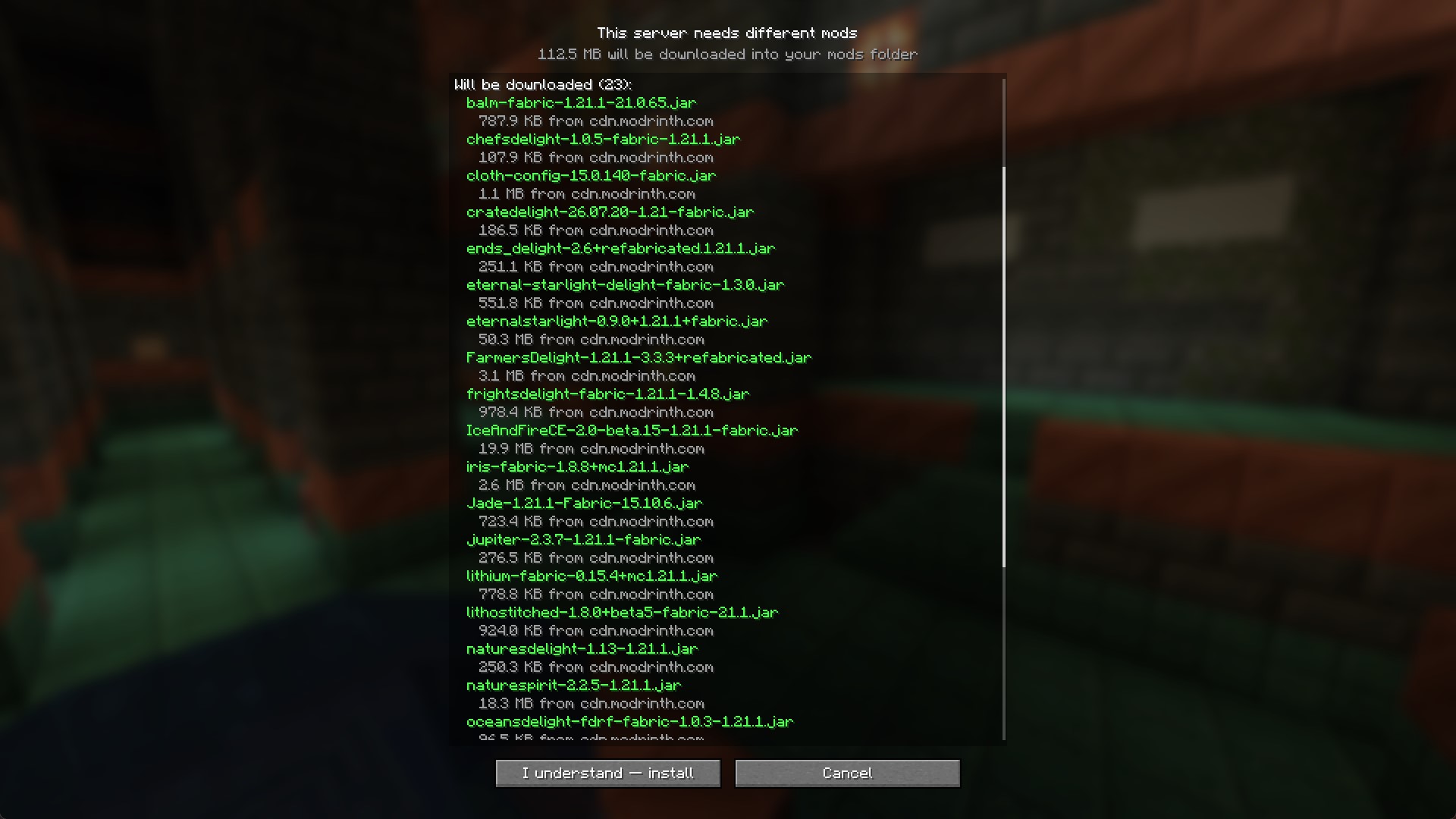
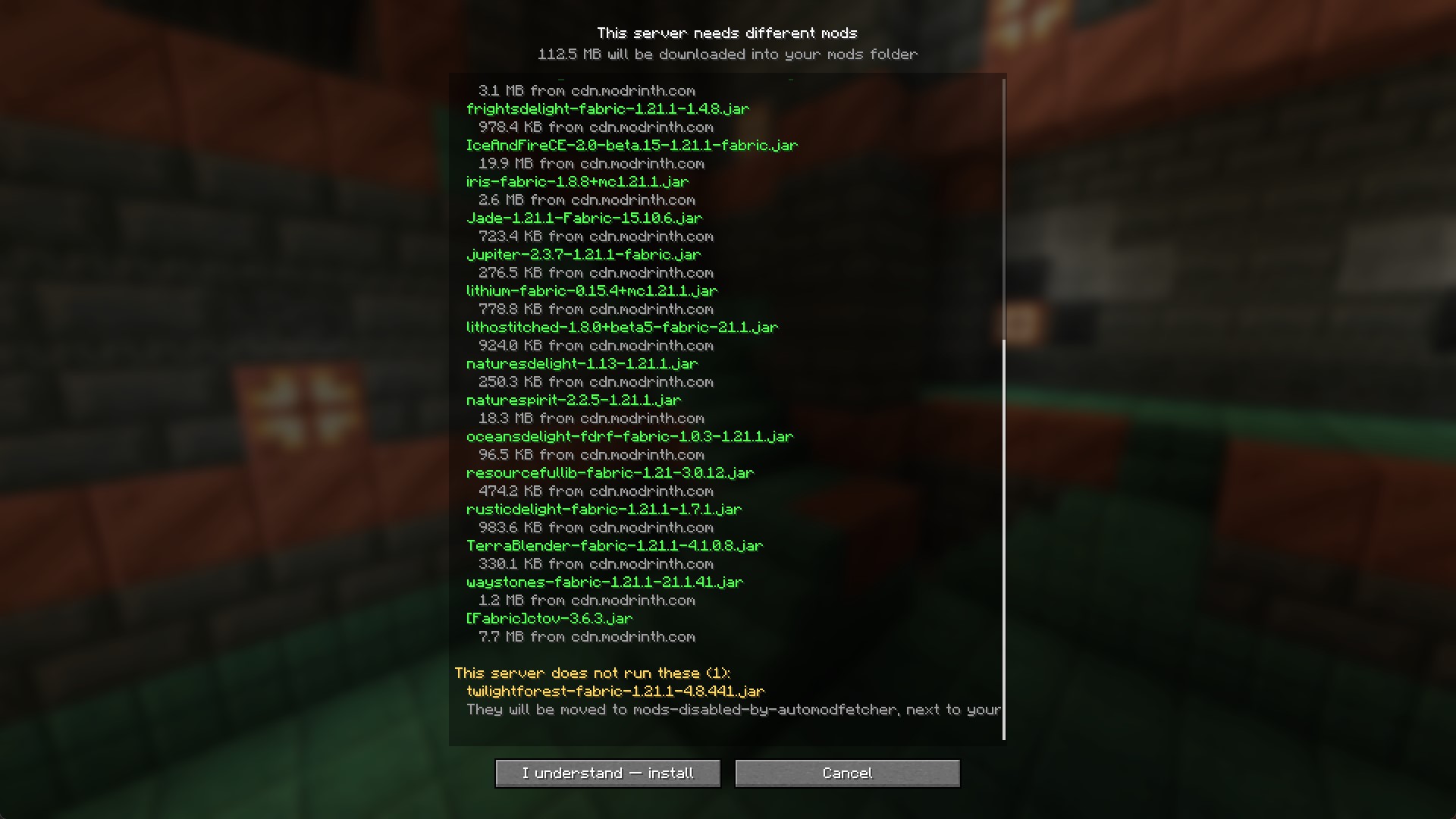
Nothing is written to your disk until you agree, and only the sections that apply are shown:
- Will be downloaded: shows each mod name, size, and the site it comes from.
- Came from server: small mods the server sent inline.
- Refused: anything rejected.
- Install these yourself: mods that aren't allowed to distribute, each with a link to that exact version's page rather than a project front page.
- Which mod that server does not run: leftovers from an old pack are moved aside rather than deleted.
- Will be removed: files this mod installed earlier that the server no longer wants.
Downloading
One line per file, marked for each mod's download state.
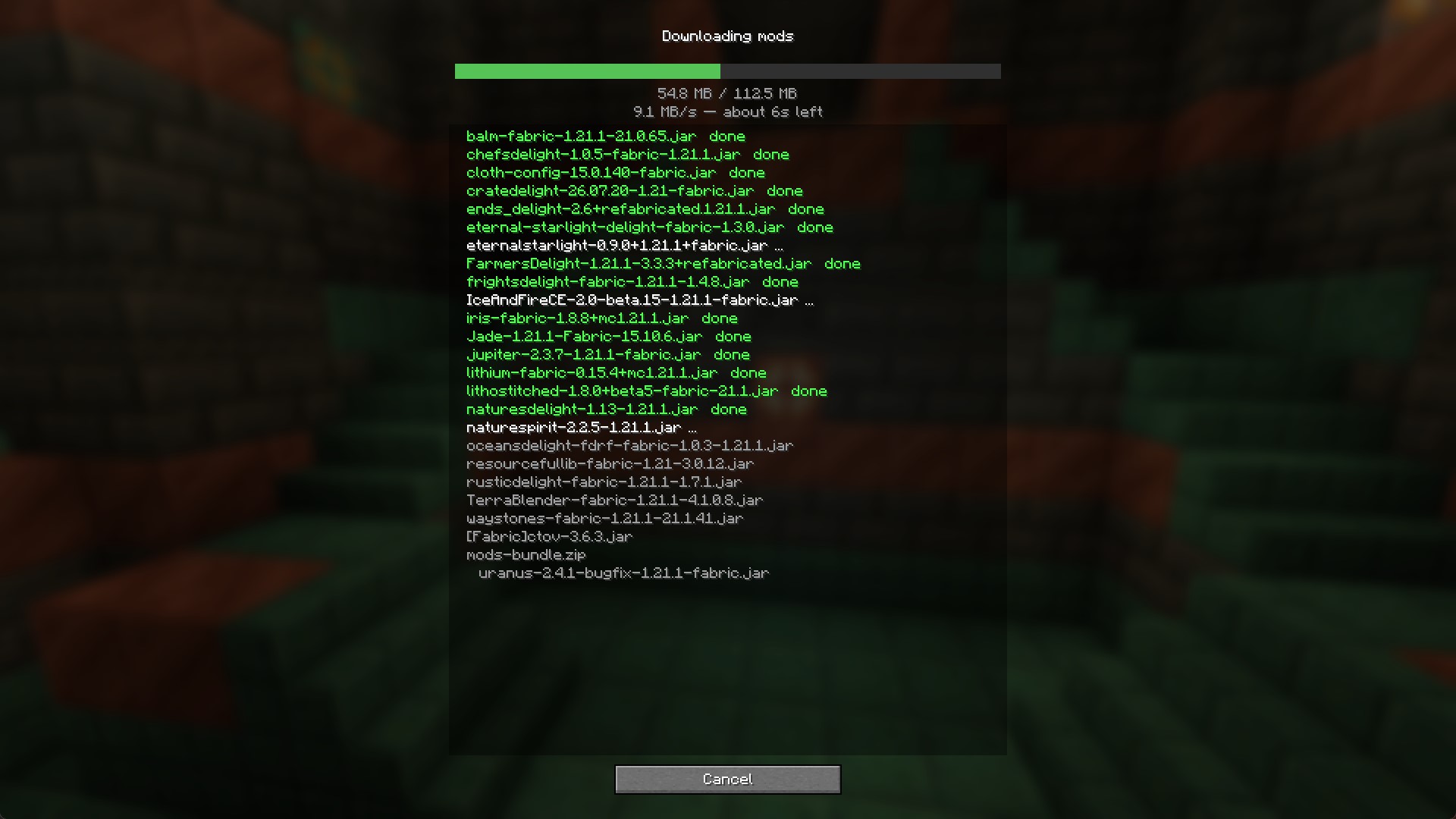
Complete Download
Shows the result after completing the download. If something is missing, you can easily press the "Try again" button.
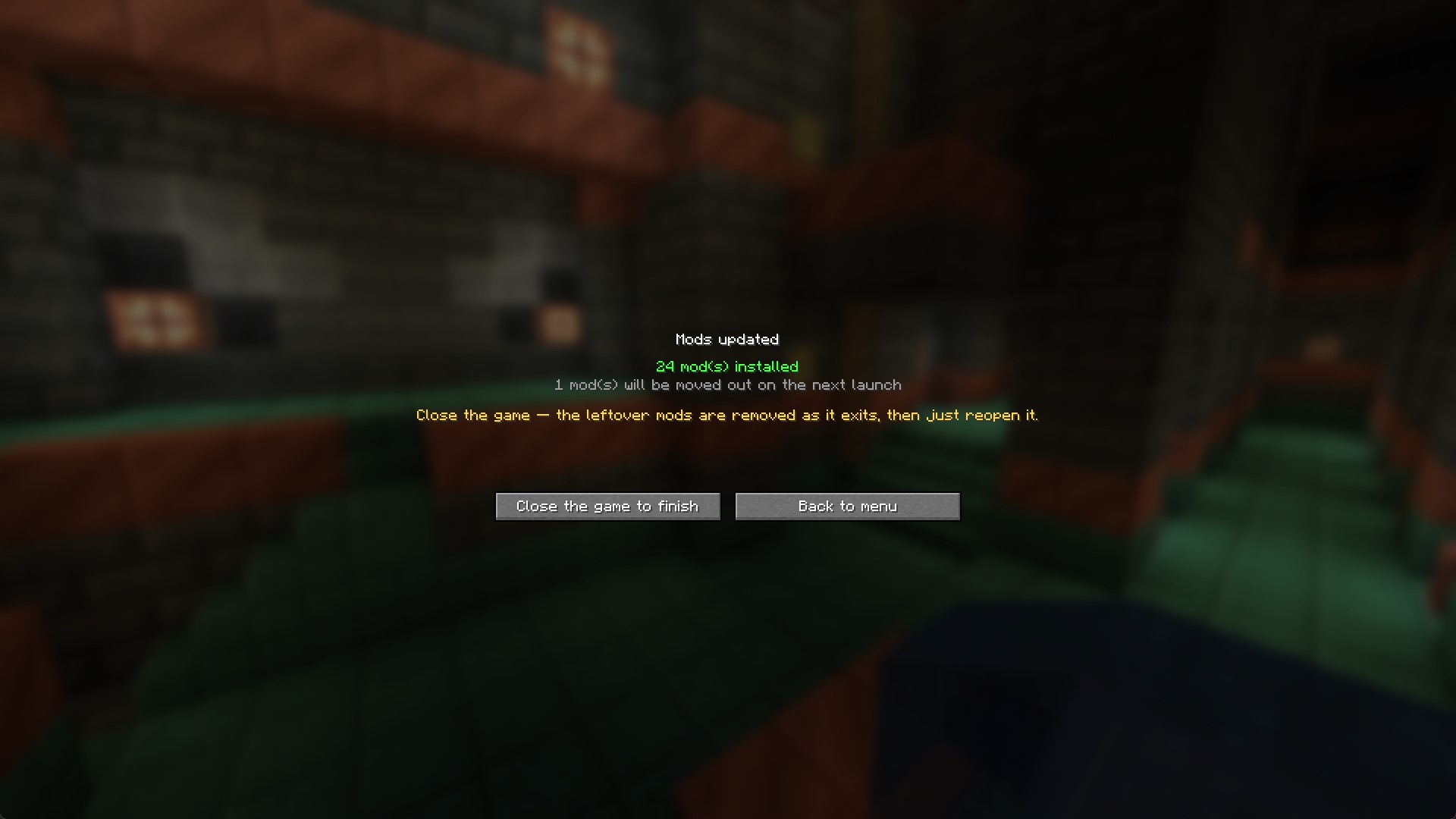
Your mods folder is already correct, but this session still has the old ones loaded. Rather than let you join into a failure you just fixed, it stops you and says why.
Extra
Get kicked a second after joining and vanilla just says "Disconnected". This screen quotes what the server actually said, then adds "This may be why:" and lists the mods you were missing.
Configs
Both files are created on first run and work exactly as they are. You only open them to change something.
Client — config/automodfetcher/client.json
{
  "allowedDomains": ["cdn.modrinth.com", "edge.forgecdn.net", "mediafilez.forgecdn.net"],
  "allowInsecureHttp": false,
  "deleteRemovedMods": true,
  "maxConcurrentDownloads": 3
}
A site outside allowedDomains is not silently blocked. It is shown on the confirm screen with the site named, and agreeing applies to that one server.
Server — config/automodfetcher/server.json
curseforgeApiKey— optional. Only needed for mods that are on CurseForge but not on Modrinth.excludeFileNames— files never offered to players. Supports a trailing*.githubToken— optional. Fill this in and/automodfetcher bundleuploads your custom mods for you, then fills in the address itself.includeAuthorRestrictedMods— off by default. If you have the permission of the mod author, you can turn it on.includeServerOnlyMods— server-side mods are not offered to clients unless you ask for it.
Compatibility
| Mod Loader | Available Versions | Notes |
|---|---|---|
| Fabric | 1.20.1, 1.21.1 | Fabric-API required |
| Forge | 1.20.1 | |
| NeoForge | 1.21.1 |
⚠️ Requirements & Important Notes
- Install on Both: AutoModFetcher must be installed on both the server and the player's client.
- One Restart Required: After the mods download, you just need to restart your game once to load them up and start playing.
- Respects Creators: If a mod author disables third-party downloads, AutoModFetcher respects their wishes and provides players with a direct, clickable link to the official page instead.
If you need to contact me further, you're welcome to join my Discord group.
License: All Rights Reserved. Free to use on commercial servers and in modpacks/server packs with credit. Standalone redistribution is not permitted.
Project description from CurseForge.
Pick your setup
Auto Mod Fetcher by Minecraft version and loader
Choose the version and loader you play, then open the matching release.
Minecraft version
1.20.1
2 loader buildsCheck the dependencies, then try the file in a copied instance before changing a world you care about.
Recent files
Auto Mod Fetcher versions and loaders
automodfetcher-neoforge-0.2.9.1+1.21.1.jar
10 Sept 2026
Client Source doesn’t say Server Source doesn’t say Dependencies No extras listed Listed on Release listing
Check the 1.21.1 · NeoForge setup 1.21.1NeoForge release
automodfetcher-forge-0.2.9.1+1.20.1.jar
10 Sept 2026
Client Source doesn’t say Server Source doesn’t say Dependencies No extras listed Listed on Release listing
Check the 1.20.1 · Forge setup 1.20.1Forge release
automodfetcher-fabric-0.2.9.1+1.21.1.jar
10 Sept 2026
Client Source doesn’t say Server Source doesn’t say Dependencies 2 required · 2 unchecked Listed on Release listing
Check the 1.21.1 · Fabric setup Fabric1.21.1 release
automodfetcher-fabric-0.2.9.1+1.20.1.jar
10 Sept 2026
Client Source doesn’t say Server Source doesn’t say Dependencies 2 required · 2 unchecked Listed on Release listing
Check the 1.20.1 · Fabric setup Fabric1.20.1 release
automodfetcher-neoforge-0.1.0+1.21.1.jar
20 Aug 2026
Client Source doesn’t say Server Source doesn’t say Dependencies No extras listed Listed on Release listing
Check the 1.21.1 · NeoForge setup 1.21.1NeoForge release
automodfetcher-forge-0.1.0+1.20.1.jar
20 Aug 2026
Client Source doesn’t say Server Source doesn’t say Dependencies No extras listed Listed on Release listing
Check the 1.20.1 · Forge setup 1.20.1Forge release
automodfetcher-fabric-0.1.0+1.21.1.jar
20 Aug 2026
Client Source doesn’t say Server Source doesn’t say Dependencies 2 required · 2 unchecked Listed on Release listing
Check the 1.21.1 · Fabric setup Fabric1.21.1 release
automodfetcher-fabric-0.1.0+1.20.1.jar
20 Aug 2026
Client Source doesn’t say Server Source doesn’t say Dependencies 2 required · 2 unchecked Listed on Release listing
Check the 1.20.1 · Fabric setup Fabric1.20.1 release
Looking for an older file? The official CurseForge project page is in Resources.
 mod
CurseForge · Minecraft
TAKOU TRADES
This mod adds a new system for trading in minecraft.
 mod
CurseForge · Minecraft
BeyondHIPU
Press the button, then take all items from the chest.
 mod
CurseForge · Minecraft
Swedish Torch (Swedish fire)
Swedish Torch adds a new block to Minecraft, it creates a large cylindrical area that prevents hostile and natural mobs from spawning naturally. The mod features cooking functionality, and an optional visual display of the protected area.