Minecraft version
Back to mods 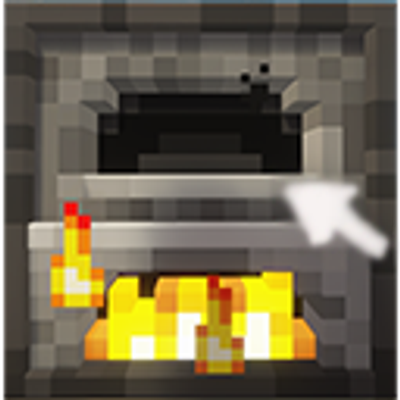
CurseForge · Minecraft mod
Better Removal
Sneak + right-click (empty hand) any supported container to extract its output items directly into your inventory — without opening the GUI.
Choose a version Pick your version below, then grab the matching file.
Quick answer
Which Better Removal release should I use?
Latest stable file better-removal-1.21.1-fabric-1.5.jar
Game version 1.21.1
Loader Fabric
Better Removal better-removal-1.21.1-fabric-1.5.jar targets 1.21.1 with Fabric. The project page does not say whether this file belongs on the client, dedicated server, or both. No extra mods listed for this file.
Where it goes
Is Better Removal required on the client, server, or both?
The project page does not say whether this file belongs on the client, dedicated server, or both.
Client Source doesn’t say
Dedicated server Source doesn’t say
Loader for this release Fabric
Required install it here Optional supported, not mandatory Not supported do not install here Source doesn’t say do not assume
The source does not explicitly classify this release as client-only or server-only.
What else does Better Removal better-removal-1.21.1-fabric-1.5.jar need?
better-removal-1.21.1-fabric-1.5.jar. Change the file and its required mods may change too.
This file does not list any required mods. Do not add a library just because a different file uses it.
This file does not list any required or optional mods.
Before you install it
Add Better Removal without breaking your instance.
Built for Better Removal better-removal-1.21.1-fabric-1.5.jar. Pick another file and the loader, install side or required mods may change.
- 01
Stick to this file
Use better-removal-1.21.1-fabric-1.5.jar. It targets 1.21.1 with Fabric; another release may have different loader, side or dependency requirements.
- 02
Bring the mods it needs
This file does not list any required mods. Do not add a library just because a different file uses it.
- 03
Put it on the correct side
The project page does not say whether this file belongs on the client, dedicated server, or both.
- 04
Pick the file you checked
Use the “Get this file” button beside better-removal-1.21.1-fabric-1.5.jar. It opens that exact file at the source.
About this project
What does Better Removal add?
Better Removal
Sneak + empty-hand right-click a container to directly extract its items into your inventory — without opening the GUI.
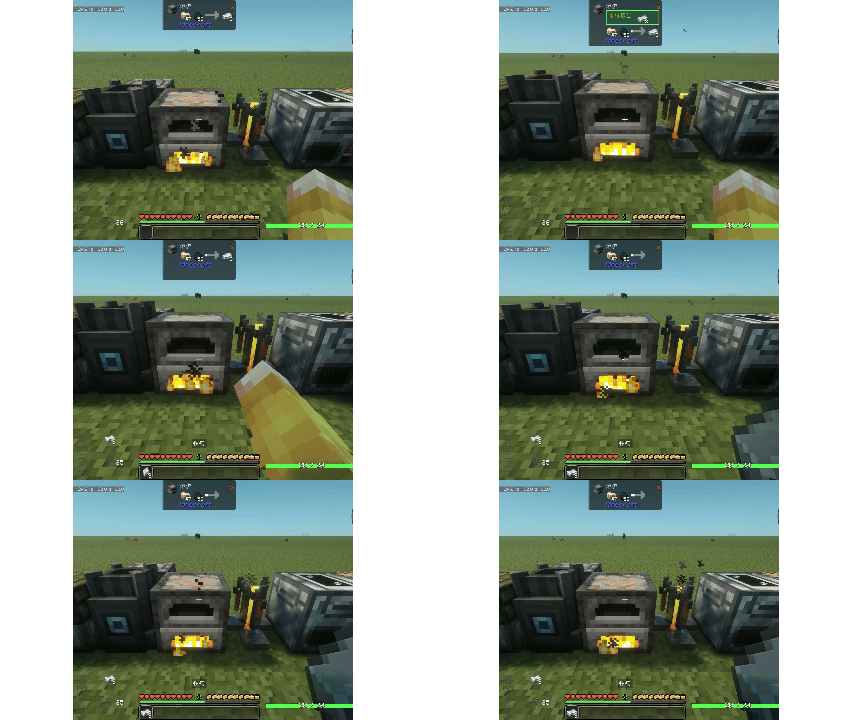
Extraction Modes
By default only the output slots are extracted. You can switch the extraction mode with the /br command or a keybinding:
| Mode | Command | Extracts |
|---|---|---|
| Output (default) | /br output |
Output slots only |
| Input | /br input |
Input slots only |
| Fuel | /br fuel |
Fuel slots only |
| All | /br all |
Every slot |
/br now— shows your current extraction mode.- A keybinding (unbound by default) cycles through the modes:
Output → Input → Fuel → All → Output ...
Supported Containers
Vanilla
| Container |
|---|
| Furnace / Blast Furnace / Smoker |
| Brewing Stand |
| Hopper / Dispenser / Dropper |
Farmer's Delight
| Container |
|---|
| Cooking Pot |
| Wooden / Bamboo Basket |
Ad Astra
| Container |
|---|
| Compressor |
| Etrionic Blast Furnace |
| Fuel Refinery |
| Oxygen Loader |
| Cryo Freezer |
Crabber's Delight
| Container |
|---|
| Crab Trap |
The Aether
| Container |
|---|
| Freezer |
| Altar |
Vinery
| Container |
|---|
| Fermentation Barrel |
| Apple Press |
Fossils and Archeology: Revival
| Container |
|---|
| Analyzer |
| Sifter |
| Culture Vat |
| Archeology Workbench |
Compatibility
When this mod is installed together with Carry On, its activation is changed to Left Alt + empty-hand right-click.
Jade
With Jade installed, holding the modifier key (Sneak, or Left Alt with Carry On) while looking at a supported container with empty hands shows a highlighted "Will extract:" line in the tooltip, previewing the items that would be extracted for the current mode. This can be toggled via the Jade Preview option in the Configured config.
Note: For the preview to show real container contents, Jade must be installed on both the client and the server.
Configuration
Edit via the Configured mod.
Project description from CurseForge.
Pick your setup
Better Removal by Minecraft version and loader
Choose the version and loader you play, then open the matching release.
Minecraft version
1.20.1
2 loader buildsCheck the dependencies, then try the file in a copied instance before changing a world you care about.
Recent files
Better Removal versions and loaders
better-removal-1.21.1-fabric-1.5.jar
28 Aug 2026
Client Source doesn’t say Server Source doesn’t say Dependencies No extras listed Listed on Release listing
Check the 1.21.1 · Fabric setup Fabric1.21.1 release
better_removal-1.20.1-forge-1.5.jar
28 Aug 2026
Client Source doesn’t say Server Source doesn’t say Dependencies No extras listed Listed on Release listing
Check the 1.20.1 · Forge setup 1.20.1Forge release
better-removal-1.20.1-fabric-1.5.jar
27 Aug 2026
Client Source doesn’t say Server Source doesn’t say Dependencies No extras listed Listed on Release listing
Check the 1.20.1 · Fabric setup Fabric1.20.1 release
better_removal-1.20.1-forge-1.4.jar
26 Aug 2026
Client Source doesn’t say Server Source doesn’t say Dependencies No extras listed Listed on Release listing
Check the 1.20.1 · Forge setup 1.20.1Forge release
better-removal-1.21.1-1.4.jar
26 Aug 2026
Client Source doesn’t say Server Source doesn’t say Dependencies No extras listed Listed on Release listing
Check the 1.21.1 · Fabric setup Fabric1.21.1 release
better-removal-1.20.1-1.4.jar
25 Aug 2026
Client Source doesn’t say Server Source doesn’t say Dependencies No extras listed Listed on Release listing
Check the 1.20.1 · Fabric setup Fabric1.20.1 release
better-removal-1.3.jar
25 Aug 2026
Client Source doesn’t say Server Source doesn’t say Dependencies No extras listed Listed on Release listing
Check the 1.21.1 · Fabric setup Fabric1.21.1 beta
better-removal-1.3.jar
24 Aug 2026
Client Source doesn’t say Server Source doesn’t say Dependencies No extras listed Listed on Release listing
Check the 1.20.1 · Fabric setup Fabric1.20.1 beta
better-removal-1.2.jar
20 Aug 2026
Client Source doesn’t say Server Source doesn’t say Dependencies No extras listed Listed on Release listing
Check the 1.20.1 · Fabric setup Fabric1.20.1 beta
better-removal-1.1.jar
20 Aug 2026
Client Source doesn’t say Server Source doesn’t say Dependencies No extras listed Listed on Release listing
Check the 1.20.1 · Fabric setup Fabric1.20.1 beta
Looking for an older file? The official CurseForge project page is in Resources.
 mod
mod CurseForge + Modrinth · Minecraft
Create: Numismatics Utils
Utilities for Create: Numismatics! Display Account Balance on your HUD with the Bank Meter and remotely access your account with the Portable Bank Terminal
 mod
mod CurseForge · Minecraft
Oathbound Relics
Oathbound Relics adds cursed curios, powerful relics, unique weapons, and progression tied to the Oathbound Relic.
 mod
mod CurseForge + Modrinth · Minecraft
Dynamic Trees - BetterNether
Compatibility between Dynamic Trees and BetterNether