Minecraft version
Back to mods 
CurseForge · Minecraft mod
Better HUD Widgets
Build your own HUD with fully customizable, draggable, interactive widgets
Choose a version Pick your version below, then grab the matching file.
Quick answer
Which Better HUD Widgets release matches Fabric?
Best match for your filters [1.21.11]HUD_BW-4.2.0.jar
Game version 1.21.11
Loader Fabric
Better HUD Widgets [1.21.11]HUD_BW-4.2.0.jar targets 1.21.11 with Fabric. The project page does not say whether this file belongs on the client, dedicated server, or both. No extra mods listed for this file.
Where it goes
Is Better HUD Widgets required on the client, server, or both?
The project page does not say whether this file belongs on the client, dedicated server, or both.
Client Source doesn’t say
Dedicated server Source doesn’t say
Loader for this release Fabric
Required install it here Optional supported, not mandatory Not supported do not install here Source doesn’t say do not assume
The source does not explicitly classify this release as client-only or server-only.
What else does Better HUD Widgets [1.21.11]HUD_BW-4.2.0.jar need?
[1.21.11]HUD_BW-4.2.0.jar on Fabric. Every mod below is checked against that same setup.
This file does not list any required mods. Do not add a library just because a different file uses it.
This file does not list any required or optional mods.
Before you install it
Add Better HUD Widgets without breaking your instance.
Built for Better HUD Widgets [1.21.11]HUD_BW-4.2.0.jar on Fabric. Pick another file and the loader, install side or required mods may change.
- 01
Stick to this file
Use [1.21.11]HUD_BW-4.2.0.jar. It targets 1.21.11 with Fabric; another release may have different loader, side or dependency requirements.
- 02
Bring the mods it needs
This file does not list any required mods. Do not add a library just because a different file uses it.
- 03
Put it on the correct side
The project page does not say whether this file belongs on the client, dedicated server, or both.
- 04
Pick the file you checked
Use the “Get this file” button beside [1.21.11]HUD_BW-4.2.0.jar. It opens that exact file at the source.
About this project
What does Better HUD Widgets add?
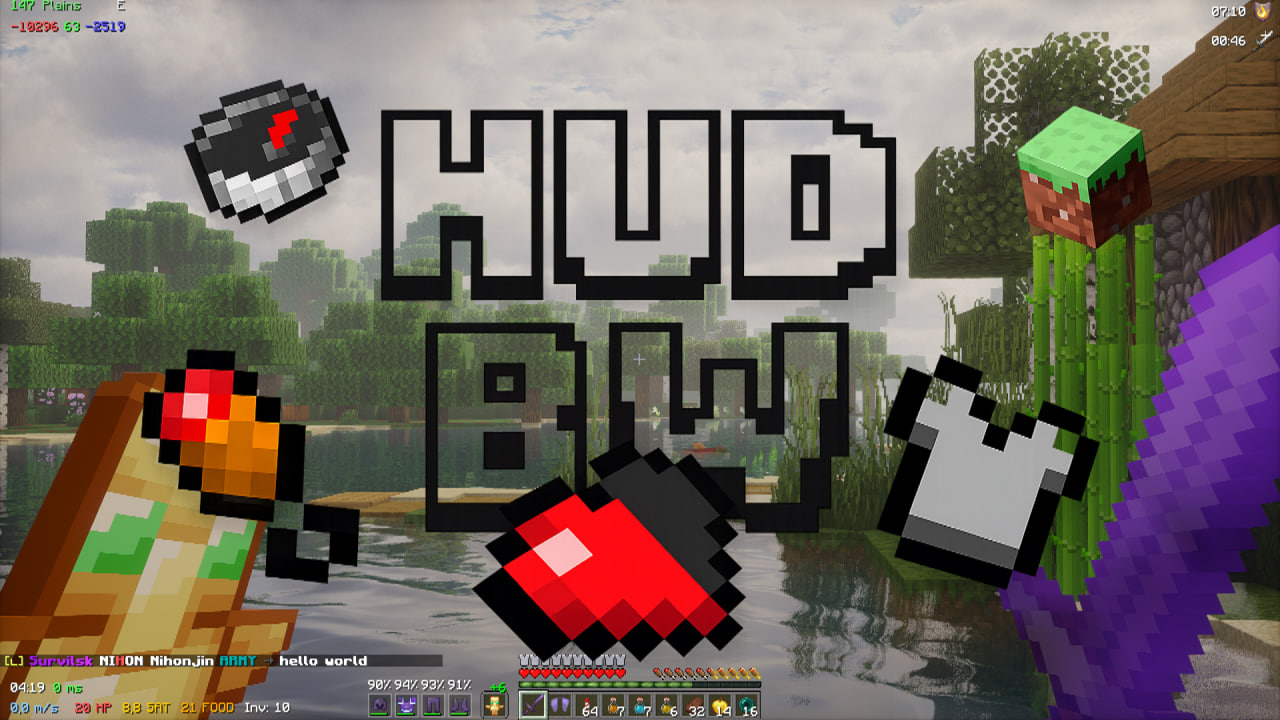
Better HUD Widgets adds a wide variety of widgets, making life easier for players. It includes several widgets for armor, potions, speed, coordinates, biome, hunger, and more. Each widget can be customized individually, for example, size, background, and style.
✨ Features
- Interactive GUI – simple widget customization, drag-and-drop, resizing, and more.
- Soft animations – hover over a widget in the list, and the rest fade away.
- Drag Preview – the GUI hides while you're moving a widget around.
- Quick undo – made a mistake? Ctrl+Z brings it back.
- Calculator – well, sometimes you just need one.
/hbw calcor/calcu. - Hiding – hide widgets you don't need. You can also completely hide hidden widgets from the top settings bar.
- Profiles – save your layout, switch, and share with friends in one click!
- Snap alignment – align widgets to a grid or pixel-perfect (hold Shift).
- Localization – supports English, Spanish, Hindi, Russian, Belarusian, and Ukrainian.
🎮 Editor Controls
Open the GUI with K (Default):
- Left Click (LMB) – drag a widget
- Right Click (RMB) – open its settings (background, size, mode, and widget-specific options)
- Middle Click (MMB) – show or hide widget
- Scroll Wheel – cycle through display modes (or scroll the side panel's list if you're hovering it)
- Ctrl+Z – undo your last move, toggle, or setting change
- Side Panel – click any row to toggle visibility instantly, scroll for more, or collapse the entire panel from the tab on its edge
- Top Bar – quick buttons for Hide All, Grid Snap, Reset (with confirmation), Profiles, Durability Warning toggle, Show-Hidden toggle, F3-Hide toggle. Hover any of them for a tooltip
Prefer the mouse wheel over precision clicking? Every widget's settings popup also has its own Visible toggle, so you never have to rely on the scroll wheel or middle click alone.
📊 Widgets & Modes
Scroll over a widget in the editor to cycle its mode. Right-click it for everything else.
🛡️ Armor — four flavors
- Armor (Classic) – the original all-in-one column (helmet → boots → main hand). Settings let you hide the hand item entirely and choose which side the durability text sits on.
- Armor (Top) – just helmet + chestplate, with an optional hand item (main / off / both) placed above or below.
- Armor (Bottom) – just leggings + boots, same hand-item options as above.
- Armor (Hotbar Style) – armor pieces drawn as a row of fake hotbar slots next to your real one. Choose between bordered "slot" style or plain icons, show durability as a percent or a raw number above each slot, and add either or both hands as extra slots.
All four share the same durability display modes (current/max, current only, percentage), keep a proper empty gap where a piece is missing instead of everything sliding together, and can be freely combined – split your armor into Top + Bottom, or run Classic alongside the Hotbar style, whatever fits your HUD.
🎯 Target HP
Looking at a mob or player shows their current health as a clean number – nothing else on screen, just the number.
🔄 Angle / Rotation
- Yaw – horizontal look angle (e.g.
168.4) - Pitch – vertical look angle (e.g.
-24.3) - Combined – both at once (e.g.
168.4 / -24.3)
📍 Coordinates (XYZ)
- Mode 1: Colored X/Y/Z
- Mode 2: Labeled (X: 100 Y: 64 Z: -500)
- Mode 3: Nether Converter – Overworld coords + their Nether equivalent, side by side
🧪 Potion Effects — with levels
- Mode 1: Icon, full name + effect level (II, III...), timer underneath
- Mode 2: Compact – icon + timer only
- Infinite effects show
∞instead of a countdown - Settings let you put the timer/name text on either side of the icon – icons stay flush in a straight column no matter how long the names get – and optionally hide vanilla's own top-right potion icons so you're not seeing them twice
⚡ FPS & CPS
- FPS: plain number / labeled / full readout – current FPS, rolling average, and a proper 0.1% low (the average of your worst 0.1% of frames – the number that actually tells you when you're stuttering)
- CPS: total clicks, or split left/right
❤️🍗 HP / Food / Saturation
- Mode 1: Full label (
20 HP) - Mode 2: Digits only, no label
- Mode 3: Heart / drumstick icon paired with the number
⏰ Clock
- Mode 1: Your system clock
- Mode 2: In-game world time
🧭 Compass
- Mode 1: Cardinal letter (N/S/E/W)
- Mode 2: Exact bearing in degrees
🌍 Biome
Shows the name of the biome under your feet.
💡 Light Level
The actual, time-of-day-adjusted light value – the same number the game checks before deciding a mob can spawn where you're standing. Green = safe, yellow = risky, red = start building walls.
📶 Ping
Server latency, color-coded by how bad it is.
🏃 Speed
Live blocks/second, updates smoothly while moving.
🛡️ Armor Points + Toughness
The exact numbers behind your armor icons, including toughness – useful when comparing gear that looks identical on the bar.
⏱️ Session Timer
How long you've been playing since you joined.
🎒 Also Included
- Inventory Space – free slots left in your main inventory
- Offhand Counter – total count of that item across your whole inventory (great for totems, rockets, ender pearls)
- Low-Durability Warning – an action-bar warning (with optional sound) when your gear is about to break, on a threshold you set. Toggle it on/off right from the editor's top bar.
💾 Profiles
Set your layout up exactly how you like it, save it as a profile from the top bar, and switch between as many setups as you want – PvP layout, building layout, whatever – with one click. Nothing gets overwritten until you tell it to. Want to share a setup with a friend instead of saving it locally? Copy it to your clipboard as text and send it straight into Discord. They paste it back in and they're done.
🔧 Commands
/hbw reset– reset the whole layout back to default/hbw calc <expression>– simple calculator/calcu <expression>– alternative command
📦 Installation
- Install Fabric Loader
- Drop HUD BW and Fabric API into your mods folder.
- Launch, press
K, arrange your screen the way you actually want it
🛠️ Upcoming in Version 3.4
There aren't any ideas for version 3.4 right now
Have a question, suggestion, or idea?
Check our Discord: https://discord.gg/2gyMDXE4Dt
Project description from CurseForge.
Pick your setup
Better HUD Widgets by Minecraft version and loader
Choose the version and loader you play, then open the matching release.
Minecraft version
26.2
1 loader buildMinecraft version
26.1.2
1 loader buildMinecraft version
26.1.1
1 loader buildMinecraft version
26.1
1 loader buildMinecraft version
1.21.11
1 loader buildMinecraft version
1.21.10
1 loader buildMinecraft version
1.21.9
1 loader buildMinecraft version
1.21.8
1 loader buildMinecraft version
1.21.7
1 loader buildMinecraft version
1.21.6
1 loader buildMinecraft version
1.21.5
1 loader buildShowing the newest 12 of 24 game versions. Older files are in the list below.
Check the dependencies, then try the file in a copied instance before changing a world you care about.
Recent files
Better HUD Widgets versions and loaders
[1.21.11]HUD_BW-4.2.0.jar
1.21.11-HUD_BW-4.2.0.jar
21 Nov 2026
Client Source doesn’t say Server Source doesn’t say Dependencies No extras listed Listed on Release listing
Check the 1.21.11 · Fabric setup Fabric1.21.11 release
[26.3]HUD_BW-4.2.0.jar
26.3-HUD_BW-4.2.0.jar
21 Nov 2026
Client Source doesn’t say Server Source doesn’t say Dependencies No extras listed Listed on Release listing
Check the 26.3 · Fabric setup Fabric26.3 release
[26.2]HUD_BW-4.2.0.jar
26.2-HUD_BW-4.2.0.jar
21 Nov 2026
Client Source doesn’t say Server Source doesn’t say Dependencies No extras listed Listed on Release listing
Check the 26.2 · Fabric setup Fabric26.2 release
[1.20.1]HUD_BW-4.2.0-fabric.jar
1.20.1-HUD_BW-4.2.0-fabric.jar
2 Nov 2026
Client Source doesn’t say Server Source doesn’t say Dependencies No extras listed Listed on Release listing
Check the 1.20.1 · Fabric setup Fabric1.20.1 release
[1.16.5]HUD_BW-4.1.0-fabric.jar
28 Oct 2026
Client Source doesn’t say Server Source doesn’t say Dependencies No extras listed Listed on Release listing
Check the 1.16.5 · Fabric setup 1.16.5Fabric1.16.4 release
[1.20.1]HUD_BW-4.1.0-fabric.jar
27 Oct 2026
Client Source doesn’t say Server Source doesn’t say Dependencies No extras listed Listed on Release listing
Check the 1.20.1 · Fabric setup Fabric1.20.1 release
[1.21.1]HUD_BW-4.1.0.jar
26 Oct 2026
Client Source doesn’t say Server Source doesn’t say Dependencies No extras listed Listed on Release listing
Check the 1.21.1 · Fabric setup 1.21Fabric1.21.1 release
[1.21.11]HUD_BW-4.1.0.jar
26 Oct 2026
Client Source doesn’t say Server Source doesn’t say Dependencies No extras listed Listed on Release listing
Check the 1.21.11 · Fabric setup Fabric1.21.11 release
[26.3]HUD_BW-4.1.0.jar
26 Oct 2026
Client Source doesn’t say Server Source doesn’t say Dependencies No extras listed Listed on Release listing
Check the 26.3 · Fabric setup Fabric26.3 release
[26.1.x]HUD_BW-4.1.0.jar
26 Oct 2026
Client Source doesn’t say Server Source doesn’t say Dependencies No extras listed Listed on Release listing
Check the 26.1.2 · Fabric setup Fabric26.126.1.126.1.2 release
[26.2]HUD_BW-4.1.0.jar
26 Oct 2026
Client Source doesn’t say Server Source doesn’t say Dependencies No extras listed Listed on Release listing
Check the 26.2 · Fabric setup Fabric26.2 release
[1.21.11]HUD_BW-4.0.jar
6 Oct 2026
Client Source doesn’t say Server Source doesn’t say Dependencies No extras listed Listed on Release listing
Check the 1.21.11 · Fabric setup Fabric1.21.11 release
Looking for an older file? The official CurseForge project page is in Resources.
 mod
CurseForge · Minecraft
Ages Progression
Ages adds configurable progression with milestones to advance and gain access to selected equipment, items, and workstations
 mod
CurseForge · Minecraft
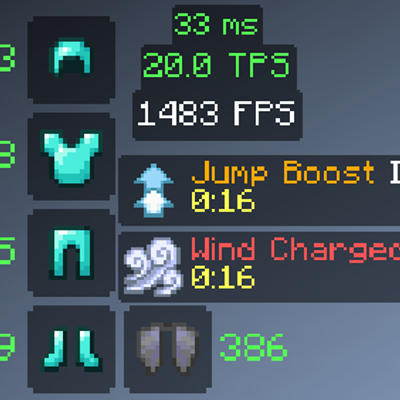
Hud4U
A customizable HUD with FPS, coordinates, keystrokes, ping, and more. drag-and-drop layout editor!
 mod
CurseForge + Modrinth · Minecraft
Fate/Unlimited Block Works
Bring the holy grail war to minecraft