Minecraft version
Back to mods 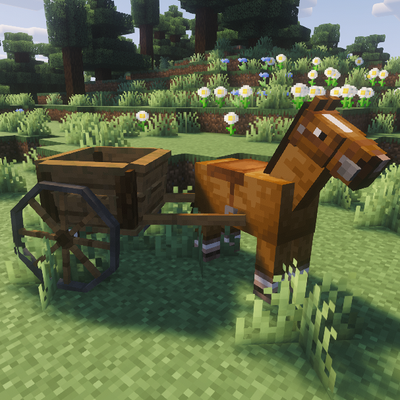
CurseForge · Minecraft mod
Modular Carts
A vanilla style modular carts for harvesting crops, planting fields, and journeying
Choose a version Pick your version below, then grab the matching file.
Quick answer
Which Modular Carts release should I use?
Latest stable file simple_carts-2.5.jar
Game version 1.21.1
Loader NeoForge
Modular Carts simple_carts-2.5.jar targets 1.21.1 with NeoForge. The project page does not say whether this file belongs on the client, dedicated server, or both. No extra mods listed for this file.
Where it goes
Is Modular Carts required on the client, server, or both?
The project page does not say whether this file belongs on the client, dedicated server, or both.
Client Source doesn’t say
Dedicated server Source doesn’t say
Loader for this release NeoForge
Required install it here Optional supported, not mandatory Not supported do not install here Source doesn’t say do not assume
The source does not explicitly classify this release as client-only or server-only.
What else does Modular Carts simple_carts-2.5.jar need?
simple_carts-2.5.jar. Change the file and its required mods may change too.
This file does not list any required mods. Do not add a library just because a different file uses it.
This file does not list any required or optional mods.
Before you install it
Add Modular Carts without breaking your instance.
Built for Modular Carts simple_carts-2.5.jar. Pick another file and the loader, install side or required mods may change.
- 01
Stick to this file
Use simple_carts-2.5.jar. It targets 1.21.1 with NeoForge; another release may have different loader, side or dependency requirements.
- 02
Bring the mods it needs
This file does not list any required mods. Do not add a library just because a different file uses it.
- 03
Put it on the correct side
The project page does not say whether this file belongs on the client, dedicated server, or both.
- 04
Pick the file you checked
Use the “Get this file” button beside simple_carts-2.5.jar. It opens that exact file at the source.
About this project
What does Modular Carts add?
A single modular cart with expandable storage, a plow that harvests and replants your field, a cushion to carry your friends, and even a furnace and crafting table!
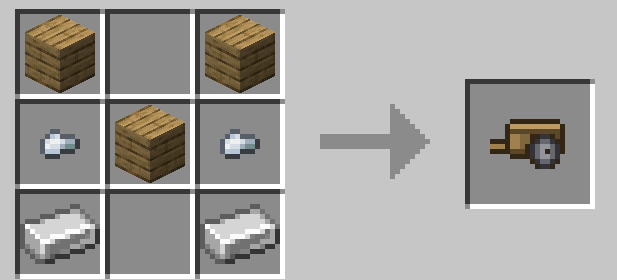
Base Craft, there is a cart for every wood type!
Attach a cart by pressing the keybind (default R) while riding a horse near a cart. You can also carry a cart on your own.
Detachable Modules:
Storage:
Right click the cart with a chest to increase the internal storage.
Plow:
Right click the cart with an iron hoe to add a plow, right click with a diamond hoe to expand the plow and increase its effect radius. Put hoes in the tool slots to harvest and repland and use shovels to create paths and clear foliage.
Seat:
Right click the cart with wool to add a stable seat, and can carry up to two mobs/friends.
Crafting Table:
Right click the cart with a crafting table (can be used via the cart's gui).
End Chest:
Right click the cart with an end chest to add ender storage.
Furnace:
Right click the cart with a furnace to add a furnace.
Armor:
Right click the cart with an iron block to reinforce your cart.
Lightweight Frame:
Right click the cart with bamboo to add a lightweight frame and increase the tow speed.
Project description from CurseForge.
Pick your setup
Modular Carts by Minecraft version and loader
Choose the version and loader you play, then open the matching release.
Check the dependencies, then try the file in a copied instance before changing a world you care about.
Recent files
Modular Carts versions and loaders
simple_carts-2.5.jar
24 Aug 2026
Client Source doesn’t say Server Source doesn’t say Dependencies No extras listed Listed on Release listing
Check the 1.21.1 · NeoForge setup 1.21.1NeoForge release
simple_carts-1.0.jar
simple_carts-1.2.4.jar
23 Aug 2026
Client Source doesn’t say Server Source doesn’t say Dependencies No extras listed Listed on Release listing
Check the 1.21.1 · NeoForge setup 1.21.1NeoForge release
Looking for an older file? The official CurseForge project page is in Resources.