Minecraft version
Back to mods 
CurseForge · Minecraft mod
CTM Reborn
CTM Features for Chisel Reborn primarily, but a library mod for any mod to use.
Choose a version Pick your version below, then grab the matching file.
Quick answer
Which CTM Reborn release should I use?
Latest stable file [NeoForge] CTM Reborn 4.9.2 for 26.3
Game version 26.3
Loader NeoForge
CTM Reborn [NeoForge] CTM Reborn 4.9.2 for 26.3 targets 26.3 with NeoForge. The project page does not say whether this file belongs on the client, dedicated server, or both. No extra mods listed for this file.
Where it goes
Is CTM Reborn required on the client, server, or both?
The project page does not say whether this file belongs on the client, dedicated server, or both.
Client Source doesn’t say
Dedicated server Source doesn’t say
Loader for this release NeoForge
Required install it here Optional supported, not mandatory Not supported do not install here Source doesn’t say do not assume
The source does not explicitly classify this release as client-only or server-only.
What else does CTM Reborn [NeoForge] CTM Reborn 4.9.2 for 26.3 need?
[NeoForge] CTM Reborn 4.9.2 for 26.3. Change the file and its required mods may change too.
This file does not list any required mods. Do not add a library just because a different file uses it.
This file does not list any required or optional mods.
Before you install it
Add CTM Reborn without breaking your instance.
Built for CTM Reborn [NeoForge] CTM Reborn 4.9.2 for 26.3. Pick another file and the loader, install side or required mods may change.
- 01
Stick to this file
Use [NeoForge] CTM Reborn 4.9.2 for 26.3. It targets 26.3 with NeoForge; another release may have different loader, side or dependency requirements.
- 02
Bring the mods it needs
This file does not list any required mods. Do not add a library just because a different file uses it.
- 03
Put it on the correct side
The project page does not say whether this file belongs on the client, dedicated server, or both.
- 04
Pick the file you checked
Use the “Get this file” button beside [NeoForge] CTM Reborn 4.9.2 for 26.3. It opens that exact file at the source.
About this project
What does CTM Reborn add?
CTM Reborn
A connected-textures and baked-model library for Fabric and NeoForge, and a fork of Athena by ThatGravyBoat and Terrarium Earth.
CTM Reborn exists for one reason: to keep the Athena format alive on current Minecraft versions so that Chisel Reborn and every resource pack ever written against Athena keeps working while upstream Athena is between releases.
What connected textures actually do
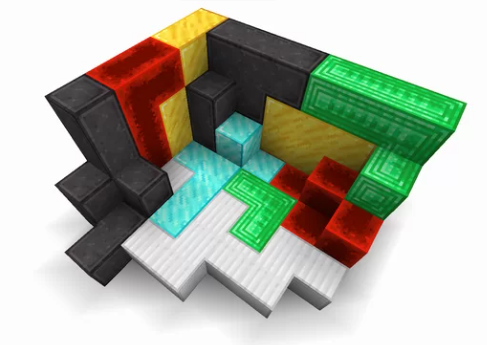
Demonstration image from Connected Textures (CTM) Overhaul, released under CC0-1.0.
Look at the borders. Vanilla Minecraft draws every block with the same texture, so a wall of one material reads as a grid of repeated tiles with a seam at every boundary. With connected textures, each block asks its neighbours what they are and picks a different sprite depending on the answer — so the grooves and edges trace the outline of the whole shape instead of every individual cube.
The red, green, cyan and white regions above are each many separate blocks. The framing follows the silhouette of each region, corners turn where the region actually turns, and interior faces come out clean. That is the entire idea, and the Athena format is a way of describing it in JSON.
This is Athena's implementation
Not a reimplementation, not a rewrite, not a clone of the format. The code in this project is Athena's code. The connected-texture logic, the model types, the format parsing, the quad generation, the platform hookup — ThatGravyBoat and the Terrarium Earth contributors wrote all of it. CTM Reborn carries that implementation onto newer Minecraft versions and keeps it building. The changes here are version compatibility and maintenance; the substance is theirs.
Athena is a genuinely well-designed library. The format is compact, the model types cover the cases packs actually need, and the connection-condition system is more expressive than it first looks. None of that is our work, and nothing here is presented as an improvement on it.
The fork is a stopgap, not a replacement. It is published under Athena's own MIT license with its authorship intact, and the intent is to deprecate CTM Reborn the moment Athena updates to these Minecraft versions.
The Athena format
Model definitions live at assets/<namespace>/athena/<block>.json and are tagged with the loader they use:
{
  "athena:loader": "athena:ctm",
  "ctm_textures": "mymod:block/marble_[$index]",
  "connect_to": { "type": "sameBlock" }
}
They can also be written inline in a blockstate file, using the athena:athena block-state model.
Model types
| Loader | Use |
|---|---|
athena:ctm |
Standard full-block connected textures |
athena:carpet_ctm |
Flat, carpet-like blocks |
athena:pane_ctm |
Panes and glass panes |
athena:pillar |
Blocks that connect along an axis |
athena:limited_pillar |
Pillars with a restricted connection set |
athena:pane_pillar |
Pane-shaped pillars |
athena:mural |
One image spread across a width × height grid of blocks |
athena:giant is the original name for athena:mural and still works.
Texture layouts
ctm_textures accepts three shapes, and the format picks based on what it sees:
- Single sprite —
"mymod:block/plain". One texture, no connection logic. - 47-slice —
"mymod:block/marble_[$index]". The classic full CTM set;[$index]is filled in with0–46, one sprite per neighbour configuration. - Four-slice — an object naming
particle,center,vertical,horizontalandempty. Each block face is drawn as four quadrants assembled from those five sprites, which gets you convincing connections from a handful of textures.
Any of the three can also be given per-face, with an optional default:
"ctm_textures": {
  "default": "mymod:block/side_[$index]",
  "up":      { "particle": "...", "center": "...", "vertical": "...", "horizontal": "...", "empty": "..." }
}
Connection conditions
connect_to decides which neighbours count as connected. It defaults to sameState.
| Type | Connects when the neighbour... |
|---|---|
sameState |
is the exact same block state |
sameBlock |
is the same block, any state |
state |
matches a given block and optional properties |
tag |
is in a given block tag |
not, and, or, xor |
combine other conditions |
These nest, so a condition like "any block in this tag, but not if it is powered" is expressible directly in the pack.
Tinting
Faces can carry a tint — either a fixed colour or a tint index resolved through the usual block colour handlers — so grass-like and foliage-like blocks connect and stay biome-coloured.
How it works
- A client resource-reload listener collects every
assets/<ns>/athena/file and keys it by theathena:loaderfield, so a pack can define models for blocks from mods it does not ship. - Definitions are parsed with codecs (Mojang's DataFixerUpper), which means the same description both reads and writes — that is what makes the data provider below possible.
- At bake time each model resolves its sprites into a small integer-keyed table, deduplicating repeats, then emits quads per face.
- For each face the model builds a
CtmState: eight boolean neighbour checks — up, down, left, right and the four diagonals — evaluated through the block'sconnect_tocondition. That state selects the sprite or the four quadrant sprites. - Platform hookup is thin. Fabric registers a
CustomUnbakedBlockStateModelplus a model-loading plugin; NeoForge registers throughRegisterBlockStateModelswith a smallModelBakerymixin. Everything else is shared. - A data provider is included for generating these files from code rather than writing them by hand.
Compatibility
The mod id is ctm_reborn, but nothing a pack depends on changed:
- Files are still read from
assets/<namespace>/athena/. - The
athena:loaderkey still works, alongsidectm_reborn:loader. - Every model type is registered under both
athena:andctm_reborn:. - On Fabric the mod declares
provides: ["athena"], so mods depending on Athena are satisfied. NeoForge has no equivalent mechanism, so mods there that hard-require theathenamod id will not see it.
Versions
| Branch | Minecraft | Platforms |
|---|---|---|
main |
26.3 | Fabric and NeoForge |
26.2 |
26.2 | Fabric and NeoForge |
License and credits
MIT, inherited from Athena.
- Athena — ThatGravyBoat and contributors, Terrarium Earth. The format, the design, and the implementation this project is built from. https://github.com/terrarium-earth/Athena
- Demonstration image — Connected Textures (CTM) Overhaul, CC0-1.0. https://modrinth.com/mod/ctm-overhaul
Project description from CurseForge.
Pick your setup
CTM Reborn by Minecraft version and loader
Choose the version and loader you play, then open the matching release.
Minecraft version
26.3
2 loader buildsMinecraft version
26.2
2 loader buildsCheck the dependencies, then try the file in a copied instance before changing a world you care about.
Recent files
CTM Reborn versions and loaders
[NeoForge] CTM Reborn 4.9.2 for 26.3
ctm-reborn-neoforge-4.9.2.jar
19 Sept 2026
Client Source doesn’t say Server Source doesn’t say Dependencies No extras listed Listed on Release listing
Check the 26.3 · NeoForge setup NeoForge26.3 release
[Fabric] CTM Reborn 4.9.2 for 26.3
ctm-reborn-fabric-4.9.2.jar
19 Sept 2026
Client Source doesn’t say Server Source doesn’t say Dependencies 1 required · 1 unchecked Listed on Release listing
Check the 26.3 · Fabric setup Fabric26.3 release
[NeoForge] CTM Reborn 4.8.1 for 26.2
ctm-reborn-neoforge-4.8.1.jar
25 Aug 2026
Client Source doesn’t say Server Source doesn’t say Dependencies No extras listed Listed on Release listing
Check the 26.2 · NeoForge setup NeoForge26.2 release
[Fabric] CTM Reborn 4.8.1 for 26.2
ctm-reborn-fabric-4.8.1.jar
25 Aug 2026
Client Source doesn’t say Server Source doesn’t say Dependencies 1 required · 1 unchecked Listed on Release listing
Check the 26.2 · Fabric setup Fabric26.2 release
[Fabric] CTM Reborn 4.9.1 for 26.3
ctm-reborn-fabric-4.9.1.jar
25 Aug 2026
Client Source doesn’t say Server Source doesn’t say Dependencies 1 required · 1 unchecked Listed on Release listing
Check the 26.3-snapshot · Fabric setup Fabric26.3-snapshot release
[NeoForge] CTM Reborn 4.8.0 for 26.2
ctm-reborn-4.8.0.jar
23 Aug 2026
Client Source doesn’t say Server Source doesn’t say Dependencies No extras listed Listed on Release listing
Check the 26.2 · NeoForge setup NeoForge26.2 release
[Fabric] CTM Reborn 4.8.0 for 26.2
ctm-reborn-4.8.0.jar
23 Aug 2026
Client Source doesn’t say Server Source doesn’t say Dependencies 1 required · 1 unchecked Listed on Release listing
Check the 26.2 · Fabric setup Fabric26.2 release
[Fabric] CTM Reborn 4.9.0 for 26.3
ctm-reborn-4.9.0.jar
23 Aug 2026
Client Source doesn’t say Server Source doesn’t say Dependencies 1 required · 1 unchecked Listed on Release listing
Check the 26.3-snapshot · Fabric setup Fabric26.3-snapshot release
Looking for an older file? The official CurseForge project page is in Resources.
 mod
mod CurseForge + Modrinth · Minecraft
Fzzy Config
Config API with automatic GUIs, powerful validation options, server-client sync, and more!
 mod
mod CurseForge · Minecraft
Shulker Box Tooltip [Fabric/Forge/NeoForge]
What's in my shulker box?
 mod
mod CurseForge + Modrinth · Minecraft
Energized Power - Farmer's Delight
Compatibility between Energized Power and Farmer's Delight