Minecraft version
Back to mods 
CurseForge · Minecraft mod
MineClient Bridge
An authenticated client-side bridge for inspecting and controlling Minecraft through local automation tools.
Choose a version Pick your version below, then grab the matching file.
Quick answer
Which MineClient Bridge release should I use?
Latest stable file MineClient Bridge 1.1.1 - NeoForge 1.21.1
Game version 1.21.1
Loader NeoForge
MineClient Bridge 1.1.1 - NeoForge 1.21.1 targets 1.21.1 with NeoForge. The project page does not say whether this file belongs on the client, dedicated server, or both. No extra mods listed for this file.
Where it goes
Is MineClient Bridge required on the client, server, or both?
The project page does not say whether this file belongs on the client, dedicated server, or both.
Client Source doesn’t say
Dedicated server Source doesn’t say
Loader for this release NeoForge
Required install it here Optional supported, not mandatory Not supported do not install here Source doesn’t say do not assume
The source does not explicitly classify this release as client-only or server-only.
What else does MineClient Bridge 1.1.1 - NeoForge 1.21.1 need?
MineClient Bridge 1.1.1 - NeoForge 1.21.1. Change the file and its required mods may change too.
This file does not list any required mods. Do not add a library just because a different file uses it.
This file does not list any required or optional mods.
Before you install it
Add MineClient Bridge without breaking your instance.
Built for MineClient Bridge 1.1.1 - NeoForge 1.21.1. Pick another file and the loader, install side or required mods may change.
- 01
Stick to this file
Use MineClient Bridge 1.1.1 - NeoForge 1.21.1. It targets 1.21.1 with NeoForge; another release may have different loader, side or dependency requirements.
- 02
Bring the mods it needs
This file does not list any required mods. Do not add a library just because a different file uses it.
- 03
Put it on the correct side
The project page does not say whether this file belongs on the client, dedicated server, or both.
- 04
Pick the file you checked
Use the “Get this file” button beside MineClient Bridge 1.1.1 - NeoForge 1.21.1. It opens that exact file at the source.
About this project
What does MineClient Bridge add?
MineClient Bridge
MineClient Bridge is a client-side NeoForge 1.21.1 mod that gives authorized local tools a bounded way to observe and operate a Minecraft client. It is intended for automated testing, accessibility experiments, controlled demonstrations, and development workflows that need real client input and framebuffer evidence.
Features
- Captures the current presented framebuffer as PNG.
- Reads bounded client, player, world, inventory, effect, crosshair, entity, GUI-widget, and container-slot state.
- Discovers and operates named Minecraft key mappings.
- Supports bounded view, in-world mouse buttons and scroll, GUI mouse, active-screen text, and internal raw-key input.
- Submits authorized Minecraft commands through the normal client command path.
- Releases held input and can request a graceful client shutdown.
- Includes an optional MCP server and Codex acceptance skill in the source repository.
Safety And Privacy
The bridge binds to 127.0.0.1 and rejects non-loopback requests. Every control endpoint requires a generated 256-bit bearer token, stored separately from the normal JSON configuration and never logged. Requests, responses, text, commands, and raw-key names have fixed size limits, and held keys are released during shutdown.
MineClient Bridge has no telemetry and does not send client data to an external service. It exposes no shell, script, filesystem, outbound-network, operating-system input, or direct world-edit API. Authorized commands and client input can cause normal in-game actions, so the token should be treated as a local password.
Installation
- Install NeoForge for Minecraft 1.21.1.
- Place the MineClient Bridge JAR in the client's
modsfolder. - Start the client. Configuration and token files are created on first launch.
The mod is client-only and has no gameplay-mod dependency. It is enabled by default on 127.0.0.1:38121 and can be disabled in config/mineclient-bridge.json.
Compatibility
- Minecraft 1.21.1
- NeoForge 21.1.197 or newer within the 21.1 line
- Java 21
- Client side only
The optional MCP prepared-root launcher currently targets Windows background desktops. The NeoForge mod itself does not require the MCP.
Live Client Evidence
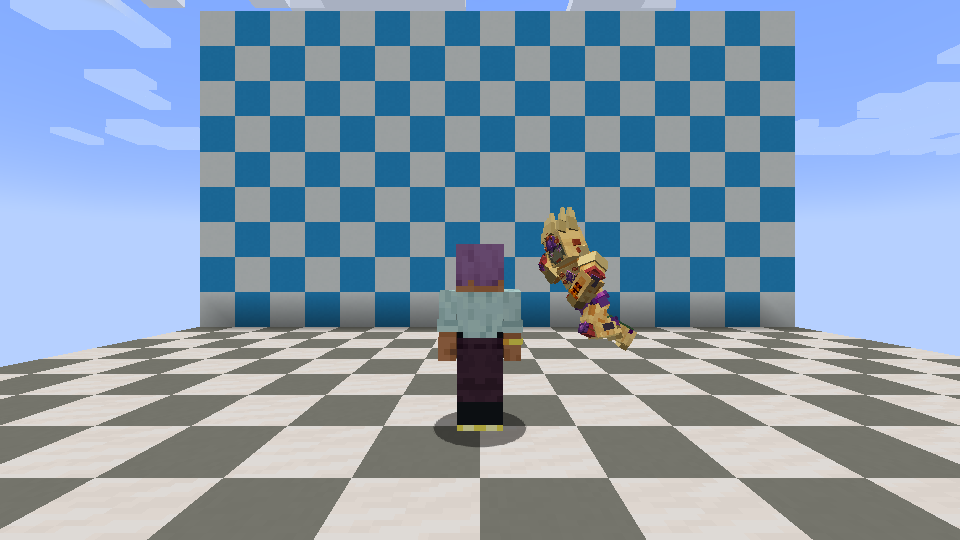
This is a real 960x540 framebuffer captured during a mod-compatibility smoke test. The gameplay model belongs to a separate test mod; MineClient Bridge adds no in-game overlay.
The project avatar is an original AI-assisted illustration and does not represent a separate in-game UI.
Project description from CurseForge.
Pick your setup
MineClient Bridge by Minecraft version and loader
Choose the version and loader you play, then open the matching release.
Check the dependencies, then try the file in a copied instance before changing a world you care about.
Recent files
MineClient Bridge versions and loaders
MineClient Bridge 1.1.1 - NeoForge 1.21.1
mineclient-bridge-neoforge-1.21.1-1.1.1.jar
25 Aug 2026
Client Source doesn’t say Server Source doesn’t say Dependencies No extras listed Listed on Release listing
Check the 1.21.1 · NeoForge setup 1.21.1NeoForge release
MineClient Bridge 1.1.0 - NeoForge 1.21.1
mineclient-bridge-neoforge-1.21.1-1.1.0.jar
25 Aug 2026
Client Source doesn’t say Server Source doesn’t say Dependencies No extras listed Listed on Release listing
Check the 1.21.1 · NeoForge setup 1.21.1NeoForge release
MineClient Bridge 1.0.0 - NeoForge 1.21.1
mineclient-bridge-neoforge-1.21.1-1.0.0.jar
24 Aug 2026
Client Source doesn’t say Server Source doesn’t say Dependencies No extras listed Listed on Release listing
Check the 1.21.1 · NeoForge setup 1.21.1NeoForge release
Looking for an older file? The official CurseForge project page is in Resources.
 mod
mod CurseForge + Modrinth · Minecraft
Floating Damage Indicators
Adds floating damage numbers above every target you hit, and your own incoming damage too — color-coded by damage type.
 mod
mod CurseForge · Minecraft
Bonecraft: Dominion
Summoning Necromancy Mod, Faction/Colony Management, Useful workers, minions.
 mod
mod CurseForge · Minecraft
Gregnautics Core
Gregnautics Core is a lightweight core mod for Gregnautics that provides shared compatibility hooks, fixes, and small gameplay integrations used across the modpack