Minecraft version
Back to mods 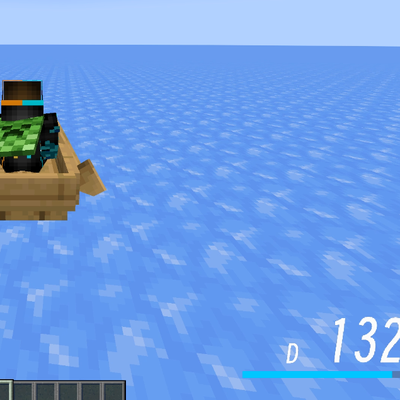
CurseForge · Minecraft mod
BetterSpeedHUD
一个速度 HUD 模组:在载具或鞘翅滑翔时,于屏幕右下角显示速度、档位与速度条的精美速度抬头显示,并且所有元素都可以在游戏内自由调整。A Better HUD mod to show your speed on your screen. Highly customizable.
Choose a version Pick your version below, then grab the matching file.
Quick answer
Which BetterSpeedHUD release should I use?
Latest stable file BetterSpeedHUD-1.2.1-neoforge-1.21.1.jar
Game version 1.21, 1.21.8, 1.21.5
Loader NeoForge
BetterSpeedHUD-1.2.1-neoforge-1.21.1.jar targets 1.21, 1.21.8, 1.21.5 with NeoForge. The project page does not say whether this file belongs on the client, dedicated server, or both. No extra mods listed for this file.
Where it goes
Is BetterSpeedHUD required on the client, server, or both?
The project page does not say whether this file belongs on the client, dedicated server, or both.
Client Source doesn’t say
Dedicated server Source doesn’t say
Loader for this release NeoForge
Required install it here Optional supported, not mandatory Not supported do not install here Source doesn’t say do not assume
The source does not explicitly classify this release as client-only or server-only.
What else does BetterSpeedHUD-1.2.1-neoforge-1.21.1.jar need?
BetterSpeedHUD-1.2.1-neoforge-1.21.1.jar. Change the file and its required mods may change too.
This file does not list any required mods. Do not add a library just because a different file uses it.
This file does not list any required or optional mods.
Before you install it
Add BetterSpeedHUD without breaking your instance.
Built for BetterSpeedHUD-1.2.1-neoforge-1.21.1.jar. Pick another file and the loader, install side or required mods may change.
- 01
Stick to this file
Use BetterSpeedHUD-1.2.1-neoforge-1.21.1.jar. It targets 1.21, 1.21.8, 1.21.5 with NeoForge; another release may have different loader, side or dependency requirements.
- 02
Bring the mods it needs
This file does not list any required mods. Do not add a library just because a different file uses it.
- 03
Put it on the correct side
The project page does not say whether this file belongs on the client, dedicated server, or both.
- 04
Pick the file you checked
Use the “Get this file” button beside BetterSpeedHUD-1.2.1-neoforge-1.21.1.jar. It opens that exact file at the source.
About this project
What does BetterSpeedHUD add?
BetterSpeedHUD
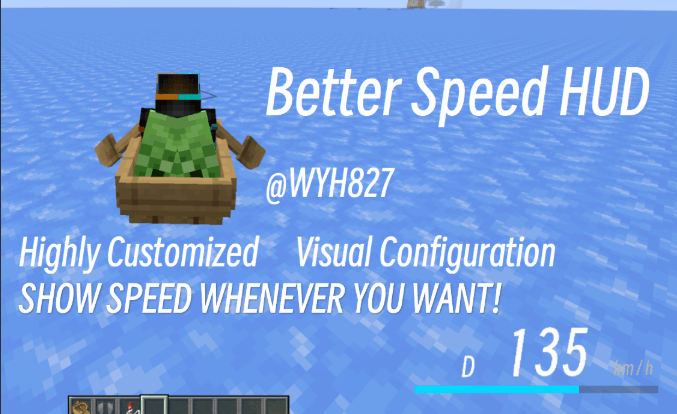
A speed HUD mod for **Minecraft Forge 1.20.1/1.21.1**: displays a sleek speed head-up display (HUD) showing speed, gear, and a speed bar at the bottom‑right corner of the screen when riding a vehicle or gliding with an elytra. All elements can be freely adjusted in‑game.
> A Better HUD mod to show your speed on your screen. Highly customizable. @WYH827
Features
- **Real‑time speed display**: measures speed based on the player's actual coordinate displacement (blocks/second × 72 converted to km/h). Compatible with vanilla vehicles and modded vehicles (e.g., MrCrayfish's vehicle mod). Elytra gliding is also supported.
- **Visual HUD**:
Dgear on the left, three‑digit large speed number in the center (leading zeros shown in grey),km/hon the right, and a speed bar below. - **Adjustable max speed** (default 200): the speed bar always displays the percentage of
speed / max speed, capped at 100% when exceeded. - **Toggle for actual speed**: when disabled, speed stops increasing once it reaches the max speed (pegs the meter); when enabled, the actual speed is always shown, while the bar still caps at 100% of the max speed.
- **Two fonts**: Minecraft default font / Modern bitmap font (switchable in‑game with one click).
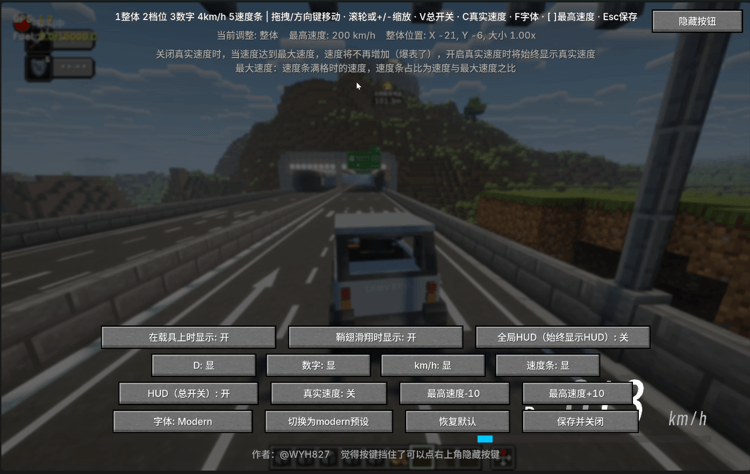
- **In‑game configuration screen** (default key **H**):
- The overall HUD and individual elements (D, digits, km/h, speed bar) each have independent position, size, and visibility controls;
- Adjust via drag‑and‑drop, arrow keys, scroll wheel, or shortcuts;
- A "Hide Buttons" button in the top‑right corner hides all UI buttons for unobstructed viewing and positioning;
- One‑click switch to Modern preset / restore defaults;
- Max speed +/‑ buttons.
- **Display conditions**: show on vehicle / show on elytra / always show (when "always" is enabled, the first two are locked to on).
- **HUD master toggle**: can completely hide the HUD at any time.
- **Safe configuration writing**: dragging and adjustments only modify in‑memory values; the config file is written only when the settings screen is closed, avoiding frequent disk writes.
Installation
- Requires **Minecraft 1.20.1 + Forge 47.x** (client‑side), Java 17.
- Place
BetterSpeedHUD-1.1.jarinto the.minecraft/modsfolder. - Launch the game, enter a world, and ride a vehicle or glide with an elytra to see the HUD.
In‑Game Configuration
Press **H** to open the settings screen (can also be accessed via the Mod Menu's "Config" button).
Key Controls
| Key | Function |
|---|---|
1 ~ 5 |
Select the element to adjust (Overall / Gear D / Digits / km/h / Speed bar) |
| Arrow keys / Mouse drag | Move the currently selected element |
Mouse wheel / + - |
Scale the currently selected element |
V |
HUD master toggle |
C |
Toggle actual speed |
F |
Switch font (Minecraft / Modern) |
[ ] |
Decrease / Increase max speed (Shift + key adjusts by 25) |
Esc / "Save & Close" |
Save configuration and close |
Button Descriptions
- First row: Show on vehicle / Show on elytra / Global HUD (always show HUD)
- Second row: Toggle visibility for D / Digits / km/h / Speed bar individually
- Third row: HUD (master toggle) / Actual speed / Max speed ‑10 / Max speed +10
- Fourth row: Font / Switch to Modern preset / Restore defaults / Save & Close
- Top‑right corner: Hide Buttons (hides all UI buttons for unobstructed viewing and positioning)
> Note: When actual speed is disabled, speed stops increasing once it hits the max speed (pegs the meter). When enabled, the actual speed is always shown.
>
> Note: Max speed is the speed at which the bar becomes full; the bar's fill ratio is speed / max speed.
Configuration File
The configuration file is located at .minecraft/config/speedhud-client.toml. Main fields:
[hud]
xOffset = 0 # Overall horizontal offset (positive = right)
yOffset = 0 # Overall vertical offset (positive = down)
scale = 1.0 # Overall scale
enabled = true # HUD master toggle
showOnVehicle = true # Show on vehicle
showOnElytra = true # Show on elytra
globalHud = false # Always show
maxSpeed = 200 # Max speed (full bar value)
showActualSpeed = false # Show actual speed
font = "minecraft" # minecraft / modern

[hud.modules] # Module visibility
gear = true
speed = true
unit = true
bar = true

[hud.elements.gear] # D gear position and scale
x = 16
y = 40
scale = 1.0

[hud.elements.speed] # Speed digits
x = 76
y = 34
scale = 1.0

[hud.elements.unit] # km/h
x = 176
y = 46
scale = 1.0

[hud.elements.bar] # Speed bar
x = 0
y = 58
scale = 1.0
Modern Font
The Modern font is a custom bitmap font (generated from Smiley Sans Oblique):
- Texture:
assets/speedhud/textures/font/modern.png, 1152×192, with 18 characters per row, each cell 64×192; - Character order:
0123456789DKM/Hkmh; - Glyphs are aligned to the bottom of the cell (row 192);
- Definition file:
assets/speedhud/font/modern.json(height 192 / ascent 7).
To replace the font, provide a PNG following the above specifications and replace assets/speedhud/textures/font/modern.png.
Open Source License
This project is released under the **MIT License**. See LICENSE.txt for details.
Author: @WYH827
Project description from CurseForge.
Pick your setup
BetterSpeedHUD by Minecraft version and loader
Choose the version and loader you play, then open the matching release.
Minecraft version
1.21.10
2 loader buildsMinecraft version
1.21.9
2 loader buildsMinecraft version
1.21.8
2 loader buildsMinecraft version
1.21.7
2 loader buildsMinecraft version
1.21.6
2 loader buildsMinecraft version
1.21.5
2 loader buildsMinecraft version
1.21.4
2 loader buildsMinecraft version
1.21.3
2 loader buildsMinecraft version
1.21.2
2 loader buildsMinecraft version
1.21.1
2 loader buildsMinecraft version
1.21
2 loader buildsShowing the newest 12 of 18 game versions. Older files are in the list below.
Check the dependencies, then try the file in a copied instance before changing a world you care about.
Recent files
BetterSpeedHUD versions and loaders
BetterSpeedHUD-1.2.1-neoforge-1.21.1.jar
24 Aug 2026
Client Source doesn’t say Server Source doesn’t say Dependencies No extras listed Listed on Release listing
Check the 1.21.11 · NeoForge setup 1.211.21.81.21.51.21.4 release
BetterSpeedHUD-1.2.1-forge-1.21.1.jar
24 Aug 2026
Client Source doesn’t say Server Source doesn’t say Dependencies No extras listed Listed on Release listing
Check the 1.21.11 · Forge setup 1.211.21.81.21.51.21.4 release
BetterSpeedHUD-1.2-forge-1.21.1.jar
24 Aug 2026
Client Source doesn’t say Server Source doesn’t say Dependencies No extras listed Listed on Release listing
Check the 1.21.11 · Forge setup 1.211.21.81.21.51.21.4 release
BetterSpeedHUD-1.2-forge-1.20.1.jar
24 Aug 2026
Client Source doesn’t say Server Source doesn’t say Dependencies No extras listed Listed on Release listing
Check the 1.20.6 · Forge setup 1.20.21.20.51.20.1Forge release
BetterSpeedHUD-1.1.jar
24 Aug 2026
Client Source doesn’t say Server Source doesn’t say Dependencies No extras listed Listed on Release listing
Check the 1.20.6 · Forge setup 1.20.21.20.51.20.1Forge release
Looking for an older file? The official CurseForge project page is in Resources.
 mod
mod CurseForge + Modrinth · Minecraft
Auroral
Harness the power of the Aurora Borealis in wintery north. Collect Liquid Aura in Glacial Basins to craft Shimmersteel tools and Shimmerweave armor with unique abilities. Features Nether-free brewing, magical flora, and a tiny pet Snowlette companion.
 mod
mod CurseForge + Modrinth · Minecraft
Don't Punch My TACZ
Stops TACZ or SuperbWarfare guns from visually duplicating/glitching
 mod
mod CurseForge · Minecraft
Broadcast Craft
Functional broadcast cameras, PTZ control, tally lights and video switching for Minecraft.