Minecraft version
Back to mods 
CurseForge · Minecraft mod
Create: Superflat Dimension
This mod adds a Superflat Dimension where you can use a crafted Superflat Pass to freely travel between the Superflat Dimension and your original world.
Choose a version Pick your version below, then grab the matching file.
Quick answer
Which Create: Superflat Dimension release should I use?
Latest stable file Create: Superflat Dimension 1.1.0 mc1.21.1
Game version 1.21.1
Loader NeoForge
Create: Superflat Dimension 1.1.0 mc1.21.1 targets 1.21.1 with NeoForge. The project page does not say whether this file belongs on the client, dedicated server, or both. No extra mods listed for this file.
Where it goes
Is Create: Superflat Dimension required on the client, server, or both?
The project page does not say whether this file belongs on the client, dedicated server, or both.
Client Source doesn’t say
Dedicated server Source doesn’t say
Loader for this release NeoForge
Required install it here Optional supported, not mandatory Not supported do not install here Source doesn’t say do not assume
The source does not explicitly classify this release as client-only or server-only.
What else does Create: Superflat Dimension 1.1.0 mc1.21.1 need?
Create: Superflat Dimension 1.1.0 mc1.21.1. Change the file and its required mods may change too.
This file does not list any required mods. Do not add a library just because a different file uses it.
This file does not list any required or optional mods.
Before you install it
Add Create: Superflat Dimension without breaking your instance.
Built for Create: Superflat Dimension 1.1.0 mc1.21.1. Pick another file and the loader, install side or required mods may change.
- 01
Stick to this file
Use Create: Superflat Dimension 1.1.0 mc1.21.1. It targets 1.21.1 with NeoForge; another release may have different loader, side or dependency requirements.
- 02
Bring the mods it needs
This file does not list any required mods. Do not add a library just because a different file uses it.
- 03
Put it on the correct side
The project page does not say whether this file belongs on the client, dedicated server, or both.
- 04
Pick the file you checked
Use the “Get this file” button beside Create: Superflat Dimension 1.1.0 mc1.21.1. It opens that exact file at the source.
About this project
What does Create: Superflat Dimension add?
Create: Superflat Dimension
Create: Superflat Dimension is a simple and practical addon for Create that adds a dedicated Superflat Dimension to Minecraft. It is designed for players who want a large, open, and convenient space for building factories, testing machinery, designing automation systems, experimenting with contraptions, or simply enjoying Create without worrying about terrain.
Superflat Dimension
The Superflat Dimension provides a clean and mostly flat environment with plenty of open space. This makes it especially useful for large-scale Create projects, factories, production lines, mechanical systems, automated farms, and testing setups.
Instead of searching for a suitable location in the Overworld and spending time clearing terrain, you can simply enter the Superflat Dimension and start building.

Superflat Pass
The main way to access the dimension is through the Superflat Pass.
The pass allows you to enter the Superflat Dimension and return to the normal world, providing a simple and convenient way to switch between your regular survival world and your dedicated Create building area.
The mod keeps things simple and focused, adding only the features needed to make the Superflat Dimension easy to access and use.
Crafting Recipe
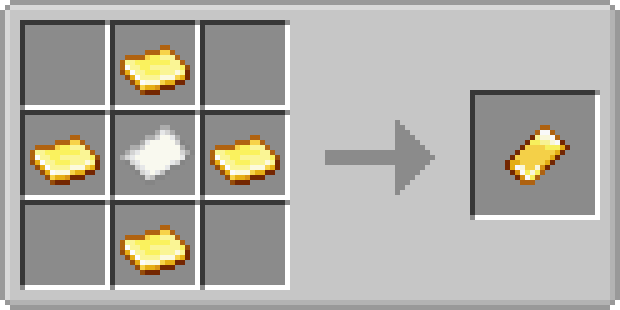
Mechanical Mixer Recipe
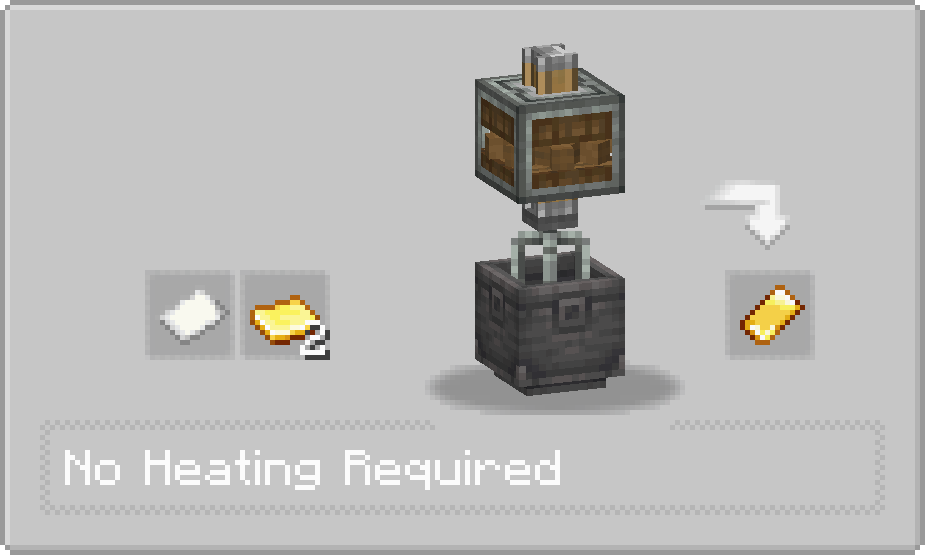
Perfect for Create
The Superflat Dimension is especially useful for Create players who need a large amount of free space for:
- Large factories and production lines
- Mechanical contraptions
- Automation systems
- Railway and transportation systems
- Redstone and Create testing
- Large-scale building projects
- Experimenting with new Create designs
Whether you are building your first machine or designing a huge automated factory, the Superflat Dimension gives you the space you need.
Keep Your Machines Running
If you want your Create machinery to continue operating while you are outside the Superflat Dimension, this mod can be used together with a Create chunk-loading addon, such as Create: Power Loader.
With a suitable chunk-loading block from the addon, you can keep the relevant chunks loaded even when you are not inside the Superflat Dimension. This allows supported Create machines and automation systems to continue running while you work or explore elsewhere.
Recommended Mod: Create: Power Loader. A chunk-loading addon that can help keep your Create machinery active while you are away from the Superflat Dimension.
A Simple Building Space for Create
Create: Superflat Dimension adds a dedicated space for building, testing, and experimenting with Create. It makes large-scale construction and automation easier by giving you a convenient, mostly flat environment without requiring you to clear large areas in the Overworld.
Whether you are testing a small machine, planning a new factory, or building a large automation system, the Superflat Dimension provides a straightforward place to do it.
Dependencies

Create is required to use this mod.

Create Fabric is required to use the Fabric version.
Project description from CurseForge.
Pick your setup
Create: Superflat Dimension by Minecraft version and loader
Choose the version and loader you play, then open the matching release.
Minecraft version
1.20.1
2 loader buildsCheck the dependencies, then try the file in a copied instance before changing a world you care about.
Recent files
Create: Superflat Dimension versions and loaders
Create: Superflat Dimension 1.1.0 mc1.21.1
create_superflat_dimension-1.1.0-mc1.21.1.jar
3 Oct 2026
Client Source doesn’t say Server Source doesn’t say Dependencies No extras listed Listed on Release listing
Check the 1.21.1 · NeoForge setup 1.21.1NeoForge release
Create: Superflat Dimension 1.1.0 mc1.20.1
create_superflat_dimension-1.1.0-mc1.20.1.jar
3 Oct 2026
Client Source doesn’t say Server Source doesn’t say Dependencies 1 required · 1 unchecked Listed on Release listing
Check the 1.20.1 · Forge setup 1.20.1Forge release
Create: Superflat Dimension 1.1.0 mc1.20.1-fabric
create-superflat-dimension-1.1.0-mc1.20.1-fabric.jar
3 Oct 2026
Client Source doesn’t say Server Source doesn’t say Dependencies 2 required · 2 unchecked Listed on Release listing
Check the 1.20.1 · Fabric setup Fabric1.20.1 release
Create: Superflat Dimension 1.0.0 mc1.21.1
create_superflat_dimension-1.0.0-mc1.21.1.jar
25 Sept 2026
Client Source doesn’t say Server Source doesn’t say Dependencies 1 required · 1 unchecked Listed on Release listing
Check the 1.21.1 · NeoForge setup 1.21.1NeoForge release
Create: Superflat Dimension 1.0.0 mc1.20.1-fabric
create-superflat-dimension-1.0.0-mc1.20.1-fabric.jar
25 Sept 2026
Client Source doesn’t say Server Source doesn’t say Dependencies 2 required · 2 unchecked Listed on Release listing
Check the 1.20.1 · Fabric setup Fabric1.20.1 release
Create: Superflat Dimension 1.0.0 mc1.20.1
create_superflat_dimension-1.0.0-mc1.20.1.jar
25 Sept 2026
Client Source doesn’t say Server Source doesn’t say Dependencies 1 required · 1 unchecked Listed on Release listing
Check the 1.20.1 · Forge setup 1.20.1Forge release
Create: Superflat Dimension 1.20.1 v1.0.0 Beta.2
create_superflat_dimension-1.20.1-1.0.0-beta.2.jar
17 Sept 2026
Client Source doesn’t say Server Source doesn’t say Dependencies 1 required · 1 unchecked Listed on Release listing
Check the 1.20.1 · Forge setup 1.20.1Forge beta
Create: Superflat Dimension 1.21.1 v1.0.0 Beta.2
create_superflat_dimension-1.21.1-1.0.0-beta.2.jar
4 Sept 2026
Client Source doesn’t say Server Source doesn’t say Dependencies 1 required · 1 unchecked Listed on Release listing
Check the 1.21.1 · NeoForge setup 1.21.1NeoForge beta
Create: Superflat Dimension 1.21.1 v1.0.0 Beta.1
create_superflat_dimension-1.21.1-1.0.0-beta.1.jar
29 Aug 2026
Client Source doesn’t say Server Source doesn’t say Dependencies 1 required · 1 unchecked Listed on Release listing
Check the 1.21.1 · NeoForge setup 1.21.1NeoForge beta
Looking for an older file? The official CurseForge project page is in Resources.