Minecraft version
Back to mods 
CurseForge · Minecraft mod
Create Aeronautics: Skyport
Automate your Aeronautics craft to run just like they do in the real world.
Choose a version Pick your version below, then grab the matching file.
Quick answer
Which Create Aeronautics: Skyport release should I use?
Latest stable file skyport-1.1.0
Game version 1.21.1
Loader NeoForge
Create Aeronautics: Skyport skyport-1.1.0 targets 1.21.1 with NeoForge. The project page does not say whether this file belongs on the client, dedicated server, or both. No extra mods listed for this file.
Where it goes
Is Create Aeronautics: Skyport required on the client, server, or both?
The project page does not say whether this file belongs on the client, dedicated server, or both.
Client Source doesn’t say
Dedicated server Source doesn’t say
Loader for this release NeoForge
Required install it here Optional supported, not mandatory Not supported do not install here Source doesn’t say do not assume
The source does not explicitly classify this release as client-only or server-only.
What else does Create Aeronautics: Skyport skyport-1.1.0 need?
skyport-1.1.0. Change the file and its required mods may change too.
This file does not list any required mods. Do not add a library just because a different file uses it.
This file does not list any required or optional mods.
Before you install it
Add Create Aeronautics: Skyport without breaking your instance.
Built for Create Aeronautics: Skyport skyport-1.1.0. Pick another file and the loader, install side or required mods may change.
- 01
Stick to this file
Use skyport-1.1.0. It targets 1.21.1 with NeoForge; another release may have different loader, side or dependency requirements.
- 02
Bring the mods it needs
This file does not list any required mods. Do not add a library just because a different file uses it.
- 03
Put it on the correct side
The project page does not say whether this file belongs on the client, dedicated server, or both.
- 04
Pick the file you checked
Use the “Get this file” button beside skyport-1.1.0. It opens that exact file at the source.
About this project
What does Create Aeronautics: Skyport add?
Skyport provides Create Aeronautics airports and aircraft that run the same as in the real world.
Build an airport and designate paths for aircraft to taxi and take off from. Watch from outside the perimeter fence while an aircraft you’re not piloting taxis away from its gate, taxis out, holds short to check the runway for traffic, and takes off without you.
Plan a flight and the plane will fly it for you: push back, taxi, takeoff, climb out along the runway heading, cruise, circling in a holding pattern if the airport is busy, approach, land, taxi to its gate. The whole process is simulated via Sable’s rigid-body physics – the same as if you fly it yourself. It’s forced into motion, not driven along clunky paths, so it "banks" and requires a full runway to takeoff.
The Four Blocks
Airport Station — at the airport (duh). Draw its runway, taxiways, gates, helipad, and holding patterns, just like real-world airports. Airports are registered globally; any aircraft can be sent to any airport, just like Create train stations.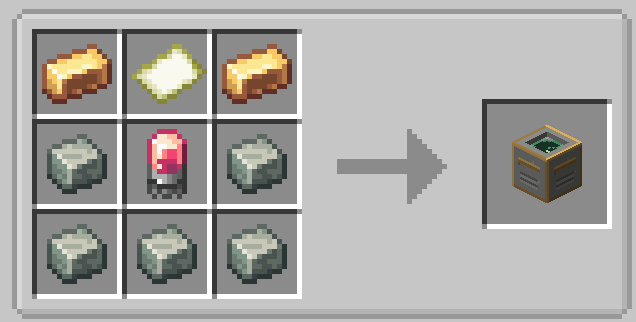
Autopilot — attached to the aircraft. Functions almost identical to Create train schedules. Plane, helicopter, or blimp; cruise speed, cruise altitude, and waypoints. Each waypoint waits for a condition before departing: a timer, a passenger, loading or unloading cargo. Can be started from its own interface or redstone.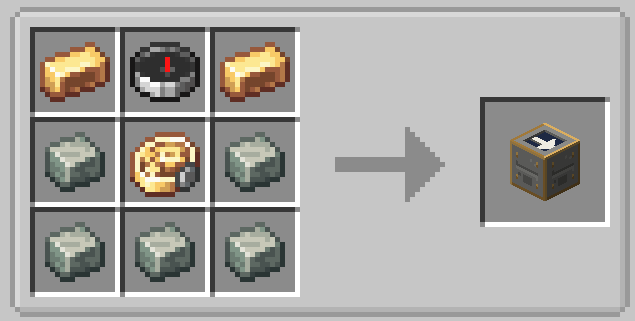
Air Traffic Control — global real-time display of all airports and all aircraft, with a sidebar giving information about the status of each. "Unloaded" aircraft are listed separately and can be activated with a single click. Hold up a Create Display Link to view it as a departures board.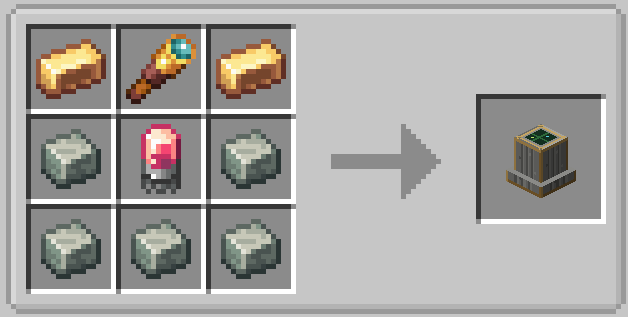
VOR Beacon — take the scenic route.
Makes a waypoint for aircraft to travel too mid-route.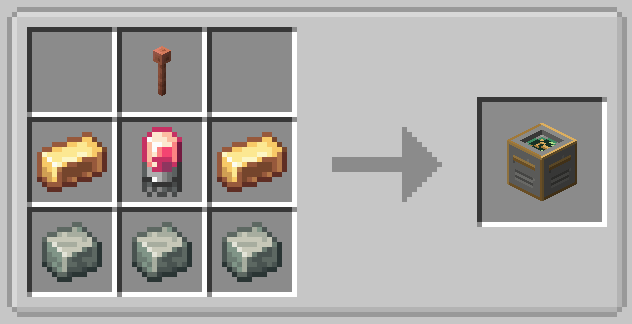
Smart Chunkloading SystemThis mod has a special system for dealing with aircraft running through unloaded chunks, saving valuable server resources. Aircraft can travel through "unloaded" chunks with no players aboard by generating a small chunkloading bubble as it travels. If an aircraft has no players nearby, it turns off chunkloading and rests until it is reactivated by a player using the ATC block, saving server resources when the aircraft is not in use. This is all toggleable in the server config.
They don’t get in each other’s way
One aircraft per runway, one on the taxiway, one per parking location, and altitude separation in the air. Departing aircraft queue behind hold lines, just as Create trains wait behind a signal; arriving aircraft circle in the hold pattern until the runway is clear rather than landing over another plane.
If one runway isn’t enough, add another for departure-only flights so that no one has to wait behind a landing flight. If one taxiway isn’t enough, create segments of taxiways that are one-way — an inbound half and an outbound half — and allow traffic to pass by each other rather than nose-to-nose.
Built for Survival or Creative ServerFlight is free by default, but survival costs can be toggled in server config:
Rotation — Creates rotational force that reaches the Autopilot. Requires a shaft connection from the powertrain already in your aircraft.
Fuel — furnace fuel, from any container aboard the aircraft. Flying faster costs more per block travelled than per second, trading speed against range. Out of fuel mid-flight means engine failure, not just a pause: wings level and gliding descent.
Requirements
Minecraft 1.21.1
NeoForge 21.1.0
Create 6.0.0+
Create Aeronautics 1.3.0+
**This mod is in beta, and I am fairly new to modding, so things might not run perfectly.
CC Compatible! See the list of functions~**
skyport_autopilot — one aircraft (works aboard the craft, put computer next to autopilot)
Read: getCallsign · getState · isEngaged · getPosition · getAircraftId · getSubLevelId · getFuel · getUnattendedSeconds · getSchedule · getCurrentStop · getAirports · getVors
Write: setSchedule · addStop · removeStop · moveStop · setName · setCruiseAltitude · setCruiseSpeed · setLoop · setPowerSource · engage · disengage
skyport_tower — the whole network, in-flight included
getAirports · getAirport(name) · getVors · getTraffic · getRoster · getAircraft(which) · setSchedule(which, table) · engage(which) · disengage(which)
which is a callsign or an id. An ambiguous callsign is refused by name rather than resolved to whichever came first — re-routing the wrong plane isn’t something a script could detect afterwards.
skyport_station — one airport, read-only
getAirport · getName · getGates · getHelipads · getTraffic
Planned features:
- More intensive collision avoidance system
- Extend to land and sea vehicles.
- Create ponders
- Nicer textures
- Handheld ATC tool
- Translations
Help me convince my fiance that moving into an abandoned house in Japan is a good idea:
https://forms.gle/CoNUYL23Yj7QhKoX7
Made with love and help from Claude ~
Project description from CurseForge.
Pick your setup
Create Aeronautics: Skyport by Minecraft version and loader
Choose the version and loader you play, then open the matching release.
Check the dependencies, then try the file in a copied instance before changing a world you care about.
Recent files
Create Aeronautics: Skyport versions and loaders
skyport-1.1.0
skyport-1.1.0.jar
11 Oct 2026
Client Source doesn’t say Server Source doesn’t say Dependencies No extras listed Listed on Release listing
Check the 1.21.1 · NeoForge setup 1.21.1NeoForge release
skyport-1.0.1
skyport-1.0.1.jar
15 Sept 2026
Client Source doesn’t say Server Source doesn’t say Dependencies No extras listed Listed on Release listing
Check the 1.21.1 · NeoForge setup 1.21.1NeoForge release
Skyport 1.0 - Official Release
skyport-1.0.0.jar
9 Sept 2026
Client Source doesn’t say Server Source doesn’t say Dependencies No extras listed Listed on Release listing
Check the 1.21.1 · NeoForge setup 1.21.1NeoForge release
skyport-1.0.0-beta.2
skyport-1.0.0-beta.2.jar
27 Aug 2026
Client Source doesn’t say Server Source doesn’t say Dependencies No extras listed Listed on Release listing
Check the 1.21.1 · NeoForge setup 1.21.1NeoForge beta
skyport-1.0.0-beta
skyport-1.0.0-beta.1.jar
26 Aug 2026
Client Source doesn’t say Server Source doesn’t say Dependencies No extras listed Listed on Release listing
Check the 1.21.1 · NeoForge setup 1.21.1NeoForge beta
Looking for an older file? The official CurseForge project page is in Resources.