Minecraft version
Back to mods 
CurseForge · Minecraft mod
Pricetag
What everything in your pack is worth
Choose a version Pick your version below, then grab the matching file.
Quick answer
Which Pricetag release should I use?
Latest stable file pricetag-1.0.0-26.1.2.jar
Game version 26.1.2
Loader NeoForge
pricetag-1.0.0-26.1.2.jar targets 26.1.2 with NeoForge. The project page does not say whether this file belongs on the client, dedicated server, or both. No extra mods listed for this file.
Where it goes
Is Pricetag required on the client, server, or both?
The project page does not say whether this file belongs on the client, dedicated server, or both.
Client Source doesn’t say
Dedicated server Source doesn’t say
Loader for this release NeoForge
Required install it here Optional supported, not mandatory Not supported do not install here Source doesn’t say do not assume
The source does not explicitly classify this release as client-only or server-only.
What else does pricetag-1.0.0-26.1.2.jar need?
pricetag-1.0.0-26.1.2.jar. Change the file and its required mods may change too.
This file does not list any required mods. Do not add a library just because a different file uses it.
This file does not list any required or optional mods.
Before you install it
Add Pricetag without breaking your instance.
Built for pricetag-1.0.0-26.1.2.jar. Pick another file and the loader, install side or required mods may change.
- 01
Stick to this file
Use pricetag-1.0.0-26.1.2.jar. It targets 26.1.2 with NeoForge; another release may have different loader, side or dependency requirements.
- 02
Bring the mods it needs
This file does not list any required mods. Do not add a library just because a different file uses it.
- 03
Put it on the correct side
The project page does not say whether this file belongs on the client, dedicated server, or both.
- 04
Pick the file you checked
Use the “Get this file” button beside pricetag-1.0.0-26.1.2.jar. It opens that exact file at the source.
About this project
What does Pricetag add?
Pricetag works out what every item in your modpack is worth, from the pack's own recipes.
It adds no items, no blocks and no world generation. It is a library.
📦 Here because another mod asked for it? Drop the jar in your
modsfolder and you are done. There is nothing to configure and nothing to learn — no items are added and nothing about your game changes. The rest of this page is for pack and mod developers.
What it does
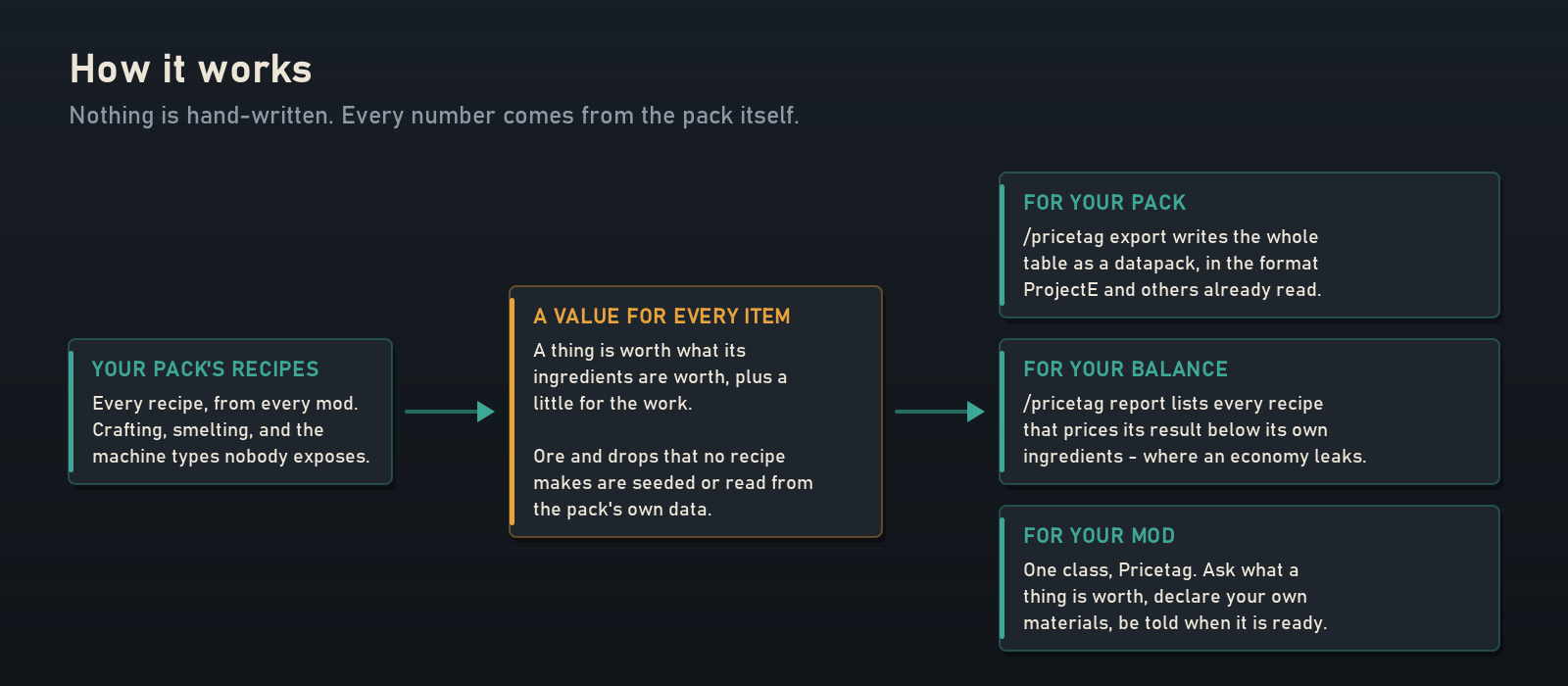
A value table for a big modpack is normally either missing or hand-written, and hand-written means out of date the moment someone adds a mod. Pricetag does not have a table. It reads the recipes your pack actually loaded — every recipe, from every mod, including machine types nobody bothers to expose — and derives a value for each item from its ingredients, plus a little for the work.
The things no recipe produces — ore out of the ground, a drop off a mob, a press out of a meteorite — are the only ones that need a starting number. Those come from three places: mods that declare their own through the API, whatever pe_custom_conversions data the pack already carries, and a small config you can add to. Everything else falls out of the recipes.
The result is a complete, self-consistent price list for a pack that nobody curated by hand.
The numbers, on a real pack
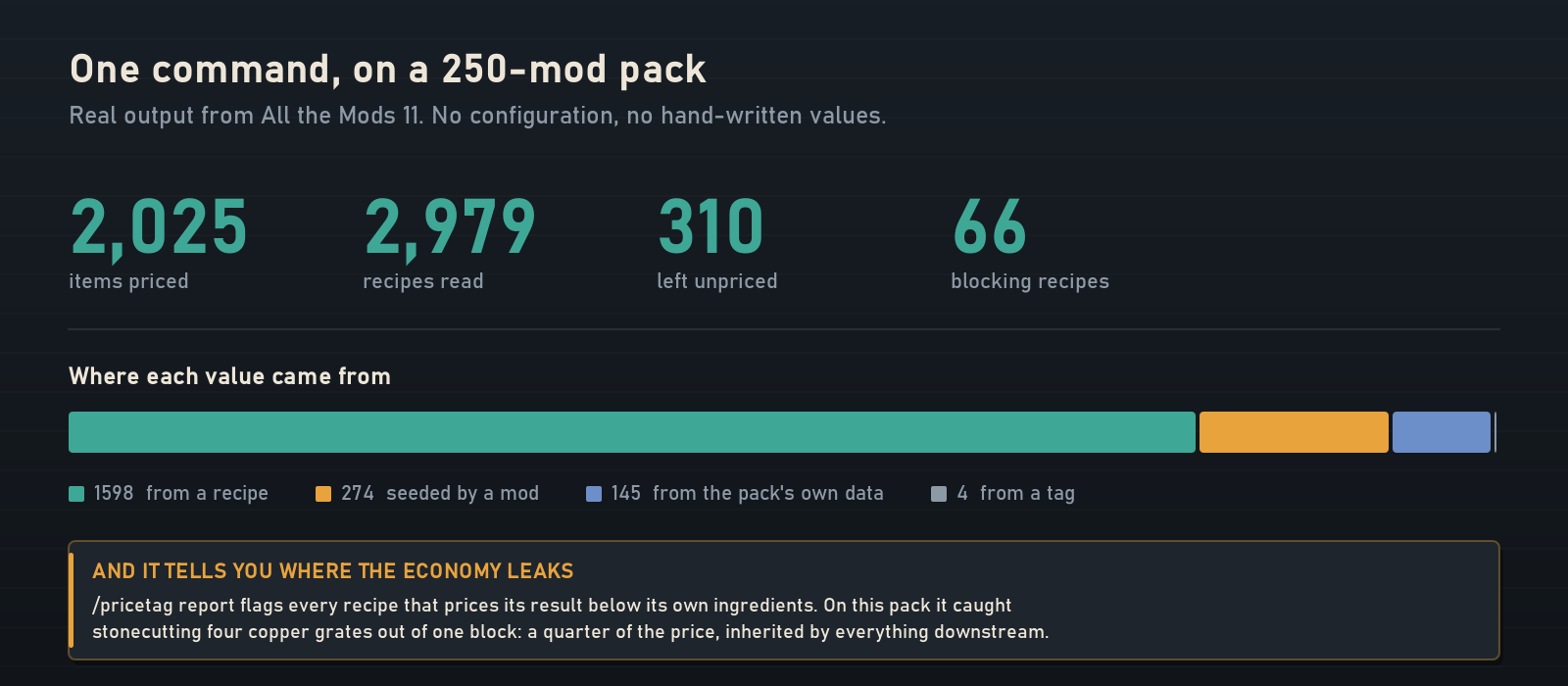
That is one command on All the Mods 11, with no configuration: 2,025 items priced from 2,979 recipes. 1,598 of those values were derived from a recipe, 274 declared by mods, 145 read from data the pack already shipped, and 4 guessed from a tag. 310 items were left unpriced, and Pricetag says which ones and why rather than inventing a number for them.
Commands
Everything Pricetag does in game, it does through one command. Nothing here is required to play — install the jar and it works — but this is the whole tool if you want it.
| Command | What it does | Who |
|---|---|---|
/pricetag explain <item> |
Shows exactly how one value was reached: which recipe, which ingredients, what each contributed and what it added up to. Every ingredient in the output is clickable and explains itself in turn, so you can walk a suspicious number all the way back to the ore it came from. | Anyone |
/pricetag export |
Writes the whole table out as a ready-made datapack in the pe_custom_conversions format, under config/pricetag/export/. ProjectE reads it, and so does anything else speaking that convention. Ship it with your pack, edit it, or freeze it. |
Level 2 |
/pricetag report |
Writes value-report.json and tells you the path. Inside: where every value came from, which items are still unpriced, and — the useful part — every recipe that prices its result below its own ingredients, each with a hint on how to fix it. |
Level 2 |
/pricetag set <value> [item] |
Pins a value you disagree with, so nothing recalculates it. Defaults to the item in your hand. | Level 2 |
/pricetag unset [item] |
Releases a pinned value and lets it be derived again. | Level 2 |
/pricetag reload |
Re-derives the entire table without restarting. If the scan fails it keeps the previous values rather than leaving you with nothing. | Level 2 |
/pricetag dump |
The raw table as JSON, for diffing two runs against each other. | Level 2 |
🔍 Start with
explain. It is the only one open to every player, because it answers questions instead of changing anything — and it is the fastest way to understand what Pricetag has decided about your pack. Hold something and run it.
For pack developers
/pricetag report is the one to run on a pack you are balancing. Every large pack has recipes that produce more value than they consume, and they are almost never deliberate — a stonecutter recipe with four outputs, a compression loop that does not round-trip, a machine recipe that duplicates. On All the Mods 11 the report caught stonecutting four copper grates out of one copper block at a quarter of the block's price, with everything downstream inheriting the mistake.
/pricetag export is the one to run when you are done. It hands you the whole table as a datapack you can ship, edit by hand, or freeze so it stops moving when someone adds a mod.
For mod developers
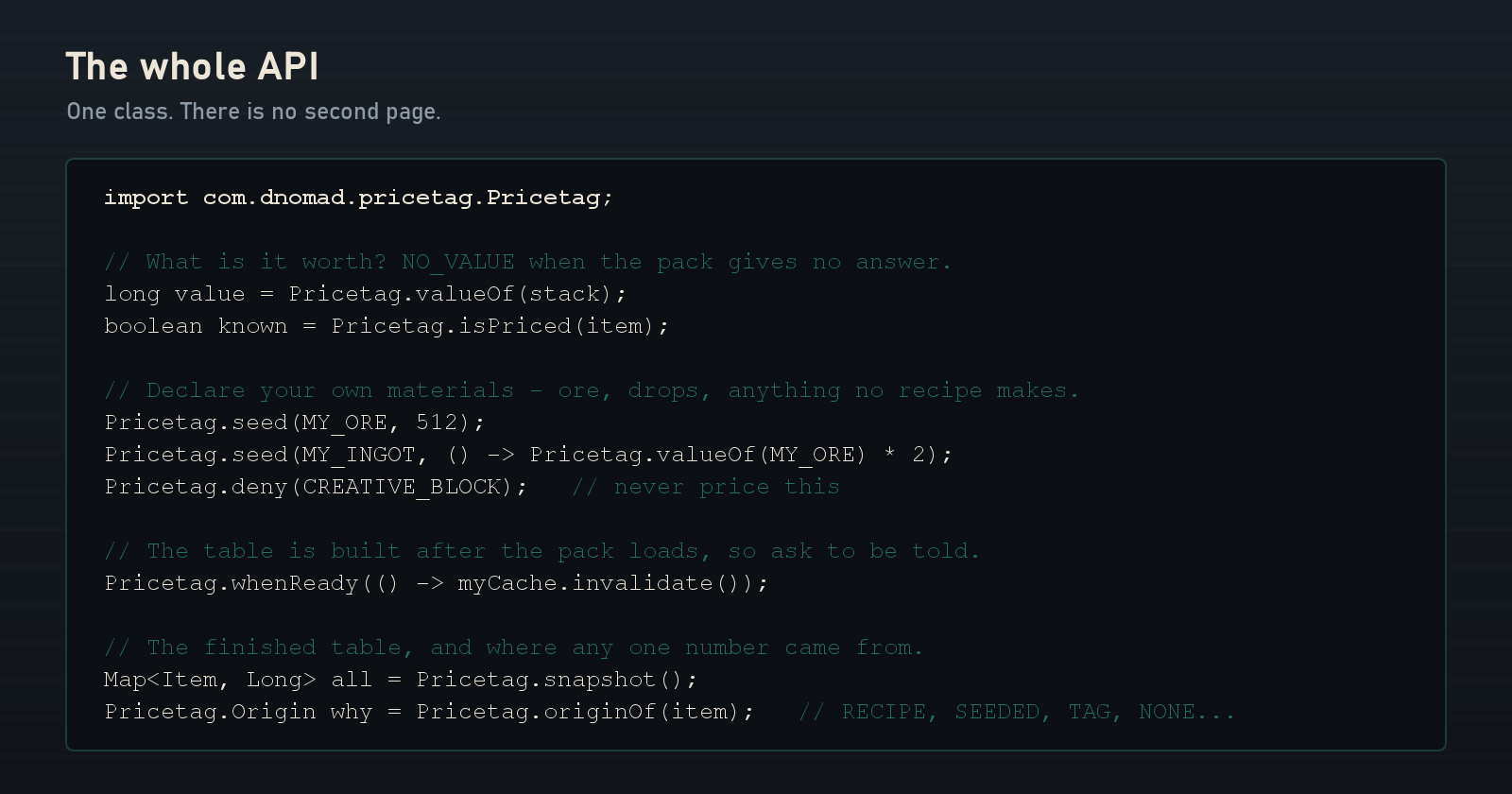
The public API is one class, com.dnomad.pricetag.Pricetag. There is no second page to it. Ask what something is worth, declare prices for materials of your own that no recipe makes, and be told when the table is ready.
Two things worth knowing before you wire it up:
- The table is built after the pack's recipes load, so it does not exist during registration. Register your seeds in
FMLCommonSetupEventand usewhenReadyfor anything that needs a finished value. seedhas a lazy overload taking aLongSupplier, for a value that is defined in terms of another one that is not known yet.
If your mod already has a working recipe chain, you may not need to do anything at all — Pricetag will price it from the recipes like everything else. Seeds are only for the primitives.
💡 Depending on it is explicitly allowed. The licence carries an API Exception: you may compile against this class, call it, and ship a mod that requires Pricetag, freely and without asking. That is what it is for.
Installation and compatibility
- Requires NeoForge. Nothing else.
- Both sides — install it on the server, and on clients if the pack does.
- Adds no items, blocks, entities, world generation, key bindings or GUI. Nothing to conflict with.
- ProjectE is not required. If it is installed, Pricetag reads the data it finds and can write data it will read. If it is not, everything still works — the format is just a convenient way to move a table around.
Credits
Pricetag contains no third-party code, data or artwork.
It reads and writes the pe_custom_conversions data format — a convention established by ProjectE and populated in practice by ProjectE-Integration by TagnumElite (MIT). Nothing of theirs is included here and no part of this mod derives from their work; supporting a shared format is interoperability rather than use. But the convention is theirs and is worth naming.
Modpack permission
You may include Pricetag in any modpack, public or private, free or monetised, provided the pack is distributed through an official platform (CurseForge, Modrinth) that downloads the mod from its official source. No need to ask.
Third-party add-ons and compatibility patches are welcome, as long as they do not bundle or redistribute this mod's files. And as above, using the API — compiling against it and requiring this mod — is explicitly permitted.
Full terms are in LICENSE.txt inside the jar.
Author
Created and maintained by DNomad.
📦 Other projects: curseforge.com/members/dnomad/projects
Bug reports and API requests are genuinely useful — if you are building on this and something is missing from the API, say so.
Project description from CurseForge.
Pick your setup
Pricetag by Minecraft version and loader
Choose the version and loader you play, then open the matching release.
Check the dependencies, then try the file in a copied instance before changing a world you care about.
Recent files
Pricetag versions and loaders
pricetag-1.0.0-26.1.2.jar
pricetag-1.0.0.jar
26 Aug 2026
Client Source doesn’t say Server Source doesn’t say Dependencies No extras listed Listed on Release listing
Check the 26.1.2 · NeoForge setup NeoForge26.1.2 release
Looking for an older file? The official CurseForge project page is in Resources.
 mod
mod CurseForge + Modrinth · Minecraft
Modulation
A growing collection of quality-of-life tweaks, bug fixes, and cross-mod integrations for modpack creators!
 mod
mod CurseForge + Modrinth · Minecraft
KubeJS Generator
Edit recipes in the GUI and export them to KubeJS scripts
 mod
mod CurseForge + Modrinth · Minecraft
Reliable Advancements
In-game advancement editing and improvements to the advancement screen!