Minecraft version
Back to mods 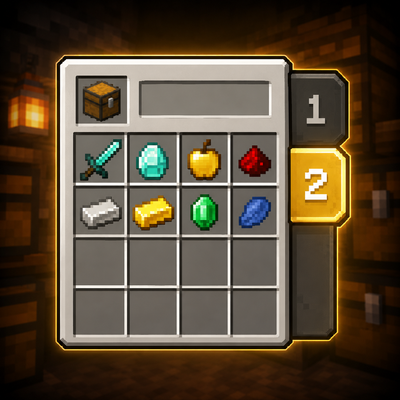
CurseForge · Minecraft mod
Extra Inventory Tab
Add extra inventory pages and easily switch between them using simple tabs.
Choose a version Pick your version below, then grab the matching file.
Quick answer
Which Extra Inventory Tab release matches 1.21.1 Forge?
Best match for your filters moreinventory-1.0.0-forge-1.21.1.jar
Game version 1.21.1
Loader Forge
Extra Inventory Tab moreinventory-1.0.0-forge-1.21.1.jar targets 1.21.1 with Forge. The project page does not say whether this file belongs on the client, dedicated server, or both. No extra mods listed for this file.
Where it goes
Is Extra Inventory Tab required on the client, server, or both?
The project page does not say whether this file belongs on the client, dedicated server, or both.
Client Source doesn’t say
Dedicated server Source doesn’t say
Loader for this release Forge
Required install it here Optional supported, not mandatory Not supported do not install here Source doesn’t say do not assume
The source does not explicitly classify this release as client-only or server-only.
What else does Extra Inventory Tab moreinventory-1.0.0-forge-1.21.1.jar need?
moreinventory-1.0.0-forge-1.21.1.jar on 1.21.1 Forge. Every mod below is checked against that same setup.
This file does not list any required mods. Do not add a library just because a different file uses it.
This file does not list any required or optional mods.
Before you install it
Add Extra Inventory Tab without breaking your instance.
Built for Extra Inventory Tab moreinventory-1.0.0-forge-1.21.1.jar on 1.21.1 Forge. Pick another file and the loader, install side or required mods may change.
- 01
Stick to this file
Use moreinventory-1.0.0-forge-1.21.1.jar. It targets 1.21.1 with Forge; another release may have different loader, side or dependency requirements.
- 02
Bring the mods it needs
This file does not list any required mods. Do not add a library just because a different file uses it.
- 03
Put it on the correct side
The project page does not say whether this file belongs on the client, dedicated server, or both.
- 04
Pick the file you checked
Use the “Get this file” button beside moreinventory-1.0.0-forge-1.21.1.jar. It opens that exact file at the source.
About this project
What does Extra Inventory Tab add?
Extra Inventory Tabs
Extra Inventory Tabs expands your Minecraft inventory by adding additional inventory pages that can be accessed through simple tabs directly inside the vanilla inventory screen.
No backpacks, no extra containers, and no complicated menus — just more inventory space while keeping the familiar Minecraft inventory experience.
Features
- Extra inventory page for additional storage
- Simple inventory tabs to switch between pages
- Seamlessly integrated into the vanilla inventory screen
- Your items remain stored in their respective inventory pages
- Fast and intuitive switching
- Lightweight and simple
- Designed to feel like a vanilla Minecraft feature
- Perfect for exploration, mining, building, modpacks, and everyday survival
How It Works
Open your inventory normally and use the new tabs to switch between your inventory pages.
Your original inventory remains unchanged, while the additional tab gives you another page where you can store more items.
No commands or special items are required.
Why Extra Inventory Tabs?
Minecraft inventories can fill up extremely quickly, especially when exploring large modpacks or collecting building materials.
Instead of adding backpacks or completely replacing the inventory system, Extra Inventory Tabs keeps things simple:
Same inventory. More space. One click away.
Perfect For
- Survival worlds
- Exploration
- Large modpacks
- Builders
- Mining sessions
- Players who want more inventory space without backpacks
If you enjoy simple Quality of Life mods that improve Minecraft without changing the core experience, Extra Inventory Tabs is made for you.
Project description from CurseForge.
Pick your setup
Extra Inventory Tab by Minecraft version and loader
Choose the version and loader you play, then open the matching release.
Minecraft version
1.21.1
3 loader buildsMinecraft version
1.20.1
2 loader buildsMinecraft version
1.16.5
2 loader buildsCheck the dependencies, then try the file in a copied instance before changing a world you care about.
Recent files
Extra Inventory Tab versions and loaders
moreinventory-1.0.0-forge-1.21.1.jar
26 Aug 2026
Client Source doesn’t say Server Source doesn’t say Dependencies No extras listed Listed on Release listing
Check the 1.21.1 · Forge setup Forge1.21.1 release
Looking for an older file? The official CurseForge project page is in Resources.
 mod
CurseForge · Minecraft
JEI: Craft Directly from Chests, Shulkers & Ender Chest
A JEI fork (aka "MCdestined's Simple Storage") that turns your crafting table into a smart Crafting Station: auto-pull ingredients from connected chests, Ender Chests, and Shulker Boxes, or extract in-stock items in 1 click.
 mod
CurseForge + Modrinth · Minecraft
Combatlog
An attempt to prevent people from logging out while in combat
 mod
CurseForge · Minecraft
Statboard | Leaderboards, Statistics & Metrics
A Minecraft mod that tracks singleplayer and multiplayer statistics, metrics, and player leaderboards, featuring rich in-game GUI and an optional web dashboard integrated directly into the game.