CurseForge · Minecraft mod
Build-A-Golem: Custom Modular Golems
Build your own golem from 34 blocks: mix heads, torsos, arms and legs, combine 24 abilities, give it orders and level it up to Legend.
Quick answer
Which Build-A-Golem: Custom Modular Golems release should I use?
Build-A-Golem: Custom Modular Golems Build-A-Golem 1.1.0 (NeoForge 26.3) targets 26.3 with NeoForge. The project page does not say whether this file belongs on the client, dedicated server, or both. All 1 required mods have matching files.
Where it goes
Is Build-A-Golem: Custom Modular Golems required on the client, server, or both?
The project page does not say whether this file belongs on the client, dedicated server, or both.
The source does not explicitly classify this release as client-only or server-only.
What else does Build-A-Golem: Custom Modular Golems Build-A-Golem 1.1.0 (NeoForge 26.3) need?
Build-A-Golem 1.1.0 (NeoForge 26.3). Change the file and its required mods may change too.
Install TONI's Core Lib first. We found matching files for this game-version and loader setup.
We only count dependency files that match this setup. A file for another loader does not fill the gap.
Before you install it
Add Build-A-Golem: Custom Modular Golems without breaking your instance.
Built for Build-A-Golem: Custom Modular Golems Build-A-Golem 1.1.0 (NeoForge 26.3). Pick another file and the loader, install side or required mods may change.
- 01
Stick to this file
Use Build-A-Golem 1.1.0 (NeoForge 26.3). It targets 26.3 with NeoForge; another release may have different loader, side or dependency requirements.
- 02
Bring the mods it needs
Install TONI's Core Lib first. We found matching files for this game-version and loader setup.
- 03
Put it on the correct side
The project page does not say whether this file belongs on the client, dedicated server, or both.
- 04
Pick the file you checked
Use the “Get this file” button beside Build-A-Golem 1.1.0 (NeoForge 26.3). It opens that exact file at the source.
About this project
What does Build-A-Golem: Custom Modular Golems add?

Why settle for one iron golem when you can build your own?
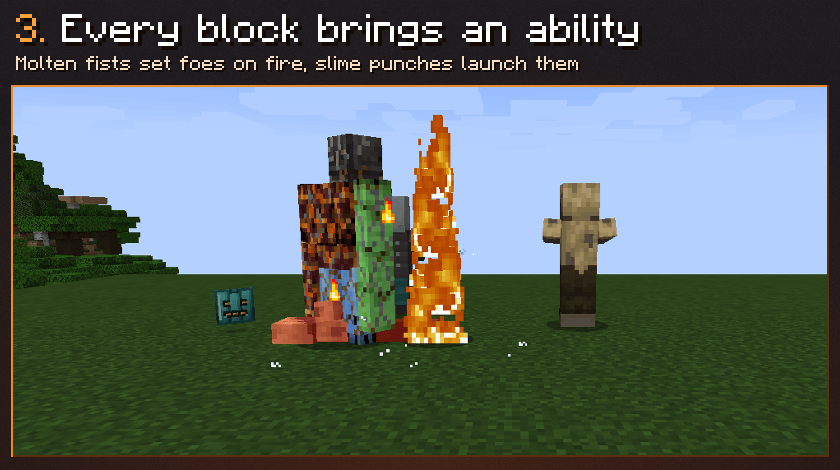
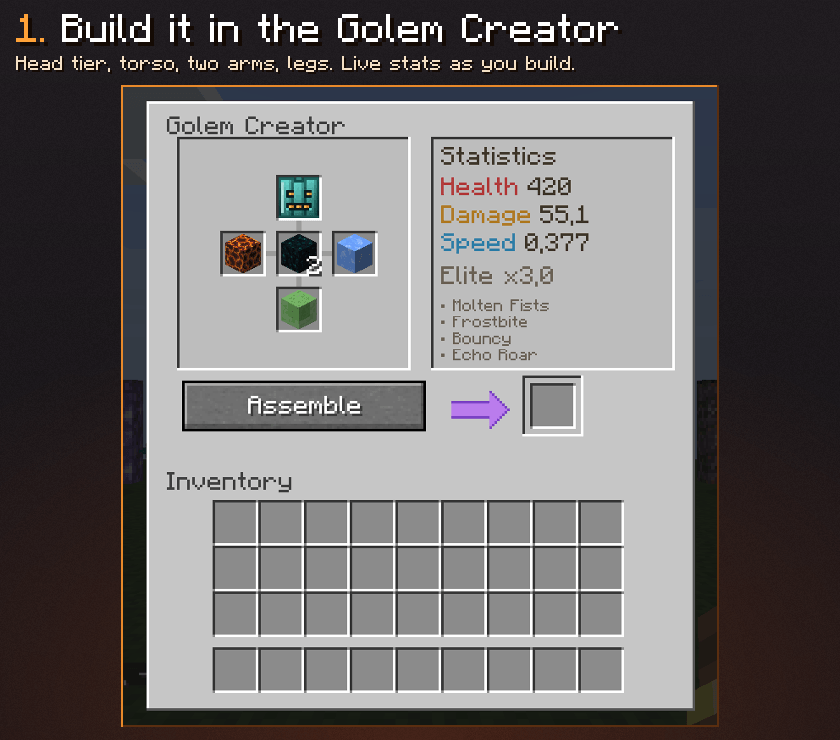
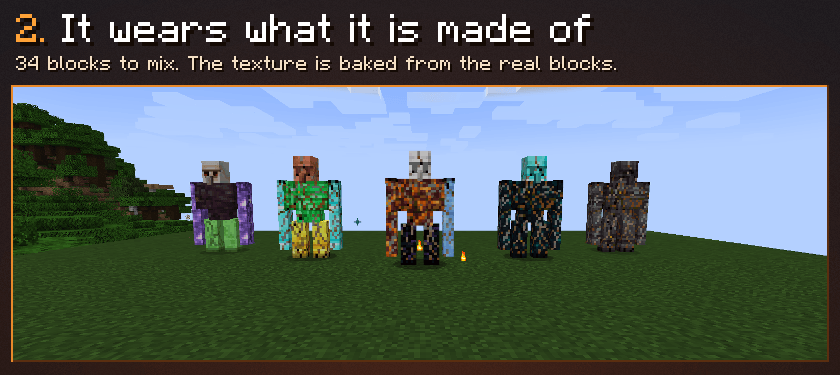
Build-A-Golem lets you design golems part by part in the Golem Creator: pick a pumpkin head tier, a torso, two arms and legs from 34 vanilla blocks. Every block changes its health, damage and speed and brings its own ability, and the golem is textured with the real blocks you used. Then give it orders, level it up and send it into battle.
Features
- Modular golems: head, torso (2 blocks), left arm, right arm and legs. The torso sets health, the arms set damage, the legs set speed.
- 34 building blocks: clay, calcite, copper, lapis, end stone, prismarine, iron, gold, redstone, amethyst, emerald, diamond, obsidian, crying obsidian, netherite, magma, packed and blue ice, slime, sculk, bone, glowstone, TNT, quartz and 11 kinds of logs and stems.
- 24 abilities that stack when you mix blocks (the full list is below).
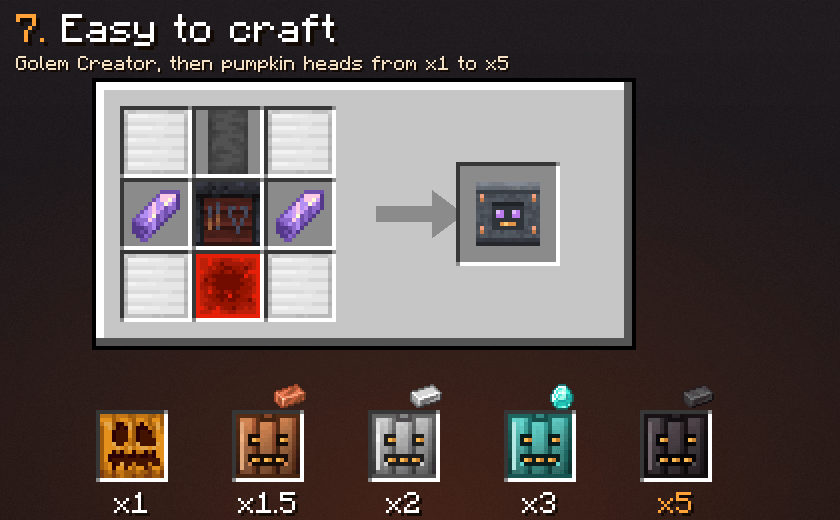
- Pumpkin head tiers: carved, copper, iron, diamond and netherite pumpkins multiply every stat by x1, x1.5, x2, x3 and x5.
- Pure Build bonus: torso, arms and legs of the same block give +25% to every stat.
- A unique look: the texture of each golem is baked from the blocks it is made of, so no two builds look alike. It cracks as it gets hurt.
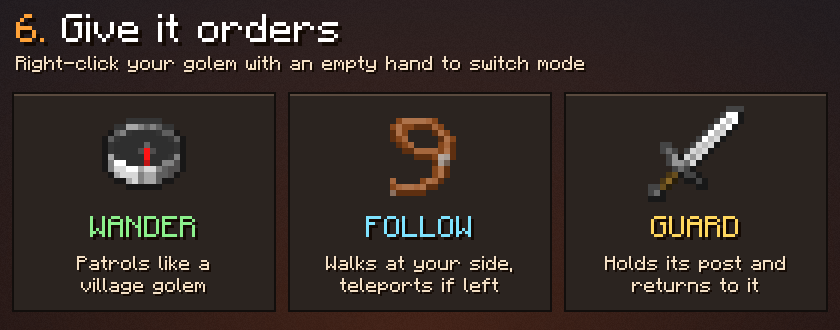
- Orders: Wander, Follow (it walks with you and teleports when left behind) or Guard (it holds a spot and always returns to it).
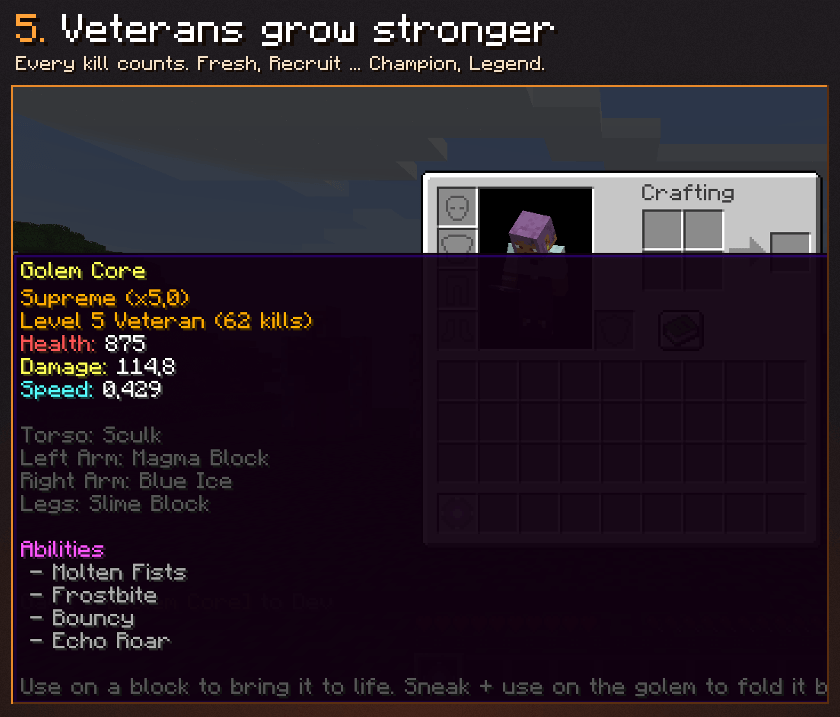
- Veterancy: every monster it kills counts. Ten levels from Fresh to Legend, +5% health and damage per level.
- Portable: sneak + use folds the golem back into a Golem Core that keeps its parts, its kills and its level.
- Upgrade in place: use a better pumpkin on your golem to swap its head without rebuilding it.
- It defends its owner, helps you in fights, never attacks you, and iron ingots repair it.


Abilities
- Iron Core (iron): iron ingots repair 25 health instead of 15.
- Conductive (copper): immune to lightning, shocks melee attackers.
- Piglin Pact (gold): piglins leave the golem and its owner alone.
- Pristine Edge (diamond): takes 20% less damage.
- Ancient Resilience (netherite): immune to fire, lava and knockback.
- Merchant's Guard (emerald): heals near villagers, kills can drop emeralds.
- Resonance (amethyst): hits splash magic damage around the target.
- Unbreakable (obsidian): immune to explosions and knockback.
- Lament (crying obsidian): once, it cheats death and comes back at half health.
- Overclocked (redstone): regular bursts of speed.
- Enchanted (lapis): hits make enemies glow, kills drop extra experience.
- Aquatic Guardian (prismarine): Conduit Power and +30% damage underwater.
- Calcite Echo (calcite): hits push back every enemy around.
- Void Born (end stone): no fall damage, teleports away when badly hurt.
- Malleable (clay): heals in water and rain.
- Natural Symbiosis (logs and stems): heals on grass and dirt, but burns easily.
- Molten Fists (magma): sets enemies on fire, immune to fire.
- Frostbite (packed ice, blue ice): hits slow and freeze.
- Bouncy (slime): punches launch enemies into the air, no fall damage.
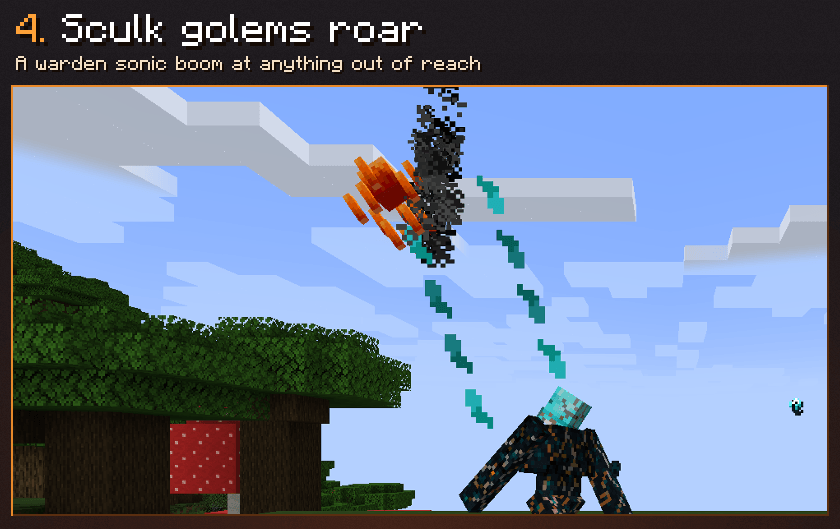
- Echo Roar (sculk): every 8 seconds, a warden sonic boom at a target 4 to 16 blocks away.
- Bonecrusher (bone block): +60% damage to undead.
- Radiant (glowstone): monsters within 16 blocks glow through walls.
- Volatile (TNT): explodes when it dies, hurting only monsters and breaking no blocks.
- Blessed (quartz): Regeneration for its owner and nearby villagers.


How to use it
- Craft the Golem Creator and open it. Put a pumpkin in the head slot, 2 blocks in the torso and 1 in each arm and the legs. The panel shows the stats and the abilities as you build.
- Press Assemble to get a Golem Core. Use it on a block and your golem comes to life.
- Right-click your golem with an empty hand: switch between Wander, Follow and Guard. The action bar shows its mode, level and health.
- Sneak + right-click with an empty hand: fold it back into its Golem Core.
- Right-click with an iron ingot to repair it, or with a better pumpkin to upgrade its head.

Requirements
- TONI's Core Lib (installed automatically by the CurseForge app).
- Fabric: Fabric API.
- The mod is needed on both sides: server and clients.
Versions
- Fabric and NeoForge: Minecraft 1.21 to 26.3
- Forge: Minecraft 1.21 to 26.3, except 1.21.2
Golems built with Golem Forge 1.0.0 keep working: the mod id is the same.
Questions, ideas or bugs? Join the Discord.
Project description from CurseForge.
Pick your setup
Build-A-Golem: Custom Modular Golems by Minecraft version and loader
Choose the version and loader you play, then open the matching release.
26.3
3 loader builds26.2
3 loader builds26.1.2
3 loader builds26.1.1
3 loader builds26.1
3 loader builds1.21.11
3 loader builds1.21.10
3 loader builds1.21.9
3 loader builds1.21.8
3 loader builds1.21.7
3 loader builds1.21.6
3 loader builds1.21.5
3 loader buildsShowing the newest 12 of 17 game versions. Older files are in the list below.
Check the dependencies, then try the file in a copied instance before changing a world you care about.
Recent files
Build-A-Golem: Custom Modular Golems versions and loaders
Build-A-Golem 1.1.0 (NeoForge 26.3)
golemforge-1.1.0-neoforge-26.3.jar
9 Nov 2026
Build-A-Golem 1.1.0 (Forge 26.3)
golemforge-1.1.0-forge-26.3.jar
9 Nov 2026
Build-A-Golem 1.1.0 (Fabric 26.3)
golemforge-1.1.0-fabric-26.3.jar
9 Nov 2026
Build-A-Golem 1.1.0 (NeoForge 26.2)
golemforge-1.1.0-neoforge-26.2.jar
9 Nov 2026
Build-A-Golem 1.1.0 (Forge 26.2)
golemforge-1.1.0-forge-26.2.jar
9 Nov 2026
Build-A-Golem 1.1.0 (Fabric 26.2)
golemforge-1.1.0-fabric-26.2.jar
9 Nov 2026
Build-A-Golem 1.1.0 (NeoForge 26.1.2)
golemforge-1.1.0-neoforge-26.1.2.jar
9 Nov 2026
Build-A-Golem 1.1.0 (Forge 26.1.2)
golemforge-1.1.0-forge-26.1.2.jar
9 Nov 2026
Build-A-Golem 1.1.0 (Fabric 26.1.2)
golemforge-1.1.0-fabric-26.1.2.jar
9 Nov 2026
Build-A-Golem 1.1.0 (NeoForge 26.1.1)
golemforge-1.1.0-neoforge-26.1.1.jar
9 Nov 2026
Build-A-Golem 1.1.0 (Forge 26.1.1)
golemforge-1.1.0-forge-26.1.1.jar
9 Nov 2026
Build-A-Golem 1.1.0 (Fabric 26.1.1)
golemforge-1.1.0-fabric-26.1.1.jar
9 Nov 2026
Looking for an older file? The official CurseForge project page is in Resources.