Pandorical Needed by Loot Ender loot-ender-1.1.0.jar
requiredMatching file found Matched file: pandorical-1.3.10.jar
CurseForge · Minecraft mod
Structure loot is rolled per player, so nobody arrives second - plus lockpicking!
Quick answer
Loot Ender loot-ender-1.1.0.jar targets 26.3 with Fabric. The project page does not say whether this file belongs on the client, dedicated server, or both. All 1 required mods have matching files.
Where it goes
The project page does not say whether this file belongs on the client, dedicated server, or both.
The source does not explicitly classify this release as client-only or server-only.
loot-ender-1.1.0.jar. Change the file and its required mods may change too.
Install Pandorical first. We found matching files for this game-version and loader setup.
We only count dependency files that match this setup. A file for another loader does not fill the gap.
Before you install it
Built for Loot Ender loot-ender-1.1.0.jar. Pick another file and the loader, install side or required mods may change.
Use loot-ender-1.1.0.jar. It targets 26.3 with Fabric; another release may have different loader, side or dependency requirements.
Install Pandorical first. We found matching files for this game-version and loader setup.
The project page does not say whether this file belongs on the client, dedicated server, or both.
Use the “Get this file” button beside loot-ender-1.1.0.jar. It opens that exact file at the source.
About this project
The first player to reach a dungeon chest empties it and everyone behind them finds a box of air. That turns exploring together into a race, and a race nobody agreed to enter.
Here, opening a loot chest opens your copy of it. The block itself is never unpacked: its loot table stays on it, unrolled, forever. What you take comes out of a copy made the first time you opened it, so the next player still gets a first look, and so does the one after that.
Everything else is vanilla. The chest is the same block, in the same place, with the same lid animation and the same sound. You walk up and open it.
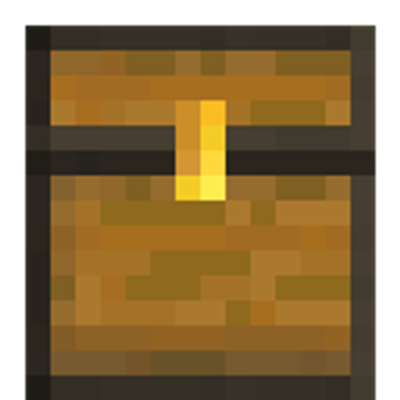
The clasp on the front. A loot chest wears a gold one until you have emptied it, so it can be picked out from the chests around it before anybody opens it.
What vanilla can no longer tell you, once loot is per player, is that you have nothing left in this one. So a chest you have emptied wears a darkened clasp instead. Nothing hovers, nothing glows; the clasp just reads as spent from across a room.
Both marks are drawn by Pandorical. A client without it sees ordinary chests everywhere and loses nothing but the reminder.
A chest or barrel that still carries an unrolled loot table, which is how the game ships every naturally generated one.
A chest minecart too. The one in a mineshaft is the same promise in a different shape, and arriving second at one is the same disappointment. A cart is an entity rather than a block, its table hangs off the vehicle, and vanilla unpacks it on the first look - so it takes its own handling, but from the outside it behaves exactly like the chest in the ground.
A chest you have been keeping wheat in is not a loot chest and never becomes one. Neither is a double chest with a table on only one half, which is a shape this mod does not claim to understand: both fall through to vanilla, untouched. Refusing the cases it is unsure of is the whole safety story, because the worst thing it could do is stand between you and an ordinary chest.
A comparator or hopper reading an unopened loot chest makes vanilla unpack it on the spot, which is vanilla's behaviour and predates this mod. If that happens the chest becomes an ordinary one holding a single rolled batch, shared, exactly as it would without this installed. It needs someone to have deliberately placed the comparator, so it has not come up.
Off by default for nobody: it ships on, and an op turns it off from the Loot Ender page of the mod menu, or in config/loot-ender.properties. With it on, a loot chest may be locked, and your copy does not open until you have picked it.
Per player, like everything else here. Your lock is yours. The first person through does not leave the door open behind them, because this mod exists on the premise that arriving second costs nothing and earns nothing, and a chest somebody else already picked would be a chest that rewarded arriving second.
Not every chest. The good tables are always locked - strongholds, mansions, end cities, bastions, ancient cities, trial chambers - and so is every other table with a name for being worth the trip, down to dungeons, mineshafts, temples, shipwreck treasure and village smithies. The ordinary ones (village houses, shipwreck supplies, anything a mod or datapack added) roll for it, at a chance you can set, 35% out of the box, so a lock stays a sign the chest is worth something rather than a toll on every barrel in a village. Whether a given chest has a lock is decided from the chest itself, so the answer never changes between visits.
Four grades, by what the chest is worth: simple, sturdy, intricate, masterwork. A better lock has more notches to search and less room for error, and snaps picks harder.
By hand, in real time. The lock fills the view; the pick sits in its keyhole.
A pick held against a jam trembles and wears, and worn through, snaps: a couple of seconds of forcing a bad angle on a simple lock, under one on a masterwork, slower the nearer you are (at normal difficulty). Every push scrapes a little off it too, so a lock cannot be probed for free: about seven pushes wear a pick through on a masterwork, some twenty-five on a simple one. The wear shows on a bar in the corner of the lock screen and nowhere else: a pick is not an item you carry about with a bar on it. Let go and the wearing stops where it is, but it does not undo, and a pick more than half worn when you leave the lock is spent, opened or not. Nothing else is ever lost: the lock keeps its answer while you stay at it, so what a snapped pick taught you is still true on the next one. Walk away and it is set afresh, so there is no probing a lock a moment at a time and coming back with the answer for free. Run out of picks and the chest stays shut until you bring more.
The pick's motion is the client's, so it never waits on the server; the answer, the cylinder and the pick's wear are the server's, so they never leave it. On a bad connection the cylinder is late rather than the game wrong.
Four settings, easiest, easy, normal and hard, on top of the lock's own grade. Easier widens the spot that turns the lock and wears picks slower; hard narrows it and wears them faster; easiest also makes the cylinder say more plainly how near the pick is. The server's is set on the mods menu page, as lock_difficulty in the config file, or with /lockpicking difficulty server <level>, and an op can set one player's over it, so a child learning the game and a player who finds it too easy can share a world:
/lockpicking difficulty - anyone. Says what locks are here, and what yours are if an op has set them for you. An op also sees every online player who has their own./lockpicking difficulty server <level> - ops only. Sets the server's, for everyone without their own./lockpicking difficulty player <players> <level> - ops only. Sets theirs over the server's; server in place of the level hands them back. It lands on the next lock they open.Picking another player's lock is always normal, whatever the picker's setting.
Three sources, because one source for the only key in the game is a wall:
With Chest Utils installed, a chest can carry a player's own lock. Whether lockpicking may do anything about that is its own setting, and it ships as never: a player's lock is a player's lock, and a server that wants otherwise should have said so on purpose.
player_lock_absent_days. For reclaiming the base of a player who is not coming back, without touching the chests of one who is. Absence is read from when a player's save file was last written, which is every logout and every autosave, so it knows about players who left long before this feature existed.A player lock is always a masterwork lock, whatever the chest is made of: a claim somebody made deliberately should cost more to break than a dungeon that left one lying around.
Two things a player lock does not share with a loot chest's. It is never remembered, so every entry costs picks - a lock beaten once in March should not still be open in December. And it draws a fresh answer each time it is opened rather than keeping one, because it is a standing defence and not a one-off obstacle. Whoever picks it is told whose chest it is before they start.
Picking opens the chest. It does not let anyone break it, and it hands over Chest Utils' plain screen rather than the one carrying the lock controls, so nobody relocks a chest they picked their way into.
On the Loot Ender page of the Pandorical mods menu, for ops, and in config/loot-ender.properties. A change made in the menu takes effect at once and is written back to the file.
lockpicking (Lockpicking) - true. Off leaves every chest opening the way it always did; lockpicks stop dropping and stop appearing in loot, and any already carried stay put.lock_difficulty (Lock difficulty) - normal. See Difficulty.common_lock_chance (Locked chests, percent) - 0.35, 35 in the menu. The chance an ordinary chest is locked; the good tables are locked regardless. 0 leaves them all open.lockpick_drop_chance (Lockpick drop, percent) - 0.05, 5 in the menu.pick_player_locks (Pick player locks) - never. Never, absent or always, as above.player_lock_absent_days (Absent after, days) - 30. How long "absent" waits.Gets no locks at all. The lock is drawn through Pandorical's screens, and locking a player out of a chest they have no way to open would be worse than not locking it: those chests open the way they always did.
Where Chest Utils is installed, your copy opens on its screen instead of the plain one, and picks up the two buttons that make sense for something you can only take from: take the lot, and top off the part-used stacks you are already carrying.
Neither mod knows how the other builds a screen. Chest Utils exposes a take-only screen for any container; this mod hands over a copy and gets the buttons for free. Without it, copies open on the ordinary chest screen and nothing else changes.
Where Block Tip is installed, a loot chest's card says "Yours alone, take only", and leads with "Emptied" once you have emptied it.
Loot Ender runs server-side, and Pandorical is required: the server will not load this mod without it. It is used for the clasps on loot chests, drawn through Pandorical's chest overlay API, the lock screen when lockpicking is on, and the settings page in the mods menu.
No Loot Ender jar is needed on a client.
Project description from CurseForge.
Pick your setup
Choose the version and loader you play, then open the matching release.
Check the dependencies, then try the file in a copied instance before changing a world you care about.
Recent files
16 Sept 2026
27 Aug 2026
Looking for an older file? The official CurseForge project page is in Resources.
 mod
modinstead of your inventory scattering across the ground when you die, your dropped items are stored inside a player head placed at your death location
 mod
modPick up a villager in a bucket!
 mod
modEnables hoppers to be placed pointing up (no extra item/recipe)