Minecraft version
Back to mods 
CurseForge · Minecraft mod
LCull
Cursed, performant Frustum logic for heavy culling scenes
Choose a version Pick your version below, then grab the matching file.
Quick answer
Which LCull release should I use?
Latest stable file NeoForge | 26.2 | 1.0.0
Game version 26.2
Loader NeoForge
LCull NeoForge | 26.2 | 1.0.0 targets 26.2 with NeoForge. The project page does not say whether this file belongs on the client, dedicated server, or both. No extra mods listed for this file.
Where it goes
Is LCull required on the client, server, or both?
The project page does not say whether this file belongs on the client, dedicated server, or both.
Client Source doesn’t say
Dedicated server Source doesn’t say
Loader for this release NeoForge
Required install it here Optional supported, not mandatory Not supported do not install here Source doesn’t say do not assume
The source does not explicitly classify this release as client-only or server-only.
What else does LCull NeoForge | 26.2 | 1.0.0 need?
NeoForge | 26.2 | 1.0.0. Change the file and its required mods may change too.
This file does not list any required mods. Do not add a library just because a different file uses it.
This file does not list any required or optional mods.
Before you install it
Add LCull without breaking your instance.
Built for LCull NeoForge | 26.2 | 1.0.0. Pick another file and the loader, install side or required mods may change.
- 01
Stick to this file
Use NeoForge | 26.2 | 1.0.0. It targets 26.2 with NeoForge; another release may have different loader, side or dependency requirements.
- 02
Bring the mods it needs
This file does not list any required mods. Do not add a library just because a different file uses it.
- 03
Put it on the correct side
The project page does not say whether this file belongs on the client, dedicated server, or both.
- 04
Pick the file you checked
Use the “Get this file” button beside NeoForge | 26.2 | 1.0.0. It opens that exact file at the source.
About this project
What does LCull add?
The project code was created with help of Artificial Intelligence.
An open source mod with cursed, performant Frustum logic for heavy culling scenes. More FPS, but has some side effects.
Advantages
- Culling entities that off-screen:
- Helps in different heavy scenes which increases FPS. (like in CounterMine 2)
- Accelerates work by x2 with Entity Culling, Sodium mods, cuz they're professionals here yea.
Weaknesses
- Instant dissappearing entities that off-screen.
- Useless for other scenes:
- Low amounts of entities
- Entities behind the walls.
- Not effective in singleplayer.
- Increases CPU load.
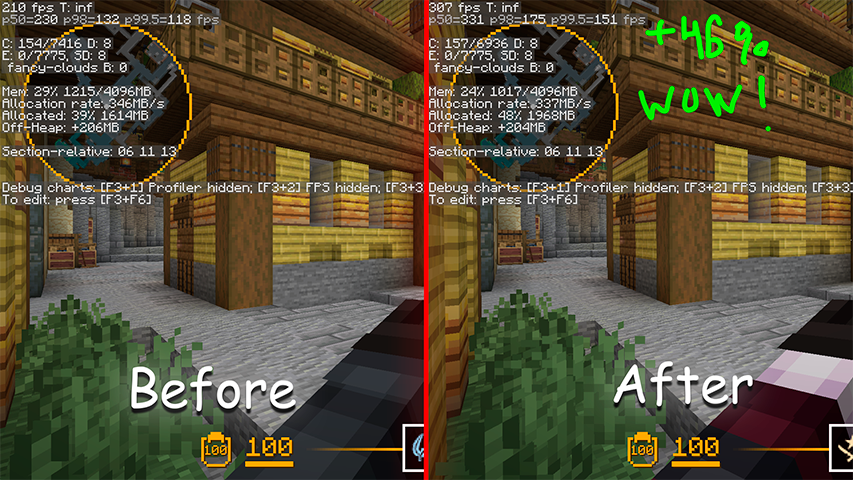
Benchmarks
Default 1.21.11 Fabric version
Before: Without mods
After: With LCull
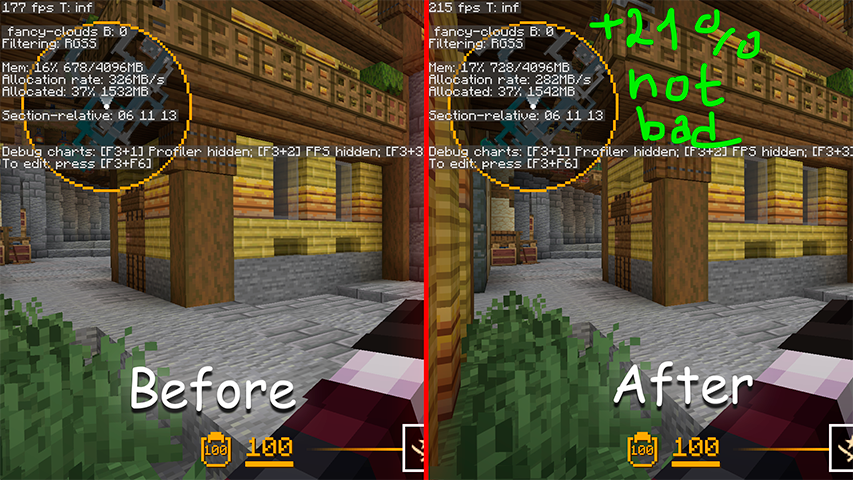
1.21.11 Fabric with mods: Sodium, Entity Culling, Fabric API
Before: Without LCull
After: With LCull
Why I made this mod?
Minecraft keeps every loaded entity in the render loop even when it is behind your back or far outside the screen, so the GPU and CPU pay full price for things you will never see. In entity-heavy scenes, like RPG-modded servers, minigame hubs or CounterMine maps WITH UP TO 10K ENTITIES (or just a much amount of Display entities), that overhead turns into a real frame-rate tax. Sodium and Entity Culling already do excellent work on the block and entity side, but I wanted a small, focused frustum path tuned specifically for thousands of entities on screen at once, and a clean place to experiment with the rendering pipeline. LCull grows out of the ideas in Lomka (my earlier work that proved tick and refresh culling help a lot) and narrows the scope to one job: stop drawing entities that are not in the view frustum.
How the LCull's Frustum checks works?
Every frame the game already builds a Frustum for the active camera. LCull asks that frustum whether an entity's axis-aligned bounding box lives inside the visible volume, using the same cube-in-frustum test the renderer uses for chunks. When the whole box is outside, the entity is skipped during rendering and never reaches the draw call. The tricky part is stability: the frustum shifts a little whenever you move, change FOV or resize the window, and a naive check would make entities flicker at the screen edges. To avoid that LCull keeps a tiny per-entity cache of the last cull decision and only flips it when the camera context stays stable for a few ticks. The cache key is a quantized camera position plus the view direction plus the entity position, so a small camera jitter does not invalidate the result. This hysteresis gives smooth culling without re-evaluating every entity every frame.
What the Minecraft and LCull problem?
Minecraft does apply its own frustum to chunks and block entities, but the per-entity render loop still iterates and submits everything that is loaded, which is exactly why off-screen mobs cost as much as on-screen ones. LCull removes that off-screen cost, yet it cannot remove entities hidden behind walls, because that needs occlusion culling and a visibility graph, a much harder problem than a frustum test. The mod also does nothing useful when there are only a few entities, or in singleplayer where the simulation, not rendering, is the bottleneck. Because culling is decided on the render thread, entities can pop out the instant they leave the view; that is the intended trade for the FPS win, and it trades a little extra CPU work for the frustum evaluation. There is also a narrow compatibility edge: a mod that assumes every entity is "rendered" each frame could behave oddly, which is why LCull stays an opt-in, tunable tweak rather than a silent override.
Links
Project description from CurseForge.
Pick your setup
LCull by Minecraft version and loader
Choose the version and loader you play, then open the matching release.
Minecraft version
26.1.2
3 loader buildsMinecraft version
26.1.1
3 loader buildsMinecraft version
26.1
3 loader buildsMinecraft version
1.21.11
3 loader buildsMinecraft version
1.21.10
3 loader buildsMinecraft version
1.21.9
3 loader buildsMinecraft version
1.21.8
3 loader buildsMinecraft version
1.21.7
3 loader buildsMinecraft version
1.21.6
3 loader buildsMinecraft version
1.21.4
3 loader buildsMinecraft version
1.21.1
3 loader buildsShowing the newest 12 of 14 game versions. Older files are in the list below.
Check the dependencies, then try the file in a copied instance before changing a world you care about.
Recent files
LCull versions and loaders
NeoForge | 26.2 | 1.0.0
lcull-1.0.0-neoforge+26.2.jar
28 Aug 2026
Client Source doesn’t say Server Source doesn’t say Dependencies No extras listed Listed on Release listing
Check the 26.2 · NeoForge setup NeoForge26.2 release
NeoForge | 26.1 | 1.0.0
lcull-1.0.0-neoforge+26.1.jar
28 Aug 2026
Client Source doesn’t say Server Source doesn’t say Dependencies No extras listed Listed on Release listing
Check the 26.1.2 · NeoForge setup NeoForge26.126.1.126.1.2 release
NeoForge | 1.21.11 | 1.0.0
lcull-1.0.0-neoforge+1.21.11.jar
28 Aug 2026
Client Source doesn’t say Server Source doesn’t say Dependencies No extras listed Listed on Release listing
Check the 1.21.11 · NeoForge setup NeoForge1.21.11 release
NeoForge | 1.21.9 | 1.0.0
lcull-1.0.0-neoforge+1.21.9.jar
28 Aug 2026
Client Source doesn’t say Server Source doesn’t say Dependencies No extras listed Listed on Release listing
Check the 1.21.10 · NeoForge setup NeoForge1.21.91.21.10 release
NeoForge | 1.21.6 | 1.0.0
lcull-1.0.0-neoforge+1.21.6.jar
28 Aug 2026
Client Source doesn’t say Server Source doesn’t say Dependencies No extras listed Listed on Release listing
Check the 1.21.8 · NeoForge setup 1.21.81.21.61.21.7NeoForge release
NeoForge | 1.21.4 | 1.0.0
lcull-1.0.0-neoforge+1.21.4.jar
28 Aug 2026
Client Source doesn’t say Server Source doesn’t say Dependencies No extras listed Listed on Release listing
Check the 1.21.4 · NeoForge setup 1.21.4NeoForge release
NeoForge | 1.21.1 | 1.0.0
lcull-1.0.0-neoforge+1.21.jar
28 Aug 2026
Client Source doesn’t say Server Source doesn’t say Dependencies No extras listed Listed on Release listing
Check the 1.21.1 · NeoForge setup 1.211.21.1NeoForge release
Forge | 1.20.1 | 1.0.0
lcull-1.0.0-forge+1.20.1.jar
28 Aug 2026
Client Source doesn’t say Server Source doesn’t say Dependencies No extras listed Listed on Release listing
Check the 1.20.1 · Forge setup 1.20.1Forge release
Fabric | 26.2 | 1.0.0
lcull-1.0.0-fabric+26.2.jar
28 Aug 2026
Client Source doesn’t say Server Source doesn’t say Dependencies No extras listed Listed on Release listing
Check the 26.2 · Fabric setup FabricQuilt26.2 release
Fabric | 26.1 | 1.0.0
lcull-1.0.0-fabric+26.1.jar
28 Aug 2026
Client Source doesn’t say Server Source doesn’t say Dependencies No extras listed Listed on Release listing
Check the 26.1.2 · Fabric setup FabricQuilt26.126.1.1 release
Fabric | 1.21.11 | 1.0.0
lcull-1.0.0-fabric+1.21.11.jar
28 Aug 2026
Client Source doesn’t say Server Source doesn’t say Dependencies No extras listed Listed on Release listing
Check the 1.21.11 · Fabric setup FabricQuilt1.21.11 release
Fabric | 1.21.9 | 1.0.0
lcull-1.0.0-fabric+1.21.9.jar
28 Aug 2026
Client Source doesn’t say Server Source doesn’t say Dependencies No extras listed Listed on Release listing
Check the 1.21.10 · Fabric setup FabricQuilt1.21.91.21.10 release
Looking for an older file? The official CurseForge project page is in Resources.
 mod
mod CurseForge · Minecraft
AsyncParticles
Async particle ticking/rendering.
 mod
mod CurseForge · Minecraft
Hydrogen [FPS]
A new performance mod for modern Minecraft that aims to improve FPS, while keeping a vanilla feel.
 mod
mod CurseForge + Modrinth · Minecraft
Oreganized
Oreganized is a mod that adds two new metals to minecraft, Lead, Silver, and the alloy Electrum. All with their unique uses and abilities and not just a new meaningless toolset.