Just Enough Items (JEI) Optional for magicstick-1.2.0.jar
optionalMatching file found Matched file: 19.64.0.455 for NeoForge 1.21.1
CurseForge · Minecraft mod
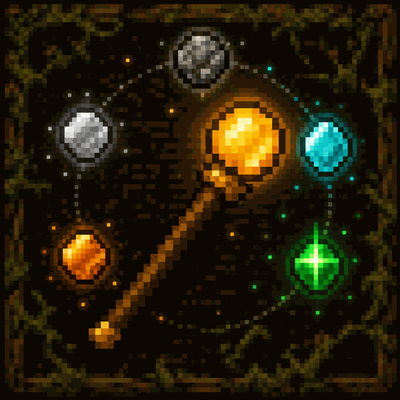
Turn a humble stick into a shared wand that absorbs the world, crafts with essence, and climbs Wood to End.
Quick answer
magicstick-1.2.0.jar targets 1.21.1 with NeoForge. The project page does not say whether this file belongs on the client, dedicated server, or both. No extra mods listed for this file.
Where it goes
The project page does not say whether this file belongs on the client, dedicated server, or both.
The source does not explicitly classify this release as client-only or server-only.
magicstick-1.2.0.jar. Change the file and its required mods may change too.
This file does not list any required mods. Do not add a library just because a different file uses it.
2 extra mods were pulled in by other dependencies. Indented rows show who needs each one. We only count dependency files that match this setup. A file for another loader does not fill the gap.
Before you install it
Built for magicstick-1.2.0.jar. Pick another file and the loader, install side or required mods may change.
Use magicstick-1.2.0.jar. It targets 1.21.1 with NeoForge; another release may have different loader, side or dependency requirements.
This file does not list any required mods. Do not add a library just because a different file uses it.
The project page does not say whether this file belongs on the client, dedicated server, or both.
Use the “Get this file” button beside magicstick-1.2.0.jar. It opens that exact file at the source.
About this project
NeoForge 21.1.230 for Minecraft 1.21.1. Client + server. Java 21. Optional JEI.
A vanilla stick is never just a stick. Punch a block with it and it becomes the STICK: one wand per player that eats nearby drops, stores a shared inventory, spends essence to craft, and grows from Wood through Earth, Metal, Crystal, Nether, and End.
There is no crafting table recipe for the wand itself. The ritual is: find a stick, hit the world.
Each player has one STICK binding. Inventory, essence counters, upgrades, enchants, food, and teleport marks live on that binding — ender-chest style, not on the item NBT of a single stack.
Hold the STICK in the hotbar. Item entities on the ground that the wand knows how to eat are absorbed instead of picked up.
The Codex tab is the ledger: search what you have tasted, and what is still locked.
Default key G opens the STICK Hub (rebind under Magic STICK):
| Tab | What it does |
|---|---|
| Inv | 27-slot wand inventory, shared across every copy |
| Ench | Enchant tracks earned by mining, fighting, swimming, sneaking, and collecting XP. Click a track to cycle the active level (including off) |
| Codex | Absorb progress and the enchanted-drop toggle |
| Food | Auto-feed from absorbed food: Manual, Stingy, or Glutton |
| Make | Materialize unlocked items by paying essence |
| Marks | End tier only: up to 8 recall points |
Sneak-use the STICK (when not planting a Recall mark) to open Essence Craft directly. Pay essence for vanilla recipes, smelt costs, smithing (including netherite), stored fluids, and items you have unlocked by absorbing. Amount buttons: 1, 1/4 stack, 1/2 stack, full stack.
If worn armor (or an elytra) would break, the wand spends essence and remakes a fresh unenchanted copy.
Default key V cycles the right-click behavior. Charge like a bow for Bolt and Warp Bolt.
| Mode | When it unlocks | What it does |
|---|---|---|
| Bolt | Always | Spend essence to fire a damage bolt. Charge longer for a harder hit |
| Blink | End STICK | Line-of-sight teleport, paid in End essence |
| Warp Bolt | End STICK | Fire a bolt; you warp to where it lands |
| Recall | End STICK | Teleport to the selected mark. Sneak-use plants or updates a mark. G → Marks to pick, rename, or forget |
| Flight Boost | Absorb an elytra | Firework-style boost while gliding |
Hotbar place mode: with the STICK selected, the last absorb-list block you used can be placed by spending its essence.
Absorb enough of the next essence and the wand upgrades. The item model, mining level, and melee scale with the tier.
| Tier | Roughly equals | You start using |
|---|---|---|
| Wood | Wooden tools | Absorb, Hub, Bolt, Essence Craft |
| Earth | Stone | Earth essence, stronger mining |
| Metal | Iron | Fluid scoop / place |
| Crystal | Diamond | Crystal essence, Silk Touch track |
| Nether | Netherite | Nether essence, hotter work |
| End | The End | Blink, Warp Bolt, Recall, Marks tab |
Flight (not a use mode until elytra): absorb a dragon egg (punch the block with the STICK — it will not teleport away) to unlock creative-style flight while the wand is in the hotbar, paid in End essence (double-tap space). Absorb an elytra to glide without wearing one; Flight Boost then appears on V.
JEI is optional. The wand works without it.
With JEI installed, use + or drag a recipe / ghost ingredient onto Essence Craft to focus that output. The wand still checks absorb unlocks and essence cost.
All Rights Reserved. See LICENSE.
Source and issues: https://github.com/SilverTechnoMage/magicstick
Project description from CurseForge.
Pick your setup
Choose the version and loader you play, then open the matching release.
Check the dependencies, then try the file in a copied instance before changing a world you care about.
Recent files
28 Aug 2026
Looking for an older file? The official CurseForge project page is in Resources.
 mod
modThis is a major overhaul addon for **Dyson Cube Project**.
 mod
modBuilt off of Immersive Aeronautics and IPSable, this mod allows seamless compatibility between Immersive Portals and Create Aeronautics (and more generally Sable)
 mod
modJoin Public Safety. Hunt devils born from fear. Make contracts that hurt. Become something worse than human, or die as one.