Minecraft version
Back to mods 
CurseForge · Minecraft mod
Solo Leveling: Gate Compass
Helper Addon that adds Visually stunning Gate Compass that helps you to find Gates more easily
Choose a version Pick your version below, then grab the matching file.
Quick answer
Which Solo Leveling: Gate Compass release should I use?
Latest stable file SLG1.1.0-NeoForge-1.21.1.jar
Game version 1.21.1
Loader NeoForge
Solo Leveling: Gate Compass SLG1.1.0-NeoForge-1.21.1.jar targets 1.21.1 with NeoForge. The project page does not say whether this file belongs on the client, dedicated server, or both. No extra mods listed for this file.
Where it goes
Is Solo Leveling: Gate Compass required on the client, server, or both?
The project page does not say whether this file belongs on the client, dedicated server, or both.
Client Source doesn’t say
Dedicated server Source doesn’t say
Loader for this release NeoForge
Required install it here Optional supported, not mandatory Not supported do not install here Source doesn’t say do not assume
The source does not explicitly classify this release as client-only or server-only.
What else does Solo Leveling: Gate Compass SLG1.1.0-NeoForge-1.21.1.jar need?
SLG1.1.0-NeoForge-1.21.1.jar. Change the file and its required mods may change too.
This file does not list any required mods. Do not add a library just because a different file uses it.
This file does not list any required or optional mods.
Before you install it
Add Solo Leveling: Gate Compass without breaking your instance.
Built for Solo Leveling: Gate Compass SLG1.1.0-NeoForge-1.21.1.jar. Pick another file and the loader, install side or required mods may change.
- 01
Stick to this file
Use SLG1.1.0-NeoForge-1.21.1.jar. It targets 1.21.1 with NeoForge; another release may have different loader, side or dependency requirements.
- 02
Bring the mods it needs
This file does not list any required mods. Do not add a library just because a different file uses it.
- 03
Put it on the correct side
The project page does not say whether this file belongs on the client, dedicated server, or both.
- 04
Pick the file you checked
Use the “Get this file” button beside SLG1.1.0-NeoForge-1.21.1.jar. It opens that exact file at the source.
About this project
What does Solo Leveling: Gate Compass add?
 SLR Gate Compass (SLG)
An addon for Solo Leveling: Reawakening.
SLR Gate Compass adds a dedicated Gate Compass to your HUD, allowing you to track Gates without having to guess their direction or constantly search for them. Gate direction, rank, and distance are displayed directly on the compass, so you can keep moving while staying aware of where Gates are located.
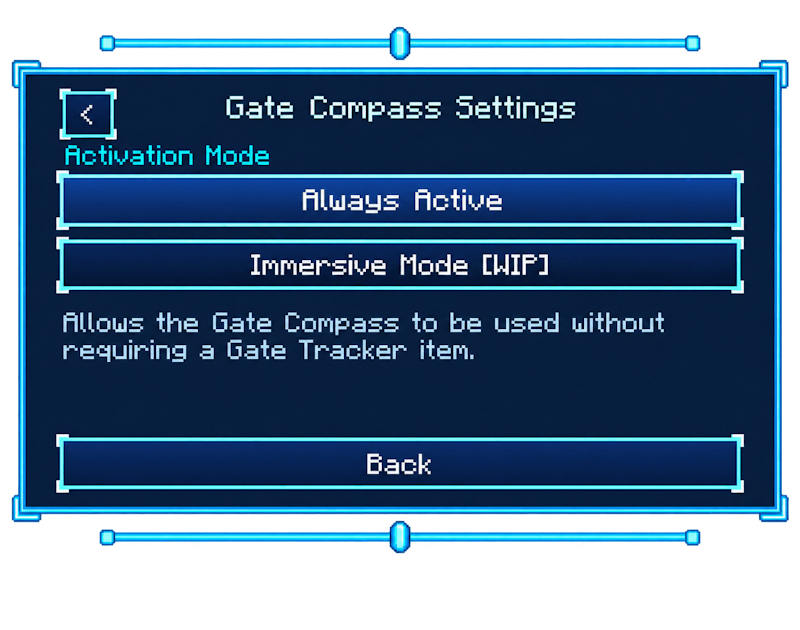
This is the first release of SLR Gate Compass. It currently includes the compass, Gate tracking, and in-game settings. Additional systems such as the Secretary NPC, Gate Tracker item, and Immersive Mode are planned for a later update.
Requirements :
Minecraft - 1.21.1
The Gate Compass
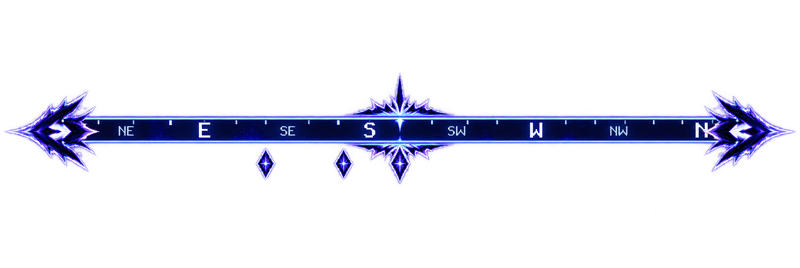
The compass is displayed directly on the HUD and includes the main directions:
N, NE, E, SE, S, SW, W, and NW.
The compass follows your facing direction as you turn, similar to a normal Minecraft compass, but specifically designed around Gate
When a Gate is detected, its marker appears on the compass. Each marker displays the Gate's rank:
E, D, C, B, A, S, and Red
When you look toward a tracked Gate, its current distance is displayed underneath the marker in blocks.
Multiple Gates can be displayed on the compass at the same time. Each marker is positioned according to the Gate's actual direction, making it easy to tell where different Gates are located relative to you.
Gates can be detected both from the world and through SLR announcements. Once detected, they remain tracked on the compass even after they are outside normal render distance, so you aren't limited to Gates that are currently loaded nearby.
Crafting Recipe & Secretary
The recipe uses Iron around a S-Rank Mana Crystal in the center, with Redstone in all four corners.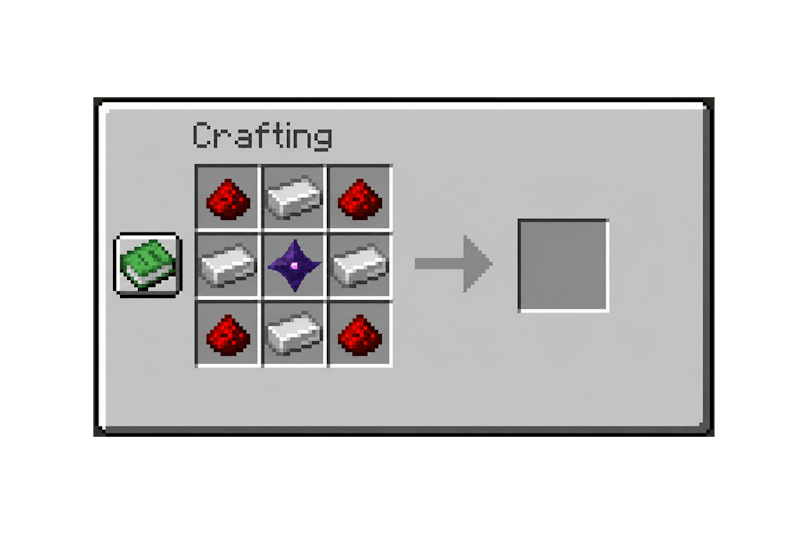
Mechanics for Secretary in eveulator
You can Obtain the Gate tracker trough the Secretary Quest when you right click her you can chose form two questions.
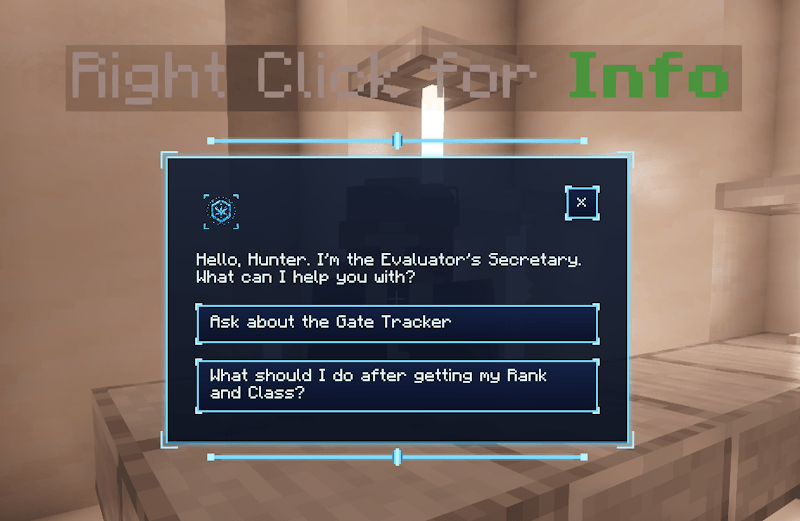
Settings (I)
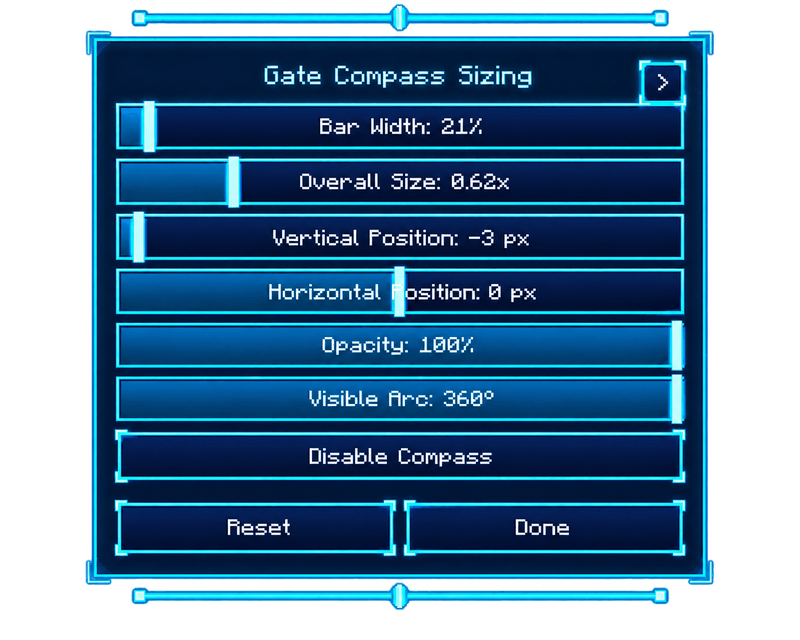
Press I to open the compass settings while in-game. Changes are applied immediately, so you can adjust the HUD without leaving your world.
Available settings:
- Size
- Width
- Vertical position
- Horizontal position
- Opacity
- Visible compass arc
- Show or hide the compass
Multiplayer
Gate positions are provided by the server, keeping tracked Gate markers synchronized with their actual locations in the world.
Compatibility
Made specifically for Solo Leveling: Reawakening on NeoForge 1.21.1.
SLR Gate Compass does not replace or modify SLR's existing menus. It adds the Gate Compass overlay and its accompanying settings.
Updates & Support
SLR Gate Compass is designed to stay focused on its main purpose: providing a clean and useful Gate Compass HUD for Solo Leveling: Reawakening.
Future updates will mainly focus on bug fixes, compatibility, performance, and visual improvements, as well as adjustments when needed to keep the compass working properly alongside SLR.
Feedback, suggestions, and bug reports can be posted in the comments, or you can contact me on Discord.
Discord: goldik_88
Info
Fan-made addon.
Not affiliated with, endorsed by, or officially connected to Solo Leveling, Mojang, or Microsoft.
Project description from CurseForge.
Pick your setup
Solo Leveling: Gate Compass by Minecraft version and loader
Choose the version and loader you play, then open the matching release.
Check the dependencies, then try the file in a copied instance before changing a world you care about.
Recent files
Solo Leveling: Gate Compass versions and loaders
SLG1.1.0-NeoForge-1.21.1.jar
SLR Gate Compass.jar
29 Aug 2026
Client Source doesn’t say Server Source doesn’t say Dependencies No extras listed Listed on Release listing
Check the 1.21.1 · NeoForge setup 1.21.1NeoForge release
SLG1.0.0-NeoForge-1.21.1.jar
SLR Gate Compass.jar
28 Aug 2026
Client Source doesn’t say Server Source doesn’t say Dependencies No extras listed Listed on Release listing
Check the 1.21.1 · NeoForge setup 1.21.1NeoForge release
Looking for an older file? The official CurseForge project page is in Resources.
 mod
mod CurseForge · Minecraft
Give me FPS
Give Me FPS is a performance optimization mod made specifically for Create.
 mod
mod CurseForge · Minecraft
Sengoku Jidai, Japanese Overhaul
An immense mod that adds and modifys weapons, biomes, mobs, world gen, blocks, and much much more.
 mod
mod CurseForge + Modrinth · Minecraft
Neo Vitae
Spill blood for power. Altars that consume life, sigils that bend the world, custom demons in an endless dungeon, sentient armor that drinks souls, a shield that pays your damage in essentia. Datapack-driven from the ground up.