Minecraft version
Back to mods 
CurseForge · Minecraft mod
Router Chest
One router chest to rule them all.
Choose a version Pick your version below, then grab the matching file.
Quick answer
Which Router Chest release should I use?
Latest stable file routerchest-1.1.1.jar
Game version 1.20.1
Loader Forge
Router Chest routerchest-1.1.1.jar targets 1.20.1 with Forge. The project page does not say whether this file belongs on the client, dedicated server, or both. No extra mods listed for this file.
Where it goes
Is Router Chest required on the client, server, or both?
The project page does not say whether this file belongs on the client, dedicated server, or both.
Client Source doesn’t say
Dedicated server Source doesn’t say
Loader for this release Forge
Required install it here Optional supported, not mandatory Not supported do not install here Source doesn’t say do not assume
The source does not explicitly classify this release as client-only or server-only.
What else does Router Chest routerchest-1.1.1.jar need?
routerchest-1.1.1.jar. Change the file and its required mods may change too.
This file does not list any required mods. Do not add a library just because a different file uses it.
This file does not list any required or optional mods.
Before you install it
Add Router Chest without breaking your instance.
Built for Router Chest routerchest-1.1.1.jar. Pick another file and the loader, install side or required mods may change.
- 01
Stick to this file
Use routerchest-1.1.1.jar. It targets 1.20.1 with Forge; another release may have different loader, side or dependency requirements.
- 02
Bring the mods it needs
This file does not list any required mods. Do not add a library just because a different file uses it.
- 03
Put it on the correct side
The project page does not say whether this file belongs on the client, dedicated server, or both.
- 04
Pick the file you checked
Use the “Get this file” button beside routerchest-1.1.1.jar. It opens that exact file at the source.
About this project
What does Router Chest add?
Chest Router
Overview Chest Router is a highly optimized, unified network storage and routing mod. Moving away from tedious category management, it introduces a streamlined "Terminal Grid" system. A single Router Chest acts as a central hub, automatically distributing inserted items via Smart Stacking while providing a paginated, searchable interface to view and extract from all connected chests within a 128-block radius. FULLY COMPATIBLE WITH MODDED ITEMS AND MODDED STORAGE UNITS.
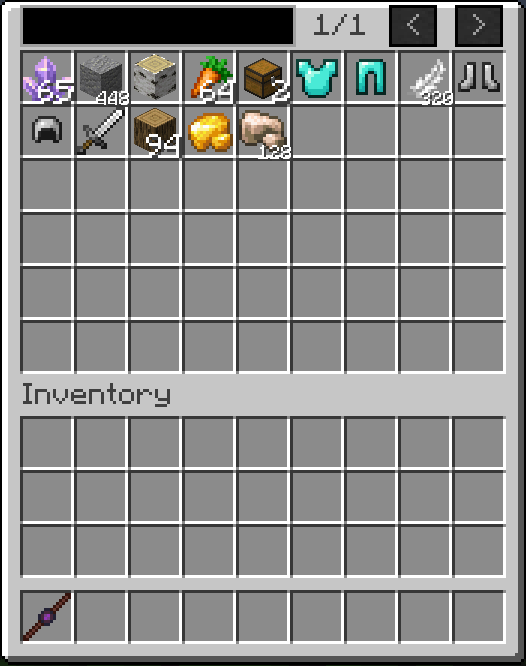
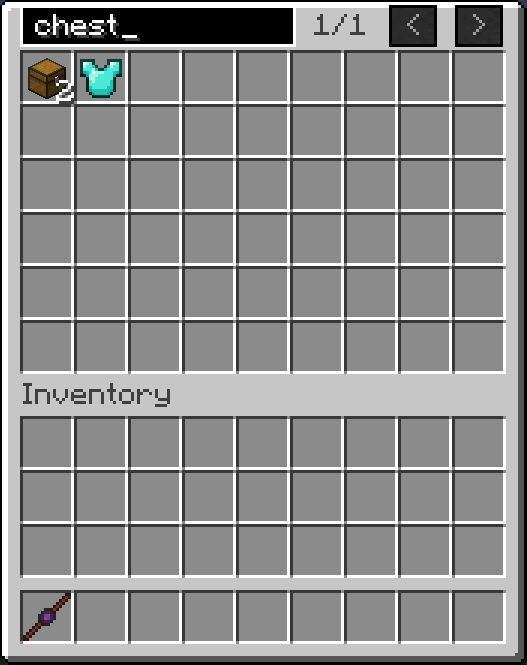
Core Features
Unified Storage Terminal: Access the inventories of all linked chests from a single Router Chest interface. The GUI features infinite pagination and a built-in search bar to find items instantly.
Smart Stacking (Auto-Routing): Items placed into the Router Chest are automatically transported to linked chests that already contain the exact same item. If no matching item is found or the stacks are full, it deposits the item into the first available empty slot.
Deep Storage Visualization: The Router Chest interface bypasses standard vanilla visual limits. If you have thousands of an item across your network, it condenses them into a single slot visually, displaying customized quantity formats (e.g., "1.5k", "2.1M") while safely maintaining vanilla 64-stack limits upon extraction.
Bulletproof Stability: Engineered with strict recursion breakers and thread-safe operations. The network prevents infinite loops, block-update crashes, and chunk-boundary deadlocks, isolating the server from crashes even if a connected modded storage block malfunctions.
Items and Blocks 1. Router Chest The central hub and terminal of the network. It provides the search UI and handles all insertion logic. Crafting Recipe: 4x Obsidian (corners), 4x Tuff (edges), 1x Ender Pearl (center).
2. Linker Wand The configuration tool used to connect or disconnect standard chests to your Router Chest network. Crafting Recipe: 2x Stick (top-middle and bottom-middle), 1x Ender Pearl (center).
Usage Guide
Synchronizing the Wand: Hold the Linker Wand and Shift + Right-Click a Router Chest. The wand will memorize this Router's coordinates and dimension.
Linking Chests: With a synchronized wand, Right-Click any standard storage chest. A sound effect will play, and the chest is now part of the network (must be within 128 blocks of the Router).
Unlinking Chests: To remove a chest from the network, Shift + Right-Click it with the synchronized wand.
Project description from CurseForge.
Pick your setup
Router Chest by Minecraft version and loader
Choose the version and loader you play, then open the matching release.
Check the dependencies, then try the file in a copied instance before changing a world you care about.
Recent files
Router Chest versions and loaders
routerchest-1.1.1.jar
2 Sept 2026
Client Source doesn’t say Server Source doesn’t say Dependencies No extras listed Listed on Release listing
Check the 1.20.1 · Forge setup 1.20.1Forge release
routerchest-1.1.0.jar
1 Sept 2026
Client Source doesn’t say Server Source doesn’t say Dependencies No extras listed Listed on Release listing
Check the 1.20.1 · Forge setup 1.20.1Forge release
routerchest-1.0.1.jar
29 Aug 2026
Client Source doesn’t say Server Source doesn’t say Dependencies No extras listed Listed on Release listing
Check the 1.20.1 · Forge setup 1.20.1Forge release
routerchest-1.0.0.jar
29 Aug 2026
Client Source doesn’t say Server Source doesn’t say Dependencies No extras listed Listed on Release listing
Check the 1.20.1 · Forge setup 1.20.1Forge release
Looking for an older file? The official CurseForge project page is in Resources.