Minecraft version
Back to mods 
CurseForge · Minecraft mod
Graphics Presets
Switch seamlessly between Very Low and Ultra graphics presets with automated Shader, Distant Horizons, and Physics Mod configurations.
Choose a version Pick your version below, then grab the matching file.
Quick answer
Which Graphics Presets release should I use?
Latest stable file Graphics Presets (Voxy Edition)3.0
Game version 26.1, 26.1.1, 26.1.2
Loader Fabric
Graphics Presets (Voxy Edition)3.0 targets 26.1, 26.1.1, 26.1.2 with Fabric. The project page does not say whether this file belongs on the client, dedicated server, or both. No extra mods listed for this file.
Where it goes
Is Graphics Presets required on the client, server, or both?
The project page does not say whether this file belongs on the client, dedicated server, or both.
Client Source doesn’t say
Dedicated server Source doesn’t say
Loader for this release Fabric
Required install it here Optional supported, not mandatory Not supported do not install here Source doesn’t say do not assume
The source does not explicitly classify this release as client-only or server-only.
What else does Graphics Presets (Voxy Edition)3.0 need?
Graphics Presets (Voxy Edition)3.0. Change the file and its required mods may change too.
This file does not list any required mods. Do not add a library just because a different file uses it.
This file does not list any required or optional mods.
Before you install it
Add Graphics Presets without breaking your instance.
Built for Graphics Presets (Voxy Edition)3.0. Pick another file and the loader, install side or required mods may change.
- 01
Stick to this file
Use Graphics Presets (Voxy Edition)3.0. It targets 26.1, 26.1.1, 26.1.2 with Fabric; another release may have different loader, side or dependency requirements.
- 02
Bring the mods it needs
This file does not list any required mods. Do not add a library just because a different file uses it.
- 03
Put it on the correct side
The project page does not say whether this file belongs on the client, dedicated server, or both.
- 04
Pick the file you checked
Use the “Get this file” button beside Graphics Presets (Voxy Edition)3.0. It opens that exact file at the source.
About this project
What does Graphics Presets add?
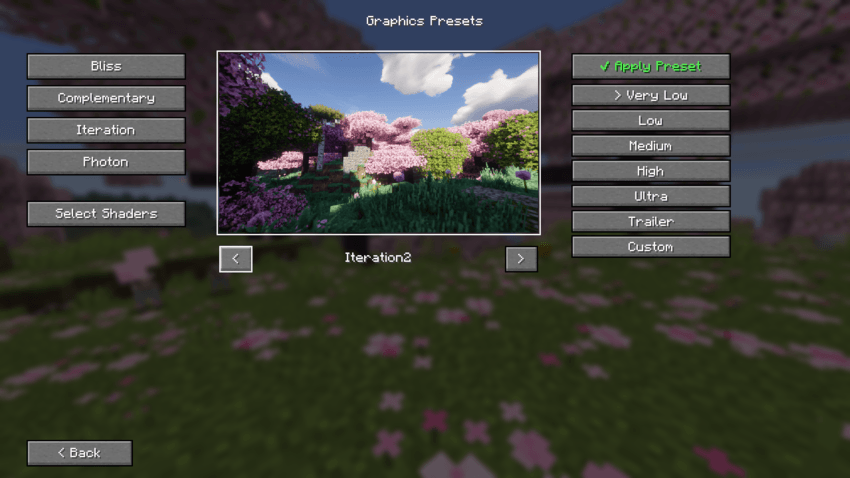
⚡ Graphics Presets
Graphics Presets is a dedicated performance and visual quality manager built for Voxy with shader, Perfect Realism and any custom Fabric modpack. It allows players to seamlessly switch between predefined visual and performance profiles with a single click right from the Main Menu, eliminating the need to manually tweak complex configuration files.
📦 Available Editions & Versions
This mod provides two dedicated editions depending on your modpack setup:
🔹 Voxy Edition (v3.0+): Tailored specifically for Voxy LOD & Iris Shaders. Features a 6-tier VRAM-based scaling system (Potato to Ultra) and automatic multi-file sync (voxy-config & voxyworldgenv2).
🔹 Classic / DH Edition (v2.x): Built for Distant Horizons (DH), Iris Shaders, and Physics Mod setup.
🌟 Key Features (Voxy Edition)
⚡ VRAM-Based Presets: Instantly switch between 6 optimized tiers mapped directly to your GPU memory:
• Potato (2GB VRAM): 64 Chunks Voxy LOD | 6 Vanilla RD
• Very Low (4GB VRAM): 128 Chunks Voxy LOD | 6 Vanilla RD
• Low (6GB VRAM): 256 Chunks Voxy LOD | 8 Vanilla RD
• Medium (8GB VRAM): 512 Chunks Voxy LOD | 8 Vanilla RD
• High (12GB VRAM): 768 Chunks Voxy LOD | 10 Vanilla RD
• Ultra (16GB+ VRAM): 1024 Chunks Voxy LOD | 12 Vanilla RD
🔄 Synchronized Engine Configuration: Dynamically tunes both voxy-config.json and voxyworldgenv2.json parameters (generation radius, queue size, parallel tasks) to ensure zero void gaps or stuttering during high-speed flight.
🖼️ Multi-Shader Preview System: Interactive UI preview with arrow navigation for BSL, Complementary, Derivative, Photon, Solas, and Vanilla visual styles.
⚡ Standalone & Modpack Ready: Works out-of-the-box for Perfect Realism, but fully compatible with any custom Fabric setup running Voxy and Iris Shaders.
💡 How to Use
- Download the correct file edition (Voxy Edition or DH Classic Edition) for your modpack.
- Click the ⚡ Graphics Presets button on the Main Menu or Options screen.
- Choose your preferred shader preview and select the preset matching your hardware.
- Click ✔ Apply Preset.
- Restart Minecraft so background engine changes take full effect.
🛠️ Requirements & Compatibility
Please make sure you have the required mods installed for your chosen edition:
For Voxy Edition:
• Fabric API
• Voxy (LOD Mod)
• Voxy World Gen v2
• Iris Shaders
For DH Classic Edition:
• Fabric API
• Distant Horizons
• Physics Mod
• Iris Shaders
Project description from CurseForge.
Pick your setup
Graphics Presets by Minecraft version and loader
Choose the version and loader you play, then open the matching release.
Minecraft version
26.1.2
1 loader buildMinecraft version
26.1.1
1 loader buildMinecraft version
26.1
1 loader buildCheck the dependencies, then try the file in a copied instance before changing a world you care about.
Recent files
Graphics Presets versions and loaders
Graphics Presets (Voxy Edition)3.0
graphics-presets-3.0(voxy edition).jar
16 Sept 2026
Client Source doesn’t say Server Source doesn’t say Dependencies No extras listed Listed on Release listing
Check the 26.2 · Fabric setup Fabric26.126.1.126.1.2 release
PerfectRealism Edition-v2.1hotfix
graphics-presets-2.1hotfix.jar
4 Sept 2026
Client Source doesn’t say Server Source doesn’t say Dependencies No extras listed Listed on Release listing
Check the 26.1 · Fabric setup Fabric26.1 release
graphics-presets v2.0
graphics-presets v2.0.jar
3 Sept 2026
Client Source doesn’t say Server Source doesn’t say Dependencies No extras listed Listed on Release listing
Check the 26.1 · Fabric setup Fabric26.1 beta
Perfect Realism - Graphics Presets v1.0
graphics-presets-1.0.0.jar
31 Aug 2026
Client Source doesn’t say Server Source doesn’t say Dependencies No extras listed Listed on Release listing
Check the 26.1 · Fabric setup Fabric26.1 alpha
Looking for an older file? The official CurseForge project page is in Resources.