Minecraft version
Back to mods 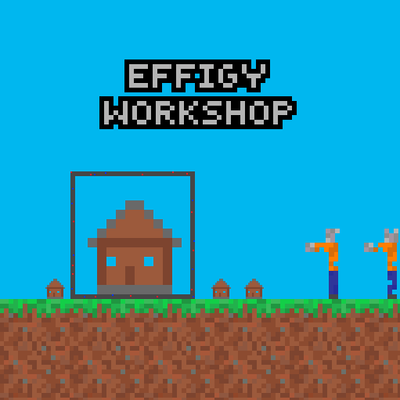
CurseForge · Minecraft mod
Effigy Workshop
Explore the ruins of the old workshop. And craft your own decorations block by block in Creative or Survival mode.
Choose a version Pick your version below, then grab the matching file.
Quick answer
Which Effigy Workshop release should I use?
Latest stable file effigyworkshop-1.0.1-neoforge-1.21.1
Game version 1.21.1
Loader NeoForge
Effigy Workshop effigyworkshop-1.0.1-neoforge-1.21.1 targets 1.21.1 with NeoForge. The project page does not say whether this file belongs on the client, dedicated server, or both. No extra mods listed for this file.
Where it goes
Is Effigy Workshop required on the client, server, or both?
The project page does not say whether this file belongs on the client, dedicated server, or both.
Client Source doesn’t say
Dedicated server Source doesn’t say
Loader for this release NeoForge
Required install it here Optional supported, not mandatory Not supported do not install here Source doesn’t say do not assume
The source does not explicitly classify this release as client-only or server-only.
What else does Effigy Workshop effigyworkshop-1.0.1-neoforge-1.21.1 need?
effigyworkshop-1.0.1-neoforge-1.21.1. Change the file and its required mods may change too.
This file does not list any required mods. Do not add a library just because a different file uses it.
This file does not list any required or optional mods.
Before you install it
Add Effigy Workshop without breaking your instance.
Built for Effigy Workshop effigyworkshop-1.0.1-neoforge-1.21.1. Pick another file and the loader, install side or required mods may change.
- 01
Stick to this file
Use effigyworkshop-1.0.1-neoforge-1.21.1. It targets 1.21.1 with NeoForge; another release may have different loader, side or dependency requirements.
- 02
Bring the mods it needs
This file does not list any required mods. Do not add a library just because a different file uses it.
- 03
Put it on the correct side
The project page does not say whether this file belongs on the client, dedicated server, or both.
- 04
Pick the file you checked
Use the “Get this file” button beside effigyworkshop-1.0.1-neoforge-1.21.1. It opens that exact file at the source.
About this project
What does Effigy Workshop add?
Allows you to build 3D or 2D decorations directly in-game to enhance the look of your house however you like.
The necessary resources can be crafted directly using vanilla materials. However, in survival mode, you might prefer to gather these resources from the old ruined workshop.
Walkthrough (spoiler) :
- Craft frame blocks using tuff, lapis and redstone.
- Build the frame in 2D or 3D (square or cube).
- Collect Fungal Cloths using an enchanted hoe (apply the ‘Mycelial Touch’ enchantment to giant mushrooms).
- Draw within the frame using coloured* or uncoloured cloths.
- Create a sketch (2D) or a model (3D). Rename it using an anvil.
- Place it on the frame to create your personalised decoration.
- Bonus: Empty your frame in one click with the Resonator enchantment (you’ll recover the resources)
- Start again!
*Shift-right-click the stack of cloth in your hand to copy the colour of a cloth you’re looking at. A cloth’s colour, brightness and transparency can be changed in the crafting table by surrounding it with dyes, glowstone or slime. They can also be darkened or lightened with just one black or white dye.
Project description from CurseForge.
Pick your setup
Effigy Workshop by Minecraft version and loader
Choose the version and loader you play, then open the matching release.
Check the dependencies, then try the file in a copied instance before changing a world you care about.
Recent files
Effigy Workshop versions and loaders
effigyworkshop-1.0.1-neoforge-1.21.1
effigyworkshop-1.0.1-neoforge-1.21.1.jar
1 Sept 2026
Client Source doesn’t say Server Source doesn’t say Dependencies No extras listed Listed on Release listing
Check the 1.21.1 · NeoForge setup 1.21.1NeoForge release
Looking for an older file? The official CurseForge project page is in Resources.
 mod
mod CurseForge · Minecraft
Epic RPG: Legendary Titles
Complete achievements to unlock Titles and customizable Perks.
 mod
mod CurseForge · Minecraft
Saro´s Road Blocks
Adds asphalt with slope/stair variants, crash barriers, street lights, and road marking tools for building realistic roads, highways, and on-ramps.
 mod
mod CurseForge · Minecraft
Saro´s Road Signs
Adds functional traffic lights, speed signs, stop signs, and custom sign packs with 3D models and sounds. Pairs with Saro's Road Blocks for complete road infrastructure.