Minecraft version
Back to mods 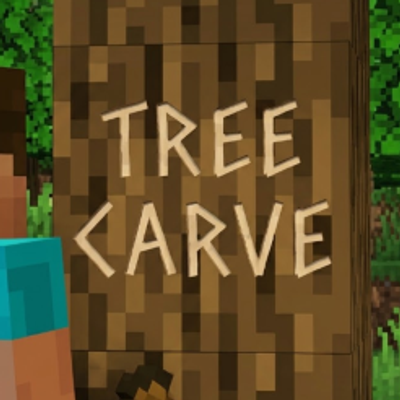
CurseForge · Minecraft mod
Tree Carve
Sneak and right-click a tree with your sword to carve a message into it. Chop the log or strip it with an axe and the message goes with it.
Choose a version Pick your version below, then grab the matching file.
Quick answer
Which Tree Carve release matches 26.1?
Best match for your filters Tree Carve 2.0.0 for 26.1.2 (NeoForge)
Game version 26.1, 26.1.1, 26.1.2
Loader NeoForge
Tree Carve 2.0.0 for 26.1.2 (NeoForge) targets 26.1, 26.1.1, 26.1.2 with NeoForge. The project page does not say whether this file belongs on the client, dedicated server, or both. No extra mods listed for this file.
Where it goes
Is Tree Carve required on the client, server, or both?
The project page does not say whether this file belongs on the client, dedicated server, or both.
Client Source doesn’t say
Dedicated server Source doesn’t say
Loader for this release NeoForge
Required install it here Optional supported, not mandatory Not supported do not install here Source doesn’t say do not assume
The source does not explicitly classify this release as client-only or server-only.
What else does Tree Carve 2.0.0 for 26.1.2 (NeoForge) need?
Tree Carve 2.0.0 for 26.1.2 (NeoForge) on 26.1. Every mod below is checked against that same setup.
This file does not list any required mods. Do not add a library just because a different file uses it.
This file does not list any required or optional mods.
Before you install it
Add Tree Carve without breaking your instance.
Built for Tree Carve 2.0.0 for 26.1.2 (NeoForge) on 26.1. Pick another file and the loader, install side or required mods may change.
- 01
Stick to this file
Use Tree Carve 2.0.0 for 26.1.2 (NeoForge). It targets 26.1, 26.1.1, 26.1.2 with NeoForge; another release may have different loader, side or dependency requirements.
- 02
Bring the mods it needs
This file does not list any required mods. Do not add a library just because a different file uses it.
- 03
Put it on the correct side
The project page does not say whether this file belongs on the client, dedicated server, or both.
- 04
Pick the file you checked
Use the “Get this file” button beside Tree Carve 2.0.0 for 26.1.2 (NeoForge). It opens that exact file at the source.
About this project
What does Tree Carve add?
Tree Carve
Leave a message on a tree.
Someone walks past a birch at the edge of your base and finds three words cut into it. That is the whole mod.
No new item to craft
You already have the tool. Sneak and right-click a log with any sword, and the face you hit becomes a carved message. Any wood, any tree, vanilla or from another mod — as long as the log still has its bark. A stripped log is the one thing you cannot carve: an axe would have nothing left to take the message off with again. Any sword will do, including one from another mod.
Your sword is otherwise untouched. A plain left-click chops the log exactly as it always did, with no modifier and nothing to unlearn.
The tree remembers, until it doesn't
A carving belongs to the trunk it was cut into. Fell the tree and the message is gone with it. Take an axe to the bark and the log strips exactly as it always has — and the message strips off with it, the way a real mark disappears under the blade.
Nothing to undo, nothing to clean up. If you want the words gone, do the same thing you would do to a real tree.
How it looks
The bark is untouched. Only the letters read as fresh-cut timber, in a shade taken from that species' own stripped wood — so an oak carving and a warped stem carving look like their own trees rather than the same paint on two backgrounds.
Arrange it however you like
The carving screen is the block face itself, drawn on that log's own wood. Place text and symbols where you want them, drag them, stretch them, turn them — what you arrange is what lands on the trunk. Text can be bold, italic, underlined or struck through, and every line picks its own hand from five, including the alphabet off an enchanting table and the runes off an illager banner.
Seventeen symbols
Hearts filled and hollow, an umbrella, a skull, stars, a flower, a note, the sun, a cloud, a snowflake, an anchor, a crown, an arrow, a cross — and the aiaigasa, the umbrella two names shelter under. A carving can be a declaration, a shelter marker or a warning without the words having to say so.
Lay a line of text over a symbol and it reads as cut into it.
A resource pack can bring artwork of its own in as one more symbol, and a datapack decides which ones a world offers.
Cut it in colour
Carrying a dye? Cut a piece in it. The colour tints the wood rather than covering it, so a red heart is still a cut in a trunk and not a sticker on one — and the dye is spent, the way it would be.
Made to fit your server
Type @ and pick from everyone who has ever played here; the name stays, the @ goes.
A message is rewritten only by whoever cut it, so nobody's words get quietly replaced under their name — though an axe still takes any carving off, for anyone standing in front of it.
Carving can be switched off, held to shorter messages, or opened up to planks and stripped logs. All of it changes in game, and everything past a barked log stays off until you say otherwise — the wiki has the list.
Requirements
Minecraft 1.21.1, on Fabric or NeoForge.
Requires Architectury API (CurseForge). On Fabric it also needs Fabric API (CurseForge) and Fabric Language Kotlin (CurseForge); on NeoForge, Kotlin for Forge (CurseForge).
Links
Full documentation lives on the wiki.
Found a bug, or want something carved that the mod cannot cut yet? The Discord picks reports up automatically and replies in your thread when the fix ships.
The mod is free and stays free — you can sponsor the author if a tree ever said something worth reading.
License: "If you make money, I make money" — free to use and redistribute for free; commercial use needs a revenue-sharing agreement. Full terms.
Project description from CurseForge.
Pick your setup
Tree Carve by Minecraft version and loader
Choose the version and loader you play, then open the matching release.
Minecraft version
26.2
2 loader buildsMinecraft version
26.1.2
2 loader buildsMinecraft version
26.1.1
2 loader buildsMinecraft version
26.1
2 loader buildsMinecraft version
1.21.1
2 loader buildsCheck the dependencies, then try the file in a copied instance before changing a world you care about.
Recent files
Tree Carve versions and loaders
Tree Carve 2.0.0 for 26.1.2 (NeoForge)
tree-carve-neoforge-2.0.0+26.1.2.jar
19 Oct 2026
Client Source doesn’t say Server Source doesn’t say Dependencies No extras listed Listed on Release listing
Check the 26.1 · NeoForge setup NeoForge26.126.1.126.1.2 release
Tree Carve 2.0.0 for 26.1.2 (Fabric)
tree-carve-fabric-2.0.0+26.1.2.jar
19 Oct 2026
Client Source doesn’t say Server Source doesn’t say Dependencies No extras listed Listed on Release listing
Check the 26.1 · Fabric setup Fabric26.126.1.126.1.2 release
Looking for an older file? The official CurseForge project page is in Resources.
 mod
CurseForge · Minecraft
FGM Plus
Real bust scaling, per-player shaping and custom hurt sounds for Wildfire's Female Gender Mod.
 mod
CurseForge + Modrinth · Minecraft
Do Another Barrel Roll
Microsoft flight simulator for Minecraft elytras, now native to NeoForge.
 mod
CurseForge + Modrinth · Minecraft
Misc Tweaks
Lightweight mod that adds a few QoL features and patches out gameplay annoyances