YetAnotherConfigLib Needed by Spatial GUI [NeoForge 26.1.x] v1.11.0
requiredMatching file found Matched file: 3.9.7 for neoforge 26.1

CurseForge · Minecraft mod
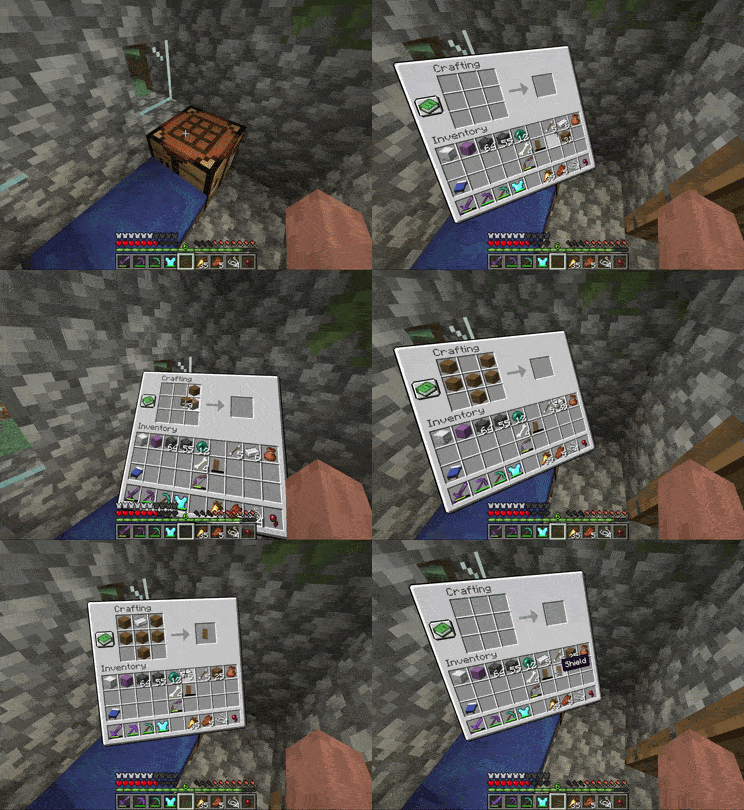
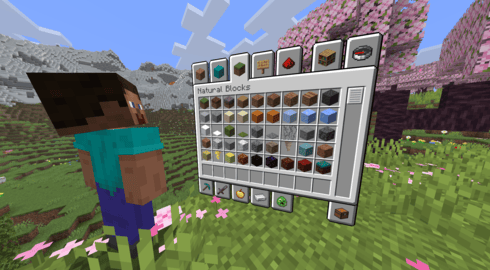
A client-side mod that renders inventory & container screens as a 3D plane.
Quick answer
Spatial GUI [NeoForge 26.1.x] v1.11.0 targets 26.1, 26.1.1, 26.1.2 with NeoForge. The project page does not say whether this file belongs on the client, dedicated server, or both. All 2 required mods have matching files.
Where it goes
The project page does not say whether this file belongs on the client, dedicated server, or both.
The source does not explicitly classify this release as client-only or server-only.
[NeoForge 26.1.x] v1.11.0 on 26.1.1. Every mod below is checked against that same setup.
Install YetAnotherConfigLib, YetAnotherConfigLib (YACL) first. We found matching files for this game-version and loader setup.
We only count dependency files that match this setup. A file for another loader does not fill the gap.
Before you install it
Built for Spatial GUI [NeoForge 26.1.x] v1.11.0 on 26.1.1. Pick another file and the loader, install side or required mods may change.
Use [NeoForge 26.1.x] v1.11.0. It targets 26.1, 26.1.1, 26.1.2 with NeoForge; another release may have different loader, side or dependency requirements.
Install YetAnotherConfigLib, YetAnotherConfigLib (YACL) first. We found matching files for this game-version and loader setup.
The project page does not say whether this file belongs on the client, dedicated server, or both.
Use the “Get this file” button beside [NeoForge 26.1.x] v1.11.0. It opens that exact file at the source.
About this project

A client-side Minecraft mod that turns screens into immersive 3D displays, with fully configurable first-person and third-person modes.
| Loader | Mod |
|---|---|
| All | YACL |
| Fabric | Fabric API & Mod Menu |
Open the config through the keybind (unbound by default), Mod Menu, or the config file. Spatial GUI has many options, so it is worth looking through them to tailor the mod to your preferences.
For advanced users and modpack creators, per-screen configuration profiles are supported via config/spatial-gui/profiles.json5. This file contains documentation.
Spatial GUI includes a built-in visual editor that lets you configure screen position, scale, rotation, and more in real-time. You can also create and manage profiles for different screens. Press the button in the config to enter editor mode, or bind it to a keybind in controls.

You can assign different editor profiles to specific screens. Press the profile picker key (backtick/tilde by default) while a screen is open to select a profile.
Spatial GUI is a client-side mod and does not need to be installed on the server.
However, compatibility isn't guaranteed with every mod. Spatial GUI modifies GUI and camera rendering, which may conflict with mods that modify these as well.
If you find a reproducible incompatibility with another mod, please report it on GitHub so it can be investigated. Reporting an issue helps make the mod better for everyone!
Spatial GUI has special compatibility with Punchy! & Punchy! Moves!
Warning: Lunar Client is not supported. Lunar Client modifies Minecraft's rendering in ways that are incompatible with Spatial GUI. While it's not completely incompatible and still functions in most cases, issues caused by using Lunar Client will not be addressed.
| Question | Answer |
|---|---|
| Does Spatial GUI work in multiplayer? | Yes. Other players and the server do not need to have Spatial GUI installed. |
| Does Spatial GUI give a gameplay advantage? | Spatial GUI is primarily visual and does not add or automate gameplay mechanics. Some settings can change how the camera behaves, so whether it is allowed on a particular server is up to that server's rules. |
| Is Spatial GUI compatible with _? | Probably! However, compatibility isn't guaranteed, especially with mods that modify GUIs, cameras, or rendering. If you encounter an issue with a specific mod, feel free to report it on GitHub. |
| Why is my GUI behaving strangely? | Another installed mod may be incompatible. Try to identify the mod involved, then check existing GitHub issues or open a new issue with steps to reproduce the problem. |
| Why is my GUI blurry? | This is usually caused by another mod or a client. Try and figure out which mod is causing this, or look in your client settings for terms like 'blur' and 'background'. |
| Can I use Spatial GUI in a modpack? | Yes. Spatial GUI is welcome in modpacks and no additional permission is required. Compatibility with other mods is not guaranteed. |
| Is Spatial GUI purely visual? | Almost entirely. Spatial GUI changes how existing screens and the camera are presented. One setting intentionally allows your rotation to persist after closing a GUI, which can turn your character's view. |
vibing for all of their GitHub contributions
DevPunchyMan & Godku (Punchy Guys Studios) for adding Spatial GUI compatibility in their mods!
Dizabanik for tons of code fixes and improvements
BUILDLCS for the Brazilian Portuguese translation
suheckii for the Russian translation
22SSendo, jankeverse, and Talbone for particularly awesome feature suggestions
Anyone else who reported bugs or suggested features :)
Project description from CurseForge.
Pick your setup
Choose the version and loader you play, then open the matching release.
Check the dependencies, then try the file in a copied instance before changing a world you care about.
Recent files
spatial-gui-1.11.0-26.1.2-neoforge.jar
7 Nov 2026
spatial-gui-1.11.0-26.1.2-fabric.jar
7 Nov 2026
spatial-gui-1.10.1-26.1.2-fabric.jar
3 Nov 2026
spatial-gui-1.10.1-26.1.2-neoforge.jar
3 Nov 2026
spatial-gui-1.10.0-26.1.2-neoforge.jar
3 Nov 2026
spatial-gui-1.10.0-26.1.2-fabric.jar
3 Nov 2026
spatial-gui-1.9.1+26.1.2-neoforge.jar
26 Oct 2026
spatial-gui-1.9.1+26.1.2-fabric.jar
26 Oct 2026
spatial-gui-1.9+26.1.2-neoforge.jar
24 Oct 2026
spatial-gui-1.9+26.1.2-fabric.jar
24 Oct 2026
spatial-gui-1.8+26.1.2-neoforge.jar
17 Oct 2026
spatial-gui-1.8+26.1.2-fabric.jar
17 Oct 2026
Looking for an older file? The official CurseForge project page is in Resources.