Minecraft version
Back to mods 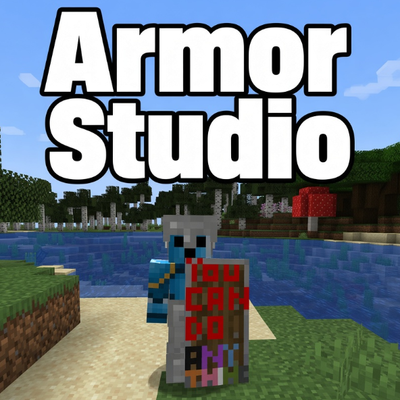
CurseForge · Minecraft mod
Armor Studio
Draw, paint, and fully customize your Armor and Shields in real-time with an interactive in-game 3D Studio
Choose a version Pick your version below, then grab the matching file.
Quick answer
Which Armor Studio release should I use?
Latest stable file paintarmor-fabric-1.21.1-1.5.5.jar
Game version 1.21.1
Loader Fabric
Armor Studio paintarmor-fabric-1.21.1-1.5.5.jar targets 1.21.1 with Fabric. The project page does not say whether this file belongs on the client, dedicated server, or both. No extra mods listed for this file.
Where it goes
Is Armor Studio required on the client, server, or both?
The project page does not say whether this file belongs on the client, dedicated server, or both.
Client Source doesn’t say
Dedicated server Source doesn’t say
Loader for this release Fabric
Required install it here Optional supported, not mandatory Not supported do not install here Source doesn’t say do not assume
The source does not explicitly classify this release as client-only or server-only.
What else does Armor Studio paintarmor-fabric-1.21.1-1.5.5.jar need?
paintarmor-fabric-1.21.1-1.5.5.jar. Change the file and its required mods may change too.
This file does not list any required mods. Do not add a library just because a different file uses it.
This file does not list any required or optional mods.
Before you install it
Add Armor Studio without breaking your instance.
Built for Armor Studio paintarmor-fabric-1.21.1-1.5.5.jar. Pick another file and the loader, install side or required mods may change.
- 01
Stick to this file
Use paintarmor-fabric-1.21.1-1.5.5.jar. It targets 1.21.1 with Fabric; another release may have different loader, side or dependency requirements.
- 02
Bring the mods it needs
This file does not list any required mods. Do not add a library just because a different file uses it.
- 03
Put it on the correct side
The project page does not say whether this file belongs on the client, dedicated server, or both.
- 04
Pick the file you checked
Use the “Get this file” button beside paintarmor-fabric-1.21.1-1.5.5.jar. It opens that exact file at the source.
About this project
What does Armor Studio add?
🎨 paint armor — Custom Armor & Shield Studio
**Paint Armor** allows you to draw, paint, and fully customize your Armor (Helmets, Chestplates, Leggings, Boots) and Shields directly in Minecraft with a powerful built-in **3D Painting Studio**!
Show off your unique designs to your friends on multiplayer servers! ⚔️✨
🌟 Key Features
- 🖌️ **In-Game Painting Studio:** Open the studio anytime by using the **Empty Canvas** item on your armor or shield.
- 🔄 **Real-Time 3D Rotating Preview:** Watch your armor update live on a rotatable 3D character model as you place pixels.
- 📐 **Face-by-Face Precision:** Easily select specific faces (*Front, Back, Sides, Top, Waist, Legs, Boots*) for pixel-perfect artwork.
- 🎨 **Unlimited Colors:**
- 16 Standard Minecraft Dye colors
- Full **RGB & Alpha sliders** with Hex (
#RRGGBB) code support. - 🛠️ **Full Toolset:** Pencil, Brush (Size 1–3), Eraser, Paint Bucket (Flood Fill), and Color Picker (Eyedropper).
- ↩️ **Undo & Redo:** Full history tracking (
Ctrl+Z/Ctrl+Y). - 📋 **Copy & Paste:** Copy designs across parts effortlessly.
- 💾 **Import & Export (.paint):** Save your favorite designs to
.paintfiles and share them with the community! - 🌐 **Multiplayer Compatible:** Custom painted gear is automatically synchronized and visible to all players on servers!
- 🌍 **Bilingual UI:** Instant one-click switch between **English** and **Turkish**.
📦 How to Use
- Craft an **Empty Canvas** using:
- 4x Paper
- 1x Dye (Any color)
- 3x Sticks
- **Right-click** with the Empty Canvas to open the Painting Studio.
- Select your gear piece and face, draw your masterpiece, and click **Save & Apply**!
⚠️ Disclaimer
*This mod provides creative freedom. Players are responsible for their own custom designs created in multiplayer.*
*Built with ❤️ for Minecraft Forge 1.20.1*
Admin / Moderation commands
/paint clear <player>/paint clear <player> <helmet|chestplate|leggings|boots|shield>/paint ban <player>/paint unban <player>/paint listbanned/paint reload
Project description from CurseForge.
Pick your setup
Armor Studio by Minecraft version and loader
Choose the version and loader you play, then open the matching release.
Minecraft version
1.20.1
2 loader buildsCheck the dependencies, then try the file in a copied instance before changing a world you care about.
Recent files
Armor Studio versions and loaders
paintarmor-fabric-1.21.1-1.5.5.jar
18 Oct 2026
Client Source doesn’t say Server Source doesn’t say Dependencies No extras listed Listed on Release listing
Check the 1.21.1 · Fabric setup Fabric1.21.1 release
paintarmor-fabric-1.20.1-1.5.5.jar
18 Oct 2026
Client Source doesn’t say Server Source doesn’t say Dependencies No extras listed Listed on Release listing
Check the 1.20.1 · Fabric setup Fabric1.20.1 release
paintarmor-1.20.1-1.5.5.jar
18 Oct 2026
Client Source doesn’t say Server Source doesn’t say Dependencies No extras listed Listed on Release listing
Check the 1.20.1 · Forge setup 1.20.1Forge release
paintarmor-fabric-1.20.1-1.0.5.jar
3 Sept 2026
Client Source doesn’t say Server Source doesn’t say Dependencies No extras listed Listed on Release listing
Check the 1.20.1 · Fabric setup Fabric1.20.1 release
paintarmor-fabric-1.21.1-1.0.5.jar
3 Sept 2026
Client Source doesn’t say Server Source doesn’t say Dependencies No extras listed Listed on Release listing
Check the 1.21.1 · Fabric setup Fabric1.21.1 release
paintarmor-1.0.5.jar
1 Sept 2026
Client Source doesn’t say Server Source doesn’t say Dependencies No extras listed Listed on Release listing
Check the 1.20.1 · Forge setup 1.20.1Forge release
paintarmor-1.0.0.jar
1 Sept 2026
Client Source doesn’t say Server Source doesn’t say Dependencies No extras listed Listed on Release listing
Check the 1.20.1 · Forge setup 1.20.1Forge release
Looking for an older file? The official CurseForge project page is in Resources.