Minecraft version
Back to mods 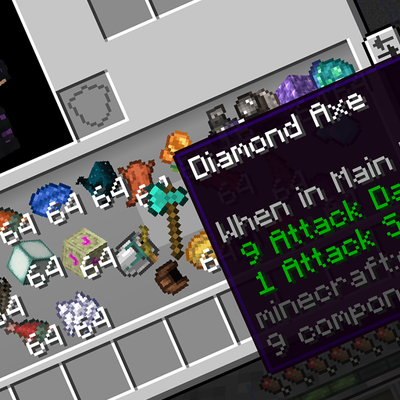
CurseForge · Minecraft mod
Inventory Physics
replaces the static inventory grid with real 2D physics: items fall, bounce, and stack naturally. Client-side only.
Choose a version Pick your version below, then grab the matching file.
Quick answer
Which Inventory Physics release should I use?
Latest stable file realisticinventory-0.7.7.jar
Game version 1.21.1
Loader NeoForge
Inventory Physics realisticinventory-0.7.7.jar targets 1.21.1 with NeoForge. The project page does not say whether this file belongs on the client, dedicated server, or both. No extra mods listed for this file.
Where it goes
Is Inventory Physics required on the client, server, or both?
The project page does not say whether this file belongs on the client, dedicated server, or both.
Client Source doesn’t say
Dedicated server Source doesn’t say
Loader for this release NeoForge
Required install it here Optional supported, not mandatory Not supported do not install here Source doesn’t say do not assume
The source does not explicitly classify this release as client-only or server-only.
What else does Inventory Physics realisticinventory-0.7.7.jar need?
realisticinventory-0.7.7.jar. Change the file and its required mods may change too.
This file does not list any required mods. Do not add a library just because a different file uses it.
This file does not list any required or optional mods.
Before you install it
Add Inventory Physics without breaking your instance.
Built for Inventory Physics realisticinventory-0.7.7.jar. Pick another file and the loader, install side or required mods may change.
- 01
Stick to this file
Use realisticinventory-0.7.7.jar. It targets 1.21.1 with NeoForge; another release may have different loader, side or dependency requirements.
- 02
Bring the mods it needs
This file does not list any required mods. Do not add a library just because a different file uses it.
- 03
Put it on the correct side
The project page does not say whether this file belongs on the client, dedicated server, or both.
- 04
Pick the file you checked
Use the “Get this file” button beside realisticinventory-0.7.7.jar. It opens that exact file at the source.
About this project
What does Inventory Physics add?
Inventory Physics
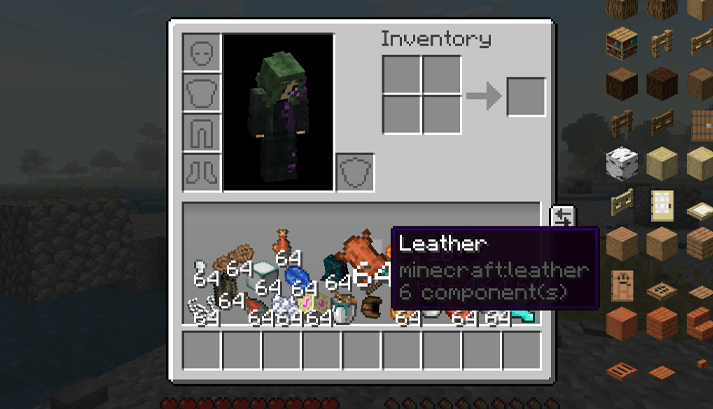
Inventory Physics is a client-side mod for Minecraft 1.21.1 (NeoForge) that replaces the standard static 3x9 storage slot grid in the player's inventory with a 2D physics chamber. Items inside behave as physical rigid bodies that fall, collide, bounce, and interact dynamically.
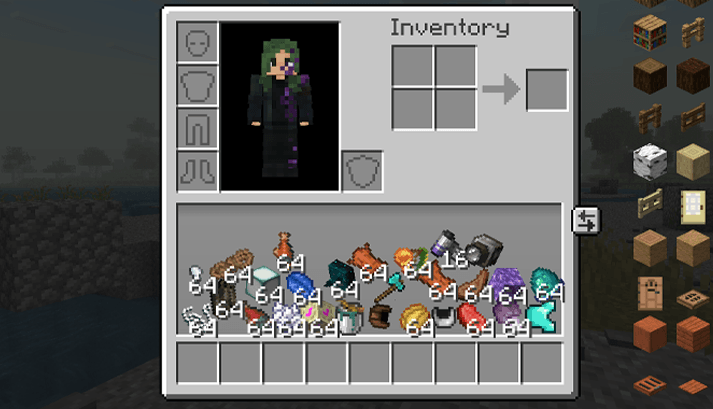
Key Features
- 2D Rigid-Body Simulation: Main inventory storage slots (9–35) are simulated inside a physical chamber using SAT (Separating Axis Theorem) collision detection and sub-stepping.
- Material-Specific Properties: Different item types have distinct physical parameters (mass, friction, bounciness, air damping, and collision box dimensions):
- Heavy blocks (anvils, stone, netherite) have higher mass and lower bounce.
- Slimeballs bounce higher.
- Feathers float down slowly due to higher air damping.
- Ice has significantly reduced friction.
- Player Movement Inertia: Jumping, falling, and vertical movement impart dynamic inertia to the items inside your inventory.
- Interactive Drag & Toss:
- Drag items with the left mouse button.
- Throw items across the inventory chamber with cursor momentum and spin.
- Drag items outside the inventory window to drop them into the game world.
- Right-click to split stacks.
- Collision Auto-Stacking: When identical stackable items collide or are thrown into each other, they automatically merge into a single stack.
- Tactile Hover Feedback: Hovering over an item scales it up slightly (~1.22x), adds subtle magnetic pull towards the cursor, and renders a soft highlight.
- 2D GUI Particles:
- Throw trails behind fast-moving items.
- Impact sparks on item/wall collisions.
- Floor dust when heavy items land.
- Starburst effects on stack merges.
- Sound Effects: Collision sounds scale their pitch and volume dynamically based on item mass and impact velocity.
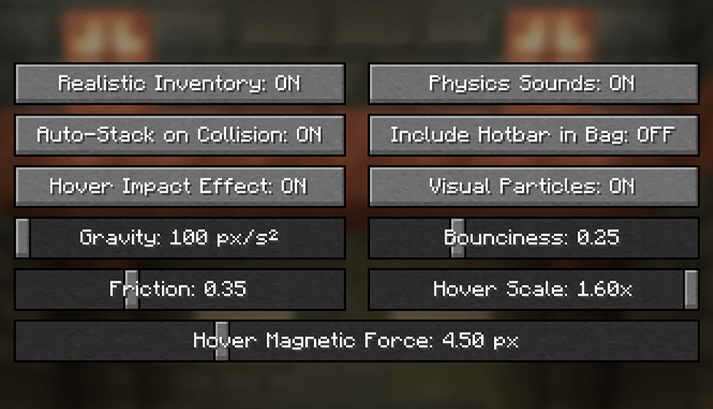
- In-Game Configuration: Full in-game config screen (via the NeoForge Mods menu) allowing you to adjust or toggle:
- Gravity, bounciness, and friction sliders.
- Hover impact effects, scale, and magnetic force.
- Auto-stacking on collision.
- 2D particle effects and collision sounds.
Technical Details & Compatibility
- Client-Side Only: Does not need to be installed on servers. Fully compatible with vanilla and modded multiplayer servers.
- Logical State: Logically, items remain in standard vanilla inventory slots. Crafting grid (0–4), armor slots (5–8), hotbar (36–44), and offhand (45) retain standard slot mechanics.
- Requires: NeoForge 21.1+ (Minecraft 1.21.1).
mod config
 )
)

Project description from CurseForge.
Pick your setup
Inventory Physics by Minecraft version and loader
Choose the version and loader you play, then open the matching release.
Check the dependencies, then try the file in a copied instance before changing a world you care about.
Recent files
Inventory Physics versions and loaders
realisticinventory-0.7.7.jar
21 Sept 2026
Client Source doesn’t say Server Source doesn’t say Dependencies No extras listed Listed on Release listing
Check the 1.21.1 · NeoForge setup 1.21.1NeoForge release
realisticinventory-0.7.6.jar
4 Sept 2026
Client Source doesn’t say Server Source doesn’t say Dependencies No extras listed Listed on Release listing
Check the 1.21.1 · NeoForge setup 1.21.1NeoForge release
realisticinventory-0.7.5.jar
1 Sept 2026
Client Source doesn’t say Server Source doesn’t say Dependencies No extras listed Listed on Release listing
Check the 1.21.1 · NeoForge setup 1.21.1NeoForge release
Looking for an older file? The official CurseForge project page is in Resources.
 mod
mod CurseForge + Modrinth · Minecraft
Unlocked Typing
This mod allows you to use Minecraft’s classic color and formatting codes (§) in every text input, chat, world names, anvils, books, signs, and more!
 mod
mod CurseForge + Modrinth · Minecraft
Field Guide
Discover Plants, Animals and Monsters with a Spyglass. Collect them all and take notes in your personal Field Guide!
 mod
mod CurseForge + Modrinth · Minecraft
Sophisticated Item Actions
Highlight nearby inventories containing an item, and restock items from or deposit items to them directly from your inventory.