Minecraft version
Back to mods 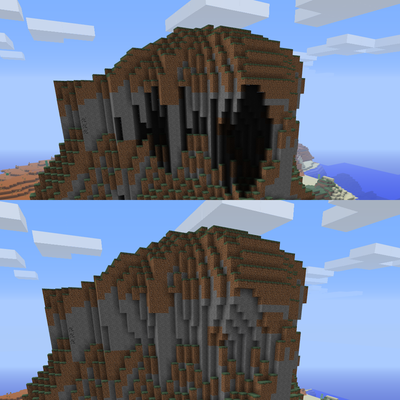
CurseForge · Minecraft mod
Various Bug Fixes
Fixes a wide variety of bugs in 1.6.4, and some enhancements
Choose a version Pick your version below, then grab the matching file.
Quick answer
Which Various Bug Fixes release should I use?
Latest stable file BugFix-1.4.jar
Game version 1.6.4
Loader Forge
Various Bug Fixes BugFix-1.4.jar targets 1.6.4 with Forge. The project page does not say whether this file belongs on the client, dedicated server, or both. No extra mods listed for this file.
Where it goes
Is Various Bug Fixes required on the client, server, or both?
The project page does not say whether this file belongs on the client, dedicated server, or both.
Client Source doesn’t say
Dedicated server Source doesn’t say
Loader for this release Forge
Required install it here Optional supported, not mandatory Not supported do not install here Source doesn’t say do not assume
The source does not explicitly classify this release as client-only or server-only.
What else does Various Bug Fixes BugFix-1.4.jar need?
BugFix-1.4.jar. Change the file and its required mods may change too.
This file does not list any required mods. Do not add a library just because a different file uses it.
This file does not list any required or optional mods.
Before you install it
Add Various Bug Fixes without breaking your instance.
Built for Various Bug Fixes BugFix-1.4.jar. Pick another file and the loader, install side or required mods may change.
- 01
Stick to this file
Use BugFix-1.4.jar. It targets 1.6.4 with Forge; another release may have different loader, side or dependency requirements.
- 02
Bring the mods it needs
This file does not list any required mods. Do not add a library just because a different file uses it.
- 03
Put it on the correct side
The project page does not say whether this file belongs on the client, dedicated server, or both.
- 04
Pick the file you checked
Use the “Get this file” button beside BugFix-1.4.jar. It opens that exact file at the source.
About this project
What does Various Bug Fixes add?
Fixes (not all):
- Harsh black lighting errors under overhangs
- The sky not getting darker during thunderstorms
- Lost hearts not flashing when taking damage
- Various missing particles (constructing golems, inserting eye of ender, water and lava touching, etc)
- The pause menu not saying "Saving level.."
- Items snapping to a different location right after being dropped instead of staying in the same spot
- /time and sleeping having a delay before changing time
- The dragon egg showing particles in a random direction as opposed to the one it teleported to
- Damage wobble always being the same instead of accounting for direction of damage
- Endermen not showing particles in the direction they teleported to
- The loading bar not appearing when creating world, travelling dimensions, etc
- The Ghast's loading animation not occuring before firing
- Teleportation not being instant
- Baby zombies not dropping XP or loot
- Protection & Resistance lowering hunger damage
- Piston arm being dark in the End
- Mobs sinking into the ground after breaking the Minecart they were in
- Stair textures looking incorrect at certain orientations
- Zombie sieges not working
- Desert villages having a cobblestone well instead of a sandstone one
- Z-fighting on spider, wolf, primed TNT, boots
Enhancements/backports/other changes:
- Villages generate cobblestone under their gravel
- Desert temples generate with stained clay instead of wool
- Sugar canes have a biome tint
- Chests and signs have a breaking animation
- Melons spawn in Jungles
- Witches have sounds
- Snow Golems have sounds
- Buckets have sounds
- Squids have sounds, ink, modern AI
- Skeletons hold their Bow like they did in Beta 1.8
- Entities get arrows stuck in them, like they did in Beta 1.8
- Trying to sleep outside in the dark will get you woken up a by mob, like in Beta
- Skeletons shoot purple arrows, like they did in Survival Test and Indev
- Nether portal size is flexible and they can be lit from any spot
- Backported crafting recipes for uncraftable stone variants
Experimental (off by default, may impact performance):
- Snowlogging for plants
- Snow accumulation during snowfall
- White leaves during snowfall
Additional:
- Added mipmap options
- Added biome blend options
- Added MSAA options
- Added worldgen options for Beta & Alpha generation
The new options can be found by opening the video settings and pressing 'M' on your keyboard.
Each individual fix/enhancement can be completely disabled in the config.
Made with AI!
Project description from CurseForge.
Pick your setup
Various Bug Fixes by Minecraft version and loader
Choose the version and loader you play, then open the matching release.
Check the dependencies, then try the file in a copied instance before changing a world you care about.
Recent files
Various Bug Fixes versions and loaders
BugFix-1.4.jar
19 Oct 2026
Client Source doesn’t say Server Source doesn’t say Dependencies No extras listed Listed on Release listing
Check the 1.6.4 · Forge setup Forge1.6.4 release
BugFix-1.3.jar
9 Sept 2026
Client Source doesn’t say Server Source doesn’t say Dependencies No extras listed Listed on Release listing
Check the 1.6.4 · Forge setup Forge1.6.4 release
BugFix-1.2.jar
5 Sept 2026
Client Source doesn’t say Server Source doesn’t say Dependencies No extras listed Listed on Release listing
Check the 1.6.4 · Forge setup Forge1.6.4 release
BugFix-1.1.jar
3 Sept 2026
Client Source doesn’t say Server Source doesn’t say Dependencies No extras listed Listed on Release listing
Check the 1.6.4 · Forge setup Forge1.6.4 release
BugFix-1.0.jar
2 Sept 2026
Client Source doesn’t say Server Source doesn’t say Dependencies No extras listed Listed on Release listing
Check the 1.6.4 · Forge setup Forge1.6.4 release
Looking for an older file? The official CurseForge project page is in Resources.
 mod
CurseForge + Modrinth · Minecraft
Reliable EMI (REMI)
A mod adding many configurable features to EMI!
 mod
CurseForge · Minecraft
Just Enough Categories
JEC:Mod categories and custom tabs for JEI.
 mod
CurseForge · Minecraft
车万女仆:爱憎分明 [Touhou Little Maid:Love & Loathe]
A maid behavior mod where trust and fear decide between loyalty, rebellion, obsession, or cold detachment.