Minecraft version
Back to mods 
CurseForge · Minecraft mod
Back with the Bundle
A faithful backport of all the modern bundle features to 1.21.1
Choose a version Pick your version below, then grab the matching file.
Quick answer
Which Back with the Bundle release should I use?
Latest stable file backwiththebundle-1.0.0.jar
Game version 1.21.1
Loader NeoForge
Back with the Bundle backwiththebundle-1.0.0.jar targets 1.21.1 with NeoForge. The project page does not say whether this file belongs on the client, dedicated server, or both. No extra mods listed for this file.
Where it goes
Is Back with the Bundle required on the client, server, or both?
The project page does not say whether this file belongs on the client, dedicated server, or both.
Client Source doesn’t say
Dedicated server Source doesn’t say
Loader for this release NeoForge
Required install it here Optional supported, not mandatory Not supported do not install here Source doesn’t say do not assume
The source does not explicitly classify this release as client-only or server-only.
What else does Back with the Bundle backwiththebundle-1.0.0.jar need?
backwiththebundle-1.0.0.jar. Change the file and its required mods may change too.
This file does not list any required mods. Do not add a library just because a different file uses it.
This file does not list any required or optional mods.
Before you install it
Add Back with the Bundle without breaking your instance.
Built for Back with the Bundle backwiththebundle-1.0.0.jar. Pick another file and the loader, install side or required mods may change.
- 01
Stick to this file
Use backwiththebundle-1.0.0.jar. It targets 1.21.1 with NeoForge; another release may have different loader, side or dependency requirements.
- 02
Bring the mods it needs
This file does not list any required mods. Do not add a library just because a different file uses it.
- 03
Put it on the correct side
The project page does not say whether this file belongs on the client, dedicated server, or both.
- 04
Pick the file you checked
Use the “Get this file” button beside backwiththebundle-1.0.0.jar. It opens that exact file at the source.
About this project
What does Back with the Bundle add?

A faithful backport of all the modern bundle features to 1.21.1. Includes:
- Updated UI and controls
- Dyed bundles
- Bundles open and display the selected item
- Crafting recipes
- Bundles as loot in village chests
Additional Features
These quality-of-life features are client-configurable and can be disabled individually at any time in the config menu.
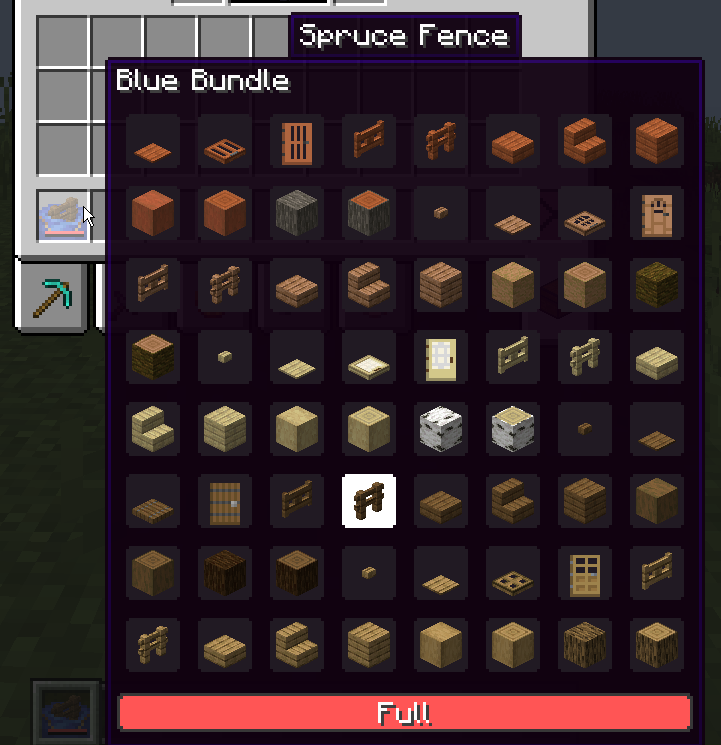
Expanded Bundle Tooltips
Displays every item stored in a bundle, and allows selecting any of them using the scroll wheel.

Bundle Drag Controls
Drag a bundle across inventory slots to insert or remove items.
Notes
- This mod does not require the experimental bundles feature.
- This mod is required on both the client and server.
- Requires NeoForge. Support for other mod loaders is not planned.
Compatibility
Easy Shulker Boxes: Back with the Bundle handles bundle interactions and tooltips by default. To use Easy Shulker Boxes for those features instead, install the Back with the Bundle + Easy Shulker Boxes Compat data pack. Note that while the data pack is enabled, bundles will not open and display the selected item.
Inventory Sorting Mods: Some sorting mods on 1.21.1 do not have support for the newer bundle interactions. If you are experiencing issues while sorting inventories that contain a bundle, please open an issue and include the sorting mod’s name and version. Back with the Bundle already supports Inventory Profiles Next.
Project description from CurseForge.
Pick your setup
Back with the Bundle by Minecraft version and loader
Choose the version and loader you play, then open the matching release.
Check the dependencies, then try the file in a copied instance before changing a world you care about.
Recent files
Back with the Bundle versions and loaders
backwiththebundle-1.0.0.jar
10 Oct 2026
Client Source doesn’t say Server Source doesn’t say Dependencies No extras listed Listed on Release listing
Check the 1.21.1 · NeoForge setup 1.21.1NeoForge release
backwiththebundle-1.0.0-rc.1.jar
4 Sept 2026
Client Source doesn’t say Server Source doesn’t say Dependencies No extras listed Listed on Release listing
Check the 1.21.1 · NeoForge setup 1.21.1NeoForge beta
Looking for an older file? The official CurseForge project page is in Resources.
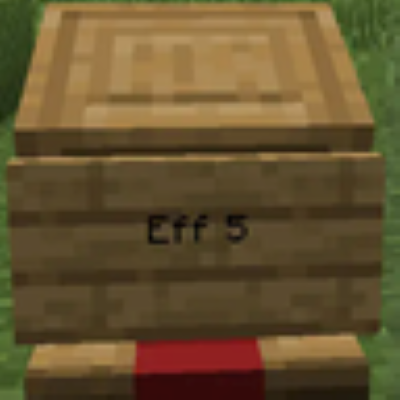 mod
mod CurseForge + Modrinth · Minecraft
Villager Trade Reroll
Mod to instant Reroll/refresh/Recycle trade using name on sign
 mod
mod CurseForge · Minecraft
Termal Astra
Thermal energies, wireless logistics and a storage network with autocrafting.
 mod
mod CurseForge · Minecraft
Craft & Find
Find, access, and craft with items from nearby storage — all from one convenient workbench.