Minecraft version
Back to mods 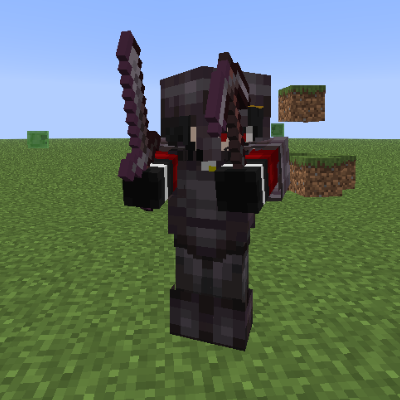
CurseForge · Minecraft mod
Gravewalker
A simple mod: you die, and instead of leaving a grave, YOUR zombie appears. You fight it, and if you win, the XP orb it drops will give you your entire inventory back
Choose a version Pick your version below, then grab the matching file.
Quick answer
Which Gravewalker release should I use?
Latest stable file gravewalker-fabric-1.1-bugfix+mc26.x.jar
Game version 26.1, 26.1.1, 26.1.2
Loader Fabric
gravewalker-fabric-1.1-bugfix+mc26.x.jar targets 26.1, 26.1.1, 26.1.2 with Fabric. The project page does not say whether this file belongs on the client, dedicated server, or both. No extra mods listed for this file.
Where it goes
Is Gravewalker required on the client, server, or both?
The project page does not say whether this file belongs on the client, dedicated server, or both.
Client Source doesn’t say
Dedicated server Source doesn’t say
Loader for this release Fabric
Required install it here Optional supported, not mandatory Not supported do not install here Source doesn’t say do not assume
The source does not explicitly classify this release as client-only or server-only.
What else does gravewalker-fabric-1.1-bugfix+mc26.x.jar need?
gravewalker-fabric-1.1-bugfix+mc26.x.jar. Change the file and its required mods may change too.
This file does not list any required mods. Do not add a library just because a different file uses it.
This file does not list any required or optional mods.
Before you install it
Add Gravewalker without breaking your instance.
Built for gravewalker-fabric-1.1-bugfix+mc26.x.jar. Pick another file and the loader, install side or required mods may change.
- 01
Stick to this file
Use gravewalker-fabric-1.1-bugfix+mc26.x.jar. It targets 26.1, 26.1.1, 26.1.2 with Fabric; another release may have different loader, side or dependency requirements.
- 02
Bring the mods it needs
This file does not list any required mods. Do not add a library just because a different file uses it.
- 03
Put it on the correct side
The project page does not say whether this file belongs on the client, dedicated server, or both.
- 04
Pick the file you checked
Use the “Get this file” button beside gravewalker-fabric-1.1-bugfix+mc26.x.jar. It opens that exact file at the source.
About this project
What does Gravewalker add?
Gravewalker lets death leave something behind. When you fall in the overworld, your own zombie rises from the spot you died, wearing your gear and guarding everything you carried.
How it works
The moment you die, your inventory, experience points and active potion effects are captured and locked inside a copy of yourself: a zombie that wears your equipment and fights using the effects you had. Your items never scatter across the ground, and nothing gets destroyed by explosions or despawn timers. Loot stays safe.
To reclaim everything, you have to take down your own gravewalker. It is not a pushover — it fights back with the strength of the effects you were carrying. Kill it and a floating grave orb drops in its place. Touch the orb and your inventory, experience and effects return to you exactly as they were. Level, progress and full item stacks all come back.
If you want flexibility, an admin command lets you decide who can grab the orb: by default only the owner can reclaim it, but you can enable "steal orbs" so any player in the world can pick it up. The setting persists on the server and applies to everyone.
Project description from CurseForge.
Pick your setup
Gravewalker by Minecraft version and loader
Choose the version and loader you play, then open the matching release.
Minecraft version
26.1.2
1 loader buildMinecraft version
26.1.1
1 loader buildMinecraft version
26.1
1 loader buildCheck the dependencies, then try the file in a copied instance before changing a world you care about.
Recent files
Gravewalker versions and loaders
gravewalker-fabric-1.1-bugfix+mc26.x.jar
3 Sept 2026
Client Source doesn’t say Server Source doesn’t say Dependencies No extras listed Listed on Release listing
Check the 26.2 · Fabric setup Fabric26.126.1.126.1.2 release
gravewalker-fabric-1.1+mc26.x.jar
3 Sept 2026
Client Source doesn’t say Server Source doesn’t say Dependencies No extras listed Listed on Release listing
Check the 26.2 · Fabric setup Fabric26.126.1.126.1.2 release
Looking for an older file? The official CurseForge project page is in Resources.
 mod
CurseForge · Minecraft
Aevum - Phase1 [AWAKENING]
Explore the secrets of Existence
 mod
CurseForge + Modrinth · Minecraft
Polydium
Well-rounded client-side optimization mod. Extremely compatible Vulkan backend for 1.21.11-26.1.2. By Polyfrost, best with OneClient.
 mod
CurseForge · Minecraft
SDM Recipe Machine Stages
The ultimate progression tool for tech-based modpacks. Lock machine recipes behind stages with seamless KubeJS and CraftTweaker integration.