Minecraft version
Back to mods 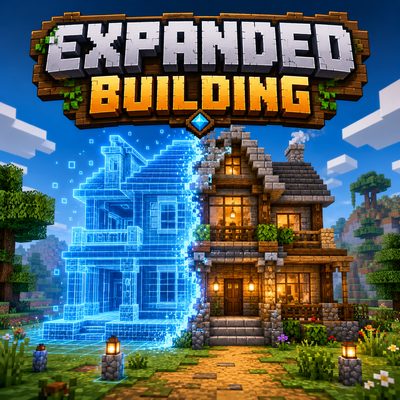
CurseForge · Minecraft mod
Expanded Building
Plan massive builds in Creative, gather the required materials, and let the Builder bring your blueprint to life block by block.
Choose a version Pick your version below, then grab the matching file.
Quick answer
Which Expanded Building release matches 26.2 Forge?
Best match for your filters expanded-building-forge-26.2-1.1.0.jar
Game version 26.2
Loader Forge
Expanded Building expanded-building-forge-26.2-1.1.0.jar targets 26.2 with Forge. The project page does not say whether this file belongs on the client, dedicated server, or both. No extra mods listed for this file.
Where it goes
Is Expanded Building required on the client, server, or both?
The project page does not say whether this file belongs on the client, dedicated server, or both.
Client Source doesn’t say
Dedicated server Source doesn’t say
Loader for this release Forge
Required install it here Optional supported, not mandatory Not supported do not install here Source doesn’t say do not assume
The source does not explicitly classify this release as client-only or server-only.
What else does Expanded Building expanded-building-forge-26.2-1.1.0.jar need?
expanded-building-forge-26.2-1.1.0.jar on 26.2 Forge. Every mod below is checked against that same setup.
This file does not list any required mods. Do not add a library just because a different file uses it.
This file does not list any required or optional mods.
Before you install it
Add Expanded Building without breaking your instance.
Built for Expanded Building expanded-building-forge-26.2-1.1.0.jar on 26.2 Forge. Pick another file and the loader, install side or required mods may change.
- 01
Stick to this file
Use expanded-building-forge-26.2-1.1.0.jar. It targets 26.2 with Forge; another release may have different loader, side or dependency requirements.
- 02
Bring the mods it needs
This file does not list any required mods. Do not add a library just because a different file uses it.
- 03
Put it on the correct side
The project page does not say whether this file belongs on the client, dedicated server, or both.
- 04
Pick the file you checked
Use the “Get this file” button beside expanded-building-forge-26.2-1.1.0.jar. It opens that exact file at the source.
About this project
What does Expanded Building add?
🏗️ Expanded Building
Plan your build in Creative. Pay for it in Survival. Let a builder put it up for you.
Expanded Building gives you a protected Creative planning mode inside a marked-off site. Design freely, finish the plan, and the world snaps back exactly as it was – your design stays behind as a ghost blueprint. Hand the required materials to a Builder NPC, and he puts your building up block by block, in real Survival, using real resources.
No creative items leak out. No duplication. Nothing is built for free.
🆕 New in 1.1.0: import Litematica and WorldEdit schematics straight into a project, feed the builder from a material chest, and plan chests, furnaces and signs.
✨ How it works
- 🪄 Left-click a block with the Builder’s Wand to set corner one, right-click for corner two.
- 📐 The site is marked on the ground and spans the full world height – cellars and towers included.
- 🎨 Your inventory and game mode are safely stored away and you switch to protected Creative. Build whatever you like inside the site.
- ⛏️ Clear terrain while you plan. Level a hill, dig out a cellar, remove the grass that is in your way.
- 🚪 Doors, trapdoors and fence gates still open while you plan – right-click opens whatever is in hand, crouch + right-click places a block against it instead. Put up a wall and you can still get back behind it.
- ✅ Finish the plan at the builder. The site is restored to the exact state it was in, and your real inventory comes back.
- 👻 Your design stays visible as a ghost: blue for blocks to place, red for ground to clear.
- 📦 Hand over the materials the blueprint needs, plus the builder’s wage – or point the wand at a chest and let him fetch them himself.
- 🧰 If the plan clears any ground, the builder needs tools. Put them in his chest – he wears them down as he digs, and stops when there is nothing usable left.
- 🔨 Start the build and watch it go up. He walks to every block, turns to it and swings, with the sound of a block placed by hand and the debris of one broken by hand.
📐 Save, share and place blueprints
A finished plan does not have to stay where you drew it.
- 💾 Save a blueprint to a file, and share it – someone else drops it in their folder and builds the same thing.
- 👀 Load it and walk it into place. The blueprint appears as a live preview around you and follows you as you move. It is green while it fits, red when it would hang over the edge.
- 🖱️ Right-click to confirm, sneak + right-click to cancel. Nothing is written until you click, so aiming costs nothing.
- 🔄 Rotate it in 90° steps – stairs, doors, fences and beds turn with it – and shift it up or down for cellars.
- ⛰️ Pasting onto a slope just works: the blueprint clears its own footprint, so terrain never pokes up through your floor.
📥 Litematica and WorldEdit files – new in 1.1.0
Somebody else’s build becomes a project without rebuilding it by hand.
- 📁 Two folders are created on first start:
config/expanded_building/litematicandconfig/expanded_building/schem. Drop the file in – no renaming needed, case does not matter, and tab completion fills the name in for you. - ⌨️
/eb litematic load <name>and/eb schem load <name>hand the file to the same preview a native blueprint gets: walk it into place, rotate it, confirm. Nothing is written to the world until you do. - ✅ Reads
.litematicversions 1–6 with any number of regions, and Sponge.schemversions 2 and 3, gzipped or raw.savewrites them back out, so a plan drawn here opens in Litematica too. - 💨 Air is not imported as a demolition order. Every empty position in a schematic is a real palette entry – taken literally, a 50×50×50 file would be 125,000 clearing instructions that wall the building in.
- ❓ Blocks from mods you do not have are skipped and reported with a count and an id, never silently turned into air.
- 🚫 The old MCEdit
.schematicis refused rather than misread – its numeric block ids stopped meaning anything back in 1.13.
📦 Getting material to the builder
- 🤝 Hand it over at the dashboard, piece by piece, or with
/eb deposit <id>in one go. - 📥 Or set a material chest: crouch + right-click a chest with the planning wand. The builder draws what the project is still short of four times a second and leaves the chest empty again – so its size never limits anything, and a hopper can keep it filled.
- 🔐 It stays your chest. The mod never places it, never removes it, never protects it, and takes only what is on the requirement list – a chest in your base loses nothing else.
- ✅ Once the requirement is covered, the project moves to Ready on its own. You do not have to walk back.
- 📋 What is still missing sorts to the top of the material list, finished lines to the bottom.
✏️ Change your mind later
Reopen a finished plan at any time – even in the middle of a build. The builder pauses, your design comes back as editable blocks, and you carry on where you left off.
- Blocks already standing are never charged twice.
- Add to the plan and only the difference has to be paid before the build resumes.
- Remove from it and the overpayment comes straight back.
⚡ Build speed
A large project would otherwise run for hours, so the builder can be hurried along – for a price. Switch the pace any time, even mid-build.
| Speed | Building | Clearing | 5000 blocks | Wage |
|---|---|---|---|---|
| 1x | 1 block/s | 2 blocks/s | ~83 min | base fee |
| 4x | 4 blocks/s | 10 blocks/s | ~21 min | 2× base fee |
| 20x | 20 blocks/s | 20 blocks/s | ~4 min | 5× base fee |
The surcharge grows with the square root of the pace, not linearly. Drop back to a slower pace and the difference is refunded immediately – paying for a fast builder up front is never a one-way street.
🔒 What is protected
A build site is not a no-go zone. Only what the builder still needs is locked:
| While… | What is locked |
|---|---|
| a plan is open (including editing a finished one) | the whole site, for everyone |
| a build is running or waiting | exactly the positions he still has to place or clear, plus his tool chest |
Everything else inside the site behaves like normal world. Doors, chests, furnaces, buttons and levers work, and you can place and break in Survival as usual – you can carry on building the house while the builder digs out the cellar underneath it. What he has finished is yours again: decorate it, rebuild it, tear it down.
Protection sits at a single choke point over every block change in the world, which means the open plan is safe from all of this at once:
- 💥 Explosions, creepers, TNT and withers
- 🔥 Fire spread
- 💧 Water and lava flowing in
- 🧨 Pistons pushing blocks in or out
- 🐑 Mob griefing and falling blocks
- 👥 Other players – they cannot place, break or open anything the builder still needs
Want a site untouchable from the first click to the last? Set protectEntireSite: true.
👥 Build together
- ➕
/eb add <player> <id>lets someone else plan, deliver material, start the build and change the pace. - 👑 Cancelling and managing members stays with the owner – a cancellation refunds whoever triggers it, and that would otherwise be a route to somebody else’s material.
- 👀 The site is visible to everyone nearby, ground marking and ghost, even while the owner is offline. Seeing and touching are deliberately two different things.
🛟 It survives things going wrong
- 💀 Die during planning? Your real inventory comes back, and no creative items drop.
- 🔌 Disconnect? The site is restored and your inventory is waiting on your next login.
- 🚶 Wander off? Planning ends on its own and your plan is saved, not lost – walk back to the builder and carry on.
- 💣 Server crash mid-build? Material is journaled to disk before the world is touched, so nothing is duplicated and nothing is lost.
- 🧙 Builder gone? He is replaced automatically once you are nearby, and
/eb recovernpc <id>forces it.
🌍 Languages
Ships in English, German, Spanish and Turkish. Any other language falls back to English.
🪄 Getting the wand
The Builder’s Wand is crafted from one emerald and two sticks, and the recipe is known from the very start – no unlock, no grinding. You will also find it in the Tools & Utilities creative tab.
  E      E = Emerald
 S       S = Stick
S
⚙️ Configuration
Everything below lives in config/expanded_building.json:
- 📏 Site size – unlimited by default, and each axis can be capped on its own
- 🔢 Projects per player – 3 by default
- 🧮 Blueprint block limit – 100,000 by default
- ⏱️ Build and clearing pace, plus the maximum speed players may pick
- 💎 Emerald wage – rate, minimum, maximum and a hard ceiling
- 🚶 How far you may wander before planning mode ends
- 🪑 Block entities – chests, furnaces and signs in a blueprint, on by default since 1.1.0. They always arrive empty: a blueprint holds a block state and never NBT
- 🚰 Fluids – off by default
- 🛡️
protectEntireSite– off by default. On, a running project locks its whole footprint over the full world height, for everyone - 🗺️
keepSiteLoaded– off by default. On, exactly one chunk is held loaded – the one the builder is standing in – so a build carries on with nobody nearby
📋 Commands
/expandedbuilding – or just /eb or /bp.
/eb give– hand out the wand (admins)/eb projects– list your own active projects/eb menu <id>– open a project without the NPC/eb add|remove <player> <id>– let someone build with you, or take it back (owner)/eb members <id>– who is on the project/eb finish|deposit|start|cancel <id>– the dashboard buttons, as commands/eb recheck <id>– carry on after refilling tools or clearing a conflict/eb recovernpc <id>– re-place a lost builder/eb recover– resolve a stuck planning session or refund/eb blueprint|litematic|schem save <name> <id>– save a plan to a file/eb blueprint|litematic|schem list– show what you have saved/eb blueprint|litematic|schem load <name>– start placing one/eb blueprint rotate [degrees]/shift <dy>– aim it/eb blueprint confirm/cancel/undo– place it, drop it, take it back
Project ids can be typed as the short form shown in the lists.
📦 Requirements
- Minecraft 26.2 or 26.1.2
- Fabric Loader 0.19.3 or newer, plus Fabric API
- Java 25
On a server where players do not have the mod installed, everything still works: the dashboard falls back to a chat menu. The ghost preview is drawn by the client, so that one needs the mod on both sides.
💬 Information and Support
Found a bug, got an idea, or want to hear about updates first? Come and say hello on Discord – it is by far the fastest way to reach me:
Project description from CurseForge.
Pick your setup
Expanded Building by Minecraft version and loader
Choose the version and loader you play, then open the matching release.
Minecraft version
26.2
3 loader buildsMinecraft version
26.1.2
3 loader buildsCheck the dependencies, then try the file in a copied instance before changing a world you care about.
Recent files
Expanded Building versions and loaders
expanded-building-forge-26.2-1.1.0.jar
11 Sept 2026
Client Source doesn’t say Server Source doesn’t say Dependencies No extras listed Listed on Release listing
Check the 26.2 · Forge setup Forge26.2 release
expanded-building-forge-26.2-1.0.0.jar
5 Sept 2026
Client Source doesn’t say Server Source doesn’t say Dependencies No extras listed Listed on Release listing
Check the 26.2 · Forge setup Forge26.2 release
Looking for an older file? The official CurseForge project page is in Resources.
 mod
mod CurseForge · Minecraft
Relics & Artifacts
Adds new structures and charms with special effects to explore.
 mod
mod CurseForge · Minecraft
Better Party X Simple Voice
Synchronizes Better Party with Simple Voice Chat, including automatic groups, password-protected parties, voice modes, speaking indicators, and HUD integration.
 mod
mod CurseForge · Minecraft
Block Finder (X-Ray)
A client side Minecraft mod to find blocks in singleplayer or multiplayer