
Minecraft version
Back to mods 
CurseForge · Minecraft mod
AtomChat
A phone-app style chat experience for Minecraft, powered by Skia.
Choose a version Pick your version below, then grab the matching file.
Quick answer
Which AtomChat release should I use?
Latest stable file NeoForge-1.21.1-0.2.6
Game version 1.21.1
Loader NeoForge
AtomChat NeoForge-1.21.1-0.2.6 targets 1.21.1 with NeoForge. The project page does not say whether this file belongs on the client, dedicated server, or both. No extra mods listed for this file.
Where it goes
Is AtomChat required on the client, server, or both?
The project page does not say whether this file belongs on the client, dedicated server, or both.
Client Source doesn’t say
Dedicated server Source doesn’t say
Loader for this release NeoForge
Required install it here Optional supported, not mandatory Not supported do not install here Source doesn’t say do not assume
The source does not explicitly classify this release as client-only or server-only.
What else does AtomChat NeoForge-1.21.1-0.2.6 need?
NeoForge-1.21.1-0.2.6. Change the file and its required mods may change too.
This file does not list any required mods. Do not add a library just because a different file uses it.
This file does not list any required or optional mods.
Before you install it
Add AtomChat without breaking your instance.
Built for AtomChat NeoForge-1.21.1-0.2.6. Pick another file and the loader, install side or required mods may change.
- 01
Stick to this file
Use NeoForge-1.21.1-0.2.6. It targets 1.21.1 with NeoForge; another release may have different loader, side or dependency requirements.
- 02
Bring the mods it needs
This file does not list any required mods. Do not add a library just because a different file uses it.
- 03
Put it on the correct side
The project page does not say whether this file belongs on the client, dedicated server, or both.
- 04
Pick the file you checked
Use the “Get this file” button beside NeoForge-1.21.1-0.2.6. It opens that exact file at the source.
About this project
What does AtomChat add?
AtomChat
A phone-app style chat experience for Minecraft, powered by Skia.





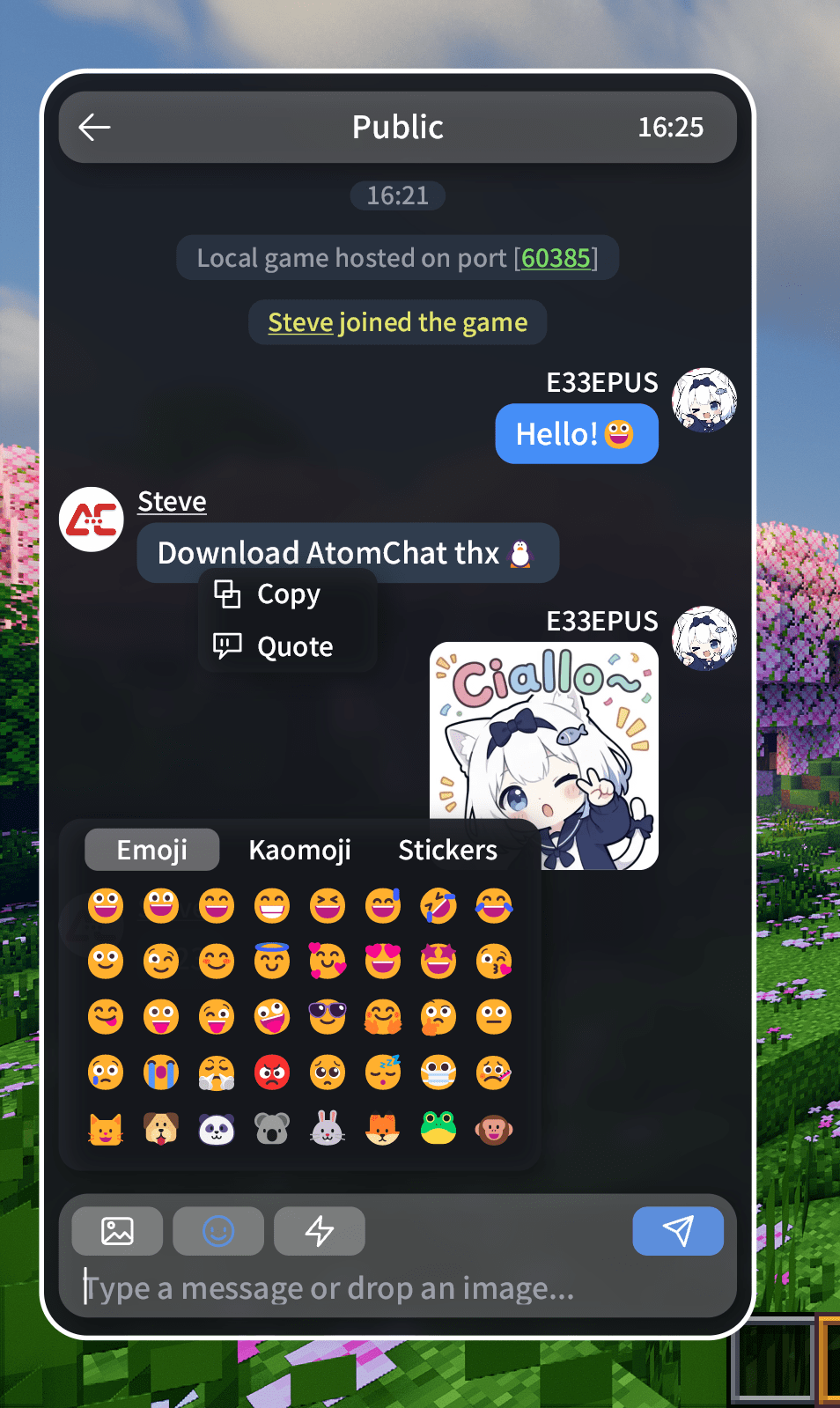
AtomChat is a brand-new chat beautification mod developed in the spirit of E33Chat. It turns the vanilla chat screen into a standalone "phone app" style chat panel: rounded bubbles, custom avatars, real player names, emoji / kaomoji / stickers, image messages, copy & quote, multi-line input, QQ-style motion — plus more screens beyond chat. A spiritual sequel (jk).
Rendering uses Skija. Every interface is vector-drawn and does not depend on vanilla chat textures.
Vanilla Improvements
- 💬 Chat bubbles & avatars — your messages show on the right, everyone else's on the left, with real player names and round skin avatars
- 🧹 Clean vanilla HUD placeholders — outside the panel, image codes show as a green
[Image]and quotes as a blue[Quote] - 📝 Multi-line input — the composer shows up to two lines and scrolls internally when longer; Up/Down arrows move between lines, while single-line drafts keep the vanilla chat history
- 🧠 Message capture — real player identity is captured from MessageHandler's three channels; unknown messages degrade to system text
- 📑 Chat history — when enabled, saved per server / world on disk, restored on rejoin, with configurable auto-cleanup
Features
- 🖼️ Image messages — renders
[[CICode]]natively, interoperable with the E33Chat / ChatImage family; images keep their aspect ratio and can be saved via right-click - 📤 Local image sending — pick with the image button, drag into the window, or paste with Ctrl+V; the picker opens in Details view with inline thumbnails
- 😊 Emoji / kaomoji / stickers — three tabs with a sliding indicator and full-width push transition; sticker packs are stored locally (png/jpg/jpeg, up to 10)
- 🔗 Rich text messages — colors, underlines, click & hover events: /tell, coordinates, FTB accept/deny and external links are all clickable; bare URLs become links automatically
- 📋 Copy / quote reply / save — right-click a bubble to copy or quote; image bubbles also offer "Save"
- 🧭 @ / block / profile / tp / whisper — right-click an avatar for @, block, whisper and quick teleport; a single click opens the player's profile
- 🪢 Private chat — the chat list shows currently online players; click one to open the conversation, right-click for its menu
- ⚡ Quick phrases — the lightning button on the composer opens your phrase list; tap to insert into the input
- 🎨 Skia vector UI & motion — rounded bubbles, blurred backgrounds, scrolling and QQ-style slide-in animations are all vector-drawn
- 📱 Custom wallpaper / avatar — upload a local image, crop it, and use it as the interface background or your avatar
- 🌍 Localization — Simplified Chinese and English; switch the Minecraft language to apply
- 😍 Highly configurable — appearance, colors, preferences and more
Configuration & Storage
- Path —
.minecraft/config/atomchat/holdsatomchat-client.jsonplus theavatar/debug/emotes/history/wallpaperfolders - [Recommended] In-game settings page (tile home: Appearance / Chat / Privacy & blocking / About) — every option applies and persists instantly, no restart. Color rows ship with preset palettes, a
+custom picker and live previews - Config file — edit
atomchat-client.jsondirectly (generated on first launch; restart the game after manual edits) - Chat history — written to
/historywhen enabled, per world / server - Custom wallpaper — stored under
/wallpaper - Custom avatars — stored under
/avatar - Sticker packs — stored under
/emotes
Compatibility
| Mod / plugin | Status |
|---|---|
[[CICode]] image protocol |
✅ Interoperable with the E33Chat / ChatImage family |
| Nick / display-name plugins | 🟡 Best effort (whisper clicks / Tab names / decorated names); extreme unknown formats fall back to gray text |
| ChatHeads | ✅ Compatible |
| Chat Animation and similar animation mods | ✅ Compatible |
| EasyBot | 🟡 Best effort (QQ message parsing); unparseable lines fall back to gray text |
| Quark | 🚫 Emote menu not shown; compatibility in progress |
Known Limitations
- Fabric / NeoForge 1.21.1 only; the Skija Windows x64 native is bundled — Linux / macOS builds are not packaged yet (cannot run)
- Images upload to the third-party host uguu.se by default and expire after about 3 hours; no server-side media hosting yet (planned)
- No E33Chat whisper sidebar, search, etc. yet
- Player identity resolution is best effort: tell-click structured capture, offline seen cache, multi-tier ownDisplayName fallback; extreme unknown formats fall back to gray text
Privacy & Data
- Local images you send are uploaded to a third-party host (uguu.se by default) and can be saved by others — do not send sensitive or private content
- Your messages can be saved by players who enabled chat history — do not send sensitive or private content
- The mod uploads no telemetry / personal information
- Image uploads happen only when you actively pick / paste / drop an image
- Local config and sticker packs stay in
.minecraft/config/atomchat/and never sync automatically
FAQ
Do I need a server? — No. AtomChat is client-only, but installing it server-side enables the custom avatar feature.
How do I send images? — Click the image button to pick a local image, or drag one into the window / Ctrl+V paste; the upload is inserted into the draft automatically, then press Enter to send.
Why is a message shown as gray system text? — When the client cannot be confident it came from a player, it is conservatively rendered as system text (e.g. nick plugins using unparseable formats).
Where are stickers stored? — .minecraft/config/atomchat/emotes/, up to 10, png / jpg / jpeg.
How do I change colors / sizes? — Adjust them live in Settings → Appearance (presets + custom picker); or edit config/atomchat/atomchat-client.json and restart the game.
Can I use it in a modpack? — Yes. If your modpack distributes the JAR, please keep the third-party notices.
Changelog
See the GitHub CHANGELOG.
Feedback
Found a bug or have a suggestion? Open an issue, or leave a comment on this page.
Project description from CurseForge.
Pick your setup
AtomChat by Minecraft version and loader
Choose the version and loader you play, then open the matching release.
Check the dependencies, then try the file in a copied instance before changing a world you care about.
Recent files
AtomChat versions and loaders
NeoForge-1.21.1-0.2.6
atomchat-NeoForge-1.21.1-0.2.6.jar
10 Sept 2026
Client Source doesn’t say Server Source doesn’t say Dependencies No extras listed Listed on Release listing
Check the 1.21.1 · NeoForge setup 1.21.1NeoForge release
Fabric-1.21.1-0.2.6
atomchat-Fabric-1.21.1-0.2.6.jar
10 Sept 2026
Client Source doesn’t say Server Source doesn’t say Dependencies 1 required · 1 unchecked Listed on Release listing
Check the 1.21.1 · Fabric setup Fabric1.21.1 release
Fabric-1.21.1-0.2.5-hotfix
atomchat-Fabric-1.21.1-0.2.5-hotfix.jar
9 Sept 2026
Client Source doesn’t say Server Source doesn’t say Dependencies 1 required · 1 unchecked Listed on Release listing
Check the 1.21.1 · Fabric setup Fabric1.21.1 release
NeoForge-1.21.1-0.2.5-hotfix
atomchat-NeoForge-1.21.1-0.2.5-hotfix.jar
9 Sept 2026
Client Source doesn’t say Server Source doesn’t say Dependencies No extras listed Listed on Release listing
Check the 1.21.1 · NeoForge setup 1.21.1NeoForge release
NeoForge-1.21.1-0.2.5
atomchat-NeoForge-1.21.1-0.2.5.jar
9 Sept 2026
Client Source doesn’t say Server Source doesn’t say Dependencies No extras listed Listed on Release listing
Check the 1.21.1 · NeoForge setup 1.21.1NeoForge release
Fabric-1.21.1-0.2.5
atomchat-Fabric-1.21.1-0.2.5.jar
9 Sept 2026
Client Source doesn’t say Server Source doesn’t say Dependencies 1 required · 1 unchecked Listed on Release listing
Check the 1.21.1 · Fabric setup Fabric1.21.1 release
Fabric-1.21.1-0.2.4
atomchat-Fabric-1.21.1-0.2.4.jar
7 Sept 2026
Client Source doesn’t say Server Source doesn’t say Dependencies 1 required · 1 unchecked Listed on Release listing
Check the 1.21.1 · Fabric setup Fabric1.21.1 release
NeoForge-1.21.1-0.2.4
atomchat-NeoForge-1.21.1-0.2.4.jar
7 Sept 2026
Client Source doesn’t say Server Source doesn’t say Dependencies No extras listed Listed on Release listing
Check the 1.21.1 · NeoForge setup 1.21.1NeoForge release
Fabric-1.21.1-0.1.3
atomchat-Fabric-1.21.1-0.1.3.jar
4 Sept 2026
Client Source doesn’t say Server Source doesn’t say Dependencies No extras listed Listed on Release listing
Check the 1.21.1 · Fabric setup Fabric1.21.1 release
Looking for an older file? The official CurseForge project page is in Resources.
 mod
mod CurseForge + Modrinth · Minecraft
Reliable EMI (REMI)
A mod adding many configurable features to EMI!
 mod
mod CurseForge · Minecraft
The Siege Overhaul
Tactical PvE sieges for 1.20.1 Forge. Enemy armies build a war camp, breach your walls, and try to occupy your base. You and your Villager Recruits soldiers hold the line. Zero admin setup, full block restoration, server-friendly. Formerly Faction Raids.
 mod
mod CurseForge · Minecraft
Berry Pouch [Cobblemon]
A simple mod that adds some small gadgets related to Cobblemon.