Applied Energistics 2 Needed by AE2 Recent Search Forge Port ae2_recent_search_forge_port-1.3.2.jar
requiredMatching file found Matched file: AE2 15.4.10 [FORGE]
CurseForge · Minecraft mod
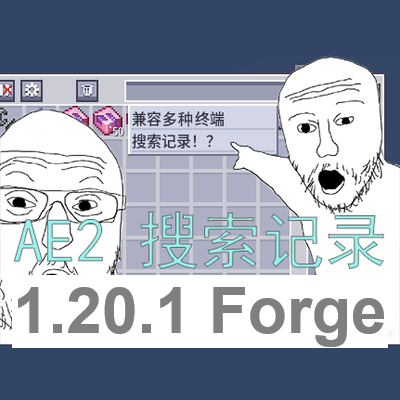
Adds clickable recent search history to AE2 terminals, making it easier to reuse item names, mod filters, tags, tooltips, and item ID searches. 1.20.1 Forge Port from www.curseforge.com/minecraft/mc-mods/ae2-recent-search
Quick answer
AE2 Recent Search Forge Port ae2_recent_search_forge_port-1.3.2.jar targets 1.20.1 with Forge. The project page does not say whether this file belongs on the client, dedicated server, or both. All 2 required mods have matching files.
Where it goes
The project page does not say whether this file belongs on the client, dedicated server, or both.
The source does not explicitly classify this release as client-only or server-only.
ae2_recent_search_forge_port-1.3.2.jar. Change the file and its required mods may change too.
Install Applied Energistics 2, GuideME first. We found matching files for this game-version and loader setup. 12 come through another mod in the chain.
12 extra mods were pulled in by other dependencies. Indented rows show who needs each one. We only count dependency files that match this setup. A file for another loader does not fill the gap.
Before you install it
Built for AE2 Recent Search Forge Port ae2_recent_search_forge_port-1.3.2.jar. Pick another file and the loader, install side or required mods may change.
Use ae2_recent_search_forge_port-1.3.2.jar. It targets 1.20.1 with Forge; another release may have different loader, side or dependency requirements.
Install Applied Energistics 2, GuideME first. We found matching files for this game-version and loader setup. 12 come through another mod in the chain.
The project page does not say whether this file belongs on the client, dedicated server, or both.
Use the “Get this file” button beside ae2_recent_search_forge_port-1.3.2.jar. It opens that exact file at the source.
About this project
Adds clickable recent search history to AE2 terminals, making it easier to reuse item names, mod filters, tags, tooltips, and item ID searches.
AE2 Recent Search is a client-side addon for Applied Energistics 2. This is the Minecraft 1.20.1 Forge port of the original AE2 Recent Search mod for Minecraft 1.21.1 NeoForge.
It adds clickable recent search history to AE2 terminals, making it easier to reuse item names, mod filters, tag filters, tooltip searches, and item ID searches. When the terminal search box is focused, recent searches appear below it in an AE2-style popup.
History is stored locally per Minecraft account. Exact duplicate searches are kept as a single entry and move to the top when reused. Favorite searches are shown above the regular history. The mod also provides in-terminal settings for enabling or disabling recent search, clearing history, showing or hiding per-entry delete buttons, keyboard navigation, choosing between "search immediately" and "fill only" click behavior, and optionally syncing clicked entries to JEI / REI / EMI through AE2's external search integration.
This mod does not add items, blocks, storage mechanics, or network behavior. It only improves the client-side search experience in AE2 terminals.
@mod, #tag, $tooltip, and *id.JEI, REI, or EMI is optional. External search sync only applies when AE2's own external search sync is enabled.
Open an AE2 terminal and click the search box. Recent searches appear directly below the field. Click an entry to apply it, use the star button inside the search field to favorite the current search, and use the delete button on a history row to remove that entry. Recent-search settings are available in the AE2 terminal's settings screen (wrench icon).
The number of visible history entries is controlled by maxVisibleEntries = 10 in config/ae2_recent_search-client.toml. Per-player history and in-game toggle states are stored in config/ae2_recent_search_history.json.
This is the Forge 1.20.1 port. It is not the same file as the original NeoForge 1.21.1 mod and cannot be used in that environment.
MIT. Ported from zh5112/AE2-Recent-Search.
AE2 Recent Search 是一个用于 Applied Energistics 2 / 应用能源 2 的客户端附属模组,本页提供的是其 Minecraft 1.20.1 Forge 移植版(原版为 Minecraft 1.21.1 NeoForge 版)。
它为 AE2 终端添加可点击的最近搜索记录,方便重复使用物品名、模组筛选、标签筛选、tooltip 搜索和物品 ID 搜索等内容。点击终端搜索框时,最近搜索会以接近 AE2 原版风格的弹窗显示在搜索框下方。
历史记录按 Minecraft 账号保存在本地。完全相同的搜索词只会保留一条,再次使用时会移动到最上方;收藏的搜索词会显示在普通历史记录上方。模组还在 AE2 终端设置界面内提供最近搜索开关、清空历史记录、单条删除按钮、键盘导航、点击行为(立即搜索或仅填入)以及通过 AE2 外部搜索集成同步到 JEI / REI / EMI 的可选设置。
该模组不添加物品、方块、存储机制或网络行为,只改善 AE2 终端的客户端搜索体验。
JEI / REI / EMI 为可选依赖。
Project description from CurseForge.
Pick your setup
Choose the version and loader you play, then open the matching release.
Check the dependencies, then try the file in a copied instance before changing a world you care about.
Recent files
ae2_recent_search-1.3.2.jar
5 Sept 2026
ae2_recent_search-1.2.1.jar
4 Sept 2026
Looking for an older file? The official CurseForge project page is in Resources.
 mod
modA tech mod with several ages to progress through, and many machines to use.
 mod
modUnifies crit chance and crit damage attributes from many mods into one tiered critical-hit system for Forge 1.20.1.
 mod
modClient-side compatibility addon for Scorched Guns 2, Punchy, and Fresh Player Animations/EMF that fixes first-person arm glitches and player pose conflicts.