Minecraft version
Back to mods 
CurseForge · Minecraft mod
Halfbright
Halfbright allows Minecraft to be brighter without looking worse. The better alternative to Fullbright / Gamma Utils Mods.
Choose a version Pick your version below, then grab the matching file.
Quick answer
Which Halfbright release should I use?
Latest stable file fabric 1.1.4
Game version 26.2
Loader Fabric
Halfbright fabric 1.1.4 targets 26.2 with Fabric. The project page does not say whether this file belongs on the client, dedicated server, or both. No extra mods listed for this file.
Where it goes
Is Halfbright required on the client, server, or both?
The project page does not say whether this file belongs on the client, dedicated server, or both.
Client Source doesn’t say
Dedicated server Source doesn’t say
Loader for this release Fabric
Required install it here Optional supported, not mandatory Not supported do not install here Source doesn’t say do not assume
The source does not explicitly classify this release as client-only or server-only.
What else does Halfbright fabric 1.1.4 need?
fabric 1.1.4. Change the file and its required mods may change too.
This file does not list any required mods. Do not add a library just because a different file uses it.
This file does not list any required or optional mods.
Before you install it
Add Halfbright without breaking your instance.
Built for Halfbright fabric 1.1.4. Pick another file and the loader, install side or required mods may change.
- 01
Stick to this file
Use fabric 1.1.4. It targets 26.2 with Fabric; another release may have different loader, side or dependency requirements.
- 02
Bring the mods it needs
This file does not list any required mods. Do not add a library just because a different file uses it.
- 03
Put it on the correct side
The project page does not say whether this file belongs on the client, dedicated server, or both.
- 04
Pick the file you checked
Use the “Get this file” button beside fabric 1.1.4. It opens that exact file at the source.
About this project
What does Halfbright add?
Halfbright
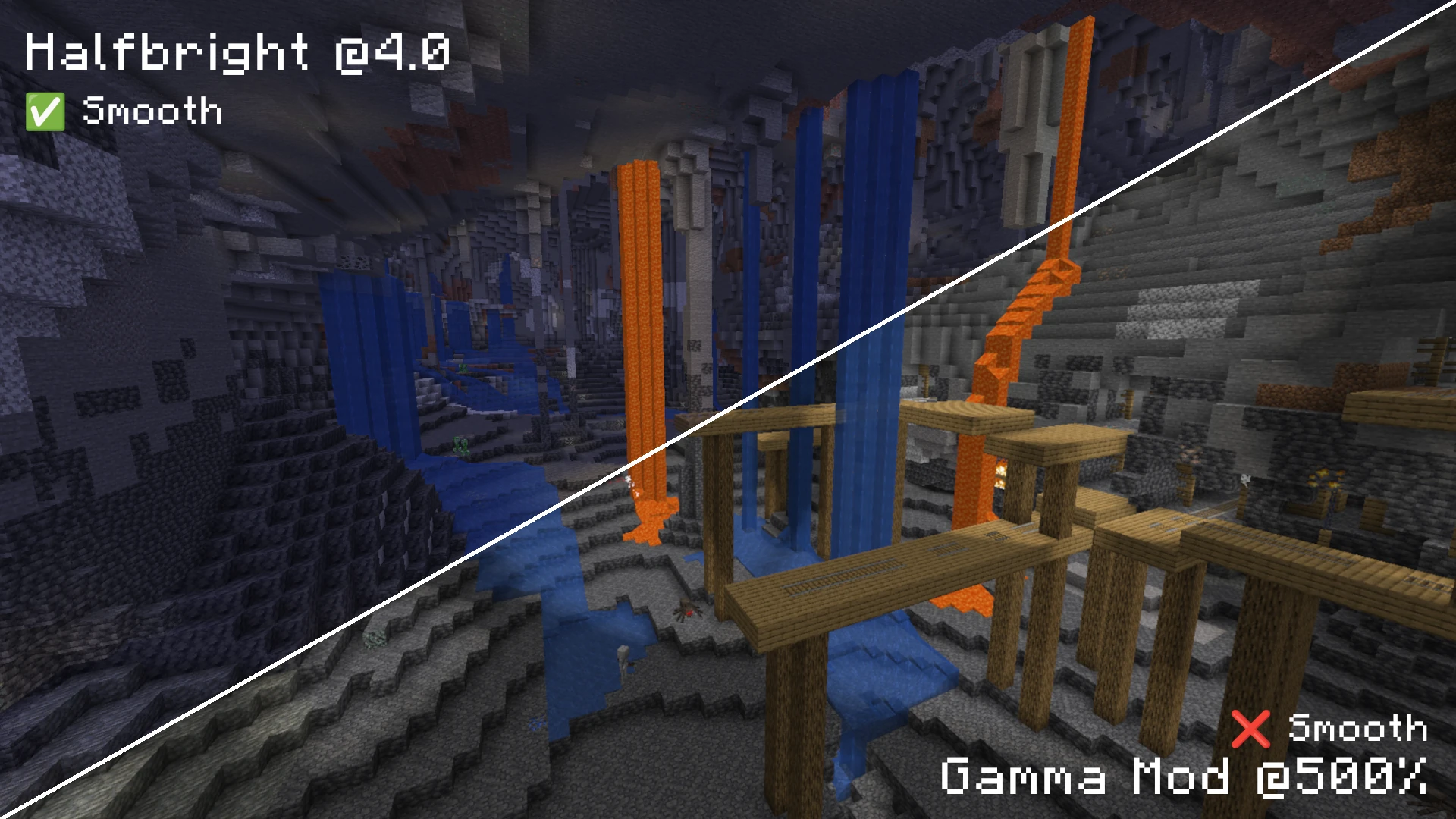
A fundamentally different approach to fullbright in modern Minecraft that looks great at any brightness level!
Brighten up your world without loosing shadows and light sources!
This is the Fullbright Mod I always wanted to have, but never managed to find.
About
Halfbright brightens up your world only half-way. This means that it makes dark spots brighter, while still having a perfect light transition going from 0 to 15 smoothly.
Halfbright avoids all kind of yellow light artifacts, brightness jumps and clamping. With Halfbright enabled, you can turn up the brightness just a bit so that you can see more in caves while not making everything 100% bright. This allows you to still see Lamps and Torches light up your world, even though the world is already brighter.
You can configure any value between 0.0 and 15.0 in steps of 0.5, and Halfbright will look great at any level. This means you can still have 'Full Brightness' when you really need it, but also have the option to just make the world just a little bit brighter. You can configure it just like you want!
Why?
Traditional fullbright mods often attempt to raise the game's gamma levels to extreme values (e.g., 1200%). While this makes things visible, it introduces severe visual issues:
- Poor Light Curves: Smooth lighting is completely broken, resulting in flat, unnatural transitions.
- Color Distortion: Intermediate light levels look washed out or shift toward a harsh yellow tint.
- Sodium Incompatibilities: On modern Minecraft versions (like 1.21.x), performance mods like Sodium completely bypass the vanilla shader pipeline (
lightmap.fsh), rendering shader-based fullbright mods inactive or broken.
Features
- Sodium Options Menu Integration: Configurable via Sodium's Options interface with a toggle button and a slider to adjust the minimum light level.
- Command Support: Use
/halfbright(with subcommandstoggle,enable,disable, andlevel <value>). - Default Keybindings:
H- Toggle Halfbright on/off.Arrow Up- Increase the minimum light level.Arrow Down- Decrease the minimum light level.
Incompatabilities
While I don't know of any imcompatible mod yet, I'm sure there might be some problems with some other mods, so please let me know if you run into any issues!
Works with and without Sodium on both Fabric and Neoforge!
How Halfbright Works
Instead of raising the global gamma, Halfbright scales the lightmap directly on the CPU.
- Lightmap Scaling: The mod captures the 16x16 lightmap texture on the CPU.
- Dynamic Range Remapping: It remaps the lower bounds of the light levels to start at a configurable minimum value (defaults to
8.0). - Curve Preservation: By keeping all 16 steps in the lightmap and scaling them smoothly, the mod preserves Minecraft's smooth lighting curve. Shadows and caves remain visually pleasing, and nights stay dark and atmospheric while ensuring you can still clearly see your surroundings.
- Universal Compatibility: By writing directly to the lightmap texture before uploading to the GPU, it works seamlessly with both vanilla rendering and custom rendering engines like Sodium on both Fabric and NeoForge.
Project description from CurseForge.
Pick your setup
Halfbright by Minecraft version and loader
Choose the version and loader you play, then open the matching release.
Minecraft version
26.1.2
2 loader buildsCheck the dependencies, then try the file in a copied instance before changing a world you care about.
Recent files
Halfbright versions and loaders
fabric 1.1.4
halfbright-fabric-v1.1.4+26.2.jar
6 Sept 2026
Client Source doesn’t say Server Source doesn’t say Dependencies No extras listed Listed on Release listing
Check the 26.2 · Fabric setup Fabric26.2 release
neoforge 1.1.4
halfbright-neoforge-v1.1.4+26.2.jar
6 Sept 2026
Client Source doesn’t say Server Source doesn’t say Dependencies No extras listed Listed on Release listing
Check the 26.2 · NeoForge setup NeoForge26.2 release
neoforge 1.1.4
halfbright-neoforge-v1.1.4+26.1.2.jar
6 Sept 2026
Client Source doesn’t say Server Source doesn’t say Dependencies No extras listed Listed on Release listing
Check the 26.1.2 · NeoForge setup NeoForge26.1.2 release
fabric 1.1.4
halfbright-fabric-v1.1.4+26.1.2.jar
6 Sept 2026
Client Source doesn’t say Server Source doesn’t say Dependencies No extras listed Listed on Release listing
Check the 26.1.2 · Fabric setup Fabric26.1.2 release
1.1.0
halfbright-fabric-v1.1.0+26.2.jar
19 Jun 2026
Client Required Server Not supported Dependencies No extras listed Listed on Release listing
Check the 26.2 · Fabric setup 26.2Fabric release
1.1.0
halfbright-neoforge-v1.1.0+26.2.jar
19 Jun 2026
Client Required Server Not supported Dependencies No extras listed Listed on Release listing
Check the 26.2 · NeoForge setup 26.2NeoForge release
1.1.0
halfbright-neoforge-v1.1.0+26.1.2.jar
19 Jun 2026
Client Required Server Not supported Dependencies No extras listed Listed on Release listing
Check the 26.1.2 · NeoForge setup 26.1.2NeoForge release
1.1.0
halfbright-fabric-v1.1.0+26.1.2.jar
19 Jun 2026
Client Required Server Not supported Dependencies No extras listed Listed on Release listing
Check the 26.1.2 · Fabric setup 26.1.2Fabric release
1.0.3
halfbright-neoforge-v1.0.3+26.2.jar
16 Jun 2026
Client Required Server Not supported Dependencies No extras listed Listed on Release listing
Check the 26.2 · NeoForge setup 26.2NeoForge release
1.0.3
halfbright-fabric-v1.0.3+26.2.jar
16 Jun 2026
Client Required Server Not supported Dependencies No extras listed Listed on Release listing
Check the 26.2 · Fabric setup 26.2Fabric release
1.0.2
halfbright-fabric-v1.0.2+26.1.2.jar
15 Jun 2026
Client Required Server Not supported Dependencies No extras listed Listed on Release listing
Check the 26.1.2 · Fabric setup 26.1.2Fabric release
1.0.2
halfbright-neoforge-v1.0.2+26.1.2.jar
15 Jun 2026
Client Required Server Not supported Dependencies No extras listed Listed on Release listing
Check the 26.1.2 · NeoForge setup 26.1.2NeoForge release
Looking for an older file? The official CurseForge project page is in Resources.
 mod
mod CurseForge + Modrinth · Minecraft
Wavey Capes
The cape shouldn't be a static slab
 mod
mod CurseForge + Modrinth · Minecraft
ParCool+ Compatibility++
A NeoForge 1.21.1 addon for ParCool that improves compatibility with Create Aeronautic, Sable, Better Combat, Carry On, Player Animator, and (client-side) ETF/EMF for cleaner player animations with resource packs.
 mod
mod Modrinth · Minecraft
RedFX (Blood Particle)
Spice up combat by adding blood effects!