Minecraft version
Back to mods 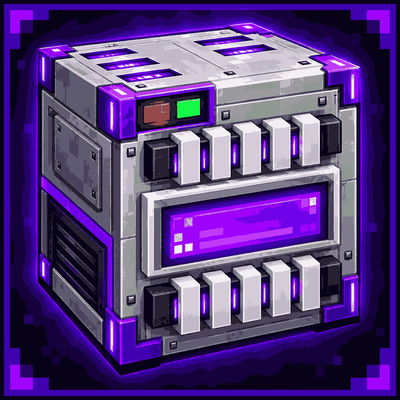
CurseForge · Minecraft mod
TechVari
A multifunctional technology block with storage, crafting, fast smelting, item organization, trash disposal, and x4 duplication.
Choose a version Pick your version below, then grab the matching file.
Quick answer
Which TechVari release should I use?
Latest stable file techvari-1.0.0+mc26.1.x.jar
Game version 26.1, 26.1.1, 26.1.2
Loader Fabric
techvari-1.0.0+mc26.1.x.jar targets 26.1, 26.1.1, 26.1.2 with Fabric. The project page does not say whether this file belongs on the client, dedicated server, or both. No extra mods listed for this file.
Where it goes
Is TechVari required on the client, server, or both?
The project page does not say whether this file belongs on the client, dedicated server, or both.
Client Source doesn’t say
Dedicated server Source doesn’t say
Loader for this release Fabric
Required install it here Optional supported, not mandatory Not supported do not install here Source doesn’t say do not assume
The source does not explicitly classify this release as client-only or server-only.
What else does techvari-1.0.0+mc26.1.x.jar need?
techvari-1.0.0+mc26.1.x.jar. Change the file and its required mods may change too.
This file does not list any required mods. Do not add a library just because a different file uses it.
This file does not list any required or optional mods.
Before you install it
Add TechVari without breaking your instance.
Built for techvari-1.0.0+mc26.1.x.jar. Pick another file and the loader, install side or required mods may change.
- 01
Stick to this file
Use techvari-1.0.0+mc26.1.x.jar. It targets 26.1, 26.1.1, 26.1.2 with Fabric; another release may have different loader, side or dependency requirements.
- 02
Bring the mods it needs
This file does not list any required mods. Do not add a library just because a different file uses it.
- 03
Put it on the correct side
The project page does not say whether this file belongs on the client, dedicated server, or both.
- 04
Pick the file you checked
Use the “Get this file” button beside techvari-1.0.0+mc26.1.x.jar. It opens that exact file at the source.
About this project
What does TechVari add?
TechVari
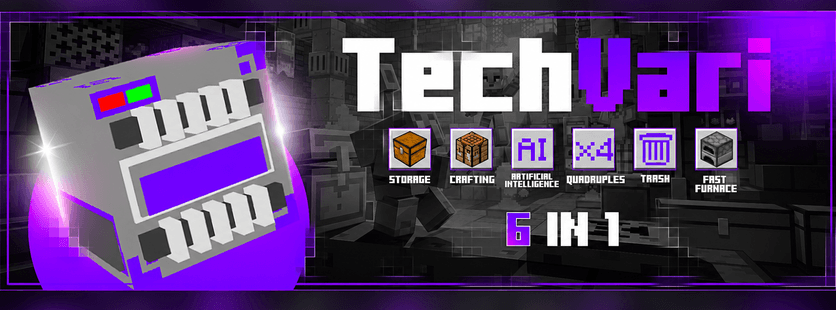
TechVari is a multifunctional technology block designed to bring several useful systems together in a single compact machine.
Instead of placing multiple blocks around your base, TechVari gives you quick access to storage, crafting, item organization, fast smelting, trash disposal and duplication through a single interface.
📁| Storage
TechVari includes an expandable storage system with two viewing modes:
- 3×9
- 6×9
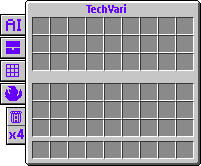
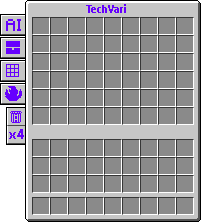
You can switch between them whenever you want, making it easier to use the amount of space that best fits your needs.
🤖| AI Organization
The AI tab helps organize messy storage automatically.
With a single action, TechVari can:
- group matching items;
- combine compatible stacks;
- reduce empty spaces between items;
- keep the storage cleaner and easier to browse.
It is designed as a practical organization system, without requiring an external AI service.
♨️| Fast Furnace
The TechVari furnace is built for extremely fast processing.
It supports:
- 5 input slots
- 5 output slots
- very high smelting speed
- vanilla furnace recipes and compatible custom recipes
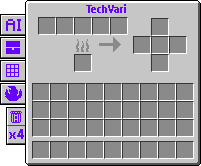
Items can be processed almost instantly, making it useful when you need to smelt large amounts of resources without waiting around.
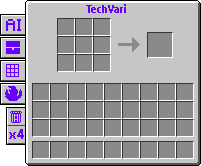
💱| Crafting
TechVari includes a built-in 3×3 crafting grid, so you can craft normal recipes directly inside the machine without needing to place a separate crafting table nearby.
🗑️| Trash
The Trash tab makes unwanted items easier to remove.
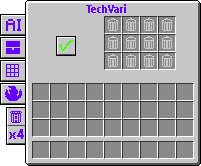
You can place several items into the trash area and confirm the action when you are ready. This gives you a cleaner and safer way to dispose of unnecessary items instead of throwing them around the world.
⏫| ×4 Duplication
TechVari also includes a dedicated ×4 system.
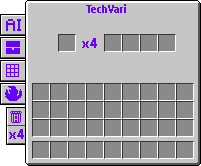
Place an item in the input slot and the machine creates four matching copies in the output area, while preserving the original item's data when possible.
Everything in one block
TechVari combines several everyday utilities into one technological block:
Storage • AI Organization • Crafting • Fast Furnace • Trash • ×4
The goal is simple: reduce clutter, speed up repetitive tasks and keep useful tools available in one place.
- Made for Fabric,
- By: Tenvoria,
- License ARR [All Rights Reserved].
Project description from CurseForge.
Pick your setup
TechVari by Minecraft version and loader
Choose the version and loader you play, then open the matching release.
Minecraft version
26.1.2
1 loader buildMinecraft version
26.1.1
1 loader buildMinecraft version
26.1
1 loader buildCheck the dependencies, then try the file in a copied instance before changing a world you care about.
Recent files
TechVari versions and loaders
techvari-1.0.0+mc26.1.x.jar
7 Sept 2026
Client Source doesn’t say Server Source doesn’t say Dependencies No extras listed Listed on Release listing
Check the 26.1.2 · Fabric setup Fabric26.126.1.126.1.2 release
techvari-1.0.0+mc26.2.jar
6 Sept 2026
Client Source doesn’t say Server Source doesn’t say Dependencies No extras listed Listed on Release listing
Check the 26.2 · Fabric setup Fabric26.2 release
Looking for an older file? The official CurseForge project page is in Resources.
 mod
mod CurseForge + Modrinth · Minecraft
Quacked SMP - Server Management Panel
Browser-based web panel for full server and player management. Modular features: Land claims, RPG skills & abilities, chat filter, anti-grief, custom dimension, edit mods and do backups. Optional integrations: Votifier, Discord, BlueMap, Simple Voice Chat.
 mod
mod CurseForge · Minecraft
PokePlushies [Cobblemon Addon]
Cobblemon Addon - Make Plushies of your Pokemon
 mod
mod CurseForge · Minecraft
VO: Better Dogs
Enhances vanilla wolves with unique personalities (Aggressive, Pacifist, Normal), smarter AI, safety behaviors, and combat improvements.