Minecraft version
Back to mods 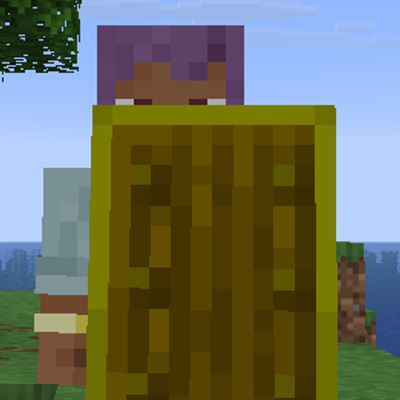
CurseForge · Minecraft mod
Shield Indicator
Colors your shield to show its current state — default, blocking, windup, or cooling down. Toggle each state's color on/off and pick from built-in presets, all from a clean single-page config screen. Client-side only
Choose a version Pick your version below, then grab the matching file.
Quick answer
Which Shield Indicator release should I use?
Latest stable file shieldstatus-neoforge-4.1.8+26.3.jar
Game version 26.3
Loader Forge
Shield Indicator shieldstatus-neoforge-4.1.8+26.3.jar targets 26.3 with Forge. The project page does not say whether this file belongs on the client, dedicated server, or both. No extra mods listed for this file.
Where it goes
Is Shield Indicator required on the client, server, or both?
The project page does not say whether this file belongs on the client, dedicated server, or both.
Client Source doesn’t say
Dedicated server Source doesn’t say
Loader for this release Forge
Required install it here Optional supported, not mandatory Not supported do not install here Source doesn’t say do not assume
The source does not explicitly classify this release as client-only or server-only.
What else does Shield Indicator shieldstatus-neoforge-4.1.8+26.3.jar need?
shieldstatus-neoforge-4.1.8+26.3.jar. Change the file and its required mods may change too.
This file does not list any required mods. Do not add a library just because a different file uses it.
This file does not list any required or optional mods.
Before you install it
Add Shield Indicator without breaking your instance.
Built for Shield Indicator shieldstatus-neoforge-4.1.8+26.3.jar. Pick another file and the loader, install side or required mods may change.
- 01
Stick to this file
Use shieldstatus-neoforge-4.1.8+26.3.jar. It targets 26.3 with Forge; another release may have different loader, side or dependency requirements.
- 02
Bring the mods it needs
This file does not list any required mods. Do not add a library just because a different file uses it.
- 03
Put it on the correct side
The project page does not say whether this file belongs on the client, dedicated server, or both.
- 04
Pick the file you checked
Use the “Get this file” button beside shieldstatus-neoforge-4.1.8+26.3.jar. It opens that exact file at the source.
About this project
What does Shield Indicator add?
Colors your shield to show its current state — default, blocking, windup, or cooling down. Toggle each state's color on/off and pick from built-in presets, all from a clean single-page config screen. Client-side only
Project description from CurseForge.
Pick your setup
Shield Indicator by Minecraft version and loader
Choose the version and loader you play, then open the matching release.
Minecraft version
26.2
3 loader buildsMinecraft version
26.1.2
3 loader buildsMinecraft version
26.1.1
2 loader buildsMinecraft version
26.1
2 loader buildsMinecraft version
1.21.11
3 loader buildsCheck the dependencies, then try the file in a copied instance before changing a world you care about.
Recent files
Shield Indicator versions and loaders
shieldstatus-neoforge-4.1.8+26.3.jar
shieldstatus-neoforge-4.1.8-26.3.jar
31 Oct 2026
Client Source doesn’t say Server Source doesn’t say Dependencies No extras listed Listed on Release listing
Check the 26.3 · Forge setup Forge26.3 release
shieldstatus-neoforge-4.1.8+26.2.jar
shieldstatus-neoforge-4.1.8-26.2.jar
31 Oct 2026
Client Source doesn’t say Server Source doesn’t say Dependencies No extras listed Listed on Release listing
Check the 26.2 · NeoForge setup NeoForge26.2 release
shieldstatus-neoforge-4.1.8+26.1.jar
shieldstatus-neoforge-4.1.8-26.1.jar
31 Oct 2026
Client Source doesn’t say Server Source doesn’t say Dependencies No extras listed Listed on Release listing
Check the 26.1 · Forge setup Forge26.1 release
shieldstatus-neoforge-4.1.8+26.1.2.jar
shieldstatus-neoforge-4.1.8-26.1.2.jar
31 Oct 2026
Client Source doesn’t say Server Source doesn’t say Dependencies No extras listed Listed on Release listing
Check the 26.1.2 · NeoForge setup NeoForge26.1.2 release
shieldstatus-neoforge-4.1.8+26.1.1.jar
shieldstatus-neoforge-4.1.8-26.1.1.jar
31 Oct 2026
Client Source doesn’t say Server Source doesn’t say Dependencies No extras listed Listed on Release listing
Check the 26.1.1 · Forge setup Forge26.1.1 release
shieldstatus-neoforge-4.1.8+1.21.11.jar
shieldstatus-neoforge-4.1.8-1.21.11.jar
31 Oct 2026
Client Source doesn’t say Server Source doesn’t say Dependencies No extras listed Listed on Release listing
Check the 1.21.11 · NeoForge setup NeoForge1.21.11 release
shieldstatus-forge-4.1.8+1.21.11.jar
shieldstatus-forge-4.1.8-1.21.11.jar
31 Oct 2026
Client Source doesn’t say Server Source doesn’t say Dependencies No extras listed Listed on Release listing
Check the 1.21.11 · Forge setup Forge1.21.11 release
shieldstatus-forge-4.1.8+26.1.1.jar
shieldstatus-forge-4.1.8-26.1.1.jar
31 Oct 2026
Client Source doesn’t say Server Source doesn’t say Dependencies No extras listed Listed on Release listing
Check the 26.1.1 · Forge setup Forge26.1.1 release
shieldstatus-forge-4.1.8+26.1.2.jar
shieldstatus-forge-4.1.8-26.1.2.jar
31 Oct 2026
Client Source doesn’t say Server Source doesn’t say Dependencies No extras listed Listed on Release listing
Check the 26.1.2 · Forge setup Forge26.1.2 release
shieldstatus-forge-4.1.8+26.1.jar
shieldstatus-forge-4.1.8-26.1.jar
31 Oct 2026
Client Source doesn’t say Server Source doesn’t say Dependencies No extras listed Listed on Release listing
Check the 26.1 · Forge setup Forge26.1 release
shieldstatus-forge-4.1.8+26.2.jar
shieldstatus-forge-4.1.8-26.2.jar
31 Oct 2026
Client Source doesn’t say Server Source doesn’t say Dependencies No extras listed Listed on Release listing
Check the 26.2 · Forge setup Forge26.2 release
shieldstatus-forge-4.1.8+26.3.jar
shieldstatus-forge-4.1.8-26.3.jar
31 Oct 2026
Client Source doesn’t say Server Source doesn’t say Dependencies No extras listed Listed on Release listing
Check the 26.3 · Forge setup Forge26.3 release
Looking for an older file? The official CurseForge project page is in Resources.
 mod
CurseForge · Minecraft
Nested Bundle Viewer
Nested Bundle Viewer shows all items in Minecraft bundles, including nested ones, removing the default display limit.
 mod
CurseForge · Minecraft
Infinity Nexus Machines
A simple mod for upgaidable machines
 mod
CurseForge · Minecraft
Bleep
Bleep, a curious robot pet with an attitude.