Fabric API Needed by Endless Hotbar endless-hotbar-1.0.0.jar
requiredMatching file found Matched file: [26.2] Fabric API 0.160.0+26.2

CurseForge · Minecraft mod
Everything is a hotbar slot now. Your whole inventory, armor and offhand become one endless hotbar.
Quick answer
Endless Hotbar endless-hotbar-1.0.0.jar targets 26.2 with Fabric. The project page does not say whether this file belongs on the client, dedicated server, or both. All 1 required mods have matching files.
Where it goes
The project page does not say whether this file belongs on the client, dedicated server, or both.
The source does not explicitly classify this release as client-only or server-only.
endless-hotbar-1.0.0.jar on 26.2. Every mod below is checked against that same setup.
Install Fabric API first. We found matching files for this game-version and loader setup.
We only count dependency files that match this setup. A file for another loader does not fill the gap.
Before you install it
Built for Endless Hotbar endless-hotbar-1.0.0.jar on 26.2. Pick another file and the loader, install side or required mods may change.
Use endless-hotbar-1.0.0.jar. It targets 26.2 with Fabric; another release may have different loader, side or dependency requirements.
Install Fabric API first. We found matching files for this game-version and loader setup.
The project page does not say whether this file belongs on the client, dedicated server, or both.
Use the “Get this file” button beside endless-hotbar-1.0.0.jar. It opens that exact file at the source.
About this project
 Ever wished your hotbar had more than nine slots?
Endless Hotbar turns your entire inventory into one long, endlessly scrollable hotbar.
No more choosing which items are important enough to keep in those nine precious slots. Just scroll.
Your regular hotbar flows directly into the rest of your inventory, then your offhand and even your armor slots.
Reach the last slot?
It loops straight back to the beginning.
There is no end.
Endless Hotbar connects all 41 player inventory slots into a single continuous hotbar:
Just use your mouse wheel to scroll through everything.
No need to open your inventory just to reach an item buried a few rows down.

Wide Mode is the default.
Instead of limiting the HUD to nine visible slots, the hotbar stretches across almost the entire width of your screen and shows as many slots as possible.
The wider your screen, the longer your hotbar gets.
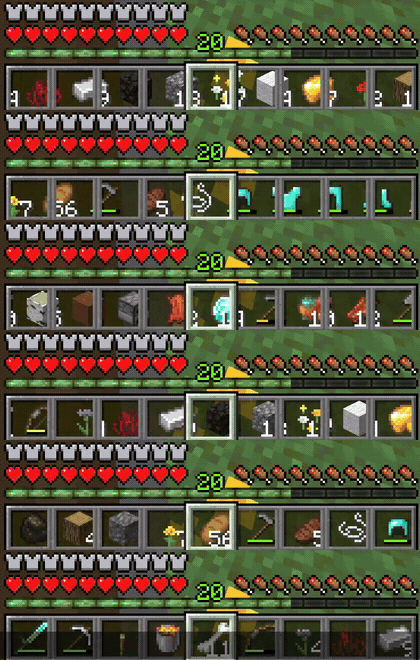
Prefer something closer to vanilla Minecraft?
Normal Mode keeps the familiar nine-slot appearance.
The rest of your inventory is still connected to the hotbar — you just see nine slots at a time while scrolling through it.
Use Normal Mode if you want the endless hotbar without covering half your screen in inventory slots.
Project description from CurseForge.
Pick your setup
Choose the version and loader you play, then open the matching release.
Check the dependencies, then try the file in a copied instance before changing a world you care about.
Recent files
6 Sept 2026
Looking for an older file? The official CurseForge project page is in Resources.
 mod
modAutomatically switches to the correct tool when breaking blocks.
 mod
modHighly customizable performance HUD for Minecraft.
 mod
modChop entire trees by breaking one log - fully configurable with auto replant and tool safety.