Minecraft version
Back to mods 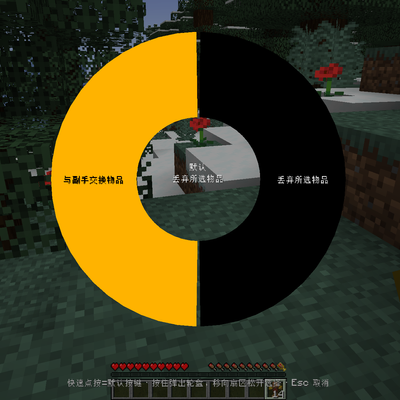
CurseForge · Minecraft mod
HG KeyRadial
Resolve Minecraft keybinding conflicts with a radial wheel — press a conflicted key and pick which action should fire.
Choose a version Pick your version below, then grab the matching file.
Quick answer
Which HG KeyRadial release should I use?
Latest stable file hgkeyradial-1.1.0-NeoForge.jar
Game version 1.21.1
Loader NeoForge
HG KeyRadial hgkeyradial-1.1.0-NeoForge.jar targets 1.21.1 with NeoForge. The project page does not say whether this file belongs on the client, dedicated server, or both. No extra mods listed for this file.
Where it goes
Is HG KeyRadial required on the client, server, or both?
The project page does not say whether this file belongs on the client, dedicated server, or both.
Client Source doesn’t say
Dedicated server Source doesn’t say
Loader for this release NeoForge
Required install it here Optional supported, not mandatory Not supported do not install here Source doesn’t say do not assume
The source does not explicitly classify this release as client-only or server-only.
What else does HG KeyRadial hgkeyradial-1.1.0-NeoForge.jar need?
hgkeyradial-1.1.0-NeoForge.jar. Change the file and its required mods may change too.
This file does not list any required mods. Do not add a library just because a different file uses it.
This file does not list any required or optional mods.
Before you install it
Add HG KeyRadial without breaking your instance.
Built for HG KeyRadial hgkeyradial-1.1.0-NeoForge.jar. Pick another file and the loader, install side or required mods may change.
- 01
Stick to this file
Use hgkeyradial-1.1.0-NeoForge.jar. It targets 1.21.1 with NeoForge; another release may have different loader, side or dependency requirements.
- 02
Bring the mods it needs
This file does not list any required mods. Do not add a library just because a different file uses it.
- 03
Put it on the correct side
The project page does not say whether this file belongs on the client, dedicated server, or both.
- 04
Pick the file you checked
Use the “Get this file” button beside hgkeyradial-1.1.0-NeoForge.jar. It opens that exact file at the source.
About this project
What does HG KeyRadial add?
KeyRadial
KeyRadial solves one of the most annoying problems in modded Minecraft: **keybinding conflicts**. When two mods (or a mod and vanilla) bind the same key, pressing it either triggers all actions at once or only the one that loaded last. KeyRadial lets **you** decide which action fires, with a fast and intuitive radial wheel.
Features
- **Automatic conflict detection** — scans your keybindings and finds every key bound to more than one action.
- **Radial selection wheel** — hold a conflicted key and a ring wheel pops up; move your mouse to a sector to highlight an action, release the key (or left-click) to trigger it.
- **Default action in the center** — the center of the wheel is the "default" action for that key. A quick tap uses the default immediately, without opening the wheel at all.
- **Easy configuration** — a new button appears right next to the vanilla "Controls…" button. It opens a screen listing every key KeyRadial can intercept, with per-key toggles and default-action selection.
- **Opt-in per key** — nothing is intercepted until you enable it. KeyRadial is completely invisible and never changes vanilla behavior unless you want it to.
- **Client-side only** — works in singleplayer and multiplayer; no server install, no network packets.
- **Settings persist** — everything is stored in
config/keyradial.json.
How to use
- Press a key that has a conflict (with interception enabled for it):
- **Quick tap** → the default action fires immediately. No wheel.
- **Hold (~0.12s)** → the radial wheel opens. Move the mouse to the sector of the action you want, then release the key (or left-click) to confirm.
- **Esc** → cancel, nothing happens.
- The center of the wheel is always the **default** action — release without moving the mouse to use it.
Configuration
- Open **Options → Controls…** and click the **Key Conflicts…** button next to the vanilla controls button.
- The screen lists every key that has a conflict. Click a row to select it.
- Toggle **Intercept** ON for the keys you want KeyRadial to manage.
- On the right side, click any conflicting action to set it as the **default** (wheel center / quick-tap action).
- All changes save immediately to
config/keyradial.json.
Installation
- Install Minecraft Forge 1.20.1.
- Drop the jar into your
modsfolder. - Launch the game. That's it.
FAQ
**Q: I have a conflicting key but the wheel doesn't open.**
A: Interception is off by default. Open the config screen (Options → Controls… → Key Conflicts…) and toggle that key ON.
**Q: Does this work on servers?**
A: Yes — it is client-side only, so it works on any server and nobody else needs to install it.
**Q: Will it break my other mods?**
A: No. For keys you don't enable, KeyRadial does nothing — vanilla/Forge behavior stays untouched. For enabled keys, only the single action you pick is triggered.
**Q: Which loader and version?**
A: Forge, Minecraft 1.20.1 (client-side).
License
MIT — free to use, modify and redistribute with attribution.
The above English introduction is provided by Deepseek.
以上英文介绍由AI提供
中文简介
添加了一个按键冲突时的二级菜单,点按按下按键使用默认功能,长按打开轮盘使用鼠标选择的功能。
暂停页面提供冲突按键设置,可以开关按键拦截,设置默认功能。
默认情况下不拦截所有按键。
相信本模组可以解决你的整合包按键冲突问题
Project description from CurseForge.
Pick your setup
HG KeyRadial by Minecraft version and loader
Choose the version and loader you play, then open the matching release.
Minecraft version
1.20.1
1 loader buildCheck the dependencies, then try the file in a copied instance before changing a world you care about.
Recent files
HG KeyRadial versions and loaders
hgkeyradial-1.1.0-NeoForge.jar
hgkeyradial-1.1.0.jar
29 Sept 2026
Client Source doesn’t say Server Source doesn’t say Dependencies No extras listed Listed on Release listing
Check the 1.21.1 · NeoForge setup 1.21.1NeoForge release
hgkeyradial-1.1.0-Fabric.jar
hgkeyradial-1.1.0.jar
29 Sept 2026
Client Source doesn’t say Server Source doesn’t say Dependencies No extras listed Listed on Release listing
Check the 1.21.1 · Fabric setup Fabric1.21.1 release
[HG]KeyRadial-1.0.1.jar
22 Sept 2026
Client Source doesn’t say Server Source doesn’t say Dependencies No extras listed Listed on Release listing
Check the 1.20.1 · Forge setup 1.20.1Forge release
hgkeyradial-1.0.0.jar
6 Sept 2026
Client Source doesn’t say Server Source doesn’t say Dependencies No extras listed Listed on Release listing
Check the 1.20.1 · Forge setup 1.20.1Forge release
Looking for an older file? The official CurseForge project page is in Resources.
 mod
mod CurseForge + Modrinth · Minecraft
Quick Skin
Sick of wasting time with Minecraft’s slow launcher just to change your skin? Quick Skin lets you swap skins instantly even on “offline” servers and gives you access to every official Minecraft cape.
 mod
mod CurseForge + Modrinth · Minecraft
BatteryCraft
Save battery and reduce MacBook heat automatically while playing Minecraft.
 mod
mod CurseForge · Minecraft
Kestramon Onboarding
A guided first-launch setup screen that picks your keybinds, video quality, audio and shader settings for you, with a custom loading screen and title screen.