SilverLib Needed by qualityapi-1.21.1-1.6.2
requiredMatching file found Matched file: silverlib-1.21.1-1.3.0

CurseForge · Minecraft mod
Shared item quality for NeoForge: data-driven tiers from Crude to Masterwork that change durability, speed, attributes and enchantments, carry through crafting, and break instead of vanishing. Standalone or as an API for other mods.
Quick answer
qualityapi-1.21.1-1.6.2 targets 1.21.1 with NeoForge. The project page does not say whether this file belongs on the client, dedicated server, or both. All 1 required mods have matching files.
Where it goes
The project page does not say whether this file belongs on the client, dedicated server, or both.
The source does not explicitly classify this release as client-only or server-only.
qualityapi-1.21.1-1.6.2. Change the file and its required mods may change too.
Install SilverLib first. We found matching files for this game-version and loader setup.
We only count dependency files that match this setup. A file for another loader does not fill the gap.
Before you install it
Built for qualityapi-1.21.1-1.6.2. Pick another file and the loader, install side or required mods may change.
Use qualityapi-1.21.1-1.6.2. It targets 1.21.1 with NeoForge; another release may have different loader, side or dependency requirements.
Install SilverLib first. We found matching files for this game-version and loader setup.
The project page does not say whether this file belongs on the client, dedicated server, or both.
Use the “Get this file” button beside qualityapi-1.21.1-1.6.2. It opens that exact file at the source.
About this project

One shared quality for every mod: a forging mod, a loot mod and a skills mod all read and write the same tier. Everything is data driven, and every section below shows the datapack that sets it up.
| Tier | Level | Stars |
|---|---|---|
| Crude | -1 | ½ |
| Standard | 0 | 1 |
| Fine | 1 | 1½ |
| Superior | 2 | 2 |
| Exquisite | 3 | 2½ |
| Masterwork | 4 | 3 |
Standard is the baseline and does nothing, so standard items behave exactly like plain ones. Rename, rebalance, add or replace tiers in a datapack. Tooltips show the tier's name, its stars, or both (each player picks with the qualityTooltipStyle client config), plus who crafted it. Every quality item also gets a small star in its tier's colour in the corner of its slot, so you can sort a chest at a glance without hovering anything. Don't want it? Turn off showQualityMarker, or list a tier in hiddenTooltipTiers to keep that tier's items looking plain.
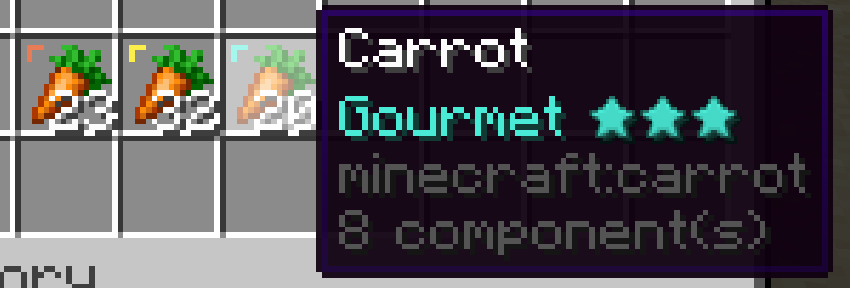
Only the tier is stored on the item. Every bonus is computed live, so items already in the world follow your datapack: per-item overrides apply on /reload, and changed tier files once players rejoin.
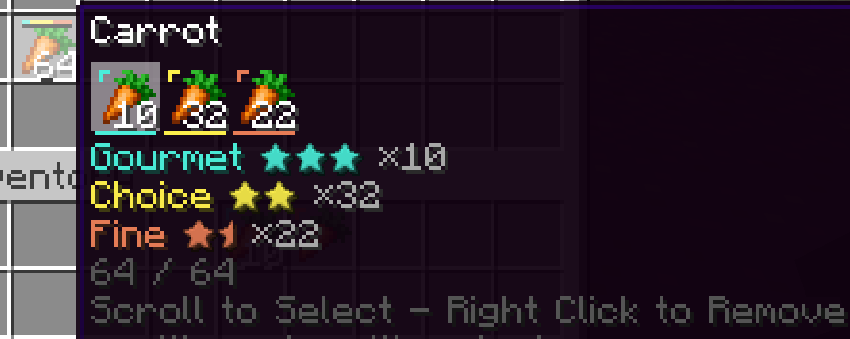
Quality API also fixes one of the major issues with adding quality to itemstacks, inventory bloat. Each item with a different quality counts as a different itemstack. Now these qualities can stack together into one stack and a simple UI lets you easily break them back out.
Weapons, armor and tools get real stats from their tier:
Picture a village smith whose masterwork blades are worth the trip, a crude axe looted off a bandit that barely holds an edge, or ore you refine up the tiers before forging a tool you'll keep for the whole run.
data/mypack/quality_api/quality/legendary.json. Override a shipped tier by using its path, e.g. data/quality_api/quality_api/quality/masterwork.json.
{
  "level": 5,
  "color": "#FF55FF",
  "particle_color": "#FF55FF",
  "weight": 1,
  "items": "#c:tools",
  "effects": {
    "durability_multiplier": 2.0,
    "mining_speed_multiplier": 1.75,
    "enchantment_levels": { "minecraft:unbreaking": 3 },
    "break_downgrade_chance": 0.5,
    "attributes": [
      { "type": "minecraft:generic.attack_damage", "operation": "add_value", "amount": 3.0, "slot": "mainhand" }
    ]
  }
}
level orders tiers and sets the stars. particle_color makes mobs and players of this tier sparkle in that colour now and then. weight is how often random rolls pick it (0 = never rolled, only given). items optionally limits what it applies to. Name it in a resource pack: "quality.mypack.legendary": "Legendary".
data/quality_api/data_maps/item/item_qualities.json patches a tier for specific items or tags. Name only what changes; the tier file fills in the rest, and item entries beat tags.
{
  "values": {
    "#minecraft:pickaxes": {
      "quality_api:masterwork": { "mining_speed_multiplier": 3.0, "enchantment_levels": { "minecraft:fortune": 1 } }
    },
    "minecraft:netherite_sword": {
      "quality_api:masterwork": {
        "attributes": [ { "type": "minecraft:generic.attack_damage", "operation": "add_value", "amount": 6.0 } ]
      }
    }
  }
}
| Equipment effect | Neutral value |
|---|---|
durability_multiplier |
1.0 |
mining_speed_multiplier |
1.0 |
enchantment_levels |
{} |
attributes (type, operation, amount, optional slot) |
[] |
break_downgrade_chance |
the config value |
break_destroy_chance (break like vanilla) |
0.0 |
Set a field to its neutral value to remove it for that item.
A tier can change everything about eating:
Food has its own names too: Poor, Common, Fine, Choice, Prime, Gourmet. Picture a farmer's prized harvest that keeps you full twice as long, or a Gourmet stew that gives a burst of strength before a boss fight. The shipped tiers leave food alone until you turn it on. AppleSkin shows the real values.
Same file as equipment, data/quality_api/data_maps/item/item_qualities.json:
{
  "values": {
    "#c:foods": {
      "quality_api:masterwork": {
        "nutrition_multiplier": 1.5,
        "saturation_multiplier": 1.5,
        "eat_effect_duration_multiplier": 2.0,
        "eat_effects": [ { "effect": "minecraft:regeneration", "duration": 100, "probability": 0.5 } ]
      },
      "quality_api:crude": { "nutrition_multiplier": 0.75 }
    }
  }
}
eat_effects take effect, duration in ticks, and optional amplifier and probability.
Any living thing can have a quality, and it reads differently depending on what it is:
| Level | Items | Food | Animals | Monsters | Townsfolk | Players |
|---|---|---|---|---|---|---|
| -1 | Crude | Poor | Sickly | Feeble | Lowly | Frail |
| 0 | Standard | Common | Common | Common | Common | Common |
| 1 | Fine | Fine | Healthy | Seasoned | Capable | Able |
| 2 | Superior | Choice | Hardy | Fierce | Skilled | Stalwart |
| 3 | Exquisite | Prime | Pedigree | Elite | Renowned | Heroic |
| 4 | Masterwork | Gourmet | Champion | Dread | Illustrious | Legendary |
Each tier can give attribute bonuses per mob type: a Dread zombie half again as big that hits like a truck, a Champion cow that's bigger and tougher, a Legendary player with extra hearts. Quality survives death and conversions (a zombie that drowns stays Dread), babies inherit it from their parents, and drops can inherit it too, so Champion cows drop masterwork beef.
Picture breeding your way up to a ranch of Pedigree livestock, a dungeon guarded by Elite skeletons, or a player rank that grows with your skill level.
Spot it in the world, no other mods needed: look at a mob or player and its tier shows on a nametag above its head (or, if you prefer, only when you sneak and right-click it with an empty hand), and the best tiers give off an occasional sparkle in their colour. Both can be changed or turned off in the client config. Packs can go further and tint a mob's whole body by its tier (see below).
Quality API stores and applies entity quality. Deciding what a mob gets when it spawns is up to your pack, another mod, or /quality entity.
data/quality_api/data_maps/entity_type/entity_qualities.json, keyed by entity type or tag. Item effects never reach mobs, so a mob with no entry gets nothing.
{
  "values": {
    "minecraft:zombie": {
      "quality_api:masterwork": {
        "attributes": [
          { "type": "minecraft:generic.max_health", "operation": "add_value", "amount": 30.0 },
          { "type": "minecraft:generic.attack_damage", "operation": "add_value", "amount": 6.0 },
          { "type": "minecraft:generic.scale", "operation": "add_value", "amount": 0.5 }
        ]
      }
    },
    "minecraft:player": {
      "quality_api:superior": {
        "attributes": [ { "type": "minecraft:generic.max_health", "operation": "add_value", "amount": 10.0 } ]
      }
    }
  }
}
Add tint to any tier in the same file and that mob's body is drawn in that colour. Crude livestock looks sickly green; masterwork players gleam gold:
{
  "values": {
    "#quality_api:animals": {
      "quality_api:crude": { "tint": "#9CCC65" }
    },
    "minecraft:player": {
      "quality_api:masterwork": { "tint": "#FFD54F" }
    }
  }
}
The tint multiplies the skin, so softer colours read best. "#FFFFFF" removes a tint set by a tag. Armour, held items and overlays such as sheep wool keep their own colours. Nothing is tinted by default.
Modded mobs pick up the shipped names by joining #quality_api:animals, #quality_api:monsters or #quality_api:townsfolk. For a new set, point items at it in data/quality_api/data_maps/item/name_set.json (or mobs in entity_type/name_set.json):
{
  "values": {
    "#c:gems": { "name_set": "gem" }
  }
}
then name the tiers in a resource pack's lang file:
{
  "quality.quality_api.fine.gem": "Clear",
  "quality.quality_api.masterwork.gem": "Flawless"
}
The catch with quality items: 10 fine carrots, 12 superior and 30 plain no longer stack, and your inventory fills with near-duplicates. A quality stack puts them back in one slot. It holds a normal stack's worth of one item, every tier counted separately, and looks just like the item inside. Tidier storage, never more storage.
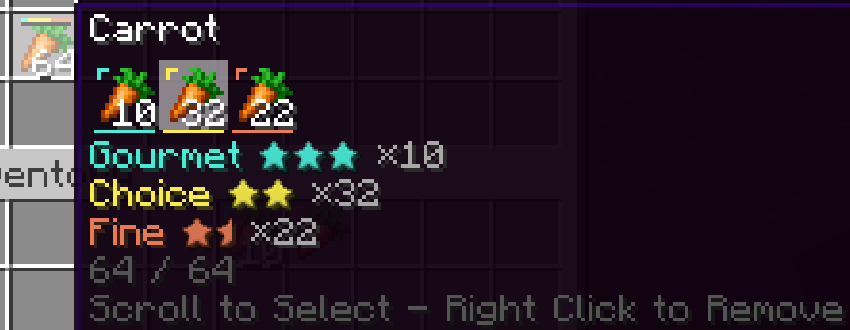
Hover it to see every tier with its count. Scroll to select, right-click to remove. With nothing selected the best tier comes out first.
Works in chests, barrels and backpacks and respects their slot rules. Only stackable items that differ by nothing but quality can share one. Server config qualityStacks turns them off; existing ones can still be emptied.
data/mypack/loot_modifiers/dungeon_quality.json rolls a weighted tier onto damageable loot without one:
{
  "type": "quality_api:roll_quality",
  "chance": 0.35,
  "conditions": [
    { "condition": "neoforge:loot_table_id", "loot_table_id": "minecraft:chests/simple_dungeon" }
  ]
}
Switch it on in data/neoforge/loot_modifiers/global_loot_modifiers.json:
{ "replace": false, "entries": [ "mypack:dungeon_quality" ] }
In a mob's loot table, the function quality_api:copy_entity_quality gives a drop the mob's tier (level_offset shifts it, fractions are rolled), and the condition quality_api:entity_min_quality gates on the mob's level. This cow drops beef of its own quality when fine or better, and extra leather when masterwork:
{
  "type": "minecraft:entity",
  "pools": [
    {
      "rolls": 1,
      "entries": [ {
        "type": "minecraft:item",
        "name": "minecraft:beef",
        "functions": [
          { "function": "minecraft:set_count", "count": { "min": 1, "max": 3 } },
          { "function": "quality_api:copy_entity_quality", "level_offset": 0,
            "conditions": [ { "condition": "quality_api:entity_min_quality", "min_level": 1 } ] }
        ]
      } ]
    },
    {
      "rolls": 1,
      "conditions": [ { "condition": "quality_api:entity_min_quality", "min_level": 4 } ],
      "entries": [ { "type": "minecraft:item", "name": "minecraft:leather",
                     "functions": [ { "function": "minecraft:set_count", "count": 5 } ] } ]
    }
  ]
}
quality_api:min_quality accepts an ingredient of at least a given level. For an exact tier use NeoForge's neoforge:components with "quality_api:quality": "quality_api:superior".
{
  "type": "minecraft:crafting_shaped",
  "pattern": [ "I", "I", "S" ],
  "key": {
    "I": { "type": "quality_api:min_quality", "items": "minecraft:iron_ingot", "min_level": 2 },
    "S": { "item": "minecraft:stick" }
  },
  "result": { "id": "minecraft:iron_sword" }
}
craftInheritanceDamageableOnly), so the mod works with nothing else installed.#quality_api:blacklist never get a quality./quality set <tier>, /quality remove, /quality entity <targets> set <tier>, /quality entity <targets> remove./give @s iron_sword[quality_api:quality="quality_api:masterwork"].| Config | File | What it does |
|---|---|---|
| craftInheritance | common | highest, lowest, average (default), or none |
| craftInheritanceDamageableOnly | common | only results with durability inherit (default on) |
| downgradeChance | common | chance a crafted quality drops one tier (default 0) |
| rollOnCraft | common | results crafted from plain ingredients roll a weighted tier (default off) |
| recordCrafter | common | show "Crafted by" (default on) |
| brokenInsteadOfDestroyed | common | the broken state (default on) |
| breakDowngradeChance | common | chance breaking drops a tier (default 0.75) |
| highestTierCanDowngrade | common | whether the top tier can drop when broken (default on) |
| breedInheritance | common | how bred animals inherit from their parents: average (default), highest, lowest, or none |
| keepPlayerQualityOnDeath | common | players keep their quality on respawn (default on) |
| qualityStacks | server | quality stacks and their auto-pickup (default on) |
| qualityTooltipStyle | client | BOTH (default), SYMBOLS or TEXT |
| entityQualityDisplay | client | NAMETAG (default) shows a mob's tier when you look at it, INSPECT when you sneak and right-click it with an empty hand, OFF never |
| showEntityQualityParticles | client | sparkles for tiers with a particle_color (default on) |
| showQualityTooltip | client | quality lines in tooltips and the tier on mobs and players (default on) |
| showQualityMarker | client | a small star in the tier's colour in the corner of each item's slot (default on) |
| hiddenTooltipTiers | client | tiers left out of tooltips, slot markers and mob labels, e.g. ["quality_api:standard"] |
Forging, tailoring and cooking mods keep reinventing quality, and none of them can see each other's. Build on Quality API instead and get tooltips, durability, attributes, the broken state, quality stacks and every other quality mod's compatibility for free.
Qualities: read, apply, remove, roll, forLevel, shift, meanLevel, names, food values and isBroken, for items and entities.QualityCraftEvent: decide a crafted result's tier. A skill mod nudges it up for a good crafter, a minigame drops it for a bad run.QualityLootEvent: decide a drop's tier from the killer and the mob.QualityBreedEvent: decide a bred baby's tier. Set breedInheritance to none and run your own genetics.QualityFoodEatenEvent, QualityBreakDowngradeEvent, QualityItemBrokenEvent.Custom stations skip the crafting table: run your minigame, call forLevel with the level the score earns, then apply. The API has no side effects before a world loads, so an optional ModList.isLoaded bridge works.
Requires NeoForge for Minecraft 1.21.1 and SilverLib.
Project description from CurseForge.
Pick your setup
Choose the version and loader you play, then open the matching release.
Check the dependencies, then try the file in a copied instance before changing a world you care about.
Recent files
quality_api-1.6.2.jar
1 Nov 2026
quality_api-1.6.1.jar
31 Oct 2026
quality_api-1.6.0.jar
29 Oct 2026
quality_api-1.5.0.jar
29 Oct 2026
quality_api-1.4.0.jar
28 Oct 2026
quality_api-1.3.3.jar
11 Oct 2026
quality_api-1.3.2.jar
11 Oct 2026
quality_api-1.3.1.jar
11 Oct 2026
quality_api-1.3.0.jar
11 Oct 2026
quality_api-1.2.2.jar
10 Oct 2026
quality_api-1.2.1.jar
4 Oct 2026
quality_api-1.2.0.jar
28 Sept 2026
Looking for an older file? The official CurseForge project page is in Resources.
 mod
modA Random Cheats Mod
 mod
modView the loot and mobs contained in each structure in JEI.
 mod
modThe mod features magic, artifact refining, talismans, and formation arrays—each one is absolutely worth experiencing!