Applied Energistics 2 Needed by Applied Quantum Inscriber applied_quantum_inscriber-2.3.3-1.21.1.jar
requiredNo matching file
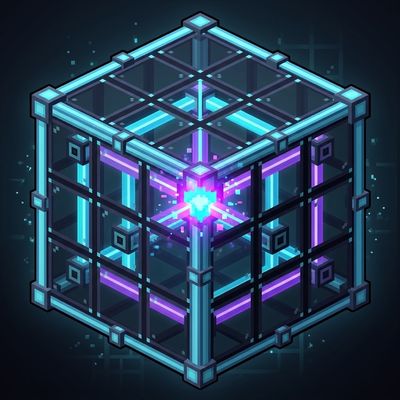
CurseForge · Minecraft mod
A 3x3x3 and 5x5x5 Quantum Inscriber multiblock that massively parallelizes AE2 processor crafting directly on your ME network.
Quick answer
Applied Quantum Inscriber applied_quantum_inscriber-2.3.3-1.21.1.jar targets 1.21.4, 1.21.1, 1.21.3 with NeoForge. The project page does not say whether this file belongs on the client, dedicated server, or both. 1 required mod needs a matching file.
Where it goes
The project page does not say whether this file belongs on the client, dedicated server, or both.
The source does not explicitly classify this release as client-only or server-only.
applied_quantum_inscriber-2.3.3-1.21.1.jar on 1.21.2. Every mod below is checked against that same setup.
Install Applied Energistics 2 first, but 1 required mod has no matching file for this setup. Do not mix loader builds to force a match.
We only count dependency files that match this setup. A file for another loader does not fill the gap.
Before you install it
Built for Applied Quantum Inscriber applied_quantum_inscriber-2.3.3-1.21.1.jar on 1.21.2. Pick another file and the loader, install side or required mods may change.
Use applied_quantum_inscriber-2.3.3-1.21.1.jar. It targets 1.21.4, 1.21.1, 1.21.3 with NeoForge; another release may have different loader, side or dependency requirements.
Install Applied Energistics 2 first, but 1 required mod has no matching file for this setup. Do not mix loader builds to force a match.
The project page does not say whether this file belongs on the client, dedicated server, or both.
Use the “Get this file” button beside applied_quantum_inscriber-2.3.3-1.21.1.jar. It opens that exact file at the source.
About this project
Applied Quantum Inscriber adds a Quantum Inscriber multiblock (3×3×3 and 5×5×5) encased in dark quantum glass with a dynamic 3D internal laser matrix. It massively parallelizes all Applied Energistics 2 (and addon) Inscriber recipes directly on your ME network.
Tired of building sprawling walls of sluggish AE2 Inscribers and wrestling with press channels? The Quantum Inscriber fuses standard AE2 Inscribers, a central AE2 Crafting Storage core (1k to 256k), and a corner Quantum Port into a single high-throughput quantum chamber. Once formed, the raw machines vanish behind a sleek translucent glass shell with glowing laser emitters that visually scale as you install Acceleration Cards.
Two Multiblock Sizes (3×3×3 Small & 5×5×5 Large):
Small 3×3×3 Build: 25 Inscribers + 1 Central Core + 1 Corner Quantum Port (up to 26 parallel operations, 140t base cycle).
Large 5×5×5 Build: 123 Inscribers + 1 Central Core + 1 Corner Quantum Port (up to 124 parallel operations, 120t base cycle).
5 Core Tiers (Start Early, Scale Late): Place any AE2 Crafting Storage block (1k, 4k, 16k, 64k, or 256k) at the center of the cube. Higher tiers unlock more base parallel slots and faster cycle times:
1k Core: 8 base parallel ops, 0t speed bonus
4k Core: 16 base parallel ops, -10t speed bonus
16k Core: 32 base parallel ops, -20t speed bonus
64k Core: 64 base parallel ops, -30t speed bonus
256k Core: 124 base parallel ops, -40t speed bonus
Dynamic Speed Card Scaling (0 → 4 Cards): Each AE2 Acceleration Card adds +7 parallel operations and slashes processing time down to 6 ticks per batch (up to 124 items every 6 ticks in a 5×5×5 build). Visually, each card unlocks new internal laser cages, power buses, and photon pulses inside the chamber.
Press-Free Mode Toggle (Presses: Classic / Press-free): Switch between Classic mode and Press-Free mode with a single button in the GUI — craft printed circuits and processors without needing Inscriber Presses in your recipes or buffer.
Built-In ME Auto-Export: No Import Buses required! Place a Pattern Provider directly against the Quantum Port and finished items are pushed straight back into your ME network automatically.
Self-Powered via ME Grid or External FE (1.0M FE Buffer): The Quantum Port draws power straight from your ME network (1 AE = 2 FE) or accepts external Forge Energy (FE) cables.
Flush Corner Quantum Port: Installed cleanly in any of the 8 corners of the cube, exposing 3 outer faces for Pattern Providers, cables, and pipes without protruding outside the multiblock footprint.
Modern AE2-Styled GUI: Includes Dark and Light themes (Theme: Dark / Light), live load percentage, tick speed readout, ME network status, and scrollable Input / Output buffer tabs.
Safe & Fully Configurable: Pauses cleanly without losing items if energy runs low or outputs fill up, survives chunk unloads and world restarts, and exposes all capacities, tick speeds, and energy rates in applied_quantum_inscriber-common.toml.
| Structure Size | Dimensions | Total Inscribers | Core Block (Exact Center) | Quantum Port Placement | Max Parallel Ops |
|---|---|---|---|---|---|
| Small | 3×3×3 |
25× AE2 Inscriber |
1× Crafting Storage (1k–256k) |
Any 1 of the 8 corners |
Up to 26 ops |
| Large | 5×5×5 |
123× AE2 Inscriber |
1× Crafting Storage (1k–256k) |
Any 1 of the 8 corners |
Up to 124 ops |
Hold [Shift] while hovering over the Quantum Port item in your inventory for a quick in-game structure guide.
By night_sculptor. Built on the public Applied Energistics 2 API - all AE2
blocks are used untouched, addon processors work out of the box.
================================================================
Applied Quantum Inscriber добавляет в игру мультиблочный Квантовый высекатель (3×3×3 и 5×5×5) с прозрачной квантовой оболочкой и 3D-лазерной матрицей внутри. Он позволяет массово и параллельно крафтить процессоры, печатные схемы, кремний и любые рецепты высекателя из Applied Energistics 2 и его аддонов напрямую в вашей ME-сети.
Надоели бесконечные ряды медленных высекателей и путаница с прессами? Квантовый высекатель объединяет обычные высекатели AE2, блок хранилища создания (1k — 256k) в центре и Квантовый порт (Quantum Port) в углу структуры в единый высокоскоростной мультиблок. При сборке куб покрывается тёмным кварцевым стеклом с неоновым каркасом, а внутри загорается трёхмерная лазерная решётка, которая усложняется по мере установки карт ускорения.
Два размера мультиблока (3×3×3 и 5×5×5):
Малый куб 3×3×3 — 25 высекателей + 1 ядро в центре + 1 Квантовый порт в любом углу (до 26 параллельных операций, базовый цикл 140 тиков).
Большой куб 5×5×5 — 123 высекателя + 1 ядро в центре + 1 Квантовый порт в любом углу (до 124 параллельных операций, базовый цикл 120 тиков).
5 уровней ядра: в центр куба можно поставить любое хранилище создания AE2 — от начального 1k до топового 256k. Чем выше тир ядра, тем больше базовых параллельных потоков и тем быстрее идёт каждый крафт:
Ядро 1k: 8 базовых потоков, бонус времени 0 т
Ядро 4k: 16 базовых потоков, бонус времени -10 т
Ядро 16k: 32 базовых потока, бонус времени -20 т
Ядро 64k: 64 базовых потока, бонус времени -30 т
Ядро 256k: 124 базовых потока, бонус времени -40 т
Масштабирование картами ускорения (0 → 4 карты): каждая карта ускорения AE2 добавляет +7 параллельных потоков и радикально сокращает время операции вплоть до 6 тиков на всю пачку (до 124 предметов каждые 6 тиков в кубе 5×5×5). Вместе с этим внутри стеклянного куба появляются новые контуры лазерной матрицы и ускоряются фотонные импульсы.
Режим без прессов (Прессы: не нужны / Press-free): переключается одной кнопкой прямо в GUI! Вы можете крафтить по классике с прессами или включить безпрессовый режим, чтобы шаблоны подавали только слитки, кристаллы, красную пыль и кремний.
Прямой авто-экспорт в ME-сеть: больше не нужны шины импорта! Поставьте Поставщик шаблонов (Pattern Provider) вплотную к Квантовому порту — готовые процессоры и схемы автоматически отправляются обратно в ME-сеть.
Двойное питание и буфер 1.0M FE: Квантовый порт сам запитывает внутренний буфер на 1 000 000 FE напрямую от вашей ME-сети (1 AE = 2 FE) или принимает энергию по любым внешним FE-кабелям.
Удобный угловой порт: Квантовый порт ставится прямо в любой из 8 углов куба (не торчит снаружи лишним блоком) и имеет сразу 3 открытые грани для удобного подключения поставщиков шаблонов, кабелей и труб.
Обновлённый GUI в стиле AE2: переключение тёмной и светлой темы (Theme: Dark / Light), живая статистика загрузки (Load), времени цикла, статуса ME-сети и прокручиваемые вкладки входного и выходного буферов (Input / Output).
Полная сохранность ресурсов: при нехватке энергии или заполнении выходного буфера операции встают на паузу без потери предметов, а прогресс и инвентари надёжно сохраняются при перезаходе в мир и выгрузке чанков.
Поставьте в центр будущей структуры блок Хранилища создания AE2 (1k, 4k, 16k, 64k или 256k).
Соберите вокруг него сплошной куб 3×3×3 (25 высекателей) или 5×5×5 (123 высекателя) из обычных Высекателей AE2 (Inscriber), оставив один любой угол под Квантовый порт (Quantum Port).
Установите Квантовый порт в выбранный угол куба — структура мгновенно сформируется и превратится в стеклянную квантовую камеру с лазерами.
Нажмите ПКМ по Квантовому порту (или любому блоку куба), чтобы открыть интерфейс, вставьте до 4 Карт ускорения AE2 и при желании включите режим Press-free.
Поставьте Поставщик шаблонов (Pattern Provider) вплотную к любой из трёх внешних граней углового Квантового порта и подключите его к вашей ME-сети.
Положите внутрь шаблоны процессоров и печатных схем — высекатель сам заберёт энергию из ME-сети и автоматически вернёт готовые предметы обратно в систему!
Minecraft: 1.20.1 (Forge) / 1.21.1 (NeoForge)
Applied Energistics 2 (обязательно)
JEI или EMI (рекомендуется для просмотра рецептов)
Project description from CurseForge.
Pick your setup
Choose the version and loader you play, then open the matching release.
Check the dependencies, then try the file in a copied instance before changing a world you care about.
Recent files
6 Nov 2026
3 Nov 2026
1 Nov 2026
1 Nov 2026
Looking for an older file? The official CurseForge project page is in Resources.
 mod
A clean, fully customizable client-side task manager and hud overlay to track your build,farms and gools diractly in-game
 mod
A companion to Base Metals and Modern Metals that adds a wide variety of gems and things that can be built from them.
 mod
Sick of wasting time with Minecraft’s slow launcher just to change your skin? Quick Skin lets you swap skins instantly even on “offline” servers and gives you access to every official Minecraft cape.