Fabric API Needed by Clicks 1.0.0 for Minecraft 1.19
requiredMatching file found Matched file: [1.19] Fabric API 0.58.0+1.19
CurseForge · Minecraft mod
Keep a running total of your left and right clicks. Set a goal for each button and track your progress in a movable HUD.
Quick answer
Clicks 1.0.0 for Minecraft 1.19 targets 1.19 with Fabric. The project page does not say whether this file belongs on the client, dedicated server, or both. All 1 required mods have matching files.
Where it goes
The project page does not say whether this file belongs on the client, dedicated server, or both.
The source does not explicitly classify this release as client-only or server-only.
Clicks 1.0.0 for Minecraft 1.19 on 1.19. Every mod below is checked against that same setup.
Install Fabric API first. We found matching files for this game-version and loader setup.
We only count dependency files that match this setup. A file for another loader does not fill the gap.
Before you install it
Built for Clicks 1.0.0 for Minecraft 1.19 on 1.19. Pick another file and the loader, install side or required mods may change.
Use Clicks 1.0.0 for Minecraft 1.19. It targets 1.19 with Fabric; another release may have different loader, side or dependency requirements.
Install Fabric API first. We found matching files for this game-version and loader setup.
The project page does not say whether this file belongs on the client, dedicated server, or both.
Use the “Get this file” button beside Clicks 1.0.0 for Minecraft 1.19. It opens that exact file at the source.
About this project
Your clicks, counted.


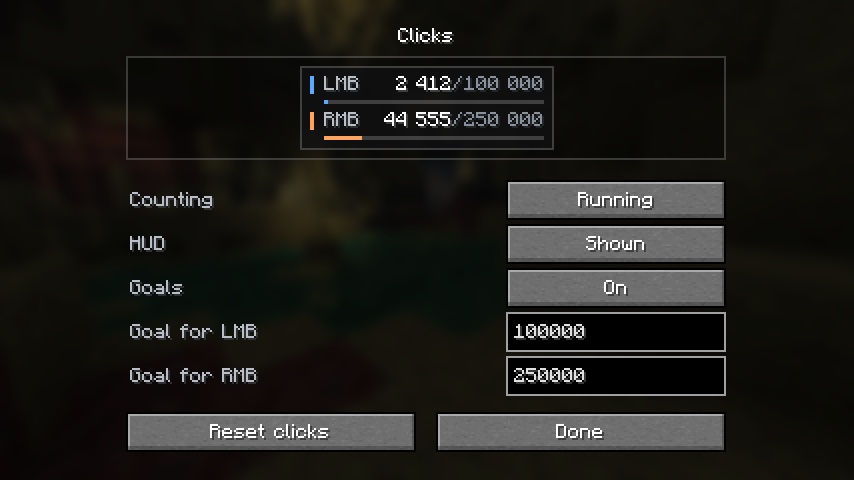
You click a lot in Minecraft. Now you can put a number on it.
Clicks keeps separate totals for your left and right mouse buttons, saved between sessions.
| Keep your total Your next session starts where you left off. Pause the count whenever you like. |
Set a goal Pick a target for each button. Reach it, and the progress bar turns green. |
Make room Open chat to drag the HUD. Hide it when you want a clear screen; counting continues. |
|---|
Only in-game presses count. Menus and chat don't. Holding a button counts once.
Get started: install Fabric API and Mod Menu, then open Mod Menu → Clicks → Configure.
В Minecraft кликаешь постоянно. Почему бы не вести счёт?
Clicks считает нажатия ЛКМ и ПКМ отдельно и сохраняет результат между запусками.
| Копи результат Продолжай с того же числа при следующем запуске. Подсчёт можно поставить на паузу. |
Ставь цели Задай каждой кнопке свою цель. Когда дойдёшь до неё, полоска станет зелёной. |
Освободи экран Перетащи панель в открытом чате или скрой её. Клики продолжат считаться. |
|---|
Считаются только нажатия во время игры. Меню и чат не учитываются, удержание кнопки считается один раз.
Как начать: установи Fabric API и Mod Menu, затем открой Mod Menu → Clicks → Настройки.
Project description from CurseForge.
Pick your setup
Choose the version and loader you play, then open the matching release.
Showing the newest 12 of 34 game versions. Older files are in the list below.
Check the dependencies, then try the file in a copied instance before changing a world you care about.
Recent files
clicks-1.0.0+1.19.jar
8 Sept 2026
Looking for an older file? The official CurseForge project page is in Resources.
