Minecraft version
Back to mods 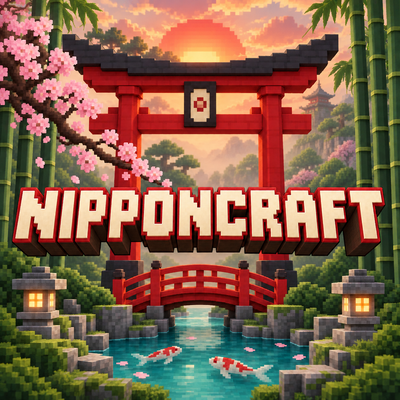
CurseForge · Minecraft mod
Nipponcraft
Nipponcraft adds detailed Japanese décor, animated koi ponds, steaming onsens, glowing lanterns, and instant-build structures to Minecraft
Choose a version Pick your version below, then grab the matching file.
Quick answer
Which Nipponcraft release should I use?
Latest stable file Gamefantomnipponcraft-Forge-1.20.1.jar
Game version 1.20.1
Loader Forge
Nipponcraft Gamefantomnipponcraft-Forge-1.20.1.jar targets 1.20.1 with Forge. The project page does not say whether this file belongs on the client, dedicated server, or both. No extra mods listed for this file.
Where it goes
Is Nipponcraft required on the client, server, or both?
The project page does not say whether this file belongs on the client, dedicated server, or both.
Client Source doesn’t say
Dedicated server Source doesn’t say
Loader for this release Forge
Required install it here Optional supported, not mandatory Not supported do not install here Source doesn’t say do not assume
The source does not explicitly classify this release as client-only or server-only.
What else does Nipponcraft Gamefantomnipponcraft-Forge-1.20.1.jar need?
Gamefantomnipponcraft-Forge-1.20.1.jar. Change the file and its required mods may change too.
This file does not list any required mods. Do not add a library just because a different file uses it.
This file does not list any required or optional mods.
Before you install it
Add Nipponcraft without breaking your instance.
Built for Nipponcraft Gamefantomnipponcraft-Forge-1.20.1.jar. Pick another file and the loader, install side or required mods may change.
- 01
Stick to this file
Use Gamefantomnipponcraft-Forge-1.20.1.jar. It targets 1.20.1 with Forge; another release may have different loader, side or dependency requirements.
- 02
Bring the mods it needs
This file does not list any required mods. Do not add a library just because a different file uses it.
- 03
Put it on the correct side
The project page does not say whether this file belongs on the client, dedicated server, or both.
- 04
Pick the file you checked
Use the “Get this file” button beside Gamefantomnipponcraft-Forge-1.20.1.jar. It opens that exact file at the source.
About this project
What does Nipponcraft add?
Nipponcraft Mod | Shaders used in screenshots: BSL
Create your own peaceful Japanese getaway with Nipponcraft 🌸 Decorate cozy homes, build lantern-lit gardens, and bring your world to life with swimming koi and Japanese cranes.
What’s included:
Square and circular koi ponds with animated fish and walkable red bridges.
Three steaming onsen styles: stone, wood, and natural boulders.
Functional tatami beds, low tables, floor cushions, wall fans, and tea sets.
Glowing lanterns, including paper lanterns that hang beneath blocks.
Placeable sushi, ramen, dango, bentos, and ramune bottles.
A ramen cart and working ramune vending machine.
Torii gates, bonsai trees, bamboo décor, connecting privacy screens, and zen gardens.
Builder blocks that create a furnished ramen shop, large pagoda, or giant bonsai.
Peaceful Japanese cranes with their own spawn egg.
Everything is available in the mod’s creative tab. Structure builders automatically clear grass and small plants when placed.
Compatibility: Minecraft Java Edition 1.20.1, Forge 47.x, and Java 17. Install the same mod version on your server and clients. Shader bloom and lighting appearance depend on your setup.
Project description from CurseForge.
Pick your setup
Nipponcraft by Minecraft version and loader
Choose the version and loader you play, then open the matching release.
Minecraft version
1.20.4
1 loader buildMinecraft version
1.20.1
1 loader buildMinecraft version
1.19.2
1 loader buildMinecraft version
1.18.2
1 loader buildMinecraft version
1.12.2
1 loader buildMinecraft version
1.7.10
1 loader buildCheck the dependencies, then try the file in a copied instance before changing a world you care about.
Recent files
Nipponcraft versions and loaders
Gamefantomnipponcraft-Forge-1.20.1.jar
17 Sept 2026
Client Source doesn’t say Server Source doesn’t say Dependencies No extras listed Listed on Release listing
Check the 1.20.1 · Forge setup 1.20.1Forge release
Gamefantomnipponcraft-Forge-1.12.2.jar
17 Sept 2026
Client Source doesn’t say Server Source doesn’t say Dependencies No extras listed Listed on Release listing
Check the 1.12.2 · Forge setup Forge1.12.2 release
Gamefantomnipponcraft-Forge-1.7.10.jar
17 Sept 2026
Client Source doesn’t say Server Source doesn’t say Dependencies No extras listed Listed on Release listing
Check the 1.7.10 · Forge setup Forge1.7.10 release
Gamefantomnipponcraft-Forge-1.21.10.jar
17 Sept 2026
Client Source doesn’t say Server Source doesn’t say Dependencies No extras listed Listed on Release listing
Check the 1.21.10 · Forge setup Forge1.21.10 release
Gamefantomnipponcraft-Forge-1.18.2.jar
17 Sept 2026
Client Source doesn’t say Server Source doesn’t say Dependencies No extras listed Listed on Release listing
Check the 1.18.2 · Forge setup Forge1.18.2 release
Gamefantomnipponcraft-Forge-1.16.5.jar
17 Sept 2026
Client Source doesn’t say Server Source doesn’t say Dependencies No extras listed Listed on Release listing
Check the 1.19.2 · Forge setup Forge1.19.2 release
Gamefantomnipponcraft-Forge-1.21.11.jar
17 Sept 2026
Client Source doesn’t say Server Source doesn’t say Dependencies No extras listed Listed on Release listing
Check the 1.19.2 · Forge setup Forge1.19.2 release
Gamefantomnipponcraft-Forge-1.20.4.jar
17 Sept 2026
Client Source doesn’t say Server Source doesn’t say Dependencies No extras listed Listed on Release listing
Check the 1.20.4 · Forge setup Forge1.20.4 release
Gamefantomnipponcraft-Forge-1.19.2.jar
17 Sept 2026
Client Source doesn’t say Server Source doesn’t say Dependencies No extras listed Listed on Release listing
Check the 1.19.2 · Forge setup Forge1.19.2 release
GameFantomnipponcraft-Forge-1.20.1-1.3.2.jar
8 Sept 2026
Client Source doesn’t say Server Source doesn’t say Dependencies No extras listed Listed on Release listing
Check the 1.20.1 · Forge setup 1.20.1Forge release
Looking for an older file? The official CurseForge project page is in Resources.