Quick answer
Which Chat Tabs release should I use?
Latest stable file chat-tabs-1.0.5-26.3
Game version 26.3
Loader Fabric
Chat Tabs chat-tabs-1.0.5-26.3 targets 26.3 with Fabric. The project page does not say whether this file belongs on the client, dedicated server, or both. 1 required mod needs a matching file.
Where it goes
Is Chat Tabs required on the client, server, or both?
The project page does not say whether this file belongs on the client, dedicated server, or both.
Client Source doesn’t say
Dedicated server Source doesn’t say
Loader for this release Fabric
Required install it here Optional supported, not mandatory Not supported do not install here Source doesn’t say do not assume
The source does not explicitly classify this release as client-only or server-only.
What else does Chat Tabs chat-tabs-1.0.5-26.3 need?
chat-tabs-1.0.5-26.3. Change the file and its required mods may change too.
Install Fabric API, Mod Menu, Text Placeholder API first, but 1 required mod has no matching file for this setup. Do not mix loader builds to force a match. 1 comes through another mod in the chain.
2 listed on this file 1 pulled in by one of those mods
Fabric API Needed by Chat Tabs chat-tabs-1.0.5-26.3 requiredMatching file found Matched file: [26.3] Fabric API 0.166.2+26.3
Mod Menu Needed by Chat Tabs chat-tabs-1.0.5-26.3 requiredMatching file found Matched file: v21.0.1 for 26.3
No matching file
1
extra mod was pulled in by another dependency.
Indented rows show who needs each one. We only count dependency files that match this setup. A file for another loader does not fill the gap.
Before you install it
Add Chat Tabs without breaking your instance.
Built for Chat Tabs chat-tabs-1.0.5-26.3. Pick another file and the loader, install side or required mods may change.
- 01
Stick to this file
Use chat-tabs-1.0.5-26.3. It targets 26.3 with Fabric; another release may have different loader, side or dependency requirements.
- 02
Bring the mods it needs
Install Fabric API, Mod Menu, Text Placeholder API first, but 1 required mod has no matching file for this setup. Do not mix loader builds to force a match. 1 comes through another mod in the chain.
- 03
Put it on the correct side
The project page does not say whether this file belongs on the client, dedicated server, or both.
- 04
Pick the file you checked
Use the “Get this file” button beside chat-tabs-1.0.5-26.3. It opens that exact file at the source.
About this project
What does Chat Tabs add?
Ever lose a whisper in the wall of text on a server? Chat Tabs brings the private-message tabs from old-school MMORPGs like Tibia into Minecraft. Every player you whisper with gets their own tab, so DMs stop getting buried under public chat, deaths, and spam.
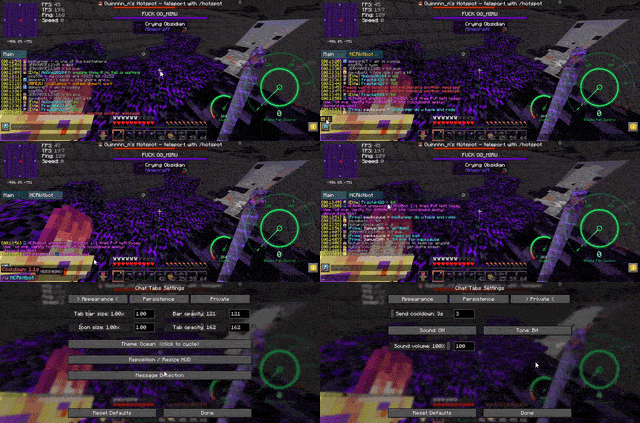
Built for 6b6t.org, but fully configurable for any server.
Features
Core chat tabs
- Automatic private-message tabs — incoming and outgoing whispers are detected and grouped into a per-player conversation tab.
- Main tab — all messages (public, system, and a copy of every whisper) still flow into Main, so nothing is hidden, just organized.
- Unread indicators — each tab shows an unread count; unread tab labels are highlighted. A small ✉ badge on the HUD shows your total unread whispers even when chat is closed.
- Click-to-expand unread badge — click the ✉ badge to expand a list of unread conversations and jump straight to one.
- Scrollable tab bar — tabs overflow into a horizontally scrollable strip (mouse wheel over the bar) with
‹ / › indicators. The selected tab auto-scrolls into view.
- Click to switch, click × to close — hover a tab to reveal its close button.
- Drag to reorder — click and drag conversation tabs to rearrange them.
- Reply from a tab — while a whisper tab is open, pressing Enter automatically sends your message as a whisper to that player (using your configured whisper command). No need to type
/w <name> yourself.
- Slash commands still work — commands starting with
/ (e.g. /tpa) are sent normally even when a private tab is selected.
- Whisper cooldown — optional delay (0–60 s, default 3 s) between private sends to reduce accidental spam.
- Smart de-duplication — outgoing whispers and the server’s own echo are matched so messages don’t appear twice.
Appearance & HUD
- Color themes — cycle through 24 built-in themes (Ocean, Midnight, Slate, Forest, Ember, Crimson, Purple, Neon, Abyss, High Contrast, and more).
- Custom transparency — independent opacity for the bar and tabs.
- Scalable tab bar — resize the whole tab strip (and its text) with a scale slider.
- Reposition & resize HUD — drag the tab bar, unread badge, and settings button; drag the blue edge of the tab bar to change its width.
- Settings button on the tab bar — a ⚙ button on the right of the tab strip for quick access while chat is open.
- Sound notifications — configurable sound on incoming whispers (Pling, Bell, Chime, Xylophone, Cow Bell, Bit, Amethyst, XP Orb, Level Up, Challenge) with volume control.
Configuration
- In-game settings GUI — open via the ⚙ button, Mod Menu, or a configurable keybind. Organized into Appearance, Persistence, and Private tabs.
- User-friendly Message Detection — no regex needed. Toggle timestamps, heads/prefixes, and use simple formats with
{player} and {message}. Defaults work great on 6b6t (including timestamps and heads).
- Persistent sent messages — optional. Keep chat input history (Up/Down arrows) across disconnects, relogs, and restarts (1–1000 lines, default 100).
- Persistent chat log — optional. Restore Main tab history after relog/restart with player heads & formatting preserved (10–100000 messages, default 1000).
- Persistent tabs — optional. Keep private conversation tabs and their messages across restarts (same size limit as the chat log).
- Config file — everything is stored in
config/tibia_chat_tabs.json and is created automatically on first run.
Compatible with Chat Patches and the Better Chat module from Meteor Client.
Requirements
- Fabric Loader
- Fabric API
- Mod Menu (optional)
Client-side only — no server installation needed.
Supported versions: 1.21.1, 1.21.3–1.21.6, 1.21.8, 1.21.9, 1.21.11, 26.1, 26.2, 26.3
Why
Chat in classic MMORPGs like Tibia kept private conversations in their own tabs next to the main channel. This mod recreates that experience for Minecraft, aimed at high-traffic anarchy servers where whispers get lost fast.
Issues & Source
Source code, bug reports, and feature requests:
https://github.com/Fractal420/Chat-Tabs-Mod
Project description from CurseForge.
Pick your setup
Chat Tabs by Minecraft version and loader
Choose the version and loader you play, then open the matching release.
Minecraft version
26.3
1
loader build Minecraft version
26.2
1
loader build Minecraft version
26.1.2
1
loader build Minecraft version
26.1.1
1
loader build Minecraft version
26.1
1
loader build Minecraft version
1.21.11
1
loader build Minecraft version
1.21.9
1
loader build Minecraft version
1.21.8
1
loader build Minecraft version
1.21.6
1
loader build Minecraft version
1.21.5
1
loader build Minecraft version
1.21.4
1
loader build Minecraft version
1.21.3
1
loader build Showing the newest 12 of 13 game versions.
Older files are in the list below.
Check the dependencies, then try the file in a copied instance before changing a world you care about.
Recent files
Chat Tabs versions and loaders
chat-tabs-1.0.5-26.3.jar
12 Oct 2026
Client Source doesn’t say Server Source doesn’t say Dependencies 1 unmatched of 3 Listed on Release listing
Check the 26.3 · Fabric setup → chat-tabs-1.0.5-26.2.jar
12 Oct 2026
Client Source doesn’t say Server Source doesn’t say Dependencies 2 required · 2 unchecked Listed on Release listing
Check the 26.2 · Fabric setup → chat-tabs-1.0.5-26.1.jar
12 Oct 2026
Client Source doesn’t say Server Source doesn’t say Dependencies 2 required · 2 unchecked Listed on Release listing
Check the 26.1.2 · Fabric setup → Fabric26.126.1.126.1.2 release
chat-tabs-1.0.5-1.21.11.jar
12 Oct 2026
Client Source doesn’t say Server Source doesn’t say Dependencies 2 required · 2 unchecked Listed on Release listing
Check the 1.21.11 · Fabric setup → chat-tabs-1.0.5-1.21.9.jar
12 Oct 2026
Client Source doesn’t say Server Source doesn’t say Dependencies 2 required · 2 unchecked Listed on Release listing
Check the 1.21.9 · Fabric setup → chat-tabs-1.0.5-1.21.8.jar
12 Oct 2026
Client Source doesn’t say Server Source doesn’t say Dependencies 2 required · 2 unchecked Listed on Release listing
Check the 1.21.8 · Fabric setup → chat-tabs-1.0.5-1.21.6.jar
12 Oct 2026
Client Source doesn’t say Server Source doesn’t say Dependencies 2 required · 2 unchecked Listed on Release listing
Check the 1.21.6 · Fabric setup → chat-tabs-1.0.5-1.21.5.jar
12 Oct 2026
Client Source doesn’t say Server Source doesn’t say Dependencies 2 required · 2 unchecked Listed on Release listing
Check the 1.21.5 · Fabric setup → chat-tabs-1.0.5-1.21.4.jar
12 Oct 2026
Client Source doesn’t say Server Source doesn’t say Dependencies 2 required · 2 unchecked Listed on Release listing
Check the 1.21.4 · Fabric setup → chat-tabs-1.0.5-1.21.3.jar
12 Oct 2026
Client Source doesn’t say Server Source doesn’t say Dependencies 2 required · 2 unchecked Listed on Release listing
Check the 1.21.3 · Fabric setup → chat-tabs-1.0.5-1.21.1.jar
12 Oct 2026
Client Source doesn’t say Server Source doesn’t say Dependencies 2 required · 2 unchecked Listed on Release listing
Check the 1.21.1 · Fabric setup → chat-tabs-1.0.4-26.2.jar
15 Sept 2026
Client Source doesn’t say Server Source doesn’t say Dependencies 2 required · 2 unchecked Listed on Release listing
Check the 26.2 · Fabric setup → 
 mod
 mod
 mod