Minecraft version
Back to mods 
CurseForge · Minecraft mod
Cablephobic
LaserIO + XNet, without the cables — node-based wireless item/fluid/energy/gas routing.
Choose a version Pick your version below, then grab the matching file.
Quick answer
Which Cablephobic release should I use?
Latest stable file cablephobic-3.0.2.jar
Game version 26.2
Loader NeoForge
cablephobic-3.0.2.jar targets 26.2 with NeoForge. The project page does not say whether this file belongs on the client, dedicated server, or both. No extra mods listed for this file.
Where it goes
Is Cablephobic required on the client, server, or both?
The project page does not say whether this file belongs on the client, dedicated server, or both.
Client Source doesn’t say
Dedicated server Source doesn’t say
Loader for this release NeoForge
Required install it here Optional supported, not mandatory Not supported do not install here Source doesn’t say do not assume
The source does not explicitly classify this release as client-only or server-only.
What else does cablephobic-3.0.2.jar need?
cablephobic-3.0.2.jar. Change the file and its required mods may change too.
This file does not list any required mods. Do not add a library just because a different file uses it.
This file does not list any required or optional mods.
Before you install it
Add Cablephobic without breaking your instance.
Built for cablephobic-3.0.2.jar. Pick another file and the loader, install side or required mods may change.
- 01
Stick to this file
Use cablephobic-3.0.2.jar. It targets 26.2 with NeoForge; another release may have different loader, side or dependency requirements.
- 02
Bring the mods it needs
This file does not list any required mods. Do not add a library just because a different file uses it.
- 03
Put it on the correct side
The project page does not say whether this file belongs on the client, dedicated server, or both.
- 04
Pick the file you checked
Use the “Get this file” button beside cablephobic-3.0.2.jar. It opens that exact file at the source.
About this project
What does Cablephobic add?
Cablephobic
LaserIO + XNet, without the cables.
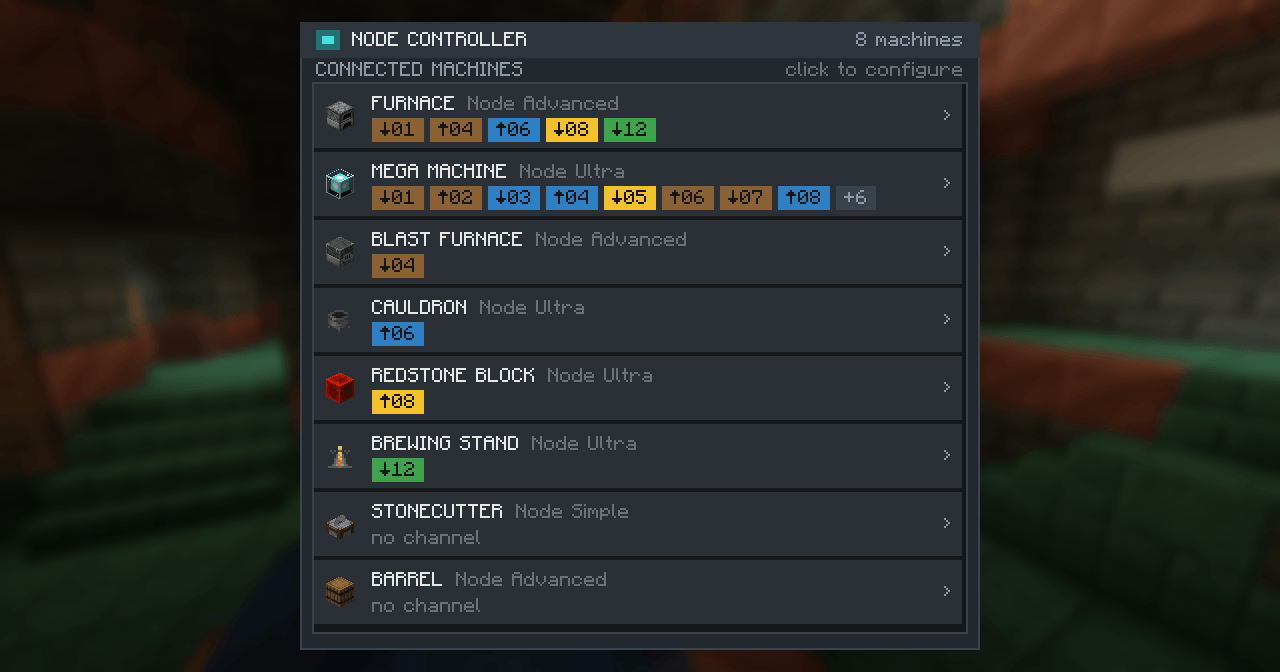
Move items, fluids, energy and Mekanism gas across your base through wrench-linked nodes and one central Node Controller. No pipes, no wires, no spaghetti.
What it is
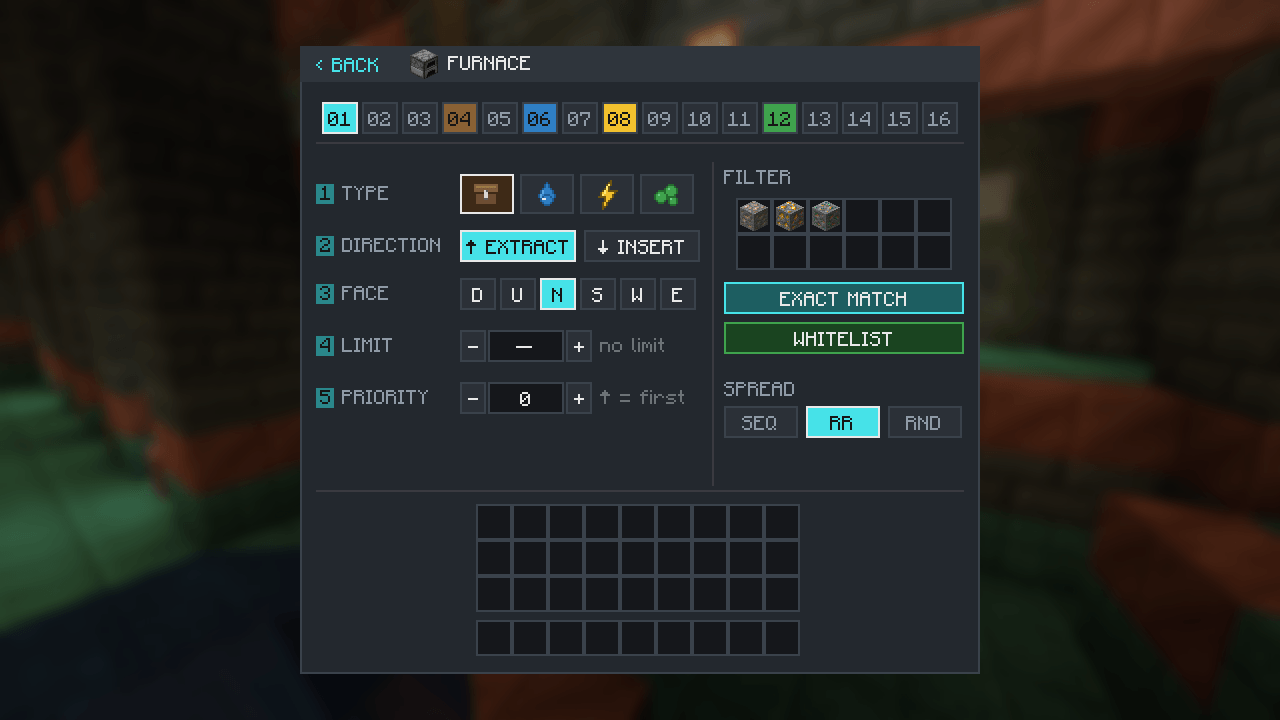
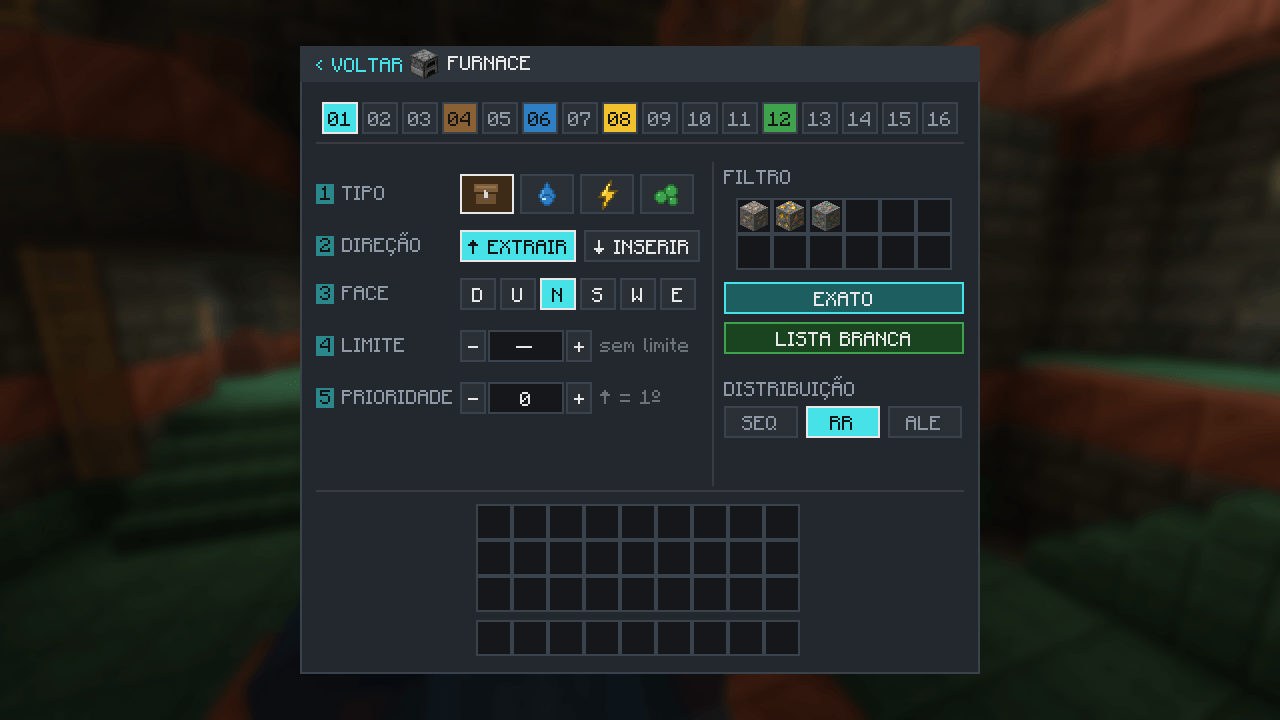
Stick a small node onto any machine, chest, tank or energy block. Link nodes together with the Link Wrench for a direct wireless connection, no blocks in between. Then open any Node Controller on the network and route everything from one screen: 16 channels, each with its own direction, face, filters, priority and distribution.
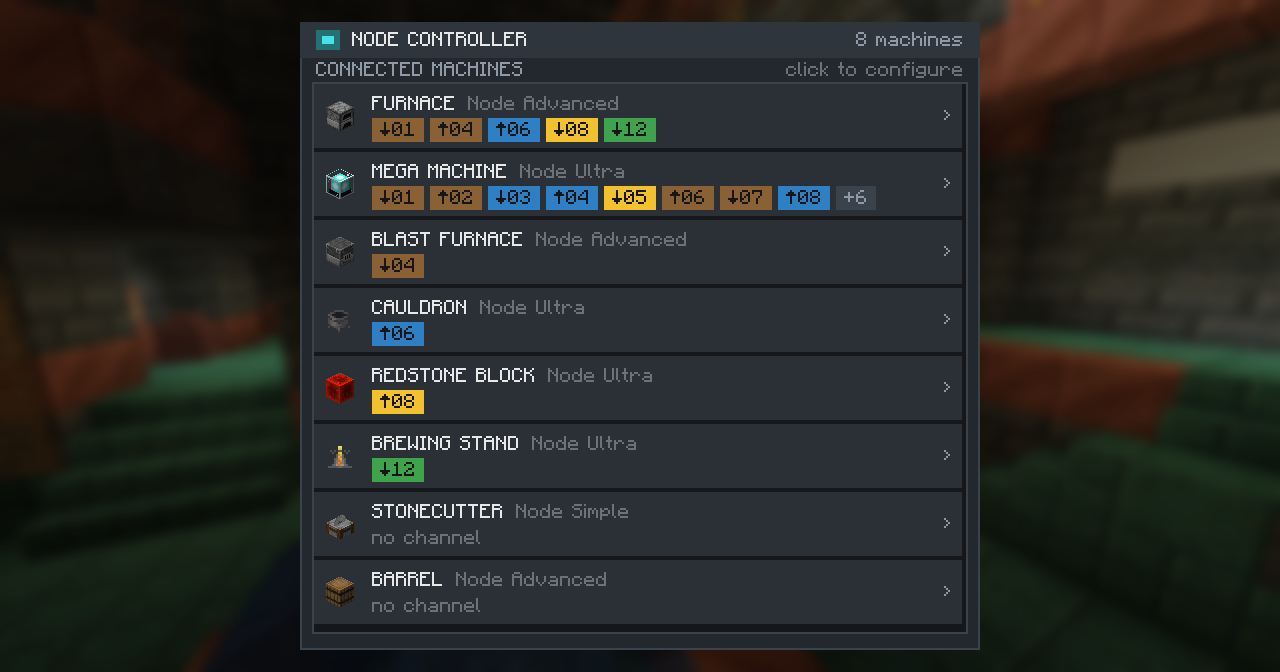
If you've played XNet or LaserIO you already know the shape of this. Cablephobic keeps the parts I loved (channels, filters, round-robin, priorities) and throws out the cable management.
Features
- Wireless nodes. No pipes or wires. Link nodes with a wrench, range-limited by tier.
- One control screen. 16 channels, each with its own Type, Direction, Face, Limit and Priority.
- Items, fluids, energy and gas. Gas support comes with Mekanism.
- Filters. Exact, tag, or NBT match; whitelist or blacklist; 12 slots per connection.
- Distribution. Sequential, round-robin, or random spread across targets.
- Three tiers. Simple, Advanced, Ultra, scaling throughput and range.
- JEI / EMI. Drag any item, fluid or chemical straight into a filter slot.
- Localized. English and Português (Brasil).
- Backbone-ready. The transfer engine stays cheap on a large central network.
- New in 2.2.0: redstone support. Cablephobic now moves redstone signals the same way it moves items, fluids and energy. Read a redstone level at one node and re-emit it at another, anywhere on your network, with no dust or repeaters in between. Pick pass-through to mirror the input level, or set a fixed strength, and choose whether it fires always or only while the input is active. An output only powers the block its node faces, so nothing else on that node gets lit up by accident.

Getting started
- Craft a Transfer Core, then a Node, a Link Wrench and a Node Controller.
- Place a node against the machine you want to touch.
- Shift+right-click a node to select it, then right-click another to link them.
- Right-click the Node Controller and set up each machine's channels.
Tiers
| Tier | Items/op | Fluid mB/op | Energy FE/op | Range |
|---|---|---|---|---|
| Simple | 4 | 256 | 256 | 8 |
| Advanced | 16 | 4096 | 3200 | 24 |
| Ultra | unlimited | unlimited | unlimited | 64 |
Configuration file
Configuration file — config/cablephobic-common.toml (available since v2.1.0)
Every balance value is tunable without touching the mod. For each of the three tiers (Simple, Advanced, Ultra) you control the per-tick throughput and the wireless link range:
- items — items moved per operation
- fluid_mb — fluid and gas moved per operation, in mB
- energy — energy moved per operation, in FE
- range — max link distance, in blocks (up to 512)
Set any value to -1 to fall back to that tier's default, so you only override what you actually want to change. Ultra defaults to unlimited throughput.
[tiers.simple]
    items = 8
    fluid_mb = 500
    range = 12
[tiers.advanced]
    ...
[tiers.ultra]
    ...
Thanks & inspiration
Cablephobic exists because I fell in love with XNet (by McJty) and LaserIO (by Direwolf20) as a player. This mod is my attempt to fold the two things I loved most (XNet's channel-based routing and LaserIO's per-connection control) into a single cable-free tool. Huge thanks to both teams for the ideas that shaped this one.
Cablephobic is an independent project and is not affiliated with or endorsed by XNet or LaserIO.
Requires NeoForge for Minecraft 1.21.1.
Project description from CurseForge.
Pick your setup
Cablephobic by Minecraft version and loader
Choose the version and loader you play, then open the matching release.
Minecraft version
26.1.2
1 loader buildMinecraft version
26.1.1
1 loader buildMinecraft version
26.1
1 loader buildMinecraft version
1.21.1
1 loader buildCheck the dependencies, then try the file in a copied instance before changing a world you care about.
Recent files
Cablephobic versions and loaders
cablephobic-3.0.2.jar
16 Sept 2026
Client Source doesn’t say Server Source doesn’t say Dependencies No extras listed Listed on Release listing
Check the 26.2 · NeoForge setup NeoForge26.2 release
cablephobic-3.0.1.jar
16 Sept 2026
Client Source doesn’t say Server Source doesn’t say Dependencies No extras listed Listed on Release listing
Check the 26.2 · NeoForge setup NeoForge26.2 release
cablephobic-2.2.0.jar
13 Sept 2026
Client Source doesn’t say Server Source doesn’t say Dependencies No extras listed Listed on Release listing
Check the 26.1.2 · NeoForge setup NeoForge26.126.1.126.1.2 release
cablephobic-2.1.1.jar
12 Sept 2026
Client Source doesn’t say Server Source doesn’t say Dependencies No extras listed Listed on Release listing
Check the 26.1.2 · NeoForge setup NeoForge26.126.1.126.1.2 release
cablephobic-2.0.0.jar
10 Sept 2026
Client Source doesn’t say Server Source doesn’t say Dependencies No extras listed Listed on Release listing
Check the 26.1.2 · NeoForge setup NeoForge26.126.1.126.1.2 release
cablephobic-1.0.0.jar
10 Sept 2026
Client Source doesn’t say Server Source doesn’t say Dependencies No extras listed Listed on Release listing
Check the 1.21.1 · NeoForge setup 1.21.1NeoForge release
Looking for an older file? The official CurseForge project page is in Resources.
 mod
mod CurseForge + Modrinth · Minecraft
BBL Utility
Various useful items and blocks including block breakers and placers. fluid placers and collectors and resource generators
 mod
mod CurseForge · Minecraft
Villager Trading Helper
Client-side, streamlines the trading process with a new screen for easy and fast one-click trading
 mod
mod CurseForge + Modrinth · Minecraft
Archive World Downloader
A Minecraft World Download mod. Save a multiplayer world as a singleplayer world you can open offline: the terrain as you explore it, containers as you open them.