Fabric API Needed by Controller Play 1.0.0 — Fabric 26.2
requiredMatching file found Matched file: [26.2] Fabric API 0.161.0+26.2
CurseForge · Minecraft mod
A polished controller-first experience for Minecraft Java with precise gameplay input, menu navigation, an on-screen keyboard, profiles, hints, and vibration.
Quick answer
Controller Play 1.0.0 — Fabric 26.2 targets 26.2 with Fabric. The project page does not say whether this file belongs on the client, dedicated server, or both. All 1 required mods have matching files.
Where it goes
The project page does not say whether this file belongs on the client, dedicated server, or both.
The source does not explicitly classify this release as client-only or server-only.
Controller Play 1.0.0 — Fabric 26.2 on 26.2 Fabric. Every mod below is checked against that same setup.
Install Fabric API first. We found matching files for this game-version and loader setup.
We only count dependency files that match this setup. A file for another loader does not fill the gap.
Before you install it
Built for Controller Play 1.0.0 — Fabric 26.2 on 26.2 Fabric. Pick another file and the loader, install side or required mods may change.
Use Controller Play 1.0.0 — Fabric 26.2. It targets 26.2 with Fabric; another release may have different loader, side or dependency requirements.
Install Fabric API first. We found matching files for this game-version and loader setup.
The project page does not say whether this file belongs on the client, dedicated server, or both.
Use the “Get this file” button beside Controller Play 1.0.0 — Fabric 26.2. It opens that exact file at the source.
About this project

Controller Play brings a complete controller-first experience to Minecraft Java Edition. It connects gameplay, inventories, menus, chat, and settings into one consistent flow so you can play comfortably from the moment the game opens.
The mod is built for precise input and a familiar Minecraft feel. Keyboard and mouse remain available whenever you want them, while controller navigation stays predictable across vanilla screens and compatible modded screens.

config/controllerplay.json, including bindings and individual device profiles.
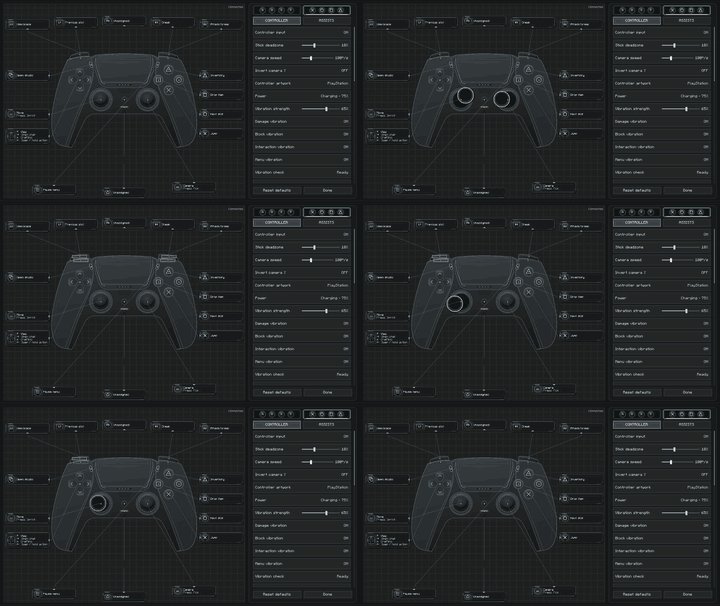
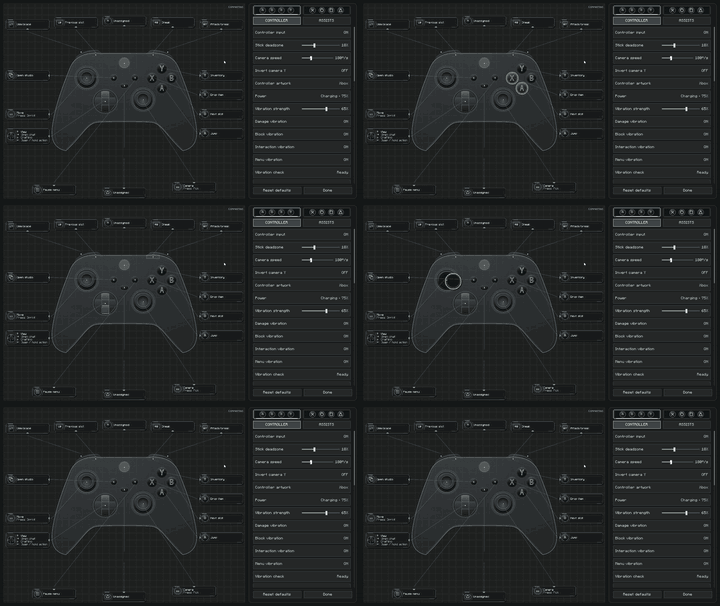

mods folder.Settings are saved as soon as they change and restored the next time Minecraft starts.

| Input | Gameplay |
|---|---|
| Left Stick | Move |
| Right Stick | Look |
| A / Cross | Jump / Select |
| B / Circle | Sneak / Back |
| X / Square | Crafting and inventory / Menu action |
| Y / Triangle | Inventory / Quick-move item |
| RT / R2 | Attack |
| LT / L2 | Use item |
| LB / L1 and RB / R1 | Hotbar or tabs |
| D-pad | Hotbar and interface navigation |
| D-pad Left (hold) | Quick Actions |
| Start / Options | Pause |
| Guide / Home | Screenshot |
Every gameplay binding can be changed from the Controller Play settings screen. Fixed navigation inputs remain available so menus cannot become unusable after rebinding.

| Minecraft | Fabric | Forge | NeoForge |
|---|---|---|---|
| 1.20.1 | Supported | 47.4.23+ | 47.1.106+ |
| 1.21.1 | Loader 0.15.11+ and Fabric API | 52.1.16+ | 21.1.250+ |
| 26.2 | Loader 0.19.5+ and Fabric API | 65.1.3+ | 26.2.0.82+ |
Controller Play is a client-side mod. Only one controller is active at a time. Full SDL3 support, including vibration, is bundled for Windows x64; other systems use the GLFW gamepad fallback where available. Hardware behavior can vary with the operating system and controller driver.
Project description from CurseForge.
Pick your setup
Choose the version and loader you play, then open the matching release.
Check the dependencies, then try the file in a copied instance before changing a world you care about.
Recent files
controller-play-fabric-26.2-1.0.0.jar
10 Sept 2026
Looking for an older file? The official CurseForge project page is in Resources.
 mod
Displays more information about some items on the item.
 mod
Transform vanilla mounts into fully customized combat companions with alloy armor, modular plugins, and unique skills.
 mod
One recipe viewer for everything: EMI's interface, JEI's plugins, and where every item really comes from.