Rinku Needed by AirWebDisplay-1.0.1+mc1.20.1-forge.jar
requiredMatching file found Matched file: [Forge] v3.0.4 MC 1.20.1
CurseForge · Minecraft mod
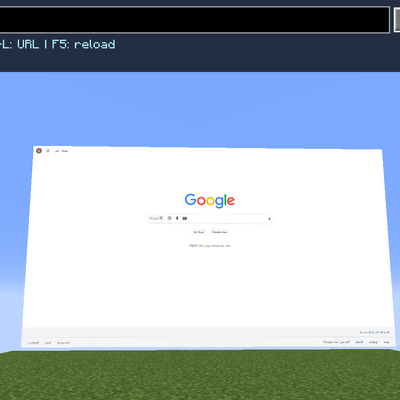
Create large, interactive web browser displays anywhere in your Minecraft world
Quick answer
AirWebDisplay-1.0.1+mc1.20.1-forge.jar targets 1.20.1 with Forge. The project page does not say whether this file belongs on the client, dedicated server, or both. All 1 required mods have matching files.
Where it goes
The project page does not say whether this file belongs on the client, dedicated server, or both.
The source does not explicitly classify this release as client-only or server-only.
AirWebDisplay-1.0.1+mc1.20.1-forge.jar. Change the file and its required mods may change too.
Install Rinku first. We found matching files for this game-version and loader setup.
We only count dependency files that match this setup. A file for another loader does not fill the gap.
Before you install it
Built for AirWebDisplay-1.0.1+mc1.20.1-forge.jar. Pick another file and the loader, install side or required mods may change.
Use AirWebDisplay-1.0.1+mc1.20.1-forge.jar. It targets 1.20.1 with Forge; another release may have different loader, side or dependency requirements.
Install Rinku first. We found matching files for this game-version and loader setup.
The project page does not say whether this file belongs on the client, dedicated server, or both.
Use the “Get this file” button beside AirWebDisplay-1.0.1+mc1.20.1-forge.jar. It opens that exact file at the source.
About this project
Bring the web directly into your Minecraft world.
AirWebDisplay allows you to create large, fully interactive browser displays that can show websites, videos, dashboards, streams, and other web content directly inside Minecraft.
Use the AirWebDisplay Remote to quickly control the selected display.
Press **F8** to interact directly with the browser.
Use the **Control Console** for advanced screen management.
**Shift + Right Click** with the Remote or Control Console can be used to access display resolution options.
AirWebDisplay supports browser resolutions up to **6144×3456 (6K)**.
Higher resolutions require significantly more GPU memory and system resources.
For most users, 1080p to 3K provides the best balance between visual quality and performance.
4K, 5K and 6K are intended for powerful systems or large displays.
Display configuration is synchronized through the server while browser rendering happens on the client.
MIT License
Skip
Project description from CurseForge.
Pick your setup
Choose the version and loader you play, then open the matching release.
Check the dependencies, then try the file in a copied instance before changing a world you care about.
Recent files
AirWebDisplay-1.0.1-mc1.20.1-forge.jar
11 Nov 2026
10 Sept 2026
10 Sept 2026
Looking for an older file? The official CurseForge project page is in Resources.
 mod
Audio sharing, minigames, trading, parties, and warps.
 mod
This mod is foucused on better bulding with tnt that does not explode.
 mod
Walkie-Talkie for NeoForge 1.21.1: immersive radio communication with battery/FE charging, configurable channels, and built-in internet stream broadcasting via Simple Voice Chat.