Minecraft version
Back to mods 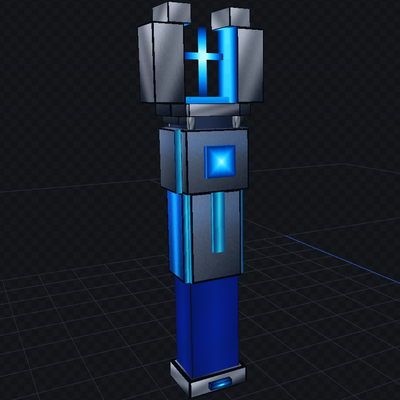
CurseForge · Minecraft mod
Quantum Sorter
Quantum Sorter – retrieves items from blocks and sends sorted items wherever you specify! It features a very large whitelist and blacklist, and as many as 6 channels!
Choose a version Pick your version below, then grab the matching file.
Quick answer
Which Quantum Sorter release should I use?
Latest stable file Quantum Sorter - 1.18.2 Forge
Game version 1.18.2
Loader Forge
Quantum Sorter - 1.18.2 Forge targets 1.18.2 with Forge. The project page does not say whether this file belongs on the client, dedicated server, or both. No extra mods listed for this file.
Where it goes
Is Quantum Sorter required on the client, server, or both?
The project page does not say whether this file belongs on the client, dedicated server, or both.
Client Source doesn’t say
Dedicated server Source doesn’t say
Loader for this release Forge
Required install it here Optional supported, not mandatory Not supported do not install here Source doesn’t say do not assume
The source does not explicitly classify this release as client-only or server-only.
What else does Quantum Sorter - 1.18.2 Forge need?
Quantum Sorter - 1.18.2 Forge. Change the file and its required mods may change too.
This file does not list any required mods. Do not add a library just because a different file uses it.
This file does not list any required or optional mods.
Before you install it
Add Quantum Sorter without breaking your instance.
Built for Quantum Sorter - 1.18.2 Forge. Pick another file and the loader, install side or required mods may change.
- 01
Stick to this file
Use Quantum Sorter - 1.18.2 Forge. It targets 1.18.2 with Forge; another release may have different loader, side or dependency requirements.
- 02
Bring the mods it needs
This file does not list any required mods. Do not add a library just because a different file uses it.
- 03
Put it on the correct side
The project page does not say whether this file belongs on the client, dedicated server, or both.
- 04
Pick the file you checked
Use the “Get this file” button beside Quantum Sorter - 1.18.2 Forge. It opens that exact file at the source.
About this project
What does Quantum Sorter add?
Don't like sorting items? Here is the Quantum Sorter—it will sort all your items exactly the way you want!
The Quantum Sorter is a mod that adds three items:The Quantum Sorter, the Network Linker, and the Network Relay.
The Quantum Sorter is used to transmit items over a distance; it accepts items inserted manually or via a hopper, and can also automatically pull them from chests and other blocks. It features both whitelist and blacklist functions, as well as six channels to which receivers can be connected. The Quantum Sorter draws items from output slots, so it can collect items, for example: from furnaces - and send them onward.
The Network Linker is used to connect the sorter to the receiver.
The Network Relay acts as the receiver, delivering the specific items designated in the sorter; simply place its front face against a chest or another block with an inventory, and it will deposit the items. It also features a two-color LED that glows in the dark, indicating whether or not it is currently connected to the sorter.
To connect the sorter to a receiver, right-click the Quantum Sorter while holding the Network Linker to capture its ID, then approach the desired Network Relay and right-click it. You will receive a notification confirming whether the connection was successful; using the tool again disconnects that specific receiver.
Clicking the Sorter Linker on another Quantum Sorter will assign it a new sorter ID.
You can also check a Network Relay's status by right-clicking it without holding the Network Linker; this displays which sorter and channel it is connected to. The sorter processes channels in a specific priority order (CH1 >> CH2 ... CH6); for each item being sent, it checks if it can be delivered to CH1, and if not, it proceeds to the next channel.
You can also build a massive network by using five channels for five specific chests or receivers, while designating the sixth channel as a "blacklist" to route all remaining items to a subsequent sorter—which can then repeat the entire process. This setup allows you to deposit items into a single chest or hopper and have them automatically sorted into chests across your entire base and world; distance is not an issue.
Project description from CurseForge.
Pick your setup
Quantum Sorter by Minecraft version and loader
Choose the version and loader you play, then open the matching release.
Minecraft version
1.17.1
1 loader buildMinecraft version
1.16.5
1 loader buildMinecraft version
1.15.2
1 loader buildCheck the dependencies, then try the file in a copied instance before changing a world you care about.
Recent files
Quantum Sorter versions and loaders
Quantum Sorter - 1.18.2 Forge
Quantum Sorter - 1.18.2 Forge.jar
4 Oct 2026
Client Source doesn’t say Server Source doesn’t say Dependencies No extras listed Listed on Release listing
Check the 1.18.2 · Forge setup Forge1.18.2 release
Quantum Sorter - 1.17.1 Forge
Quantum Sorter - 1.17.1 Forge.jar
25 Sept 2026
Client Source doesn’t say Server Source doesn’t say Dependencies No extras listed Listed on Release listing
Check the 1.17.1 · Forge setup 1.17.1Forge release
Quantum Sorter - 1.16.5 Forge
Quantum Sorter - 1.16.5 Forge.jar
16 Sept 2026
Client Source doesn’t say Server Source doesn’t say Dependencies No extras listed Listed on Release listing
Check the 1.16.5 · Forge setup 1.16.5Forge release
Quantum Sorter - 1.15.2 Forge
Quantum Sorter 1.15.2 Forge.jar
11 Sept 2026
Client Source doesn’t say Server Source doesn’t say Dependencies No extras listed Listed on Release listing
Check the 1.15.2 · Forge setup Forge1.15.2 release
Looking for an older file? The official CurseForge project page is in Resources.