Minecraft version
Back to mods 
CurseForge · Minecraft mod
Murmol
Once Human
Choose a version Pick your version below, then grab the matching file.
Quick answer
Which Murmol release should I use?
Latest stable file murmol-1.2.1-neoforge-1.21.1.jar
Game version 1.21.1
Loader NeoForge
murmol-1.2.1-neoforge-1.21.1.jar targets 1.21.1 with NeoForge. The project page does not say whether this file belongs on the client, dedicated server, or both. No extra mods listed for this file.
Where it goes
Is Murmol required on the client, server, or both?
The project page does not say whether this file belongs on the client, dedicated server, or both.
Client Source doesn’t say
Dedicated server Source doesn’t say
Loader for this release NeoForge
Required install it here Optional supported, not mandatory Not supported do not install here Source doesn’t say do not assume
The source does not explicitly classify this release as client-only or server-only.
What else does murmol-1.2.1-neoforge-1.21.1.jar need?
murmol-1.2.1-neoforge-1.21.1.jar. Change the file and its required mods may change too.
This file does not list any required mods. Do not add a library just because a different file uses it.
This file does not list any required or optional mods.
Before you install it
Add Murmol without breaking your instance.
Built for murmol-1.2.1-neoforge-1.21.1.jar. Pick another file and the loader, install side or required mods may change.
- 01
Stick to this file
Use murmol-1.2.1-neoforge-1.21.1.jar. It targets 1.21.1 with NeoForge; another release may have different loader, side or dependency requirements.
- 02
Bring the mods it needs
This file does not list any required mods. Do not add a library just because a different file uses it.
- 03
Put it on the correct side
The project page does not say whether this file belongs on the client, dedicated server, or both.
- 04
Pick the file you checked
Use the “Get this file” button beside murmol-1.2.1-neoforge-1.21.1.jar. It opens that exact file at the source.
About this project
What does Murmol add?
📖 What is this?
Murmol Mod is a magic-themed project designed for someones.
✨ Core Features:
New Content:
Adds several new materials, dozens of new items and blocks, and a brand-new dimension/biome.
Unique Mechanics:
Introduces a brand-new "Astral Curse" system that makes gameplay more interesting. You can sacrifice specific item combinations to transform into various fantasy creature forms.You can use JEI to check souls' recipes(same to the book's inside GUI)
Like this:
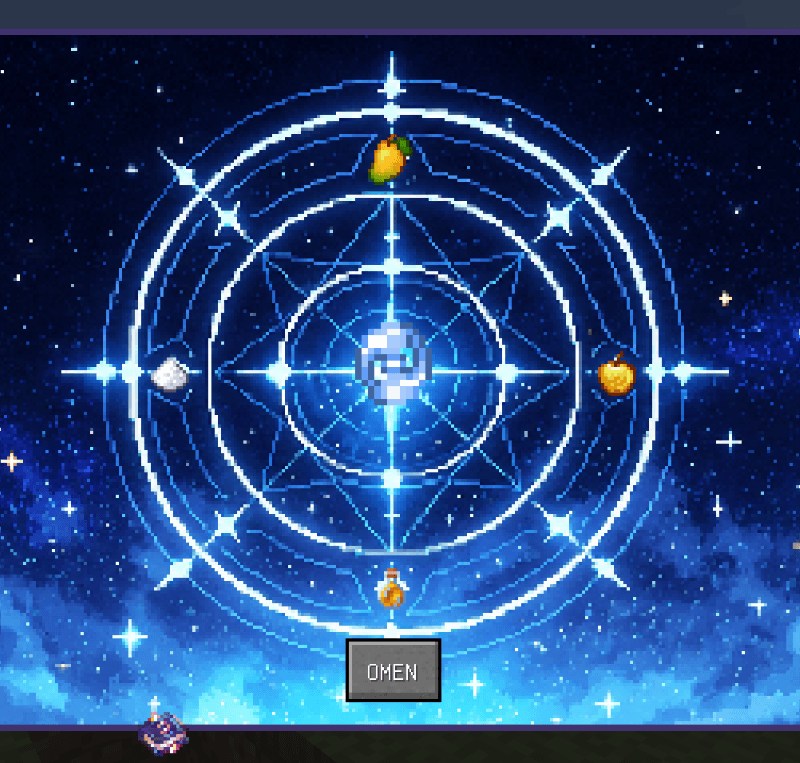
Compatibility:
There are known compatibility issues with the TaCZ NeoForge Port. Please use Gunsmith Lib for a proper experience.
May have compatibility issues with certain mods that modify the vanilla player model animations.
Project description from CurseForge.
Pick your setup
Murmol by Minecraft version and loader
Choose the version and loader you play, then open the matching release.
Check the dependencies, then try the file in a copied instance before changing a world you care about.
Recent files
Murmol versions and loaders
murmol-1.2.1-neoforge-1.21.1.jar
12 Sept 2026
Client Source doesn’t say Server Source doesn’t say Dependencies No extras listed Listed on Release listing
Check the 1.21.1 · NeoForge setup 1.21.1NeoForge release
murmol-1.2.0-neoforge-1.21.1 -jij.jar
12 Sept 2026
Client Source doesn’t say Server Source doesn’t say Dependencies No extras listed Listed on Release listing
Check the 1.21.1 · NeoForge setup 1.21.1NeoForge release
Looking for an older file? The official CurseForge project page is in Resources.
 mod
mod CurseForge · Minecraft
AnotherScape *BETA*
A RuneScape-inspired NeoForge adventure with bosses, raids, skills, items, pets, portals, trading, and a persistent multiplayer hub.
 mod
mod CurseForge · Minecraft
Entity Dynamics
This mod add entity collision and new physics in mobs.
 mod
mod CurseForge + Modrinth · Minecraft
Wavify
Adds ambient waves to beaches,oceans and rivers!