Minecraft version
Back to mods 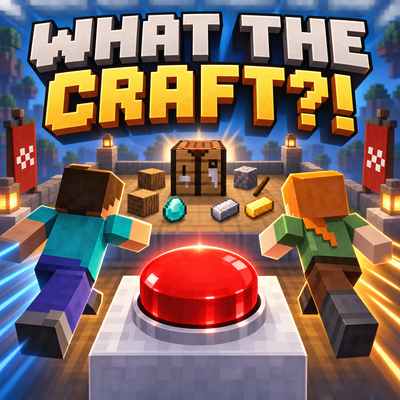
CurseForge · Minecraft mod
What the Craft?!
A Fabric multiplayer minigame where players race to complete randomized Minecraft quests, earn trophies and collect Race Coins
Choose a version Pick your version below, then grab the matching file.
Quick answer
Which What the Craft?! release should I use?
Latest stable file what-the-craft-1.7.2-fabric-1.21.1.jar
Game version 1.21.1
Loader Fabric
What the Craft?! what-the-craft-1.7.2-fabric-1.21.1.jar targets 1.21.1 with Fabric. The project page does not say whether this file belongs on the client, dedicated server, or both. No extra mods listed for this file.
Where it goes
Is What the Craft?! required on the client, server, or both?
The project page does not say whether this file belongs on the client, dedicated server, or both.
Client Source doesn’t say
Dedicated server Source doesn’t say
Loader for this release Fabric
Required install it here Optional supported, not mandatory Not supported do not install here Source doesn’t say do not assume
The source does not explicitly classify this release as client-only or server-only.
What else does What the Craft?! what-the-craft-1.7.2-fabric-1.21.1.jar need?
what-the-craft-1.7.2-fabric-1.21.1.jar. Change the file and its required mods may change too.
This file does not list any required mods. Do not add a library just because a different file uses it.
This file does not list any required or optional mods.
Before you install it
Add What the Craft?! without breaking your instance.
Built for What the Craft?! what-the-craft-1.7.2-fabric-1.21.1.jar. Pick another file and the loader, install side or required mods may change.
- 01
Stick to this file
Use what-the-craft-1.7.2-fabric-1.21.1.jar. It targets 1.21.1 with Fabric; another release may have different loader, side or dependency requirements.
- 02
Bring the mods it needs
This file does not list any required mods. Do not add a library just because a different file uses it.
- 03
Put it on the correct side
The project page does not say whether this file belongs on the client, dedicated server, or both.
- 04
Pick the file you checked
Use the “Get this file” button beside what-the-craft-1.7.2-fabric-1.21.1.jar. It opens that exact file at the source.
About this project
What does What the Craft?! add?
What The Craft?! – Forge Edition
What The Craft?! transforms Minecraft into a multiplayer quest race while still allowing the server’s main world to be played normally.
Race System
- Start races using the craftable red start button.
- Choose between Normal, Fun and Hardcore modes.
- All online players receive an invitation with Join and Not This Time options.
- Every participant receives the same randomized list of ten Overworld quests.
- Quest progress is tracked automatically.
- The first player to complete every quest wins.
- Race progress is preserved after disconnecting and reconnecting.
- Players return to their previous world, position and inventory when the race ends.
Quest Types
- Craft many different vanilla items.
- Mine logs, stone, dirt and other blocks.
- Collect specific resources.
- Harvest crops.
- Defeat hostile or passive mobs.
- Catch fish and collect different fish species.
- Travel long distances.
- Breed animals.
- Wear a complete iron armor set.
- Collect unique flowers.
- Reach special locations and complete exploration challenges.
- Shift-click crafting and compatible vein-mining actions are supported.
Game Modes
- Normal: A classic race to complete all ten quests first.
- Fun: Every player receives the same random positive or negative effect each minute. A visible timer shows when the next effect arrives.
- Hardcore: Players only have one life. Eliminated and surviving players are clearly displayed. The last surviving player can win if nobody completes the quest list first.
Race World
- Uses real vanilla Minecraft Overworld terrain generation.
- Compact biome distribution keeps many different biomes reasonably close.
- Vanilla caves, ores, vegetation, structures and villages are generated.
- Additional villages are placed around the race area.
- Protected starting platforms are positioned close to the terrain.
- A visible forcefield marks the protected spawn area.
- Beds save each player’s race respawn point.
- Keep Inventory is automatically enabled inside the race world.
- Falling into the void returns players to their race spawn or bed.
WTCoins and Shop
- Earn WTCoins by completing individual race quests.
- Winners receive a larger WTCoin reward.
- Daily Quests provide another way to earn WTCoins outside races.
- WTCoins have their own custom coin icon and HUD display.
- The Race Merchant offers supplies, resources and rare rewards.
- The redesigned shop includes categories, item icons and clearly displayed prices.
Daily Quests
- A Daily Quest can be completed in the server’s normal world.
- Progress is shown in a dedicated panel with a progress bar.
- Daily Quest progress and completion are saved.
- Completing the quest awards WTCoins.
Trophies and Leaderboards
- Winners receive a placeable trophy containing their name, time, date, mode and quest list.
- Trophy statistics are preserved when the trophy is broken and placed again.
- Trophy ranks include Bronze, Silver, Gold and Diamond.
- Trophy rank is determined by finishing time or accumulated wins.
- Placeable leaderboard panels display player rankings in the world.
- Player progress is also visible in the multiplayer player list.
Commands
/daily– View your Daily Quest./leaverace– Leave the race personally./race status– View the current race status./race top– View the leaderboard./race balance– View your WTCoin balance./race start– Start a race without the button (OP only)./restart– Cancel and restart with new quests (OP only)./endrace– End the race for everyone (OP only)./stoprace– End the race for everyone (OP only).
The mod includes its own Creative Mode tab and is designed to run as a standalone Forge mod without requiring additional gameplay mods.
Project description from CurseForge.
Pick your setup
What the Craft?! by Minecraft version and loader
Choose the version and loader you play, then open the matching release.
Minecraft version
1.20.1
1 loader buildCheck the dependencies, then try the file in a copied instance before changing a world you care about.
Recent files
What the Craft?! versions and loaders
what-the-craft-1.7.2-fabric-1.21.1.jar
14 Sept 2026
Client Source doesn’t say Server Source doesn’t say Dependencies No extras listed Listed on Release listing
Check the 1.21.1 · Fabric setup Fabric1.21.1 release
what-the-craft-1.7.0-fabric-1.21.1.jar
14 Sept 2026
Client Source doesn’t say Server Source doesn’t say Dependencies No extras listed Listed on Release listing
Check the 1.21.1 · Fabric setup Fabric1.21.1 release
whatthecraft-1.6.0-forge-1.20.1.jar
12 Sept 2026
Client Source doesn’t say Server Source doesn’t say Dependencies No extras listed Listed on Release listing
Check the 1.20.1 · Forge setup 1.20.1Forge release
Looking for an older file? The official CurseForge project page is in Resources.